<?xml version="1.0" encoding="UTF-8"?>
<feed xmlns="http://www.w3.org/2005/Atom" xml:lang="en-AU" xmlns:media="http://search.yahoo.com/mrss/">
  <id>https://david.gardiner.net.au/.NET.xml</id>
  <title type="html">David Gardiner - .NET</title>
  <updated>2026-03-06T00:21:39.233Z</updated>
  <subtitle>Blog posts tagged with &apos;.NET&apos; - A blog of software development, .NET and other interesting things</subtitle>
  <generator uri="https://github.com/flcdrg/astrojs-atom" version="1.0.218">astrojs-atom</generator>
  <author>
    <name>David Gardiner</name>
  </author>
  <link href="https://david.gardiner.net.au/.NET.xml" rel="self" type="application/atom+xml"/>
  <link href="https://david.gardiner.net.au/tags/.NET" rel="alternate" type="text/html" hreflang="en-AU"/>
  <entry>
    <id>https://david.gardiner.net.au/2025/11/aspire-without-dotnet</id>
    <updated>2025-11-17T08:00:00.000+10:30</updated>
    <title>Aspire with Python, React, Rust and Node apps</title>
    <link href="https://david.gardiner.net.au/2025/11/aspire-without-dotnet" rel="alternate" type="text/html" title="Aspire with Python, React, Rust and Node apps"/>
    <category term=".NET"/>
    <category term="Aspire"/>
    <category term="Talks"/>
    <published>2025-11-17T08:00:00.000+10:30</published>
    <summary type="html">
      <![CDATA[Using Aspire to build a distributed application with Python, React, Rust and Node.js components]]>
    </summary>
    <content type="html" xml:base="https://david.gardiner.net.au/2025/11/aspire-without-dotnet">
      <![CDATA[<p>Aspire (formerly .NET Aspire) is a great way to create observable, production-ready distributed apps by defining a code-based model of services, resources, and connections. It simplifies local development and debugging, as well as deployment.</p>
<p><img src="https://david.gardiner.net.au/_astro/aspire-logo-256.CA6LsmXl_2gR0dV.webp" alt="Aspire logo" /></p>
<p>By their very nature, distributed applications will have at least a few (if not a lot) of components. This presents a challenge both for the local developer experience and for deployment. Aspire seeks to simplify this by allowing you to model the services, resources, and connections in code. With one command you can then not only launch everything locally, but ensure that each service knows how to connect to the other services it needs to function.</p>
<p>You can use it for both development and deployment, or if you already have an existing deployment process you're happy with (eg. Infrastructure as Code/deployment pipelines) you can just use Aspire to simply your local development experience.</p>
<p>Check out my previous post <a href="/2025/11/aspire">Introducing Aspire</a> for an overview of what Aspire is and how it works.</p>
<p>As part of this year's .NET Conf virtual conference, I presented a talk "Taking .NET out of .NET Aspire - working with non-.NET applications", in which I show how despite Aspire being written in .NET, it can integrate with a whole range of other software languages ecosystems. Here's the recording of that presentation:</p>


<p>One issue with the talk was that it had to be pre-recorded a couple of weeks beforehand, so it was done using the Aspire 9.5 bits. Now that Aspire 13.0 is out, some of the packages that I used from the Community Toolkit in the demo are no longer necessary as Aspire has improved the integration with Python and Node.js applications.</p>
<p>The source code for the demo can be found at <a href="https://github.com/flcdrg/aspire-non-dotnet">https://github.com/flcdrg/aspire-non-dotnet</a>. A quick glance and you might think "there's no .NET or Aspire in this repo" and if you just look at the <code>main</code> branch then you'd be right. There are separate branches where I incrementally integrate each component into Aspire.</p>
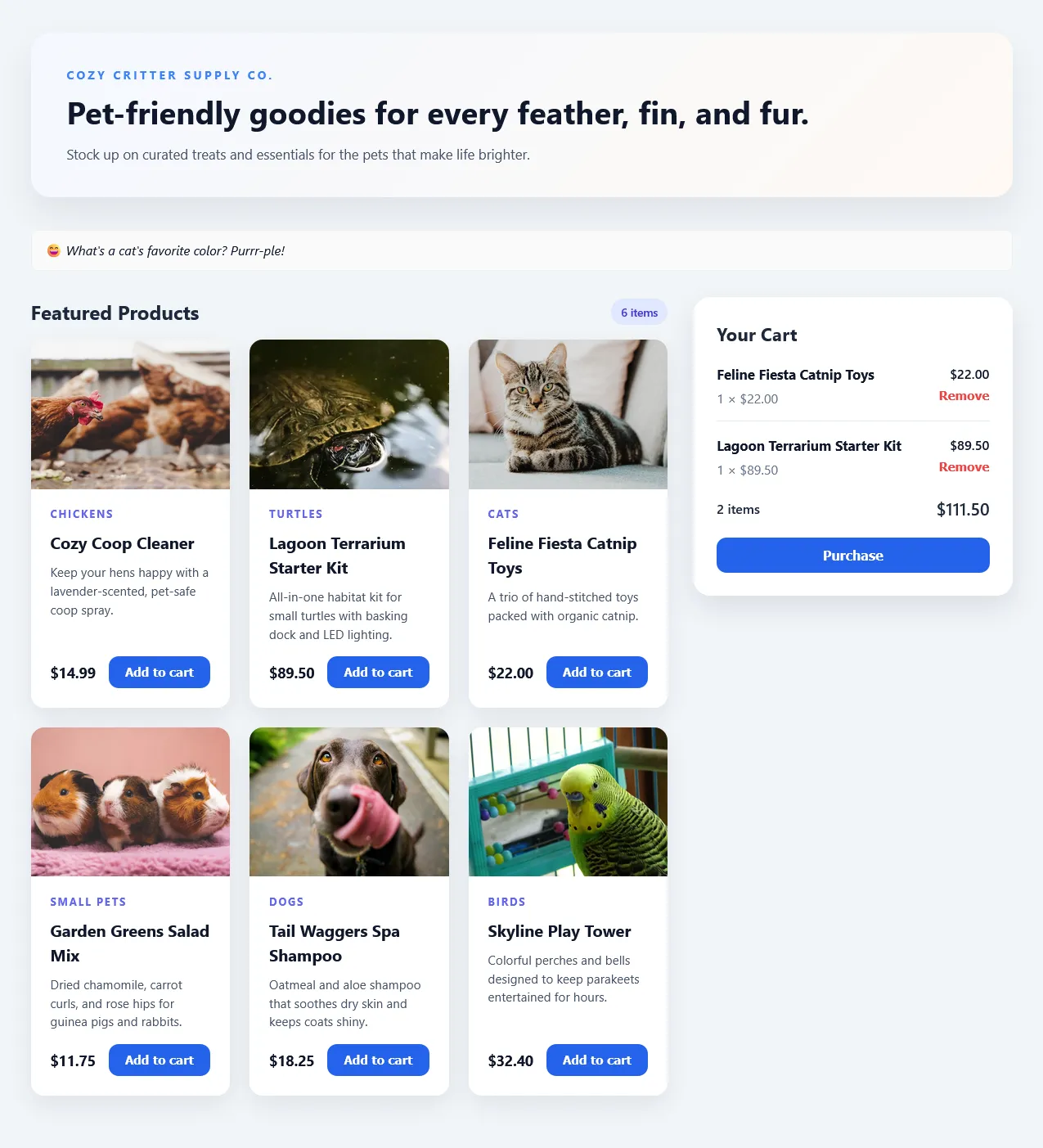
<p>The scenario I demo is a 'Pet supplies' e-commerce website, with a React front-end, Python backend API running with MongoDB. The Python backend also talks to a Rust-based payment gateway service, and as a bonus step right at the end I add a Node.js server app to provide random pet jokes!</p>
<p><img src="https://david.gardiner.net.au/_astro/aspire-petstore-web.NuLNUsqZ_Z2ud4JN.webp" alt="Screenshot of Pet supplies web page" /></p>
<p>The technology mix is not unheard of, particularly at some larger organisations where you may have different teams working on different features or services and sometimes they are allowed enough autonomy to choose their own technology stack. Whether this is a case of "using the right tool for the job" or "must use the current shiny new thing" isn't so important. The reality is that for good or other reasons you often find yourself in this situation.</p>
<h2>MongoDB</h2>
<p>MongoDB is supported out of the box in Aspire. The original process was to launch this via <code>docker compose</code>. Aspire actually <a href="https://learn.microsoft.com/dotnet/aspire/deployment/docker-integration?WT.mc_id=DOP-MVP-5001655">supports compose files too (via the Aspire.Hosting.Docker package)</a>, but in this case I'm taking advantage of the <a href="https://learn.microsoft.com/en-us/dotnet/aspire/database/mongodb-integration?WT.mc_id=DOP-MVP-5001655"><code>Aspire.Hosting.MongoDB</code></a> to configure the MongoDB service, database, and for bonus points, include the Mongo Express management UI. This will still run in a Docker container, but Aspire handles all the configuration for me.</p>


<pre><code>var mongo = builder.AddMongoDB("mongo")
    .WithDataVolume()
    .WithMongoExpress();

var mongodb = mongo.AddDatabase("petstore");
</code></pre>


<p><code>WithDataVolume()</code> means that a Docker volume is created to persist the database data between runs.</p>
<p>The original implementation also has a PowerShell script to populate the database with sample data. I wired up that script so that it gets run automatically when the MongoDB service starts up in Aspire.</p>

<pre><code>var loadData = builder.AddExecutable("load-data", "pwsh", "../mongodb", "-noprofile", "./populate.ps1")
    .WaitFor(mongo)
    .WithArgs("-connectionString")
    .WithArgs(new ConnectionStringReference(mongo.Resource, false));
//.WithExplicitStart();
</code></pre>


<p>The script conveniently already had a parameter defined to pass in a connection string, so I take advantage of that.</p>
<p>If you'd prefer to just run the script manually (rather than every time you start Aspire) you could uncomment the <code>.WithExplicitStart()</code> method.</p>
<h2>Rust</h2>
<p>I've never used the Rust programming language before, but it is becoming increasingly popular, especially where you might previously have used C or C++. Rust uses <a href="https://doc.rust-lang.org/cargo/">Cargo</a> as its package manager and build tool. Support for building and running Rust applications is provided by the <a href="https://learn.microsoft.com/dotnet/aspire/community-toolkit/hosting-rust?WT.mc_id=DOP-MVP-5001655">Community Toolkit's CommunityToolkit.Aspire.Hosting.Rust package</a>.</p>
<p>Configuring the Rust application is quite straightforward with the <code>AddRustApp</code> method. The application has a default port it listens on but allows that to be overridden via the <code>PAYMENT_API_PORT</code> environment variable. Aspire will set that to the appropriate port number by the call to <code>WithHttpEndpoint</code>.</p>

<pre><code>var rust = builder.AddRustApp("rustpaymentapi", "../RustPaymentApi", [])
    .WithHttpEndpoint(env: "PAYMENT_API_PORT");
</code></pre>


<h2>Node.js</h2>
<p>JavaScript is well known as a front end language, but platforms like Node.js allow you to write server-side applications in JavaScript (and TypeScript) too. Aspire 13.0 introduces improved support for JavaScript apps via a new <a href="https://www.nuget.org/packages/Aspire.Hosting.JavaScript">Aspire.Hosting.JavaScript package</a>. This includes the ability to configure using <code>pnpm</code> or <code>yarn</code> package managers (the default being <code>npm</code>).</p>

<pre><code>var nodeApp = builder.AddJavaScriptApp("node-joke-api", "../NodeApp", "start")
    .WithPnpm()
    // If you are using fnm for Node.js version management, you might need to adjust the PATH
    .WithEnvironment("PATH", Environment.GetEnvironmentVariable("PATH") + ";" + Environment.ExpandEnvironmentVariables(@"%USERPROFILE%\AppData\Roaming\fnm\aliases\default"))
    .WithHttpEndpoint(env: "PORT")
    .WithOtlpExporter();
</code></pre>


<p>I use <a href="https://github.com/Schniz/fnm"><code>fnm</code></a> (Fast Node Manager) to manage my Node.js versions. This means that the actual <code>node</code> executable is not in the PATH by default, but rather is added (or updated) dynamically as I change directory via my PowerShell profile script. Because that script isn't run by Aspire, I explicity append the <code>fnm</code> default alias directory to the PATH environment variable so that <code>node</code> can be found.</p>
<h2>Python</h2>
<p>Python is an interesting ecosystem. There are a number of different package managers that will influence how you work with it. Aspire has first-class support for Python applications that use <code>pip</code> via the <code>Aspire.Hosting.Python</code> NuGet package. (See <a href="https://learn.microsoft.com/dotnet/aspire/get-started/build-aspire-apps-with-python?WT.mc_id=DOP-MVP-5001655">Python apps in Aspire</a> for more details).</p>
<p>I recently worked on a client engagement where they were using <a href="https://docs.astral.sh/uv/"><code>uv</code></a> with their Python applications. Aspire 13.0 now includes direct support for <code>uv</code> (via <code>WithUv()</code>) and <code>uvicorn</code> (with <code>AddUvicornApp()</code>):</p>

<pre><code>var pythonApp = builder.AddUvicornApp("python-api", "../PythonUv", "src.api:app")
    .WithUv()
    .WaitFor(mongo)
    .WaitFor(rust)
    .WaitFor(nodeApp)
    .WithEnvironment("PYTHONIOENCODING", "utf-8")
    .WithEnvironment("MONGO_CONNECTION_STRING", new ConnectionStringReference(mongo.Resource, false))
    .WithEnvironment("PAYMENT_API_BASE_URL", new EndpointReference(rust.Resource, "http"))
    .WithEnvironment("NODE_APP_BASE_URL", ReferenceExpression.Create($"{nodeApp.Resource.GetEndpoint("http")}"))
    .WithHttpHealthCheck("/")
    .WithExternalHttpEndpoints();
</code></pre>


<p>We wait for the MongoDB service, the Rust payment service, and the Node.js joke service, so that they have all started before the Python app. We also set up environment variables to pass in the connection strings and endpoints that the Python app needs to connect to those services.</p>
<h2>A Vite React Frontend web app</h2>
<p>The same <code>Aspire.Hosting.JavaScript</code> package that we used to wire up the Node.js application can also be used for the frontend web app. Helpfully, it specifically includes support for Vite apps</p>

<pre><code>var web = builder.AddViteApp("web", "../web-vite-react")
    .WithPnpm()
    // If you are using fnm for Node.js version management, you might need to adjust the PATH
    .WithEnvironment("PATH", Environment.GetEnvironmentVariable("PATH") + ";" + Environment.ExpandEnvironmentVariables(@"%USERPROFILE%\AppData\Roaming\fnm\aliases\default"))
    .WaitFor(pythonApp)
    .WithEnvironment("VITE_API_BASE_URL", new EndpointReference(pythonApp.Resource, "http"));
</code></pre>


<p>Again, because I use <code>fnm</code> to manage my Node.js versions, I need to append the <code>fnm</code> default alias directory to the PATH environment variable so that <code>node</code> can be found.</p>
<p>The frontend application only talks to the Python backend API, so we enusre that service has started first, and set up the <code>VITE_API_BASE_URL</code> environment variable so that the Vite app knows where to find the API.</p>
<p>And with that in place, we can run the entire distributed application locally with a single command:</p>
<pre><code>dotnet run --project ./AspireAppHost/AspireAppHost.csproj --launch-profile http
</code></pre>
<p>Not all of the applications I'm using here support HTTPS self-signed development certificates, so I stick with running everything over HTTP for now. This is something that Aspire has improved on in 13.0. Obviously in a production deployment you'd want to use HTTPS everywhere. If I didn't need to set the launch profile, then I could use the Aspire CLI instead:</p>
<pre><code>aspire run
</code></pre>
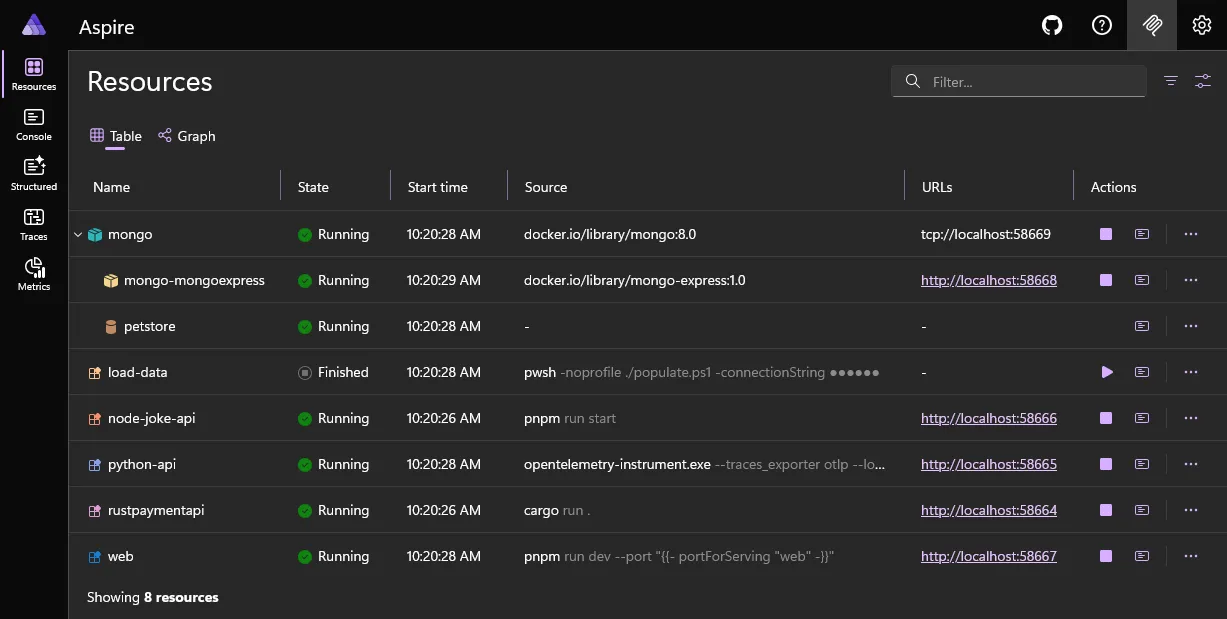
<p>The nice thing about all this is I didn't need to make any changes any of the front end or back end applications to get them to work with Aspire. All the configuration was done in the Aspire host application. This assumes that your applications have provided a 'seam' (eg. environment variables or command line arguments) to allow you to configure things like connection strings, ports, and endpoints.</p>
<p><img src="https://david.gardiner.net.au/_astro/aspire-petstore-resources.CkupUbS-_Z1nuOUe.webp" alt="Screenshot of Aspire dashboard showing resources page" /></p>
<p>Here's the final version of AppHost.cs:</p>

<pre><code>var builder = DistributedApplication.CreateBuilder(args);

// MongoDB
var mongo = builder.AddMongoDB("mongo")
    .WithDataVolume()
    .WithMongoExpress();

var mongodb = mongo.AddDatabase("petstore");

var loadData = builder.AddExecutable("load-data", "pwsh", "../mongodb", "-noprofile", "./populate.ps1")
    .WaitFor(mongo)
    .WithArgs("-connectionString")
    .WithArgs(new ConnectionStringReference(mongo.Resource, false));
//.WithExplicitStart();

// Rust service
var rust = builder.AddRustApp("rustpaymentapi", "../RustPaymentApi", [])
    .WithHttpEndpoint(env: "PAYMENT_API_PORT");

// Node.js App
var nodeApp = builder.AddJavaScriptApp("node-joke-api", "../NodeApp", "start")
    .WithPnpm()
    // If you are using fnm for Node.js version management, you might need to adjust the PATH
    .WithEnvironment("PATH", Environment.GetEnvironmentVariable("PATH") + ";" + Environment.ExpandEnvironmentVariables(@"%USERPROFILE%\AppData\Roaming\fnm\aliases\default"))
    .WithHttpEndpoint(env: "PORT")
    .WithOtlpExporter();

// Python API
var pythonApp = builder.AddUvicornApp("python-api", "../PythonUv", "src.api:app")
    .WithUv()
    .WaitFor(mongo)
    .WaitFor(rust)
    .WaitFor(nodeApp)
    .WithEnvironment("PYTHONIOENCODING", "utf-8")
    .WithEnvironment("MONGO_CONNECTION_STRING", new ConnectionStringReference(mongo.Resource, false))
    .WithEnvironment("PAYMENT_API_BASE_URL", new EndpointReference(rust.Resource, "http"))
    .WithEnvironment("NODE_APP_BASE_URL", ReferenceExpression.Create($"{nodeApp.Resource.GetEndpoint("http")}"))
    .WithHttpHealthCheck("/")
    .WithExternalHttpEndpoints();

// Frontend
var web = builder.AddViteApp("web", "../web-vite-react")
    .WithPnpm()
    // If you are using fnm for Node.js version management, you might need to adjust the PATH
    .WithEnvironment("PATH", Environment.GetEnvironmentVariable("PATH") + ";" + Environment.ExpandEnvironmentVariables(@"%USERPROFILE%\AppData\Roaming\fnm\aliases\default"))
    .WaitFor(pythonApp)
    .WithEnvironment("VITE_API_BASE_URL", new EndpointReference(pythonApp.Resource, "http"));

builder.Build().Run();
</code></pre>


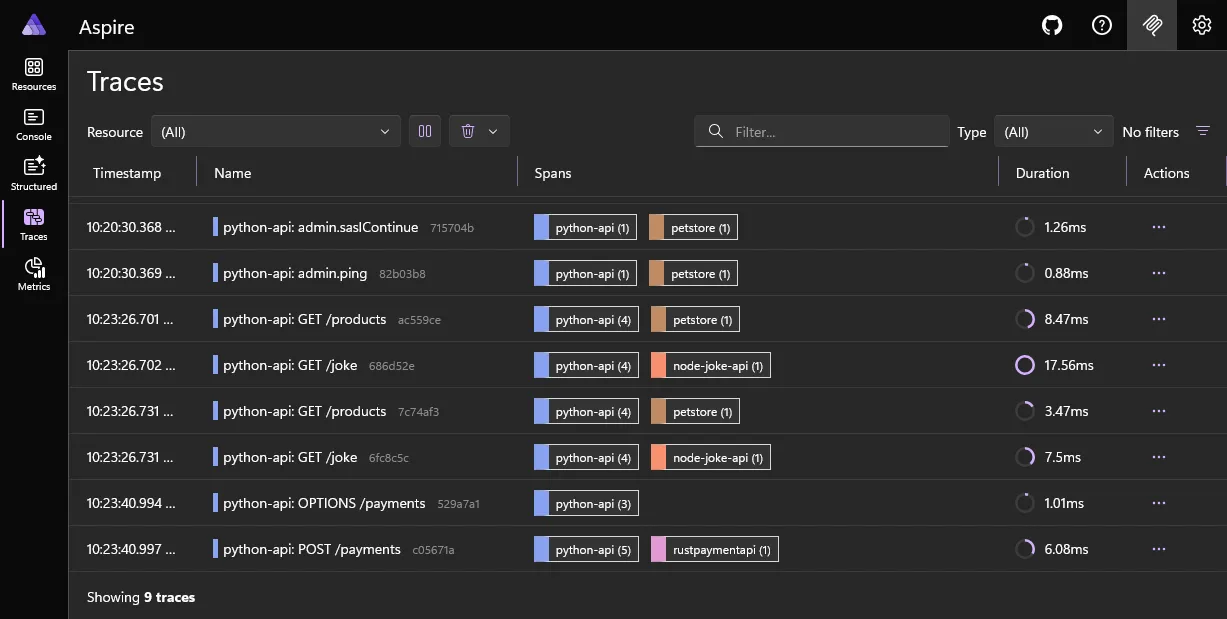
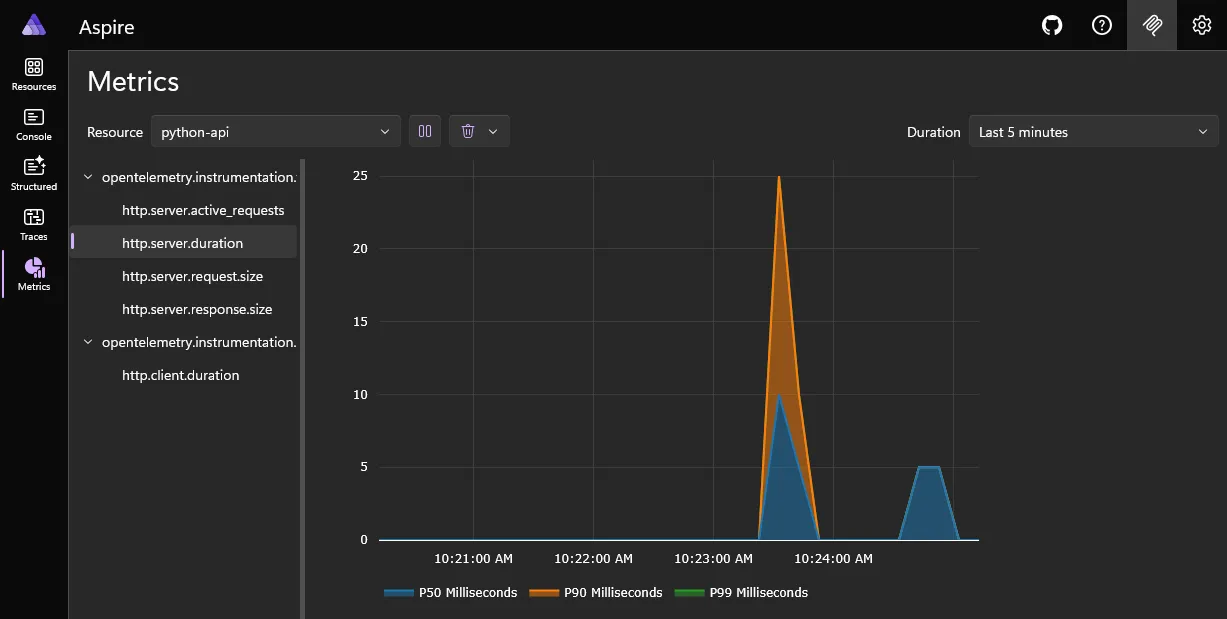
<p>To get the full benefit of Aspire you will want to take a look at adding OpenTelemetry instrumentation. If you already have that in place then there's probably nothing to change. Aspire will set a bunch of OpenTelemetry-related environment variables for each application. If that'a new thing then you'll get the double benefit of then being able to take advantage of that telemetry when your applications are deployed to production too!</p>
<p><img src="https://david.gardiner.net.au/_astro/aspire-petstore-traces.ZXy-RHuR_Z1wOzaQ.webp" alt="Screenshot of Aspire dashboard showing traces page" /></p>
<p><img src="https://david.gardiner.net.au/_astro/aspire-petstore-metrics.B07KqI6V_Z1h2lSh.webp" alt="Screenshot of Aspire dashboard showing metrics page" /></p>
<h2>Conclusion</h2>
<p>Aspire has the potential to greatly simplify and improve the local development experience for distributed applications - potentially removing the need for numerous scripts and manual steps for a developer to get up and running much more quickly. It's also a tool that can benefit almost every development team, regardless of the technology stack they are using.</p>
]]>
    </content>
    <media:thumbnail xmlns:media="http://search.yahoo.com/mrss/" url="https://david.gardiner.net.au/_astro/aspire-logo-256.CA6LsmXl.png"/>
    <media:content medium="image" xmlns:media="http://search.yahoo.com/mrss/" url="https://david.gardiner.net.au/_astro/aspire-logo-256.CA6LsmXl.png"/>
  </entry>
  <entry>
    <id>https://david.gardiner.net.au/2025/11/aspire</id>
    <updated>2025-11-12T09:00:00.000+10:30</updated>
    <title>Introducing Aspire</title>
    <link href="https://david.gardiner.net.au/2025/11/aspire" rel="alternate" type="text/html" title="Introducing Aspire"/>
    <category term=".NET"/>
    <category term="Aspire"/>
    <published>2025-11-12T09:00:00.000+10:30</published>
    <summary type="html">
      <![CDATA[What is Aspire, and how can it help you orchestrate your local development experience
by modelling your application architecture, and providing a really cool dashboard (among other things)?]]>
    </summary>
    <content type="html" xml:base="https://david.gardiner.net.au/2025/11/aspire">
      <![CDATA[<p><a href="https://aspire.dev/">Aspire</a> is a really interesting tool for orchestrating your local development experience, integrating with OpenTelemetry, and optionally providing a way to automate deployments. It has the potential to replace manual steps and custom startup scripts with a more declarative and simpler approach.</p>
<p><img src="https://david.gardiner.net.au/_astro/aspire-logo-256.CA6LsmXl_2gR0dV.webp" alt="Aspire logo" /></p>
<p>Originally known as '.NET Aspire', the name has recently been tweaked to just 'Aspire' to help promote it's applicability across all kinds of development environments, not just .NET.</p>
<p>Today the latest version of Aspire was demonstrated at <a href="https://www.dotnetconf.net/agenda">.NET Conf 2025</a>. Let's take a look at what Aspire is, and how it can help you.</p>
<h2>The AppHost</h2>
<p>At the heart of Aspire is the concept of an 'AppHost'. This is a .NET project in which you define the services (which could be local applications, containers and even remote services). You also define any dependencies between those services, and can use that to then provide configuration information (connection strings, endpoint URLs etc) so that they can communicate with each other. You're essentially creating a model of your application architecture.</p>
<p>Importantly, while the AppHost is a .NET project (possibly even a .NET 10 file-based application to make it really simple), this is the only thing that needs .NET. All the other services can be written in pretty much any language or framework you like. They could be Node.js applications, Python, Java, or anything else (including .NET of course!).</p>
<p>Here's an example AppHost file:</p>
<pre><code>var builder = DistributedApplication.CreateBuilder(args);

var mongo = builder.AddMongoDB("mongo")
    .WithDataVolume();

var api = builder.AddProject&lt;Projects.aspire_starter_ApiService&gt;("apiservice")
    .WithReference(mongo)
    .WaitFor(mongo);

var frontend = builder.AddViteApp("frontend", "../frontend")
    .WithPnpm()
    .WithReference(api)
    .WaitFor(api);

builder.Build().Run();
</code></pre>
<p>In just those ~15 lines of code, we're describing an application which has a MongoDB database, a .NET API service, and a Vite frontend web app:</p>
<ol>
<li>We create a <code>builder</code> variable (an instance of <code>IDistributedApplicationBuilder</code>) that will then use to define and wire up the services.</li>
<li>The MongoDB database is hosted as a Docker container, with a data volume to persist data between runs.</li>
<li>The API service is a .NET project that references the MongoDB service and waits for it to be ready before starting.</li>
<li>The frontend is a Vite application that references the API service and exposes an HTTP endpoint.</li>
</ol>
<p>With that in place, all you need to do is run this AppHost project (either with <code>dotnet run</code> or via the Aspire CLI with <code>aspire run</code>), and Aspire will figure out the order to start the services, then start them up while providing the requested configuration information.</p>
<h3>WaitFor</h3>
<p>The <code>WaitFor</code> method tells Aspire that this service should wait until the referenced service is in a 'running' state. Services may define health checks that Aspire will use to determine when a service is truly ready. SQL Server is a good example - where even though the main SQL Server process may have started, the database engine won't be ready immediately as there are a number of housekeeping tasks it needs to complete before all the databases become available for use.</p>
<h3>WithReference</h3>
<p>The <code>WithReference</code> method causes Aspire to inject environment variables into the service which provide a way for it to connect to the referenced service.</p>
<p>For the above code, the references to Mongo generate connection string environment variable of the form <code>ConnectionStrings__mongo</code>. The API service can use that environment variable to connect to the MongoDB database.</p>
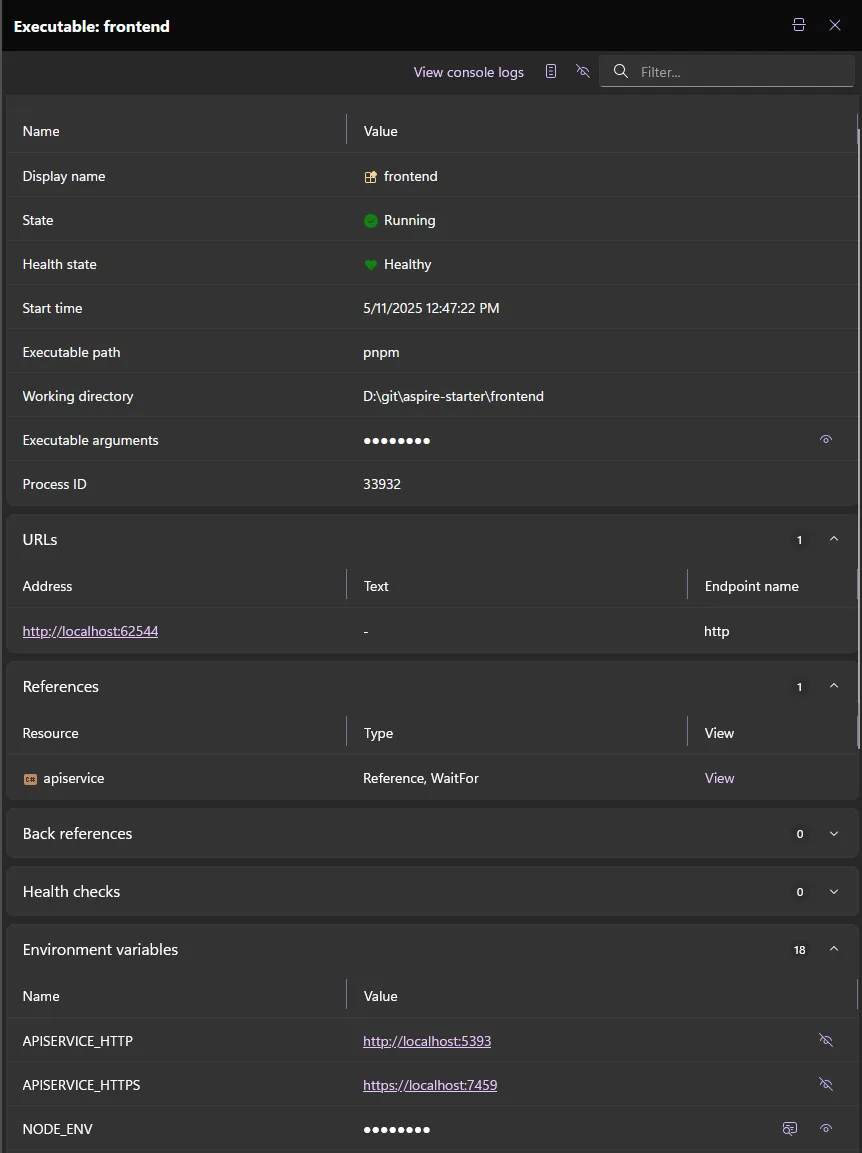
<p>The reference to the API service generate environment variables <code>APISERVICE_HTTP</code> and <code>APISERVICE_HTTPS</code> which provide the URLs that the frontend can use to connect to the API.</p>
<p>There are overloads of <code>WithReference</code> that allow you to customise naming scheme of the environment variables, and if that isn't enough you can always add a custom environment variable with <code>WithEnvironment</code>.</p>
<h2>The dashboard</h2>
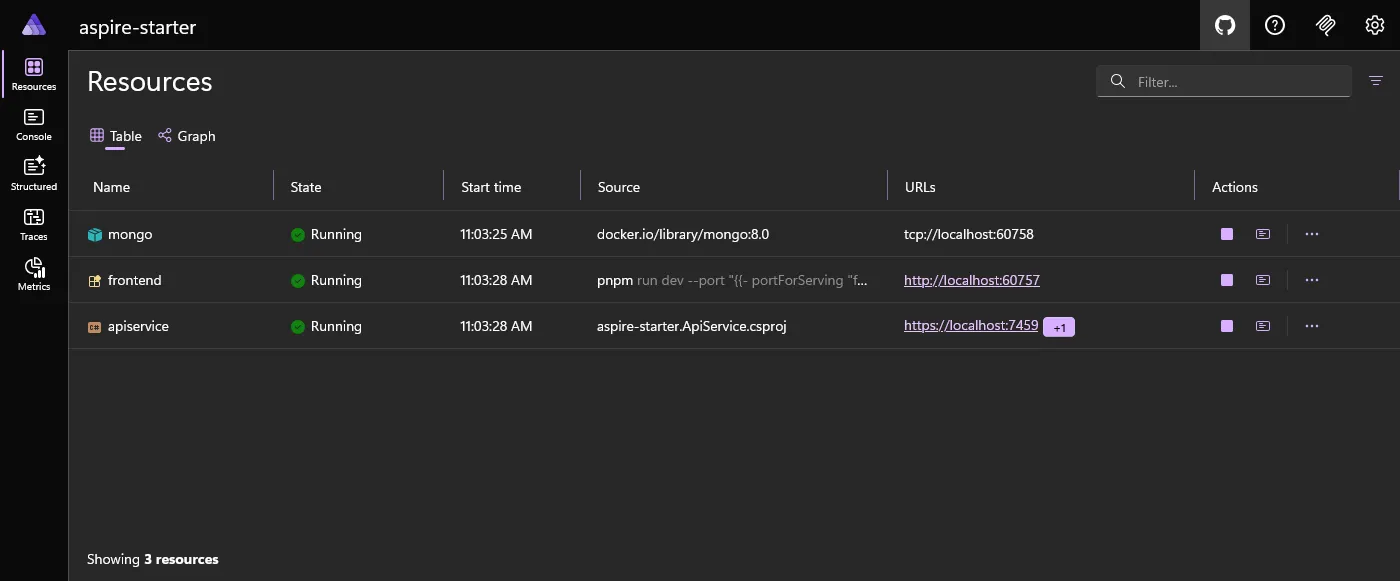
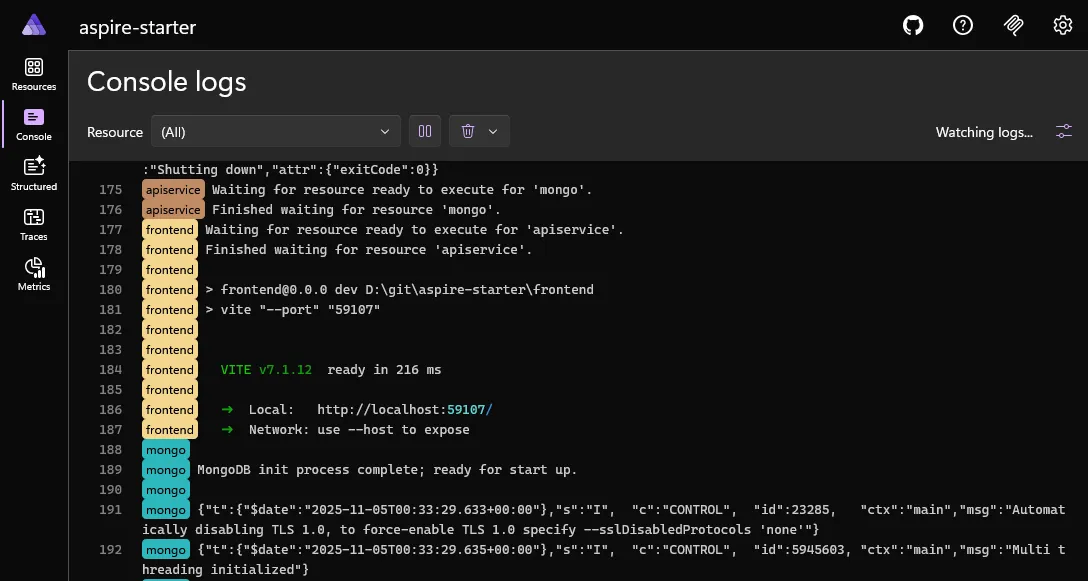
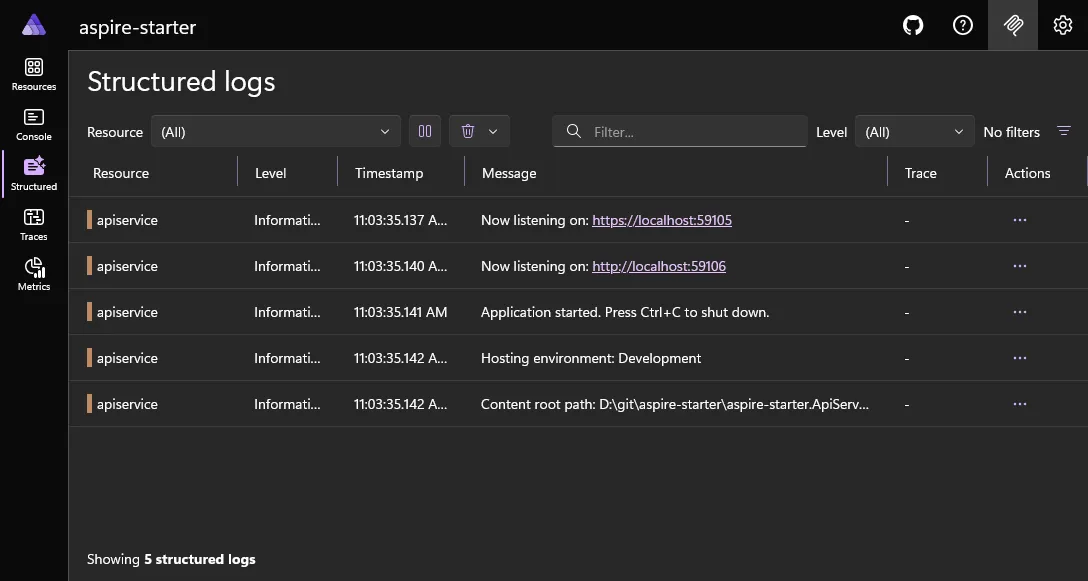
<p>One of the key features of Aspire is that you're not just left to wonder how things are going. A really cool dashboard is provided that gives you both the high-level overview of all your services, as well as being able to drill into specific service configuration and logs, and even see OpenTelemetry traces and metrics (if you have OpenTelemetry added to your services).</p>
<p><img src="https://david.gardiner.net.au/_astro/aspire-starter-dashboard.YGmYruy3_Zxr80d.webp" alt="Aspire dashboard showing running resources" /></p>
<p>Clicking on the 'frontend' service shows the configuration that Aspire has provided to that service, including the environment variables that were injected:</p>
<p><img src="https://david.gardiner.net.au/_astro/aspire-starter-service-details.LwT7lW-j_Z1N3e7e.webp" alt="Viewing a service's configuration" /></p>
<p>View all the console output from services (or filter to just a specific service):</p>
<p><img src="https://david.gardiner.net.au/_astro/aspire-starter-console.Ba6dWfxd_Z7b1R3.webp" alt="Aspire dashboard showing aggregated console output" /></p>
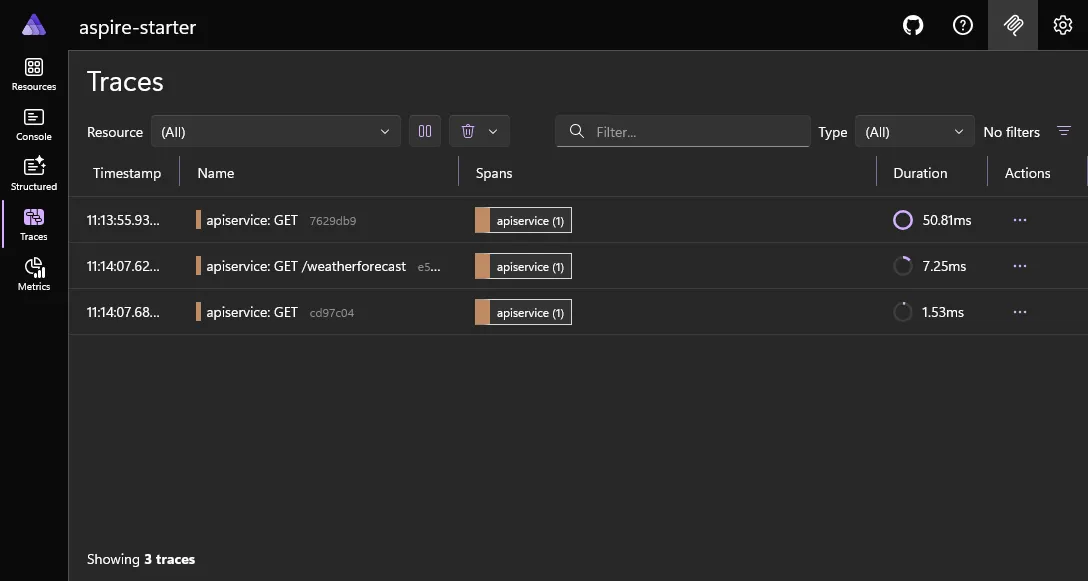
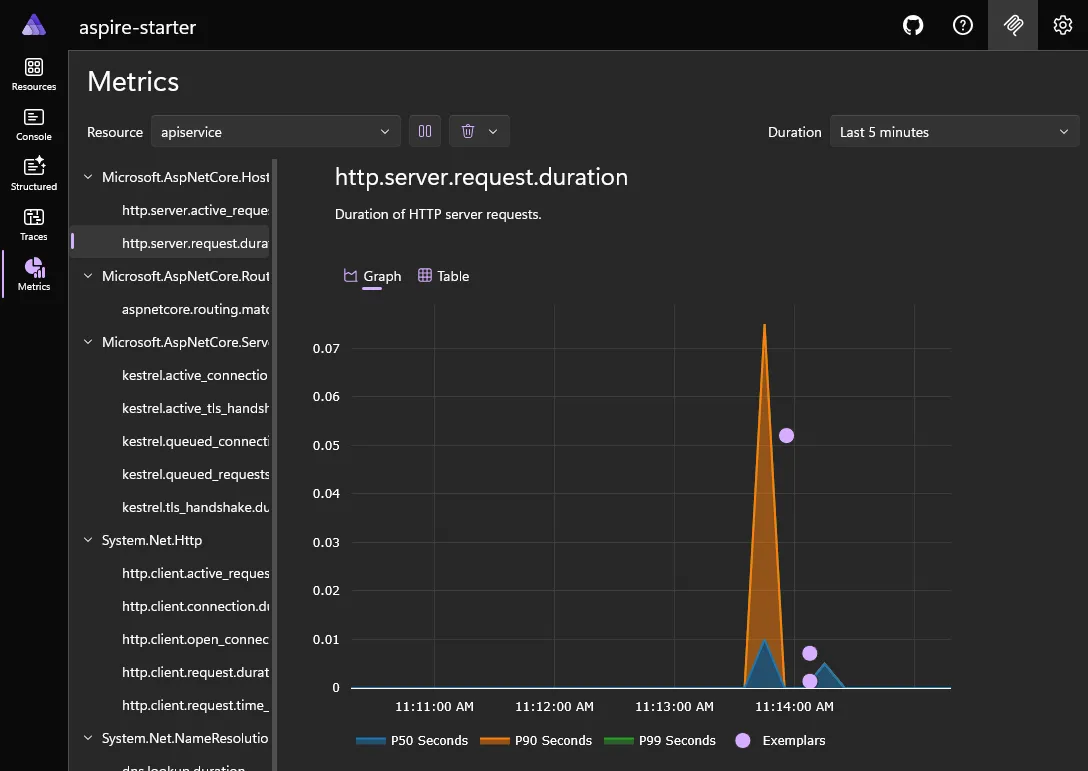
<p>If your services are instrumented with OpenTelemetry, you can see structured logs, traces and metrics:</p>
<p><img src="https://david.gardiner.net.au/_astro/aspire-starter-structured-logging.D8djTE9C_15411K.webp" alt="Aspire dashboard showing structured logging" /></p>
<p><img src="https://david.gardiner.net.au/_astro/aspire-starter-traces.CyGBFzle_ZdYPRv.webp" alt="Aspire dashboard showing traces" /></p>
<p><img src="https://david.gardiner.net.au/_astro/aspire-starter-metrics.DuU2P7n4_mqBU7.webp" alt="Aspire dashboard showing metrics" /></p>
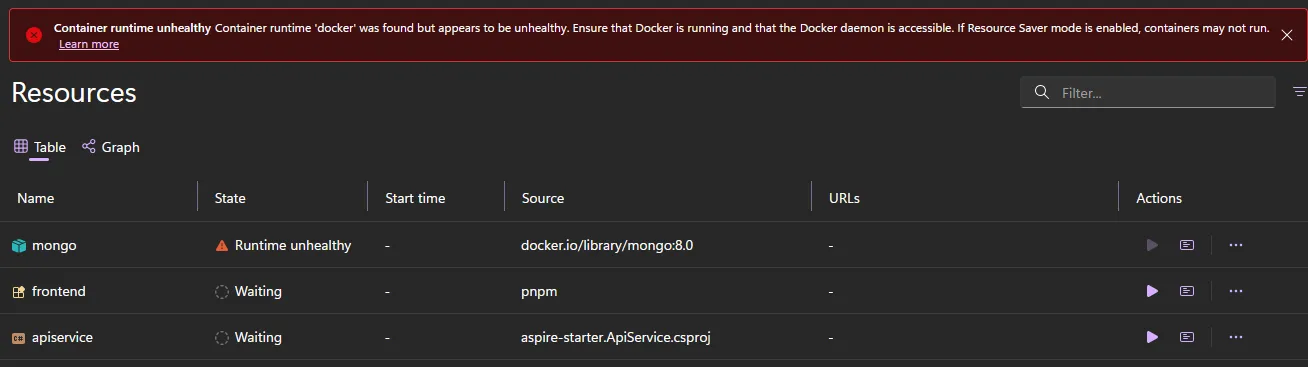
<p>Aspire is resilient enough that for example if you forget to start Docker, it will let you know that services depending on that can't start.
<img src="https://david.gardiner.net.au/_astro/aspire-dashboard-unhealthy.u_OIjb65_Z29pbV8.webp" alt="Aspire dashboard showing unhealthy state" /></p>
<p>The cool thing though is you don't need to restart Aspire. If you start Docker, Aspire will notice that it is now available, and will start the services that were waiting on it. You can see the status change in real-time in the dashboard as services become healthy. Note that the other services (which need to wait for Mongo) are not even started yet.</p>
<p><img src="https://david.gardiner.net.au/_astro/aspire-dashboard-becoming-health.D_vLN0tV_Z51bD1.webp" alt="Aspire dashboard showing becoming healthy state" /></p>
<h2>Publishing and deploying</h2>
<p>Aspire can optionally prepare the application for deployment by 'publishing' parameterised assets. You can then 'deploy' those assets to a specific target environment.</p>
<p>Currently, the following deployment targets are supported:</p>
<ul>
<li>Docker / Docker Compose</li>
<li>Kubernetes</li>
<li>Azure Container Apps</li>
<li>Azure App Services</li>
</ul>
<p>Some service types may support these targets natively, while others may need additional configuration. There are also non-Azure targets available too. For example there's support for AWS with the <a href="https://www.nuget.org/packages/Aspire.Hosting.AWS/">Aspire.Hosting.AWS</a> package. See <a href="https://github.com/aws/integrations-on-dotnet-aspire-for-aws">https://github.com/aws/integrations-on-dotnet-aspire-for-aws</a> for more information.</p>
<p>For example, adding this line to the AppHost above:</p>
<pre><code>builder.AddDockerComposeEnvironment("aspire-starter");
</code></pre>
<p>and then running the publish command:</p>
<pre><code>aspire publish
</code></pre>
<p>causes a <code>docker-compose.yaml</code> and <code>.env</code> files to be created:</p>
<pre><code>services:
  aspire-starter-dashboard:
    image: "mcr.microsoft.com/dotnet/nightly/aspire-dashboard:latest"
    expose:
      - "18888"
      - "18889"
    networks:
      - "aspire"
    restart: "always"
  mongo:
    image: "docker.io/library/mongo:8.0"
    environment:
      MONGO_INITDB_ROOT_USERNAME: "admin"
      MONGO_INITDB_ROOT_PASSWORD: "${MONGO_PASSWORD}"
    expose:
      - "27017"
    volumes:
      - type: "volume"
        target: "/data/db"
        source: "aspire-starter.apphost-06ac3d63aa-mongo-data"
        read_only: false
    networks:
      - "aspire"
  apiservice:
    image: "${APISERVICE_IMAGE}"
    environment:
      OTEL_DOTNET_EXPERIMENTAL_OTLP_EMIT_EXCEPTION_LOG_ATTRIBUTES: "true"
      OTEL_DOTNET_EXPERIMENTAL_OTLP_EMIT_EVENT_LOG_ATTRIBUTES: "true"
      OTEL_DOTNET_EXPERIMENTAL_OTLP_RETRY: "in_memory"
      ASPNETCORE_FORWARDEDHEADERS_ENABLED: "true"
      HTTP_PORTS: "${APISERVICE_PORT}"
      ConnectionStrings__mongo: "mongodb://admin:${MONGO_PASSWORD}@mongo:27017?authSource=admin&amp;authMechanism=SCRAM-SHA-256"
      OTEL_EXPORTER_OTLP_ENDPOINT: "http://aspire-starter-dashboard:18889"
      OTEL_EXPORTER_OTLP_PROTOCOL: "grpc"
      OTEL_SERVICE_NAME: "apiservice"
    expose:
      - "${APISERVICE_PORT}"
    depends_on:
      mongo:
        condition: "service_started"
    networks:
      - "aspire"
networks:
  aspire:
    driver: "bridge"
volumes:
  aspire-starter.apphost-06ac3d63aa-mongo-data:
    driver: "local"
</code></pre>
<p>Just to repeat, the publish and deployment aspects of Aspire are entirely optional. If you've already got Infrastructure as Code and/or CI/CD pipelines you can continue to use those, and just use Aspire for local development. But if you haven't got them in place, Aspire may be useful to help you get started.</p>
<h2>Learning more and getting started</h2>
<p>Head over to the new home of Aspire at <a href="https://aspire.dev">https://aspire.dev</a> to find more details about how Aspire works and how to get started.</p>
<p>(There is also the <a href="https://learn.microsoft.com/dotnet/aspire/?WT.mc_id=DOP-MVP-5001655">old documentation site which is part of Microsoft Learn</a>, but as I understand it the plan is for that content to be gradually migrated to the new site)</p>
<p>Oh, and finally keep an eye out for my presentation happening as part of the 'Community' day of <a href="https://www.dotnetconf.net/agenda">.NET Conf 2025</a> where I'll be showing how well Aspire works with non-.NET applications!</p>
]]>
    </content>
    <media:thumbnail xmlns:media="http://search.yahoo.com/mrss/" url="https://david.gardiner.net.au/_astro/aspire-logo-256.CA6LsmXl.png"/>
    <media:content medium="image" xmlns:media="http://search.yahoo.com/mrss/" url="https://david.gardiner.net.au/_astro/aspire-logo-256.CA6LsmXl.png"/>
  </entry>
  <entry>
    <id>https://david.gardiner.net.au/2025/10/dotnet-uninstall-tool</id>
    <updated>2025-10-17T11:30:00.000+10:30</updated>
    <title>Clean up old .NET installs with the .NET Uninstall Tool</title>
    <link href="https://david.gardiner.net.au/2025/10/dotnet-uninstall-tool" rel="alternate" type="text/html" title="Clean up old .NET installs with the .NET Uninstall Tool"/>
    <category term=".NET"/>
    <published>2025-10-17T11:30:00.000+10:30</published>
    <summary type="html">
      <![CDATA[Using the .NET Uninstall Tool to remove redundant .NET SDK versions]]>
    </summary>
    <content type="html" xml:base="https://david.gardiner.net.au/2025/10/dotnet-uninstall-tool">
      <![CDATA[<p>New versions of .NET are released almost monthly with bug and security fixes. Visual Studio also will install specific versions of .NET SDKs. What this means is that over time you may end up with a lot of .NET SDKs and runtimes installed, some of which are redundant and just taking up disk space.</p>
<p><img src="https://david.gardiner.net.au/_astro/dotnet.DQUHciW5_24pCaQ.webp" alt="The .NET Logo" /></p>
<p>You could uninstall specific versions manually, or you could use the <a href="https://learn.microsoft.com/dotnet/core/additional-tools/uninstall-tool-overview?WT.mc_id=DOP-MVP-5001655">.NET Uninstall Tool</a>.</p>
<p>On Windows if you're using Chocolatey, you can install the tool like this:</p>
<pre><code>choco install dotnet-uninstaller
</code></pre>
<p>Or you can download the installer directly from <a href="https://github.com/dotnet/cli-lab/releases">https://github.com/dotnet/cli-lab/releases</a> (there's also a Mac OS version available). That GitHub repository has the source for the tool too.</p>
<p>Here's what <code>dotnet --info</code> shows on my machine:</p>
<pre><code>.NET SDK:
 Version:           10.0.100-rc.2.25502.107
 Commit:            89c8f6a112
 Workload version:  10.0.100-manifests.4d32cd9e
 MSBuild version:   18.0.0-preview-25502-107+89c8f6a11

Runtime Environment:
 OS Name:     Windows
 OS Version:  10.0.26100
 OS Platform: Windows
 RID:         win-x64
 Base Path:   C:\Program Files\dotnet\sdk\10.0.100-rc.2.25502.107\

.NET workloads installed:
There are no installed workloads to display.
Configured to use workload sets when installing new manifests.
No workload sets are installed. Run "dotnet workload restore" to install a workload set.

Host:
  Version:      10.0.0-rc.2.25502.107
  Architecture: x64
  Commit:       89c8f6a112

.NET SDKs installed:
  3.1.426 [C:\Program Files\dotnet\sdk]
  6.0.428 [C:\Program Files\dotnet\sdk]
  8.0.318 [C:\Program Files\dotnet\sdk]
  8.0.415 [C:\Program Files\dotnet\sdk]
  9.0.205 [C:\Program Files\dotnet\sdk]
  9.0.305 [C:\Program Files\dotnet\sdk]
  9.0.306 [C:\Program Files\dotnet\sdk]
  10.0.100-rc.2.25502.107 [C:\Program Files\dotnet\sdk]

.NET runtimes installed:
  Microsoft.AspNetCore.App 3.1.32 [C:\Program Files\dotnet\shared\Microsoft.AspNetCore.App]
  Microsoft.AspNetCore.App 6.0.36 [C:\Program Files\dotnet\shared\Microsoft.AspNetCore.App]
  Microsoft.AspNetCore.App 8.0.21 [C:\Program Files\dotnet\shared\Microsoft.AspNetCore.App]
  Microsoft.AspNetCore.App 9.0.6 [C:\Program Files\dotnet\shared\Microsoft.AspNetCore.App]
  Microsoft.AspNetCore.App 9.0.9 [C:\Program Files\dotnet\shared\Microsoft.AspNetCore.App]
  Microsoft.AspNetCore.App 9.0.10 [C:\Program Files\dotnet\shared\Microsoft.AspNetCore.App]
  Microsoft.AspNetCore.App 10.0.0-rc.2.25502.107 [C:\Program Files\dotnet\shared\Microsoft.AspNetCore.App]
  Microsoft.NETCore.App 3.1.32 [C:\Program Files\dotnet\shared\Microsoft.NETCore.App]
  Microsoft.NETCore.App 6.0.36 [C:\Program Files\dotnet\shared\Microsoft.NETCore.App]
  Microsoft.NETCore.App 8.0.21 [C:\Program Files\dotnet\shared\Microsoft.NETCore.App]
  Microsoft.NETCore.App 9.0.6 [C:\Program Files\dotnet\shared\Microsoft.NETCore.App]
  Microsoft.NETCore.App 9.0.9 [C:\Program Files\dotnet\shared\Microsoft.NETCore.App]
  Microsoft.NETCore.App 9.0.10 [C:\Program Files\dotnet\shared\Microsoft.NETCore.App]
  Microsoft.NETCore.App 10.0.0-rc.2.25502.107 [C:\Program Files\dotnet\shared\Microsoft.NETCore.App]
  Microsoft.WindowsDesktop.App 3.1.32 [C:\Program Files\dotnet\shared\Microsoft.WindowsDesktop.App]
  Microsoft.WindowsDesktop.App 6.0.36 [C:\Program Files\dotnet\shared\Microsoft.WindowsDesktop.App]
  Microsoft.WindowsDesktop.App 8.0.21 [C:\Program Files\dotnet\shared\Microsoft.WindowsDesktop.App]
  Microsoft.WindowsDesktop.App 9.0.6 [C:\Program Files\dotnet\shared\Microsoft.WindowsDesktop.App]
  Microsoft.WindowsDesktop.App 9.0.9 [C:\Program Files\dotnet\shared\Microsoft.WindowsDesktop.App]
  Microsoft.WindowsDesktop.App 9.0.10 [C:\Program Files\dotnet\shared\Microsoft.WindowsDesktop.App]
  Microsoft.WindowsDesktop.App 10.0.0-rc.2.25502.107 [C:\Program Files\dotnet\shared\Microsoft.WindowsDesktop.App]

Other architectures found:
  x86   [C:\Program Files (x86)\dotnet]
    registered at [HKLM\SOFTWARE\dotnet\Setup\InstalledVersions\x86\InstallLocation]
</code></pre>
<p>I have Visual Studio 2022 and Visual Studio 2026 Insiders installed, and also used some of the Chocolatey packages to preinstall various SDK versions (and some runtimes may have been installed as dependencies of other software).</p>
<p>Ideally I'd just end up with the latest SDK for each major version. The Uninstall tool has a few different commands and combinations of options. First up let's see what the <code>list</code> command generates:</p>
<pre><code>dotnet-core-uninstall list
</code></pre>
<pre><code>This tool cannot uninstall versions of the runtime or SDK that are 
    - SDKs installed using Visual Studio 2019 Update 3 or later.
    - SDKs and runtimes installed via zip/scripts.
    - Runtimes installed with SDKs (these should be removed by removing that SDK).
The versions that can be uninstalled with this tool are:

.NET Core SDKs:
  9.0.306  x64    [Used by Visual Studio. Specify individually or use --force to remove]
  9.0.305  x64
  9.0.205  x64
  8.0.415  x64    [Used by Visual Studio 2022. Specify individually or use --force to remove]
  8.0.318  x64
  6.0.428  x64    [Used by Visual Studio 2022. Specify individually or use --force to remove]
  3.1.426  x64    [Used by Visual Studio 2019. Specify individually or use --force to remove]

.NET Core Runtimes:

ASP.NET Core Runtimes:

.NET Core Runtime &amp; Hosting Bundles:
</code></pre>
<p>My goal is to remove 9.0.305, 9.0.205 and 8.0.318 SDKs, as I have newer versions of 8 and 9 already installed.</p>
<p>Before committing to removing anything, it's probably a good idea to make use of the <code>whatif</code> (aka <code>dry-run</code>) command first, just so you can confirm it is going to do what you thought.</p>
<p>First up, let's see what the <code>--all-lower-patches</code> filter does:</p>
<pre><code>dotnet-core-uninstall whatif --all-lower-patches --sdk
</code></pre>
<pre><code>*** DRY RUN OUTPUT
Specified versions:
  Microsoft .NET SDK 9.0.305 (x64)
*** END DRY RUN OUTPUT
</code></pre>
<p>Interesting - that's a good start, but it doesn't include the other two SDKs.</p>
<p>What about <code>--all-but-latest</code>?</p>
<pre><code>dotnet-core-uninstall whatif --all-but-latest --sdk
</code></pre>
<pre><code>*** DRY RUN OUTPUT
Specified versions:
  Microsoft .NET SDK 9.0.305 (x64)
  Microsoft .NET SDK 9.0.205 (x64)
  Microsoft .NET SDK 8.0.318 (x64)
*** END DRY RUN OUTPUT
</code></pre>
<p>That looks good! Let's do this..</p>
<pre><code>dotnet-core-uninstall remove --all-but-latest --sdk --yes
</code></pre>
<pre><code>Uninstalling: Microsoft .NET SDK 9.0.305 (x64).
Uninstalling: Microsoft .NET SDK 9.0.205 (x64).
Uninstalling: Microsoft .NET SDK 8.0.318 (x64).
</code></pre>
<p>And there you go!</p>
<p>Here's what <code>dotnet --info</code> produces now:</p>
<pre><code>.NET SDK:
 Version:           10.0.100-rc.2.25502.107
 Commit:            89c8f6a112
 Workload version:  10.0.100-manifests.4d32cd9e
 MSBuild version:   18.0.0-preview-25502-107+89c8f6a11

Runtime Environment:
 OS Name:     Windows
 OS Version:  10.0.26100
 OS Platform: Windows
 RID:         win-x64
 Base Path:   C:\Program Files\dotnet\sdk\10.0.100-rc.2.25502.107\

.NET workloads installed:
There are no installed workloads to display.
Configured to use workload sets when installing new manifests.
No workload sets are installed. Run "dotnet workload restore" to install a workload set.

Host:
  Version:      10.0.0-rc.2.25502.107
  Architecture: x64
  Commit:       89c8f6a112

.NET SDKs installed:
  3.1.426 [C:\Program Files\dotnet\sdk]
  6.0.428 [C:\Program Files\dotnet\sdk]
  8.0.415 [C:\Program Files\dotnet\sdk]
  9.0.306 [C:\Program Files\dotnet\sdk]
  10.0.100-rc.2.25502.107 [C:\Program Files\dotnet\sdk]

.NET runtimes installed:
  Microsoft.AspNetCore.App 3.1.32 [C:\Program Files\dotnet\shared\Microsoft.AspNetCore.App]
  Microsoft.AspNetCore.App 6.0.36 [C:\Program Files\dotnet\shared\Microsoft.AspNetCore.App]
  Microsoft.AspNetCore.App 8.0.21 [C:\Program Files\dotnet\shared\Microsoft.AspNetCore.App]
  Microsoft.AspNetCore.App 9.0.10 [C:\Program Files\dotnet\shared\Microsoft.AspNetCore.App]
  Microsoft.AspNetCore.App 10.0.0-rc.2.25502.107 [C:\Program Files\dotnet\shared\Microsoft.AspNetCore.App]
  Microsoft.NETCore.App 3.1.32 [C:\Program Files\dotnet\shared\Microsoft.NETCore.App]
  Microsoft.NETCore.App 6.0.36 [C:\Program Files\dotnet\shared\Microsoft.NETCore.App]
  Microsoft.NETCore.App 8.0.21 [C:\Program Files\dotnet\shared\Microsoft.NETCore.App]
  Microsoft.NETCore.App 9.0.9 [C:\Program Files\dotnet\shared\Microsoft.NETCore.App]
  Microsoft.NETCore.App 9.0.10 [C:\Program Files\dotnet\shared\Microsoft.NETCore.App]
  Microsoft.NETCore.App 10.0.0-rc.2.25502.107 [C:\Program Files\dotnet\shared\Microsoft.NETCore.App]
  Microsoft.WindowsDesktop.App 3.1.32 [C:\Program Files\dotnet\shared\Microsoft.WindowsDesktop.App]
  Microsoft.WindowsDesktop.App 6.0.36 [C:\Program Files\dotnet\shared\Microsoft.WindowsDesktop.App]
  Microsoft.WindowsDesktop.App 8.0.21 [C:\Program Files\dotnet\shared\Microsoft.WindowsDesktop.App]
  Microsoft.WindowsDesktop.App 9.0.9 [C:\Program Files\dotnet\shared\Microsoft.WindowsDesktop.App]
  Microsoft.WindowsDesktop.App 9.0.10 [C:\Program Files\dotnet\shared\Microsoft.WindowsDesktop.App]
  Microsoft.WindowsDesktop.App 10.0.0-rc.2.25502.107 [C:\Program Files\dotnet\shared\Microsoft.WindowsDesktop.App]
</code></pre>
<p>That looks better. I can see there is still a 9.0.9 runtime that might be a candidate to be removed given there's also a 9.0.10. That specific runtime was originally installed as a Chocolatey package dependency, so I expect that will be resolved when the package that depends on that runtime version gets upgraded.</p>
]]>
    </content>
    <media:thumbnail xmlns:media="http://search.yahoo.com/mrss/" url="https://david.gardiner.net.au/_astro/dotnet.DQUHciW5.png"/>
    <media:content medium="image" xmlns:media="http://search.yahoo.com/mrss/" url="https://david.gardiner.net.au/_astro/dotnet.DQUHciW5.png"/>
  </entry>
  <entry>
    <id>https://david.gardiner.net.au/2025/07/verify-cli</id>
    <updated>2025-07-28T07:00:00.000+09:30</updated>
    <title>Verify.Cli - Snapshot testing without tests</title>
    <link href="https://david.gardiner.net.au/2025/07/verify-cli" rel="alternate" type="text/html" title="Verify.Cli - Snapshot testing without tests"/>
    <category term=".NET"/>
    <category term="Unit Testing"/>
    <published>2025-07-28T07:00:00.000+09:30</published>
    <summary type="html">
      <![CDATA[Verify.Cli is a new command-line tool for performing snapshot testing on individual files, without needing to create unit tests. Find out why I created this tool and examples of using it.]]>
    </summary>
    <content type="html" xml:base="https://david.gardiner.net.au/2025/07/verify-cli">
      <![CDATA[<p>In <a href="/2025/07/verify">my last post</a>, I looked at using the <a href="https://github.com/VerifyTests/Verify">Verify</a> library to implement snapshot testing in .NET unit tests.</p>
<p><img src="https://david.gardiner.net.au/_astro/verify-tests.CHaOWxZj_Zft2EW.webp" alt="Verify logo" /></p>
<p>I've been doing quite a lot of 'DevOps' work in recent years, and a large part of that has involved creating and optimising build and deployment (CI/CD) pipelines. Not infrequently I've wanted to add a sanity check to a pipeline to ensure a file has the correct content. "Oh if only I could call Verify from my pipeline", I'd think.</p>
<p>If the file was in version control, I could sometimes fallback to relying on <code>git diff</code> to tell if the file had changed. But if it was a generated file that technique wouldn't work. Other file comparison tools (like regular <code>diff</code>) might help, unless you had things like timestamps or other elements in the file that you wanted to ignore for the comparison. This is all bread and butter for Verify.</p>
<p>And so I created <a href="https://github.com/flcdrg/Verify.Cli">Verify.Cli</a>!</p>
<h2>Verify.Cli</h2>
<p>Verify.Cli is a command-line tool that uses Verify internally. But while Verify was originally written to be used in unit tests, it is possible to host it in a console application and get similar functionality. It can be used to perform snapshot testing on an individual file.</p>
<p>You can install Verify.CLI as a .NET global tool, or there's a Docker image so you can run it from a container.</p>
<h2>Case study - feed.xml</h2>
<p>I've recently rebuilt my blog using Astro. It generates a static website, but there is a challenge. Astro and the other libraries that are used to build my blog are updated frequently. It would be great to have confidence that those updates are not breaking the site. If it was a regular software application I could write some unit or integration tests. Given it generates static files, then the idea of snapshot testing some specific files would be helpful.</p>
<p>The <code>feed.xml</code> file is created when you run <code>pnpm build</code> in the <code>dist</code> folder. Here's part of it:</p>
<pre><code>&lt;?xml version="1.0" encoding="UTF-8"?&gt;
&lt;feed xmlns="http://www.w3.org/2005/Atom" xml:lang="en-AU" xmlns:media="http://search.yahoo.com/mrss/"&gt;
  &lt;id&gt;https://david.gardiner.net.au/feed.xml&lt;/id&gt;
  &lt;title type="html"&gt;David Gardiner&lt;/title&gt;
  &lt;updated&gt;2025-07-26T10:39:59.564Z&lt;/updated&gt;
  &lt;subtitle&gt;A blog of software development, .NET and other interesting things&lt;/subtitle&gt;
  &lt;generator uri="https://github.com/flcdrg/astrojs-atom" version="1.0.48"&gt;astrojs-atom&lt;/generator&gt;
  &lt;author&gt;
    &lt;name&gt;David Gardiner&lt;/name&gt;
  &lt;/author&gt;
  &lt;link href="https://david.gardiner.net.au/feed.xml" rel="self" type="application/atom+xml"/&gt;
  &lt;link href="https://david.gardiner.net.au/" rel="alternate" type="text/html" hreflang="en-AU"/&gt;
  &lt;entry&gt;
    &lt;id&gt;https://david.gardiner.net.au/2025/07/azure-pipeline-template-expression&lt;/id&gt;
    &lt;updated&gt;2025-07-14T08:00:00.000+09:30&lt;/updated&gt;
    &lt;title&gt;Azure Pipelines template expressions&lt;/title&gt;
    &lt;link href="https://david.gardiner.net.au/2025/07/azure-pipeline-template-expression" rel="alternate" type="text/html" title="Azure Pipelines template expressions"/&gt;
    &lt;category term="Azure Pipelines"/&gt;
    &lt;published&gt;2025-07-14T08:00:00.000+09:30&lt;/published&gt;
    &lt;summary type="html"&gt;
      &lt;![CDATA[Template expressions are a compile-time feature of Azure Pipelines. Learn how they differ to custom conditions
and see some common examples of their usage.]]&gt;
    &lt;/summary&gt;
    &lt;content type="html" xml:base="https://david.gardiner.net.au/2025/07/azure-pipeline-template-expression"&gt;
      &lt;![CDATA[&lt;p&gt;In my &lt;a href="/2025/06/azure-pipeline-conditionals"&gt;last post&lt;/a&gt; I wrote about using custom conditions in Azure Pipelines to evaluate whether to skip a step, job or stage at runtime.&lt;/p&gt;
&lt;p&gt;Sometimes we can do better though. With template expressions we can not just skip something, we can remove it entirely. We can also use it to optionally insert values in a pipeline (something you can't do with runtime custom conditions).&lt;/p&gt;
&lt;p&gt;The important thing to remember is that template expression are a "compile time" feature. They can only operate on things that are available at compile time. &lt;a href="https://learn.microsoft.com/azure/devops/pipelines/process/set-variables-scripts?view=azure-devops&amp;amp;WT.mc_id=DOP-MVP-5001655"&gt;Variables set by scripts&lt;/a&gt;, and &lt;a href="https://learn.microsoft.com/azure/devops/pipelines/process/variables?view=azure-devops&amp;amp;tabs=yaml%2Cbatch&amp;amp;WT.mc_id=DOP-MVP-5001655#use-output-variables-from-tasks"&gt;task output variables&lt;/a&gt; are two examples of things that are not available at compile time.&lt;/p&gt;
&lt;p&gt;Compare these two Azure Pipeline runs. The first uses custom conditions to decided if the 'Publish Artifact' step is executed or not. Notice the 'Publish Artifact' step is listed, but the icon shown is a white arrow (rather than green tick)
&lt;img src="https://david.gardiner.net.au/_astro/azure-pipelines-custom-conditions.Be6IaBQz_101Uki.webp" alt="Job showing a step 'Publish Artifact' that was conditionally not executed" /&gt;&lt;/p&gt;
&lt;p&gt;If we use a template expression, then if it evaluates to false then the step is not even included in the job!&lt;/p&gt;
&lt;p&gt;&lt;img src="https://david.gardiner.net.au/_astro/azure-pipelines-template-expressions.kRV13og-_2f5chf.webp" alt="Job without a 'Publish Artifact' step " /&gt;&lt;/p&gt;
&lt;p&gt;&lt;a href="https://learn.microsoft.com/azure/devops/pipelines/process/template-expressions?view=azure-devops&amp;amp;WT.mc_id=DOP-MVP-5001655"&gt;Template expressions&lt;/a&gt; use the syntax &lt;code&gt;${{ }}&lt;/code&gt;&lt;/p&gt;
&lt;p&gt;You can reference &lt;code&gt;parameters&lt;/code&gt; and &lt;code&gt;variables&lt;/code&gt; in template expressions. The latter are only variables that are defined in the YAML file and most of the &lt;a href="https://learn.microsoft.com/en-us/azure/devops/pipelines/build/variables?view=azure-devops&amp;amp;WT.mc_id=DOP-MVP-5001655"&gt;predefined variables&lt;/a&gt;. (That page does list which variables can be used in template expressions, but you may need to scroll the page to the right to see that column!)&lt;/p&gt;
&lt;p&gt;You can't reference variables that are created by scripts or anything else that is only available at runtime.&lt;/p&gt;
&lt;p&gt;You can use &lt;a href="https://learn.microsoft.com/azure/devops/pipelines/process/expressions?view=azure-devops&amp;amp;WT.mc_id=DOP-MVP-5001655#functions"&gt;general functions&lt;/a&gt; (the same ones we used previously with runtime Custom Conditions) in template expressions, as well as two special &lt;a href="https://learn.microsoft.com/en-us/azure/devops/pipelines/process/template-expressions?view=azure-devops&amp;amp;WT.mc_id=DOP-MVP-5001655#template-expression-functions"&gt;Template expression functions&lt;/a&gt;.&lt;/p&gt;
&lt;h2&gt;Common patterns&lt;/h2&gt;
</code></pre>
<p>We run the Verify CLI against this file like this (after creating a <code>verified</code> directory )</p>
<pre><code>verify --file ./dist/feed.xml --verified-dir verified
</code></pre>
<p>Because there is no existing <code>verified/feed.xml.verified.xml</code> file, the Verify library launches Beyond Compare (my diff tool of choice) and I can use it to create the verified file.</p>
<p>However if I rebuild the site again and re-run verify, it shows up a difference. It turns out that the <code>&lt;updated&gt;2025-07-26T10:39:59.564Z&lt;/updated&gt;</code> line is updated each time! Happily Verify's scrubbers can handle timestamps like that.</p>
<p>If we were using Verify in a unit test, we'd configure this scrubber using <code>VerifySettings.ScrubInlineDateTimes()</code>. The equivalent for the command-line tool is <code>--scrub-inline-datetime</code>. If we run verify again using this:</p>
<pre><code>verify --file dist/feed.xml --verified-dir verified --scrub-inline-datetime "yyyy-MM-ddTHH:mm:ss.fffZ"
</code></pre>
<p>We'll see that the scrubber has replaced the timestamp with a placeholder:</p>
<pre><code>  &lt;updated&gt;DateTime_1&lt;/updated&gt;
</code></pre>
<p>With that in place we can repeat the validation with subsequent builds and be sure that the file should be equivalent. If the comparison ever fails in the future then we can be pretty confident it's caused by a change in our logic or an update to one of the libraries.</p>
<p>Here's how I'm using Verify.Cli in a GitHub Action workflow:</p>

<pre><code>- name: Setup .NET
  uses: actions/setup-dotnet@v5
  with:
    dotnet-version: 9.x

- name: Install Verify.Cli
  run: dotnet tool install --global Verify.Cli

- name: Verify
  run: |
    verify --file dist/feed.xml --verified-dir verified --scrub-inline-datetime "yyyy-MM-ddTHH:mm:ss.fffZ"
</code></pre>


<h2>Case study - blog post</h2>
<p>The other thing I was keen to keep an eye on was individual blog posts. Here's part of one:</p>
<pre><code>&lt;!DOCTYPE html&gt;
&lt;html lang="en"&gt;
  &lt;head&gt;
    &lt;meta charset="utf-8"&gt;
    &lt;link rel="icon" href="/favicon.ico"&gt;
    &lt;meta name="viewport" content="width=device-width, initial-scale=1"&gt;
    &lt;meta name="generator" content="Astro v5.12.0"&gt;
    &lt;link rel="canonical" href="https://david.gardiner.net.au/2025/07/azure-pipeline-template-expression"&gt;
    &lt;meta name="description" content="Template expressions are a compile-time feature of Azure Pipelines. Learn how they differ to custom conditions
and see some common examples of their usage."&gt;&lt;meta name="og:description" content="Template expressions are a compile-time feature of Azure Pipelines. Learn how they differ to custom conditions
and see some common examples of their usage."&gt;&lt;meta name="og:title" content="Azure Pipelines template expressions"&gt;&lt;meta name="og:type" content="article"&gt;&lt;meta name="og:url" content="https://david.gardiner.net.au/2025/07/azure-pipeline-template-expression"&gt;&lt;meta name="og:image" content="/_astro/azure-pipelines-logo.B45UakAg.png"&gt;&lt;meta name="og:image:width" content="80"&gt;&lt;meta name="og:image:height" content="80"&gt;&lt;meta name="og:image:alt" content="Azure Pipelines logo"&gt;&lt;script type="application/ld+json"&gt;{"@context":"https://schema.org","@type":"BlogPosting","mainEntityOfPage":{"@type":"WebPage","@id":"https://david.gardiner.net.au/2025/07/azure-pipeline-template-expression"},"headline":"Azure Pipelines template expressions","description":"Template expressions are a compile-time feature of Azure Pipelines. Learn how they differ to custom conditions\nand see some common examples of their usage.","image":"/_astro/azure-pipelines-logo.B45UakAg.png","author":{"@type":"Person","name":"David Gardiner","url":"https://david.gardiner.net.au/"},"datePublished":"2025-07-14T08:00:00.000+09:30"}&lt;/script&gt;
    &lt;title&gt;Azure Pipelines template expressions&lt;/title&gt;
    
  &lt;link rel="stylesheet" href="/_astro/_slug_.CT3ttAlr.css"&gt;&lt;/head&gt;
  &lt;body&gt;
    &lt;header&gt;
      &lt;nav&gt;
        &lt;div class="nav-container" data-astro-cid-pux6a34n&gt;
</code></pre>
<p>Most of that should be pretty stable. I tried a similar approach to what I used for <code>feed.xml</code>, and created a pull request then ran it in the GitHub Actions workflow... and it failed!</p>
<p>When I looked closer I realised that I've configured pull request build to use <code>pnpm build --devOutput</code>, whilst main branch builds just use <code>pnpm build</code>.</p>
<p>One difference with the former is that it adds an extra attribute to <code>&lt;img&gt;</code> elements - <code>data-image-component="true"</code>. To be able to compare files we'll need to remove all instances of that.</p>
<p>Verify.Cli has the <code>--scrub-inline-remove</code> parameter that we can use for that. eg.</p>
<pre><code>--scrub-inline-remove ' data-image-component="true"'
</code></pre>
<p>When Astro processes images, it does appear to generate pretty stable URLs, but just in case it might be best to exclude those as well. Here's a typical <code>img</code> tag:</p>
<pre><code>&lt;img src="/_astro/MVP_Logo_Horizontal_Preferred_Cyan300_RGB_300ppi.a-4xiaYx_2bYEEr.png" 
</code></pre>
<p>These are not fixed strings - they are unique for each image, so using a regular expression would make sense. This time we'll use <code>--scrub-inline-pattern</code> with an appropriate expression:</p>
<pre><code>--scrub-inline-pattern '(?&lt;prefix&gt;")/_astro/[^"]+(?&lt;suffix&gt;")'
</code></pre>
<p>This parameter has an extra feature that I'm taking advantage of. If you include named groups in the regular expression 'prefix' and or 'suffix', then the scrubber will add those back to the start and end. I'm using that so that the double quotes are maintained.</p>
<p>The replacement looks like this:</p>
<pre><code>&lt;img src="STRING_5"
</code></pre>
<p>Here's the full command:</p>
<pre><code>verify --file dist/2025/07/azure-pipeline-template-expression.html --verified-dir verified --scrub-inline-pattern '(?&lt;prefix&gt;")/_astro/[^"]+(?&lt;suffix&gt;")' --scrub-inline-remove ' data-image-component="true"'
</code></pre>
<p>In this case, the GitHub Action workflow is using the Docker image to run Verify.Cli (another way of using it instead of installing it as a .NET global tool):</p>

<pre><code>- name: Verify post
  run: docker run --rm --user "$(id -u):$(id -g)" -v $PWD:/tmp flcdrg/verify-cli --file /tmp/dist/2025/07/azure-pipeline-template-expression.html --verified-dir /tmp/verified --scrub-inline-pattern '(?&lt;prefix&gt;")/_astro/[^"]+(?&lt;suffix&gt;")' --scrub-inline-pattern '(?&lt;prefix&gt;title=")[^"]+(?&lt;suffix&gt;")' --scrub-inline-remove ' data-image-component="true"' --scrub-inline-pattern '(?&lt;prefix&gt;meta name="generator" content="Astro v)[\d\.]+(?&lt;suffix&gt;")' --verbosity detailed
</code></pre>


<h2>What if it fails?</h2>
<p>If Verify.Cli fails locally on your machine, you can quickly identify the conflict via your visual diff tool of choice. But if it fails in a pipeline, then currently all you get is an error that the files are different. For now, I've come up with a hacky workaround:</p>

<pre><code>- name: Diff files if error
  if: failure()
  run: |
    diff -u dist/feed.xml verified/feed.xml.verified.xml
</code></pre>


<p>This step in the workflow only runs if the Verify.Cli step failed. It assumes you have the <code>diff</code> tool installed on your build agent. This could be an aspect to improve in Verify.Cli in the future.</p>
<h2>Conclusion</h2>
<p>Take a look at <a href="https://github.com/flcdrg/astro-blog-engine">https://github.com/flcdrg/astro-blog-engine</a> for a repo making use of Verify.Cli (including the <a href="https://github.com/flcdrg/astro-blog-engine/blob/main/.github/workflows/main.yml">main workflow</a>).</p>
<p>If you have a need to use the snapshot testing technique on individual files outside of unit tests, please give Verify.Cli a go. Let me know in the comments what you think, and feel free to submit any suggestions or bug reports <a href="https://github.com/flcdrg/Verify.Cli">over at the repo</a>.</p>
<p>Helmet by Leonidas Oikonomou from <a href="https://thenounproject.com/browse/icons/term/helmet/">Noun Project</a> (CC BY 3.0)</p>
]]>
    </content>
    <media:thumbnail xmlns:media="http://search.yahoo.com/mrss/" url="https://david.gardiner.net.au/_astro/verify-tests.CHaOWxZj.png"/>
    <media:content medium="image" xmlns:media="http://search.yahoo.com/mrss/" url="https://david.gardiner.net.au/_astro/verify-tests.CHaOWxZj.png"/>
  </entry>
  <entry>
    <id>https://david.gardiner.net.au/2025/07/verify</id>
    <updated>2025-07-21T20:00:00.000+09:30</updated>
    <title>Snapshot testing .NET code with Verify</title>
    <link href="https://david.gardiner.net.au/2025/07/verify" rel="alternate" type="text/html" title="Snapshot testing .NET code with Verify"/>
    <category term=".NET"/>
    <category term="Unit Testing"/>
    <published>2025-07-21T20:00:00.000+09:30</published>
    <summary type="html">
      <![CDATA[An introduction to using Verify for .NET snapshot testing]]>
    </summary>
    <content type="html" xml:base="https://david.gardiner.net.au/2025/07/verify">
      <![CDATA[<p>Snapshot testing has become a really popular way of asserting data has the correct shape and values in software unit tests. My first introduction to these kinds of tests was with <a href="https://approvaltests.com/">ApprovalTests</a> for .NET. You may also have encountered them in JavaScript with <a href="https://jestjs.io/docs/snapshot-testing">Jest</a>. But in my opinion the standout library for snapshot testing is Simon Cropp's excellent <a href="https://github.com/VerifyTests/Verify">Verify</a>.</p>
<p><img src="https://david.gardiner.net.au/_astro/verify-tests.CHaOWxZj_Zft2EW.webp" alt="Verify logo" /></p>
<p>I've written previously about Verify, specifically an extension I created for Verify to facilitate <a href="/2022/03/verify-mongodb">snapshot testing with MongoDB</a>. One thing that sets Verify apart is the ability to customise and configure how it works for each test, particularly in the way it serialises and sanitises/scrubs the data.</p>
<p>Data scrubbing (see <a href="https://github.com/VerifyTests/Verify/blob/main/docs/scrubbers.md">Scrubbers</a>) is how you deal with values that may change between unit test runs, but within a run they must be consistent. You can choose to either remove values entirely, or replace them with special placeholders.</p>
<p>For example, consider the following C# code that creates a dynamic JSON object:</p>

<pre><code>var json = new
{
    id = Guid.NewGuid(),
    time = DateTimeOffset.Now,
    name = "David Gardiner",
    currentUser = Environment.UserName
};

var text = System.Text.Json.JsonSerializer.Serialize(json);

var settings = new VerifySettings();
settings.ScrubUserName();

// Ensure received and verified files have .json suffix (otherwise it will be .txt)
settings.UseStrictJson();

return VerifyJson(text, settings);
</code></pre>


<p>The actual value of the JSON object will change every time the code is run, as it includes
values like a random GUID, the current date and time, and the current username. If you just compared a file that you'd serialised this object to, then it wouldn't match if you compared it again a few seconds later.</p>
<p>Instead, by the use of scrubbers and sanitisers, you end up with a file like this:</p>

<pre><code>{
  "id": "Guid_1",
  "time": "DateTimeOffset_1",
  "name": "David Gardiner",
  "currentUser": "TheUserName"
}
</code></pre>


<p>Notice that the GUID, time and current user values have all been replaced with placeholders names. The clever thing is that if you had other properties with the same original values, then Verify is smart enough to swap those all over too (so you could easily confirm that <code>Guid_1</code> was used in all the right places).</p>
<p>This means that your test will continue to pass if you run it 5 seconds later, or if you run it on a build server on the other side of the world with a different process username.</p>
<p>The underlying values will have changed, but the shape and usage of them hasn't, and that's what you care about.</p>
<p>There's a default set of scrubbers and sanitisers that you get out of the box, but you can enable additional ones or write your own. In the example above I opted in to username scrubbing by calling <code>ScrubUserName()</code>.</p>
<p>If necessary, you can adjust how <a href="https://github.com/VerifyTests/Verify/blob/main/docs/dates.md">Dates</a> and <a href="https://github.com/VerifyTests/Verify/blob/main/docs/guids.md">GUIDs</a> are handled. There's even more options in <a href="https://github.com/VerifyTests/Verify/blob/main/docs/serializer-settings.md">Serializer Settings</a> and <a href="https://github.com/VerifyTests/Verify/blob/main/docs/scrubbers.md">Scrubbers</a>.</p>
<p>Snapshot tests dramatically simplify your unit tests - the alternative would be lots of specific property asserts, which can get pretty messy.</p>
<p>The other aspect of Verify that really shines is how it can integrate with <a href="https://github.com/VerifyTests/DiffEngine#supported-tools">any of a number of popular GUI diff tools</a> when you're running it interactively and a comparison fails.</p>
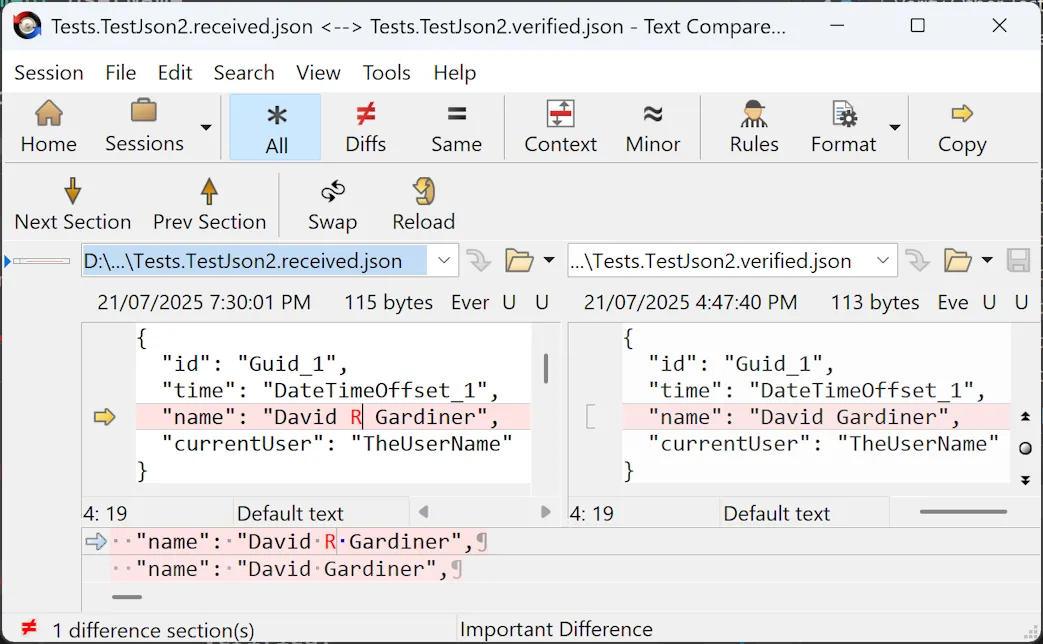
<p><img src="https://david.gardiner.net.au/_astro/beyondcompare.POaTT2nm_Z2b50cM.webp" alt="Screenshot of Beyond Compare showing the 'name' line different because the received data includes a middle initial that isn't present in the verified data" /></p>
<p>In that scenario, it will automatically launch your diff tool (<a href="https://www.scootersoftware.com/">Beyond Compare</a> is my diff tool of choice) showing you the actual and expected (verified) text and you can easily identify if the failure represents a bug that needs to be fixed, or alternatively it might be an expected change so you can easily update the verified content.</p>
<p>It's worth noting that Verify is smart enough to realise when it is running non-interactively (like on a build server), and in that case it just reports the comparison failed, causing the related unit test to fail. No GUI diff tools are launched.</p>
<p>In my next post I'll show how I took Verify and found a way to use it outside of unit tests.</p>
<p><em>Side note: The code samples in this blog post were included by using one of Simon's other projects - <a href="https://github.com/SimonCropp/MarkdownSnippets">https://github.com/SimonCropp/MarkdownSnippets</a>. A really clever tool for embedding code samples in Markdown files, which has the advantage that the code samples are more likely to be valid code as you can compile the original source files</em></p>
<p>Helmet by Leonidas Oikonomou from <a href="https://thenounproject.com/browse/icons/term/helmet/">Noun Project</a> (CC BY 3.0)</p>
]]>
    </content>
    <media:thumbnail xmlns:media="http://search.yahoo.com/mrss/" url="https://david.gardiner.net.au/_astro/verify-tests.CHaOWxZj.png"/>
    <media:content medium="image" xmlns:media="http://search.yahoo.com/mrss/" url="https://david.gardiner.net.au/_astro/verify-tests.CHaOWxZj.png"/>
  </entry>
  <entry>
    <id>https://david.gardiner.net.au/2025/05/nuget-lockfiles</id>
    <updated>2025-05-31T13:30:00.000+09:30</updated>
    <title>NuGet lock files</title>
    <link href="https://david.gardiner.net.au/2025/05/nuget-lockfiles" rel="alternate" type="text/html" title="NuGet lock files"/>
    <category term=".NET"/>
    <published>2025-05-31T13:30:00.000+09:30</published>
    <summary type="html">
      <![CDATA[How to enable lock files for .NET NuGet packages]]>
    </summary>
    <content type="html" xml:base="https://david.gardiner.net.au/2025/05/nuget-lockfiles">
      <![CDATA[<p>This is mainly for my benefit (and to be honest, a fair bit of what I post here is just as much for me as it is for anyone else!)</p>
<p><img src="https://david.gardiner.net.au/_astro/nuget.CpiOqElz_ZM1Vej.webp" alt="NuGet logo" /></p>
<p>To enable <a href="https://www.nuget.org/">NuGet</a> lock files, add a <code>Directory.Build.props</code> file (with that exact case) to your project. Usually in the root directory of your code repo, or in the specific project directories if you don't want all .NET projects to inherit this.</p>
<p>Add this content to the file (or just copy the <code>RestorePackagesWithLockFile</code> property into an existing <code>PropertyGroup</code> if the file already exists)</p>
<pre><code>&lt;Project&gt;
   &lt;PropertyGroup&gt;
      &lt;RestorePackagesWithLockFile&gt;true&lt;/RestorePackagesWithLockFile&gt;
   &lt;/PropertyGroup&gt;
&lt;/Project&gt;
</code></pre>
<p>References:</p>
<ul>
<li><a href="https://learn.microsoft.com/nuget/consume-packages/package-references-in-project-files?WT.mc_id=DOP-MVP-5001655#enabling-the-lock-file">Enabling the lock file</a></li>
<li><a href="https://learn.microsoft.com/en-us/visualstudio/msbuild/customize-by-directory?view=vs-2022&amp;WT.mc_id=DOP-MVP-5001655">Directory.Build.props</a></li>
</ul>
<p>Also worth mentioning as an update to my <a href="/2021/05/dependabot-nuget-lockfiles">post back in 2021 about Dependabot and NuGet lockfiles</a> that Dependabot <strong>finally</strong> supports updating NuGet lockfiles (as of <a href="https://github.com/dependabot/dependabot-core/pull/9678">September last year</a>)</p>
]]>
    </content>
    <media:thumbnail xmlns:media="http://search.yahoo.com/mrss/" url="https://david.gardiner.net.au/_astro/nuget.CpiOqElz.png"/>
    <media:content medium="image" xmlns:media="http://search.yahoo.com/mrss/" url="https://david.gardiner.net.au/_astro/nuget.CpiOqElz.png"/>
  </entry>
  <entry>
    <id>https://david.gardiner.net.au/2025/04/touchpad-settings</id>
    <updated>2025-04-13T19:00:00.000+09:30</updated>
    <title>Changing the Windows touchpad settings programmatically</title>
    <link href="https://david.gardiner.net.au/2025/04/touchpad-settings" rel="alternate" type="text/html" title="Changing the Windows touchpad settings programmatically"/>
    <category term=".NET"/>
    <category term="PowerShell"/>
    <category term="Windows 11"/>
    <published>2025-04-13T19:00:00.000+09:30</published>
    <summary type="html">
      <![CDATA[Now that I've got a reliable process for reinstalling Windows, I do have a list of things that I'd like to automate to get it configured "just right". As such, I've created a new repository on GitHub and added issues to track each one of these. While my Boxstarter scripts will remain for now as GitHub Gists, I think it's going to be easier to manage all of these things together in the one Git repository.]]>
    </summary>
    <content type="html" xml:base="https://david.gardiner.net.au/2025/04/touchpad-settings">
      <![CDATA[<p>Now that I've got <a href="/2025/04/reinstalling-laptop">a reliable process for reinstalling Windows</a>, I do have a list of things that I'd like to automate to get it configured "just right". As such, I've created a new repository on GitHub and <a href="https://github.com/flcdrg/reinstall-windows/issues">added issues to track each one of these</a>. While my <a href="https://gist.github.com/flcdrg/87802af4c92527eb8a30">Boxstarter scripts</a> will remain for now as GitHub Gists, I think it's going to be easier to manage all of these things together in the one <a href="https://github.com/flcdrg/reinstall-windows">Git repository</a>.</p>
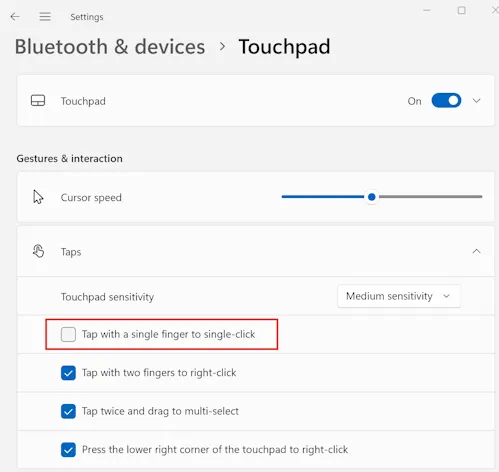

<p>One customisation I like to make to Windows is to disable the 'Tap with a single finger to single-click' for the touchpad. I find I'm less likely to accidentally click on something when I was just tapping the touch pad to move the cursor if I turn this off.</p>
<p><img src="https://david.gardiner.net.au/_astro/touchpad-settings.QcmMTYok_1np360.webp" alt="Screenshot of Windows Settings, showing Touchpad configuration, with 'Tap for a single finger to single-click' unchecked" /></p>
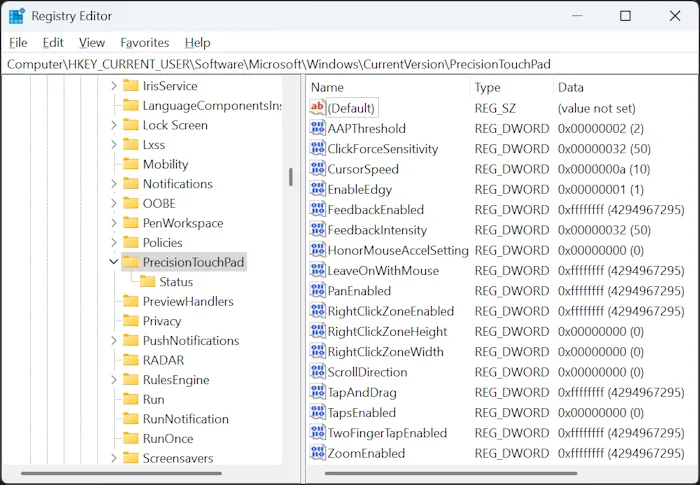
<p>I found some <a href="https://learn.microsoft.com/answers/questions/1258054/how-to-turn-off-touch-gestures-in-windows-10-11-%28d?WT.mc_id=DOP-MVP-5001655">online articles</a> that suggested this was managed by the Registry setting <code>HKEY_CURRENT_USER\Software\Microsoft\Windows\CurrentVersion\PrecisionTouchPad</code>. Experimenting with this seems to be partly true. I can see the Registry value <code>TapsEnabled</code> is updated when I enable or disable the checkbox in Windows Settings. But the reverse did not seem to be true - if I modified the Registry key, Windows Settings doesn't change, nor does the touchpad behaviour.</p>
<p><img src="https://david.gardiner.net.au/_astro/registry-editor.DJW3oChB_AQFGB.webp" alt="Windows Registry Editor showing keys for PrecisionTouchPad" /></p>
<p>Further searching lead me to the <a href="https://learn.microsoft.com/windows-hardware/design/component-guidelines/touchpad-tuning-guidelines?WT.mc_id=DOP-MVP-5001655">Tuning Guidelines</a> page of the Windows Hardware Precision Touchpad Implementation Guide. I'm no hardware manufacturer, but this does document the <a href="https://learn.microsoft.com/en-us/windows-hardware/design/component-guidelines/touchpad-tuning-guidelines?WT.mc_id=DOP-MVP-5001655#tap-with-a-single-finger-to-single-click"><code>TapsEnabled</code></a> setting. Interestinly, down the bottom of that page it does also mention:</p>
<blockquote>
<p>As of Windows 11, build 26027, the user's touchpad settings can be queried and modified dynamically via the SystemParametersInfo API</p>
</blockquote>
<p>I'm running Windows 11 24H2, which is build 26100, so that <a href="https://learn.microsoft.com/windows/win32/api/winuser/nf-winuser-systemparametersinfoa?WT.mc_id=DOP-MVP-5001655">'SystemParametersInfo'</a> API should be available to me. Let's see if calling that does the trick.</p>
<p>My C/C++ is pretty rusty, whereas I'm quite at home in C# or PowerShell. My preference would be to use <a href="https://learn.microsoft.com/dotnet/standard/native-interop/pinvoke?WT.mc_id=DOP-MVP-5001655">.NET P/Invoke</a> to call the Windows API.</p>
<p>As I've learned from previous times using P/Invoke, The trick to getting it working properly is to make sure you have the method signature(s) and data structures correct.</p>
<p>While my final goal is to call this from a PowerShell script, prototyping in a simple .NET console application should allow me to quickly test my definitions, plus get C# syntax highlighting and code completion within my IDE.</p>
<p>Let's try and find an existing definition of <code>SystemParametersInfo</code>. I searched for ".NET PInvoke" and noticed <a href="https://github.com/dotnet/pinvoke">https://github.com/dotnet/pinvoke</a>, but that repository is archived and you are instead pointed to <a href="https://github.com/microsoft/CsWin32">https://github.com/microsoft/CsWin32</a>. This project provides a .NET source generator that will create Win32 P/Invoke methods for you, based off of the latest metadata from the Windows team. That sounds perfect!</p>
<p>As per <a href="https://microsoft.github.io/CsWin32/docs/getting-started.html">the documentation</a>, I added a package reference</p>
<pre><code>dotnet add package Microsoft.Windows.CsWin32
</code></pre>
<p>Then created a <code>NativeMethods.txt</code> file and added <code>SystemParametersInfo</code> to it.</p>
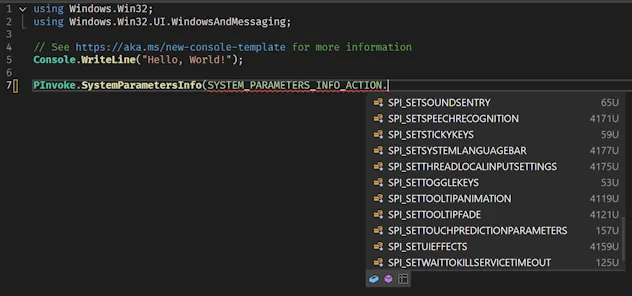
<p>I then edited <code>Program.cs</code> and tried to use my new method:</p>
<p><img src="https://david.gardiner.net.au/_astro/visual-studio-missing-enum.B4AvDanC_2jLSIq.webp" alt="Screenshot of editing Program.cs in Visual Studio" /></p>
<p>Except <code>SPI_GETTOUCHPADPARAMETERS</code> isn't available!</p>
<p>The documentation suggested you can get newer metadata for the source generator to use by adding a reference to the latest prerelease <code>Microsoft.Windows.SDK.Win32Metadata</code> package. I tried that, but still no joy. I've <a href="https://github.com/microsoft/win32metadata/issues/2079">raised an issue</a> in the <a href="https://github.com/microsoft/win32metadata">microsoft/win32metadata</a> repo, but for now it looks like I'll need to hand-roll a few of the types myself.</p>
<p>The docs for SPI_GETTOUCHPADPARAMETERS say the following:</p>
<ul>
<li>The <code>pvParam</code> parameter must point to a <code>TOUCHPAD_PARAMETERS</code> structure.</li>
<li>The <code>uiParam</code> parameter must specify the size of the structure.</li>
<li>The value of the <code>versionNumber</code> field in the <code>TOUCHPAD_PARAMETERS</code> structure must be set to the appropriate value for the version of the structure being used.</li>
</ul>
<p>The <a href="https://learn.microsoft.com/windows/win32/api/winuser/ns-winuser-touchpad_parameters?WT.mc_id=DOP-MVP-5001655">TOUCHPAD_PARAMETERS structure</a> is documented using C++. I asked GitHub Copilot if it could translate that into equivalent C# for me. It came up with this:</p>
<pre><code>// DO NOT USE THIS - IT IS INCORRECT!!
[StructLayout(LayoutKind.Sequential)]
public struct TOUCHPAD_PARAMETERS
{
    public uint VersionNumber;
    public uint MaxSupportedContacts;
    public LEGACY_TOUCHPAD_FEATURES LegacyTouchpadFeatures;

    // Bit fields are represented as individual boolean fields in C#
    public bool TouchpadPresent;
    public bool LegacyTouchpadPresent;
    public bool ExternalMousePresent;
    public bool TouchpadEnabled;
    public bool TouchpadActive;
    public bool FeedbackSupported;
    public bool ClickForceSupported;

    [MarshalAs(UnmanagedType.ByValArray, SizeConst = 25)]
    public bool[] Reserved1;

    public bool AllowActiveWhenMousePresent;
    public bool FeedbackEnabled;
    public bool TapEnabled;
    public bool TapAndDragEnabled;
    public bool TwoFingerTapEnabled;
    public bool RightClickZoneEnabled;
    public bool MouseAccelSettingHonored;
    public bool PanEnabled;
    public bool ZoomEnabled;
    public bool ScrollDirectionReversed;

    [MarshalAs(UnmanagedType.ByValArray, SizeConst = 22)]
    public bool[] Reserved2;

    public TOUCHPAD_SENSITIVITY_LEVEL SensitivityLevel;
    public uint CursorSpeed;
    public uint FeedbackIntensity;
    public uint ClickForceSensitivity;
    public uint RightClickZoneWidth;
    public uint RightClickZoneHeight;
}
</code></pre>
<p>And likewise for the two enums <a href="https://learn.microsoft.com/en-us/windows/win32/api/winuser/ne-winuser-legacy_touchpad_features?WT.mc_id=DOP-MVP-5001655">LEGACY_TOUCHPAD_FEATURES enumeration</a> and <a href="https://learn.microsoft.com/windows/win32/api/winuser/ne-winuser-touchpad_sensitivity_level?WT.mc_id=DOP-MVP-5001655">TOUCHPAD_SENSITIVITY_LEVEL enumeration</a>.</p>
<p>One thing you need to do is set the <code>VersionNumber</code> property to <code>TOUCHPAD_PARAMETERS_LATEST_VERSION</code>. Except I searched to find out what the value of that is, and no results. I ended up resorting to installing the Windows 11 SDK so I could locate WinUser.h and then I found this:</p>
<pre><code>#define TOUCHPAD_PARAMETERS_LATEST_VERSION 1
#define TOUCHPAD_PARAMETERS_VERSION_1 1
</code></pre>
<p>But then trying to call SystemParametersInfo was not working. That lead me down a bit of a rabbit hole to finally conclude that something is still wrong with the mapping in <code>TOUCHPAD_PARAMETERS</code>. The original structure in C++ is this:</p>
<pre><code>typedef struct TOUCHPAD_PARAMETERS {
  UINT                       versionNumber;
  UINT                       maxSupportedContacts;
  LEGACY_TOUCHPAD_FEATURES   legacyTouchpadFeatures;
  BOOL                       touchpadPresent : 1;
  BOOL                       legacyTouchpadPresent : 1;
  BOOL                       externalMousePresent : 1;
  BOOL                       touchpadEnabled : 1;
  BOOL                       touchpadActive : 1;
  BOOL                       feedbackSupported : 1;
  BOOL                       clickForceSupported : 1;
  BOOL                       Reserved1 : 25;
  BOOL                       allowActiveWhenMousePresent : 1;
  BOOL                       feedbackEnabled : 1;
  BOOL                       tapEnabled : 1;
  BOOL                       tapAndDragEnabled : 1;
  BOOL                       twoFingerTapEnabled : 1;
  BOOL                       rightClickZoneEnabled : 1;
  BOOL                       mouseAccelSettingHonored : 1;
  BOOL                       panEnabled : 1;
  BOOL                       zoomEnabled : 1;
  BOOL                       scrollDirectionReversed : 1;
  BOOL                       Reserved2 : 22;
  TOUCHPAD_SENSITIVITY_LEVEL sensitivityLevel;
  UINT                       cursorSpeed;
  UINT                       feedbackIntensity;
  UINT                       clickForceSensitivity;
  UINT                       rightClickZoneWidth;
  UINT                       rightClickZoneHeight;
} TOUCHPAD_PARAMETERS, *PTOUCH_PAD_PARAMETERS, TOUCHPAD_PARAMETERS_V1, *PTOUCHPAD_PARAMETERS_V1;
</code></pre>
<p>Notice all those numbers after many of the fields? Those indicate it is a <a href="https://learn.microsoft.com/en-us/cpp/c-language/c-bit-fields?view=msvc-170&amp;WT.mc_id=DOP-MVP-5001655">C bit field</a>. And guess what feature <a href="https://github.com/dotnet/csharplang/discussions/465">C# doesn't currently support</a>?</p>
<p>In that discussion though <a href="https://github.com/dotnet/csharplang/discussions/465#discussioncomment-8399377">there is a suggestion</a> that you can use <a href="https://learn.microsoft.com/dotnet/api/system.collections.specialized.bitvector32?view=net-9.0&amp;WT.mc_id=DOP-MVP-5001655"><code>BitVector32</code></a> or <a href="https://learn.microsoft.com/dotnet/api/system.collections.bitarray?view=net-9.0&amp;WT.mc_id=DOP-MVP-5001655"><code>BitArray</code></a> as a workaround. For usability, we can add properties in to expose access to the individual bits in the <code>BitVector32</code> field. Also note that the values passed in via the <code>[]</code> is a bitmask, not an array index. (Yes, that tricked me the first time too!)</p>
<pre><code>[StructLayout(LayoutKind.Sequential)]
public struct TOUCHPAD_PARAMETERS
{
    public uint VersionNumber;
    public uint MaxSupportedContacts;
    public LEGACY_TOUCHPAD_FEATURES LegacyTouchpadFeatures;

    private BitVector32 First;

    public bool TouchpadPresent
    {
        get =&gt; First[1];
        set =&gt; First[1] = value;
    }

    public bool LegacyTouchpadPresent
    {
        get =&gt; First[2];
        set =&gt; First[2] = value;
    }
</code></pre>
<p>With that done, we can now call <code>SystemParametersInfo</code> like this:</p>
<pre><code>const uint SPI_GETTOUCHPADPARAMETERS = 0x00AE;

unsafe
{
    TOUCHPAD_PARAMETERS param;
    param.VersionNumber = 1;

    var size = (uint)Marshal.SizeOf&lt;TOUCHPAD_PARAMETERS&gt;();
    var result = PInvoke.SystemParametersInfo((SYSTEM_PARAMETERS_INFO_ACTION)SPI_GETTOUCHPADPARAMETERS,
        size, &amp;param, 0);
</code></pre>
<p>And it works! Now curiously, the Windows Settings page doesn't update in real time, but if you go to a different page and then navigate back to the Touchpad page, the setting has updated!</p>
<p>We can refactor the code slightly to put it into a helper static class, so it's easier to call from PowerShell. To make this easier I created a second Console application, but this time I didn't add any source generators, so I would be forced to ensure that all required code was available You can <a href="https://github.com/flcdrg/reinstall-windows/blob/main/StandaloneApp/Program.cs">view the source code here</a>.</p>
<p>I could then copy the C# into a PowerShell script and use the <code>Add-Type</code> command to include it in the current PowerShell session. Note the use of <code>-CompilerOptions "/unsafe"</code>, which we need to specify as we're using the <code>unsafe</code> keyword in our C# code.</p>
<pre><code>$source=@'
using System;
using System.Collections.Specialized;
using System.Runtime.InteropServices;
using System.Runtime.Versioning;

public static class SystemParametersInfoHelper
{
    [DllImport("USER32.dll", ExactSpelling = true, EntryPoint = "SystemParametersInfoW", SetLastError = true), DefaultDllImportSearchPaths(DllImportSearchPath.System32)]
    [SupportedOSPlatform("windows5.0")]
    internal static extern unsafe bool SystemParametersInfo(uint uiAction, uint uiParam, [Optional] void* pvParam, uint fWinIni);

    public static void DisableSingleTap()
    {
        const uint SPI_GETTOUCHPADPARAMETERS = 0x00AE;
        const uint SPI_SETTOUCHPADPARAMETERS = 0x00AF;

        unsafe
        {
            // Use a fixed buffer to handle the managed type issue  
            TOUCHPAD_PARAMETERS param;
            param.VersionNumber = 1;

            var size = (uint)Marshal.SizeOf&lt;TOUCHPAD_PARAMETERS&gt;();
            var result = SystemParametersInfo(SPI_GETTOUCHPADPARAMETERS, size, &amp;param, 0);

            if (param.TapEnabled)
            {
                param.TapEnabled = false;

                result = SystemParametersInfo(SPI_SETTOUCHPADPARAMETERS, size, &amp;param, 3);
            }
        }
    }
}

[StructLayout(LayoutKind.Sequential)]
public struct TOUCHPAD_PARAMETERS
{
    ...
'@

Add-Type -TypeDefinition $source -Language CSharp -PassThru -CompilerOptions "/unsafe" | Out-Null
[SystemParametersInfoHelper]::DisableSingleTap()
</code></pre>
<p>The complete version of the script is <a href="https://github.com/flcdrg/reinstall-windows/blob/main/Set-Touchpad.ps1">available here</a>.</p>
<p><img src="../../assets/2025/04/touchpad-settings-demo.webp" alt="Demo of script disabling touchpad's 'tap with single finger to single-click'" /></p>
<p>That's one problem solved. Just a few more to go!</p>
]]>
    </content>
    <media:thumbnail xmlns:media="http://search.yahoo.com/mrss/" url="https://david.gardiner.net.au/_astro/touchpad-settings.QcmMTYok.png"/>
    <media:content medium="image" xmlns:media="http://search.yahoo.com/mrss/" url="https://david.gardiner.net.au/_astro/touchpad-settings.QcmMTYok.png"/>
  </entry>
  <entry>
    <id>https://david.gardiner.net.au/2025/04/azure-function-isolated</id>
    <updated>2025-04-01T21:30:00.000+10:30</updated>
    <title>ConfigureFunctionsWorkerDefaults vs ConfigureFunctionsWebApplication in .NET Azure Functions</title>
    <link href="https://david.gardiner.net.au/2025/04/azure-function-isolated" rel="alternate" type="text/html" title="ConfigureFunctionsWorkerDefaults vs ConfigureFunctionsWebApplication in .NET Azure Functions"/>
    <category term=".NET"/>
    <category term="Azure Functions"/>
    <published>2025-04-01T21:30:00.000+10:30</published>
    <summary type="html">
      <![CDATA[When you're creating a .NET Azure Function using the isolated worker model, the default template creates code that has the host builder configuration calling ConfigureFunctionsWorkerDefaults. But if you want to enable ASP.NET Core integration features (which you would do if you wanted to work directly with HttpRequest, HttpResponse, and IActionResult types in your functions), then the documentation suggests to instead call ConfigureFunctionsWebApplication. …]]>
    </summary>
    <content type="html" xml:base="https://david.gardiner.net.au/2025/04/azure-function-isolated">
      <![CDATA[<p><img src="https://david.gardiner.net.au/_astro/azure-function.B3FwAwqX_2tR59E.webp" alt="Azure Functions logo" /></p>
<p>When you're creating a .NET Azure Function using the isolated worker model, the <a href="https://learn.microsoft.com/en-au/azure/azure-functions/dotnet-isolated-process-guide?tabs=hostbuilder%2Cwindows&amp;WT.mc_id=DOP-MVP-5001655#configuration">default template creates code</a> that has the host builder configuration calling <code>ConfigureFunctionsWorkerDefaults</code>.</p>
<p>But if you want to <a href="https://learn.microsoft.com/azure/azure-functions/dotnet-isolated-process-guide?tabs=hostbuilder%2Cwindows&amp;WT.mc_id=DOP-MVP-5001655#aspnet-core-integration">enable ASP.NET Core integration</a> features (which you would do if you wanted to work directly with <code>HttpRequest</code>, <code>HttpResponse</code>, and <code>IActionResult</code> types in your functions), then the documentation <a href="https://learn.microsoft.com/en-au/azure/azure-functions/dotnet-isolated-process-guide?tabs=hostbuilder%2Cwindows&amp;WT.mc_id=DOP-MVP-5001655#aspnet-core-integration">suggests to instead call ConfigureFunctionsWebApplication</a>.</p>
<p>Usefully, once you add a package reference to <a href="https://www.nuget.org/packages/Microsoft.Azure.Functions.Worker.Extensions.Http.AspNetCore/">Microsoft.Azure.Functions.Worker.Extensions.Http.AspNetCore</a>, you'll also get a .NET code analyzer error <a href="https://dotnet-worker-rules.azurewebsites.net/rules?ruleid=AZFW0014">AZFW0014</a> if you're not calling <code>ConfigureFunctionsWebApplication</code>, so the compiler will ensure you're doing the right thing.</p>
<p>But apart from the integration with ASP.NET Core, are there any other significant differences between calling the two methods?</p>
<p>Because the code is hosted on GitHub, we can easily review the source code to find out.</p>
<h2>ConfigureFunctionsWorkerDefaults</h2>
<p><code>ConfigureFunctionsWorkerDefaults</code> is defined in the <a href="https://github.com/Azure/azure-functions-dotnet-worker/blob/main/src/DotNetWorker/Hosting/WorkerHostBuilderExtensions.cs">WorkerHostBuilderExtensions</a> class in the <a href="https://github.com/Azure/azure-functions-dotnet-worker">https://github.com/Azure/azure-functions-dotnet-worker</a> project. There are a number of overloads, but they all end up calling this implementation:</p>
<pre><code>public static IHostBuilder ConfigureFunctionsWorkerDefaults(this IHostBuilder builder, Action&lt;HostBuilderContext, IFunctionsWorkerApplicationBuilder&gt; configure, Action&lt;WorkerOptions&gt;? configureOptions)
{
    builder
        .ConfigureHostConfiguration(config =&gt;
        {
            // Add AZURE_FUNCTIONS_ prefixed environment variables
            config.AddEnvironmentVariables("AZURE_FUNCTIONS_");
        })
        .ConfigureAppConfiguration(configBuilder =&gt;
        {
            configBuilder.AddEnvironmentVariables();

            var cmdLine = Environment.GetCommandLineArgs();
            RegisterCommandLine(configBuilder, cmdLine);
        })
        .ConfigureServices((context, services) =&gt;
        {
            IFunctionsWorkerApplicationBuilder appBuilder = services.AddFunctionsWorkerDefaults(configureOptions);

            // Call the provided configuration prior to adding default middleware
            configure(context, appBuilder);

            static bool ShouldSkipDefaultWorkerMiddleware(IDictionary&lt;object, object&gt; props)
            {
                return props is not null &amp;&amp;
                    props.TryGetValue(FunctionsApplicationBuilder.SkipDefaultWorkerMiddlewareKey, out var skipObj) &amp;&amp;
                    skipObj is true;
            }

            if (!ShouldSkipDefaultWorkerMiddleware(context.Properties))
            {
                // Add default middleware
                appBuilder.UseDefaultWorkerMiddleware();
            }
        });

    // Invoke any extension methods auto generated by functions worker sdk.
    builder.InvokeAutoGeneratedConfigureMethods();

    return builder;
}
</code></pre>
<h2>ConfigureFunctionsWebApplication</h2>
<p><code>ConfigureFunctionsWebApplication</code> is defined in the <a href="https://github.com/Azure/azure-functions-dotnet-worker/blob/main/extensions/Worker.Extensions.Http.AspNetCore/src/FunctionsHostBuilderExtensions.cs">FunctionsHostBuilderExtensions</a> class. Whiles the source code is in the same GitHub project as <code>ConfigureFunctionsWorkerDefaults</code>, it ships as part of the <a href="https://www.nuget.org/packages/Microsoft.Azure.Functions.Worker.Extensions.Http.AspNetCore/">Microsoft.Azure.Functions.Worker.Extensions.Http.AspNetCore</a> NuGet package.</p>
<p>It too contains a number of overloads, but they all end up calling this implementation:</p>
<pre><code>public static IHostBuilder ConfigureFunctionsWebApplication(this IHostBuilder builder, Action&lt;HostBuilderContext, IFunctionsWorkerApplicationBuilder&gt; configureWorker)
{
    builder.ConfigureFunctionsWorkerDefaults((hostBuilderContext, workerAppBuilder) =&gt;
    {
        workerAppBuilder.UseAspNetCoreIntegration();
        configureWorker?.Invoke(hostBuilderContext, workerAppBuilder);
    });

    builder.ConfigureAspNetCoreIntegration();

    return builder;
}

internal static IHostBuilder ConfigureAspNetCoreIntegration(this IHostBuilder builder)
{
    builder.ConfigureServices(services =&gt;
    {
        services.AddSingleton&lt;FunctionsEndpointDataSource&gt;();
        services.AddSingleton&lt;ExtensionTrace&gt;();
        services.Configure&lt;ForwardedHeadersOptions&gt;(options =&gt;
        {
            // By default, the X-Forwarded-For, X-Forwarded-Host, and X-Forwarded-Proto headers
            // are sent by the host and will be processed by the worker.
            options.ForwardedHeaders = ForwardedHeaders.All;
        });
    });

    builder.ConfigureWebHostDefaults(webBuilder =&gt;
    {
        webBuilder.UseUrls(HttpUriProvider.HttpUriString);
        webBuilder.Configure(b =&gt;
        {
            b.UseForwardedHeaders();
            b.UseRouting();
            b.UseMiddleware&lt;WorkerRequestServicesMiddleware&gt;();
            b.UseEndpoints(endpoints =&gt;
            {
                var dataSource = endpoints.ServiceProvider.GetRequiredService&lt;FunctionsEndpointDataSource&gt;();
                endpoints.DataSources.Add(dataSource);
            });
        });
    });

    return builder;
}
</code></pre>
<p>So they're actually quite different!</p>
<h2>Conclusion</h2>
<p>I feel like the documentation suggesting using one or the other may be misleading. More likely you want to <strong>add</strong> a call to <code>ConfigureFunctionsWebApplication</code> but leave the call to <code>ConfigureFunctionsWorkerDefaults</code> (unless you really want to add in all your own calls to <code>ConfigureHostConfiguration</code> and <code>ConfigureAppConfiguration</code>)</p>
<pre><code>var host = new HostBuilder()
    .ConfigureFunctionsWebApplication()
    .ConfigureFunctionsWorkerDefaults()
    .Build();
</code></pre>
<p>Looks like <a href="https://github.com/Azure/azure-functions-dotnet-worker/issues/3010">I'm not alone</a> with this either.</p>
]]>
    </content>
    <media:thumbnail xmlns:media="http://search.yahoo.com/mrss/" url="https://david.gardiner.net.au/_astro/azure-function.B3FwAwqX.png"/>
    <media:content medium="image" xmlns:media="http://search.yahoo.com/mrss/" url="https://david.gardiner.net.au/_astro/azure-function.B3FwAwqX.png"/>
  </entry>
  <entry>
    <id>https://david.gardiner.net.au/2025/02/functions-serilog-appinsights</id>
    <updated>2025-02-10T08:00:00.000+10:30</updated>
    <title>.NET Azure Functions, Isolated worker model, Serilog to App Insights</title>
    <link href="https://david.gardiner.net.au/2025/02/functions-serilog-appinsights" rel="alternate" type="text/html" title=".NET Azure Functions, Isolated worker model, Serilog to App Insights"/>
    <category term=".NET"/>
    <category term="Azure Functions"/>
    <published>2025-02-10T08:00:00.000+10:30</published>
    <summary type="html">
      <![CDATA[There's already some good resources online about configuring .NET Azure Functions with Serilog. For example, Shazni gives a good introduction to Serilog and then shows how to configure for in-process and isolated Azure Functions, and Simon shows how to use Serilog with Azure Functions in isolated worker model, but neither cover using App Insights.]]>
    </summary>
    <content type="html" xml:base="https://david.gardiner.net.au/2025/02/functions-serilog-appinsights">
      <![CDATA[<p>There's already some good resources online about configuring <a href="https://learn.microsoft.com/azure/azure-functions/create-first-function-cli-csharp?WT.mc_id=DOP-MVP-5001655">.NET Azure Functions</a> with <a href="https://serilog.net/">Serilog</a>. For example, Shazni gives a <a href="https://medium.com/ascentic-technology/a-comprehensive-guide-to-configuring-logging-with-serilog-and-azure-app-insights-in-net-f6e4bda69e76">good introduction to Serilog and then shows how to configure for in-process and isolated Azure Functions</a>, and Simon shows <a href="https://simonholman.dev/configure-serilog-for-logging-in-azure-functions">how to use Serilog with Azure Functions in isolated worker model</a>, but neither cover using App Insights.</p>
<p>It's important to note that the <a href="https://learn.microsoft.com/azure/azure-functions/migrate-dotnet-to-isolated-model?WT.mc_id=DOP-MVP-5001655">in-process model goes out of support (along with .NET 8) in November 2026</a>. Going forward, only the isolated worker model is supported by future versions of .NET (starting with .NET 9)</p>
<p><img src="https://david.gardiner.net.au/_astro/serilog.DYu9tqZ__ZFlgFy.webp" alt="Serilog logo" /></p>
<p>The Serilog Sink package for logging data to Application Insights is <a href="https://www.nuget.org/packages/Serilog.Sinks.ApplicationInsights/">Serilog.Extensions.AppInsights</a>, and it has some useful code samples <a href="https://github.com/serilog-contrib/serilog-sinks-applicationinsights">in the README</a>, but they also lack mentioning the differences for isolated worker model.</p>
<p>So my goal here is to demonstrate the following combination:</p>
<ul>
<li>A .NET Azure Function</li>
<li>That is using isolated worker mode</li>
<li>That logs to Azure App Insights</li>
<li>Uses Serilog for structured logging</li>
<li>Uses the Serilog 'bootstrapper' pattern to capture any errors during startup/configuration</li>
</ul>
<p>Note: There are full working samples for this post in <a href="https://github.com/flcdrg/azure-function-dotnet-isolated-logging">https://github.com/flcdrg/azure-function-dotnet-isolated-logging</a>.</p>
<p>Our starting point is an Azure Function that has Application Insights enabled. We uncommented to the two lines in Program.cs and the two .csproj file from the default Functions project template.</p>
<pre><code>using Microsoft.Azure.Functions.Worker;
using Microsoft.Extensions.Hosting;
using Microsoft.Extensions.DependencyInjection;

var host = new HostBuilder()
    .ConfigureFunctionsWebApplication()
    .ConfigureServices(services =&gt; {
        services.AddApplicationInsightsTelemetryWorkerService();
        services.ConfigureFunctionsApplicationInsights();
    })
    .Build();

host.Run();
</code></pre>
<p>One of the challenges with using the App Insights Serilog Sink, is that it needs to be configured with an existing <code>TelemetryConfiguration</code>. The old way of doing this was to reference <a href="https://learn.microsoft.com/dotnet/api/microsoft.applicationinsights.extensibility.telemetryconfiguration.active?view=azure-dotnet&amp;WT.mc_id=DOP-MVP-5001655"><code>TelemetryConfiguration.Active</code></a>, however using this property has been discouraged in .NET Core (aka modern .NET).</p>
<p>Instead you're encouraged to retrieve a valid <code>TelemetryConfiguration</code> instance from the service provider, like this:</p>
<pre><code>Log.Logger = new LoggerConfiguration()
    .WriteTo.ApplicationInsights(
        serviceProvider.GetRequiredService&lt;TelemetryConfiguration&gt;(),
    TelemetryConverter.Traces)
    .CreateLogger();
</code></pre>
<p>Except we have a problem. How can we reference the service provider? We need to move this under the <code>HostBuilder</code>, so we have access to a service provider.</p>
<p>There's a couple of ways to do this. Traditionally we would use <code>UseSerilog</code> to register Serilog similar to this:</p>
<pre><code>    var build = Host.CreateDefaultBuilder(args)
        .UseSerilog((_, services, loggerConfiguration) =&gt; loggerConfiguration
            .Enrich.FromLogContext()
            .Enrich.WithProperty("ExtraInfo", "FuncWithSerilog")

            .WriteTo.ApplicationInsights(
                services.GetRequiredService&lt;TelemetryConfiguration&gt;(),
                TelemetryConverter.Traces))
</code></pre>
<p>But <a href="https://nblumhardt.com/2024/04/serilog-net8-0-minimal/#comment-6496448401">as of relatively recently</a>, you can now also use <code>AddSerilog</code>, as it turns out under the covers, <code>UseSerilog</code> just calls <code>AddSerilog</code>.</p>
<p>So this is the equivalent:</p>
<pre><code>builder.Services
    .AddSerilog((serviceProvider, loggerConfiguration) =&gt;
    {
        loggerConfiguration
            .Enrich.FromLogContext()
            .Enrich.WithProperty("ExtraInfo", "FuncWithSerilog")

            .WriteTo.ApplicationInsights(
                serviceProvider.GetRequiredService&lt;TelemetryConfiguration&gt;(),
                TelemetryConverter.Traces);
    })
</code></pre>
<p>There's also the 'bootstrap logging' pattern that was <a href="https://nblumhardt.com/2020/10/bootstrap-logger/">first outlined here</a>.</p>
<p>This can be useful if you want to log any configuration errors at start up. The only issue here is it will be tricky to log those into App Insights as you won't have the main Serilog configuration (where you wire up App Insights integration) completed yet. You could log to another sink (<a href="https://github.com/serilog/serilog-sinks-console">Console</a>, or <a href="https://github.com/serilog/serilog-sinks-debug">Debug</a> if you're running locally).</p>
<p>Here's an example that includes bootstrap logging.</p>
<pre><code>using Microsoft.Azure.Functions.Worker;
using Microsoft.Extensions.Hosting;
using Microsoft.Extensions.DependencyInjection;
using Microsoft.Extensions.Logging;
using Microsoft.ApplicationInsights.Extensibility;
using Serilog;

Log.Logger = new LoggerConfiguration()
    .WriteTo.Console()
    .WriteTo.Debug()
    .CreateBootstrapLogger();

try
{
    Log.Warning("Starting up.."); // Only logged to console

    var build = Host.CreateDefaultBuilder(args)
        .UseSerilog((_, services, loggerConfiguration) =&gt; loggerConfiguration
            .Enrich.FromLogContext()
            .Enrich.WithProperty("ExtraInfo", "FuncWithSerilog")

            .WriteTo.ApplicationInsights(
                services.GetRequiredService&lt;TelemetryConfiguration&gt;(),
                TelemetryConverter.Traces))

        .ConfigureFunctionsWebApplication()

        .ConfigureServices(services =&gt; {
            services.AddApplicationInsightsTelemetryWorkerService();
            services.ConfigureFunctionsApplicationInsights();
        })
        .ConfigureLogging(logging =&gt;
        {
            // Remove the default Application Insights logger provider so that Information logs are sent
            // https://learn.microsoft.com/en-us/azure/azure-functions/dotnet-isolated-process-guide?tabs=hostbuilder%2Clinux&amp;WT.mc_id=DOP-MVP-5001655#managing-log-levels
            logging.Services.Configure&lt;LoggerFilterOptions&gt;(options =&gt;
            {
                LoggerFilterRule? defaultRule = options.Rules.FirstOrDefault(rule =&gt; rule.ProviderName
                    == "Microsoft.Extensions.Logging.ApplicationInsights.ApplicationInsightsLoggerProvider");
                if (defaultRule is not null)
                {
                    options.Rules.Remove(defaultRule);
                }
            });
        })

        .Build();

    build.Run();
    Log.Warning("After run");
}
catch (Exception ex)
{
    Log.Fatal(ex, "An unhandled exception occurred during bootstrapping");
}
finally
{
    Log.Warning("Exiting application");
    Log.CloseAndFlush();
}
</code></pre>
<p>In my experimenting with this, when the Function is closed normally (eg. by being requested to stop in the Azure Portal / or pressing Ctrl-C in the console window when running locally) I was not able to get any logging working in the <code>finally</code> block. I think by then it's pretty much game over and the Function Host is keen to wrap things up.</p>
<p>But what if the Function is running in Azure? The Debug or Console sinks won't be much use there. In ApplicationInsights sink docs, there's a section on <a href="https://github.com/serilog-contrib/serilog-sinks-applicationinsights#how-when-and-why-to-flush-messages-manually">how to flush messages manually</a>. The code sample shows creating a new instance of <code>TelemetryClient</code> so that you <em>can</em> use the ApplicationInsights sink in the bootstrap logger.</p>
<pre><code>Log.Logger = new LoggerConfiguration()
    .WriteTo.Console()
    .WriteTo.Debug()
    .WriteTo.ApplicationInsights(new TelemetryClient(new TelemetryConfiguration()), new TraceTelemetryConverter())
    .CreateBootstrapLogger();
</code></pre>
<p>If I simulate a configuration error by throwing an exception inside the <code>ConfigureServices</code> call, then you do get data sent to App Insights. eg.</p>
<pre><code>{
    "name": "AppExceptions",
    "time": "2025-02-08T06:32:25.4548247Z",
    "tags": {
        "ai.cloud.roleInstance": "Delphinium",
        "ai.internal.sdkVersion": "dotnetc:2.22.0-997"
    },
    "data": {
        "baseType": "ExceptionData",
        "baseData": {
            "ver": 2,
            "exceptions": [
                {
                    "id": 59941933,
                    "outerId": 0,
                    "typeName": "System.InvalidOperationException",
                    "message": "This is a test exception",
                    "hasFullStack": true,
                    "parsedStack": [
                        {
                            "level": 0,
                            "method": "Program+&lt;&gt;c.&lt;&lt;Main&gt;$&gt;b__0_1",
                            "assembly": "FuncWithSerilog, Version=1.2.6.0, Culture=neutral, PublicKeyToken=null",
                            "fileName": "D:\\git\\azure-function-dotnet-isolated-logging\\net9\\FuncWithSerilog\\Program.cs",
                            "line": 36
                        },
                        {
                            "level": 1,
                            "method": "Microsoft.Extensions.Hosting.HostBuilder.InitializeServiceProvider",
                            "assembly": "Microsoft.Extensions.Hosting, Version=9.0.0.0, Culture=neutral, PublicKeyToken=adb9793829ddae60",
                            "line": 0
                        },
                        {
                            "level": 2,
                            "method": "Microsoft.Extensions.Hosting.HostBuilder.Build",
                            "assembly": "Microsoft.Extensions.Hosting, Version=9.0.0.0, Culture=neutral, PublicKeyToken=adb9793829ddae60",
                            "line": 0
                        },
                        {
                            "level": 3,
                            "method": "Program.&lt;Main&gt;$",
                            "assembly": "FuncWithSerilog, Version=1.2.6.0, Culture=neutral, PublicKeyToken=null",
                            "fileName": "D:\\git\\azure-function-dotnet-isolated-logging\\net9\\FuncWithSerilog\\Program.cs",
                            "line": 21
                        }
                    ]
                }
            ],
            "severityLevel": "Critical",
            "properties": {
                "MessageTemplate": "An unhandled exception occurred during bootstrapping"
            }
        }
    }
}
</code></pre>
<p>So there you go!</p>
<p>And this is all well and good, but it's important to mention that Microsoft are suggesting for new codebases <a href="https://learn.microsoft.com/azure/azure-monitor/app/worker-service?WT.mc_id=DOP-MVP-5001655">use OpenTelemetry instead of App Insights</a>! I'll have to check out how that works soon.</p>
]]>
    </content>
    <media:thumbnail xmlns:media="http://search.yahoo.com/mrss/" url="https://david.gardiner.net.au/_astro/serilog.DYu9tqZ_.png"/>
    <media:content medium="image" xmlns:media="http://search.yahoo.com/mrss/" url="https://david.gardiner.net.au/_astro/serilog.DYu9tqZ_.png"/>
  </entry>
  <entry>
    <id>https://david.gardiner.net.au/2024/05/aspnet-development-environments</id>
    <updated>2024-05-20T07:00:00.000+09:30</updated>
    <title>ASP.NET Core &apos;Development&apos; Environment confusion</title>
    <link href="https://david.gardiner.net.au/2024/05/aspnet-development-environments" rel="alternate" type="text/html" title="ASP.NET Core &apos;Development&apos; Environment confusion"/>
    <category term=".NET"/>
    <published>2024-05-20T07:00:00.000+09:30</published>
    <summary type="html">
      <![CDATA[ASP.NET Core has a useful feature for loading different configuration settings depending on which environment you're running in. One question that is worth considering though: When it refers to a 'Development' configuration, do you understand that is for your local development/debugging experience, or is it for some non-production deployment environment (Azure, AWS, or even specifically dedicated machines)?]]>
    </summary>
    <content type="html" xml:base="https://david.gardiner.net.au/2024/05/aspnet-development-environments">
      <![CDATA[<p>ASP.NET Core has a useful feature for loading <a href="https://learn.microsoft.com/en-us/aspnet/core/fundamentals/environments?view=aspnetcore-8.0&amp;WT.mc_id=DOP-MVP-5001655">different configuration settings depending on which environment</a> you're running in.</p>
<p>One question that is worth considering though: When it refers to a 'Development' configuration, do you understand that is for your local development/debugging experience, or is it for some non-production deployment environment (Azure, AWS, or even specifically dedicated machines)?</p>
<p>If you're not sure, or if there are differing opinions within your team then things can get confusing quickly!</p>
<p>One example to consider is connection strings to databases or blob storage.</p>
<ul>
<li>When developing locally these might resolve to localhost where you have SQL Server installed or a local Docker container running a storage emulator.</li>
<li>When running in a deployment environment, they would point to existing resources. In Azure, they might be Azure SQL databases or Azure Storage accounts.</li>
</ul>
<p>The <a href="https://learn.microsoft.com/dotnet/api/microsoft.extensions.hosting.environments?view=net-8.0&amp;WT.mc_id=DOP-MVP-5001655">Environment class</a> defines three pre-defined fields - Development, Production and Staging. There are also <a href="https://learn.microsoft.com/dotnet/api/microsoft.aspnetcore.hosting.hostingenvironmentextensions?view=aspnetcore-8.0&amp;WT.mc_id=DOP-MVP-5001655">three related extension methods</a> to test if the current environment is one of these - IsDevelopment, IsProduction, and isStaging. These are the three environment names provided in the box, but you are free to use other names too.</p>
<p>It's also quite common (even in Microsoft samples) to see code like this:</p>
<pre><code>if (!app.Environment.IsDevelopment())
{
    app.UseExceptionHandler("/Error");
    // The default HSTS value is 30 days. You may want to change this for production scenarios, see https://aka.ms/aspnetcore-hsts.
    app.UseHsts();
}
</code></pre>
<p>Almost always these examples are for code that should only be executed in the local development environment - for example when you're debugging the application.</p>
<h2>So how do we avoid this confusion between local development and a development deployment environment?</h2>
<h3>Define a custom environment name for local development</h3>
<p>You might settle on something like 'localdev' or 'dev' and update all your <code>launchSettings.json</code> files to use that (if you use Visual Studio).</p>
<p>The risk with this approach is if you ever have code that uses the <code>Environment.IsDevelopment()</code> conditional, that will now return false. If you had code that should only run when you're running/debugging locally you'll need to use a different comparison. Also, watch out if you're using 3rd party libraries that also include similar conditional logic and are making assumptions about what <code>IsDevelopment()</code> means.</p>
<h3>Don't use different environments for configuration</h3>
<p>Avoids the problem entirely, but you might discover you're missing out on being able to customise your local development experience.</p>
<h3>Only use 'Development' for local development</h3>
<p>This feels the safest to me. The default when you create a new ASP.NET project is that the <code>launchSettings.json</code> file sets <code>ASPNETCORE_ENVIRONMENT</code> equal to 'Development' so you won't need to change that.</p>
<p>If there is a 'dev' deployment environment, you could create an <code>appsettings.dev.json</code> to manage environment-specific configuration.</p>
<p>Another (and possibly better) option is to manage environment-specific configuration via Infrastructure as Code. Bicep, Terraform, or similar, or in YAML or Sealed Secrets for Kubernetes. All of these result in environment variables being created that are visible by the ASP.NET application. Usefully, by default, the ASP.NET configuration builder loads environment variables after any <code>.json</code> files, and the rule is that the last loaded wins. So anything set via these methods will override any configuration in the <code>appsetting.json</code> file.</p>
<p>My personal preference is to regard any instance of the application running in an environment outside of your local machine as 'production', such that if you do have conditional code using <code>Environment.IsProduction()</code> that it will behave the same across all remote environments. My thinking here is unless it can't be avoided, you don't want to suddenly exercise a different code path in your 'production' environment to what you've been testing in your 'test', 'qa', 'staging' or even the shared 'development' environment.</p>
<p>You will still have different configuration values for each of these environments. But reducing or eliminating conditional logic differences across these should improve reliability and consistency, and give you the confidence that your production environment will behave the same as your non-production environments did.</p>
]]>
    </content>
    <media:thumbnail xmlns:media="http://search.yahoo.com/mrss/" url="https://david.gardiner.net.au/_astro/dotnet-logo.CPhhz53U.png"/>
    <media:content medium="image" xmlns:media="http://search.yahoo.com/mrss/" url="https://david.gardiner.net.au/_astro/dotnet-logo.CPhhz53U.png"/>
  </entry>
</feed>