<?xml version="1.0" encoding="UTF-8"?>
<feed xmlns="http://www.w3.org/2005/Atom" xml:lang="en-AU" xmlns:media="http://search.yahoo.com/mrss/">
  <id>https://david.gardiner.net.au/tags/Azure.xml</id>
  <title type="html">David Gardiner - Azure</title>
  <updated>2026-04-15T00:26:29.422Z</updated>
  <subtitle>Blog posts tagged with &apos;Azure&apos; - A blog of software development, .NET and other interesting things</subtitle>
  <rights>Copyright 2026 David Gardiner</rights>
  <icon>https://www.gravatar.com/avatar/37edf2567185071646d62ba28b868fab?s=64</icon>
  <logo>https://www.gravatar.com/avatar/37edf2567185071646d62ba28b868fab?s=256</logo>
  <generator uri="https://github.com/flcdrg/astrojs-atom" version="3">astrojs-atom</generator>
  <author>
    <name>David Gardiner</name>
  </author>
  <link href="https://david.gardiner.net.au/tags/Azure.xml" rel="self" type="application/atom+xml"/>
  <link href="https://david.gardiner.net.au/tags/Azure" rel="alternate" type="text/html" hreflang="en-AU"/>
  <category term="Azure"/>
  <category term="Software Development"/>
  <entry>
    <id>https://david.gardiner.net.au/2026/02/azure-postgresql-upgrade</id>
    <updated>2026-02-28T13:00:00.000+10:30</updated>
    <title>Upgrading Azure Database for PostgreSQL flexible server</title>
    <link href="https://david.gardiner.net.au/2026/02/azure-postgresql-upgrade" rel="alternate" type="text/html" title="Upgrading Azure Database for PostgreSQL flexible server"/>
    <category term="Azure"/>
    <category term="Azure Pipelines"/>
    <category term="Terraform"/>
    <published>2026-02-28T13:00:00.000+10:30</published>
    <summary type="html">How to upgrade the PostgreSQL server in Azure, with examples using Terraform, and some workarounds
for known issues you may encounter during the upgrade process.</summary>
    <content type="html">&lt;p&gt;I was working on a project recently that made use of &lt;a href=&quot;https://learn.microsoft.com/azure/postgresql/overview?WT.mc_id=DOP-MVP-5001655&quot;&gt;Azure Database for PostgreSQL flexible server&lt;/a&gt;. The system had been set up a while ago, and so when I was reviewing the resources in the Azure Portal, I noticed a warning banner for the PostreSQL server:&lt;/p&gt;
&lt;pre&gt;&lt;code&gt;Your server version will lose standard Azure support on March 31, 2026. Upgrade now to avoid extended support charges starting April 1, 2026.
&lt;/code&gt;&lt;/pre&gt;
&lt;p&gt;&lt;img src=&quot;https://david.gardiner.net.au/_astro/postgresql-upgrade-old-version.BsaaRaF4_2tq5ef.webp&quot; alt=&quot;Screenshot of Azure Portal showing PostgreSQL server with warning about standard support ending 31st March 2026&quot; /&gt;&lt;/p&gt;
&lt;p&gt;Terraform was being used for Infrastructure as Code, and it looked similar to this:&lt;/p&gt;

&lt;pre&gt;&lt;code&gt;resource &quot;azurerm_postgresql_flexible_server&quot; &quot;server&quot; {
  name                              = &quot;psql-postgresql-apps-australiaeast&quot;
  resource_group_name               = data.azurerm_resource_group.rg.name
  location                          = data.azurerm_resource_group.rg.location
  version                           = &quot;11&quot;
  delegated_subnet_id               = azurerm_subnet.example.id
  private_dns_zone_id               = azurerm_private_dns_zone.example.id
  public_network_access_enabled     = false
  administrator_login               = &quot;psqladmin&quot;
  administrator_password_wo         = ephemeral.random_password.postgresql_password.result
  administrator_password_wo_version = 1
  zone                              = &quot;1&quot;

  storage_mb   = 32768
  storage_tier = &quot;P4&quot;

  sku_name   = &quot;B_Standard_B1ms&quot;
  depends_on = [azurerm_private_dns_zone_virtual_network_link.example]
}
&lt;/code&gt;&lt;/pre&gt;


&lt;p&gt;As you can see from the code and screenshot above, the PostgreSQL version in use was 11. Doing a bit of research, I found version 11 was &lt;a href=&quot;https://www.postgresql.org/support/versioning/&quot;&gt;first released back in 2018&lt;/a&gt;, and the the final minor update 11.22 was released in 2023.&lt;/p&gt;
&lt;p&gt;Azure provides standard support for PostgreSQL versions (documented at &lt;a href=&quot;https://learn.microsoft.com/azure/postgresql/configure-maintain/concepts-version-policy?WT.mc_id=DOP-MVP-5001655&quot;&gt;Azure Database for PostgreSQL version policy&lt;/a&gt;). There is also the option of paying for &lt;a href=&quot;https://learn.microsoft.com/azure/postgresql/configure-maintain/extended-support?WT.mc_id=DOP-MVP-5001655&quot;&gt;extended support&lt;/a&gt;, though in the case of v11 that only gets you to November this year, so just a few extra months.&lt;/p&gt;
&lt;p&gt;In my case, I wanted to do a test of the upgrade process first, so I restored a backup of the existing server to a new resource. This essentially creates an exact copy of the server at the same version.&lt;/p&gt;
&lt;p&gt;While we are using Infrastructure as Code, I decided to use the Azure Portal to test the upgrade, as I figured if there were any problems, they might be easier to understand, rather than try and interpret weird Terraform/AzureRM errors.&lt;/p&gt;
&lt;p&gt;Following the &lt;a href=&quot;https://learn.microsoft.com/azure/postgresql/configure-maintain/how-to-perform-major-version-upgrade?WT.mc_id=DOP-MVP-5001655&quot;&gt;upgrade documentation&lt;/a&gt;, I clicked on the &lt;strong&gt;Upgrade&lt;/strong&gt; in the Portal.&lt;/p&gt;
&lt;p&gt;&lt;img src=&quot;https://david.gardiner.net.au/_astro/postgresql-upgrade-portal1.WLqDAiM5_ZscVNA.webp&quot; alt=&quot;Screenshot of Azure Portal upgrade screen&quot; /&gt;&lt;/p&gt;
&lt;p&gt;This initiates a deployment, which depending on how much data you have and the particular SKU you&apos;re running on (eg. how fast the VM you&apos;re using is), this may take quite a while. One time it took over an hour (which was important as that may be longer than the default Terraform lifecycle, and also the pipeline job timeouts).&lt;/p&gt;
&lt;p&gt;&lt;img src=&quot;https://david.gardiner.net.au/_astro/postgresql-upgrade-progress.CC7oJ8mA_Z1fvKmn.webp&quot; alt=&quot;Screenshot of Azure Portal showing PostgreSQL resource with upgrade in progress&quot; /&gt;&lt;/p&gt;
&lt;p&gt;If that succeeds, then you should be good to try the real thing with IaC.&lt;/p&gt;
&lt;h2&gt;Upgrading with Terraform&lt;/h2&gt;
&lt;p&gt;To upgrade a major version with Terraform, you need to make a couple of changes to your &lt;a href=&quot;https://registry.terraform.io/providers/hashicorp/azurerm/latest/docs/resources/postgresql_flexible_server&quot;&gt;&lt;code&gt;azurerm_postgresql_flexible_server&lt;/code&gt;&lt;/a&gt; resource:&lt;/p&gt;
&lt;ol&gt;
&lt;li&gt;The &lt;code&gt;version&lt;/code&gt; property should be updated to the desired version&lt;/li&gt;
&lt;li&gt;The &lt;code&gt;create_mode&lt;/code&gt; property should be set to &lt;code&gt;Update&lt;/code&gt; (if it wasn&apos;t specified then the default is &apos;Default&apos;)&lt;/li&gt;
&lt;/ol&gt;
&lt;pre&gt;&lt;code&gt;resource &quot;azurerm_postgresql_flexible_server&quot; &quot;server&quot; {
  name                              = &quot;psql-postgresql-apps-australiaeast&quot;
  resource_group_name               = data.azurerm_resource_group.rg.name
  location                          = data.azurerm_resource_group.rg.location
  version                           = &quot;17&quot;
  delegated_subnet_id               = azurerm_subnet.example.id
  private_dns_zone_id               = azurerm_private_dns_zone.example.id
  public_network_access_enabled     = false
  administrator_login               = &quot;psqladmin&quot;
  administrator_password_wo         = ephemeral.random_password.postgresql_password.result
  administrator_password_wo_version = 1
  zone                              = &quot;1&quot;
  create_mode                       = &quot;Update&quot;

  storage_mb   = 32768
  storage_tier = &quot;P4&quot;

  sku_name   = &quot;B_Standard_B1ms&quot;
  depends_on = [azurerm_private_dns_zone_virtual_network_link.example]
}
&lt;/code&gt;&lt;/pre&gt;
&lt;p&gt;The weird thing (which I assume is a side-effect of Terraform state) is that even after you&apos;ve completed the upgrade, you can&apos;t change &lt;code&gt;create_mode&lt;/code&gt; back to &lt;code&gt;Default&lt;/code&gt; - Terraform will throw an error if you try that. Instead you just need to leave it set to &lt;code&gt;Update&lt;/code&gt;, but as long as the &lt;code&gt;version&lt;/code&gt; property doesn&apos;t change then Terraform will leave it at the same version.&lt;/p&gt;
&lt;h3&gt;Adjust your timeouts&lt;/h3&gt;
&lt;p&gt;I was using Azure Pipelines, so I added a &lt;code&gt;timeoutInMinutes&lt;/code&gt; property to the job and set it to 90 minutes. Be aware that there are &lt;a href=&quot;https://learn.microsoft.com/azure/devops/pipelines/process/phases?view=azure-devops&amp;amp;tabs=yaml&amp;amp;WT.mc_id=DOP-MVP-5001655#timeouts&quot;&gt;different default and maximum timeouts&lt;/a&gt; depending on what kind of build agent you use.&lt;/p&gt;
&lt;p&gt;Likewise the Terraform &lt;code&gt;azurerm_postgresql_flexible_server&lt;/code&gt; resource has &lt;a href=&quot;https://registry.terraform.io/providers/hashicorp/azurerm/latest/docs/resources/postgresql_flexible_server#timeouts&quot;&gt;default timeouts&lt;/a&gt;. You may want to specify a &lt;code&gt;timeout&lt;/code&gt; block to extend those values if necessary.&lt;/p&gt;
&lt;h2&gt;Gotchas&lt;/h2&gt;
&lt;p&gt;I hit some compatibility issues with the PostgreSQL instance I was attempting to upgrade. The Portal displayed the following error(s):&lt;/p&gt;
&lt;pre&gt;&lt;code&gt;The major version upgrade failed precheck. Upgrading shared_preload_libraries library pg_failover_slots from source version 11 to target version 17 is not supported.;
Upgrading shared_preload_libraries library pg_failover_slots from source version 11 to target version 17 is not supported.;
Upgrading with password authentication mode enabled is not allowed from source version MajorVersion11. Please enable SCRAM and reset the passwords prior to retrying the upgrade.
&lt;/code&gt;&lt;/pre&gt;
&lt;p&gt;There&apos;s two issues here:&lt;/p&gt;
&lt;ul&gt;
&lt;li&gt;The &lt;code&gt;pg_failover_slots&lt;/code&gt; shared preloaded library is &lt;a href=&quot;https://learn.microsoft.com/answers/questions/5730837/attempt-to-upgrade-azure-database-for-postgresql-f&quot;&gt;not supported for upgrading&lt;/a&gt;&lt;/li&gt;
&lt;li&gt;Legacy MD5 passwords are deprecated in newer versions, &lt;a href=&quot;https://techcommunity.microsoft.com/blog/azuredbsupport/azure-postgresql-lesson-learned-6-major-upgrade-blocked-by-password-auth-the-one/4469545&quot;&gt;and &quot;SCRAM&quot; needs to be enabled&lt;/a&gt;&lt;/li&gt;
&lt;/ul&gt;
&lt;p&gt;How do we resolve these with Infrastructure as Code? In this case as we&apos;re using Terraform, we need to map/import those settings and then we can modify them. We make use of the &lt;a href=&quot;https://registry.terraform.io/providers/hashicorp/azurerm/latest/docs/resources/postgresql_flexible_server_configuration&quot;&gt;&lt;code&gt;azurerm_postgresql_flexible_server_configuration&lt;/code&gt;&lt;/a&gt; resource for this.&lt;/p&gt;
&lt;p&gt;The &lt;code&gt;value&lt;/code&gt; properties should initially match the existing values (eg. Make sure that Terraform thinks they are unchanged). A trick to get the existing values is to run the Terraform in &apos;plan&apos; mode and take note of what values it can see from and then copy those into your code.&lt;/p&gt;
&lt;pre&gt;&lt;code&gt;import {
  to = azurerm_postgresql_flexible_server_configuration.accepted_pasword_auth_method
  id = &quot;${azurerm_resource_group.group.id}/providers/Microsoft.DBforPostgreSQL/flexibleServers/psql-postgresql-apps-australiaeast/configurations/azure.accepted_password_auth_method&quot;
}

resource &quot;azurerm_postgresql_flexible_server_configuration&quot; &quot;accepted_pasword_auth_method&quot; {
  name      = &quot;azure.accepted_password_auth_method&quot;
  server_id = azurerm_postgresql_flexible_server.server.id
  value     = &quot;md5&quot;
}

import {
  to = azurerm_postgresql_flexible_server_configuration.password_encryption
  id = &quot;${azurerm_resource_group.group.id}/providers/Microsoft.DBforPostgreSQL/flexibleServers/psql-postgresql-apps-australiaeast/configurations/password_encryption&quot;
}

resource &quot;azurerm_postgresql_flexible_server_configuration&quot; &quot;password_encryption&quot; {
  name      = &quot;password_encryption&quot;
  server_id = azurerm_postgresql_flexible_server.server.id
  value     = &quot;md5&quot;
}

import {
  to = azurerm_postgresql_flexible_server_configuration.shared_preload_libraries
  id = &quot;${azurerm_resource_group.group.id}/providers/Microsoft.DBforPostgreSQL/flexibleServers/psql-postgresql-apps-australiaeast/configurations/shared_preload_libraries&quot;
}

resource &quot;azurerm_postgresql_flexible_server_configuration&quot; &quot;shared_preload_libraries&quot; {
  name      = &quot;shared_preload_libraries&quot;
  server_id = azurerm_postgresql_flexible_server.server.id
  value     = &quot;anon,auto_explain,pg_cron,pg_failover_slots,pg_hint_plan,pg_partman_bgw,pg_prewarm,pg_stat_statements,pgaudit,pglogical,timescaledb,wal2json&quot;
}
&lt;/code&gt;&lt;/pre&gt;
&lt;p&gt;Once you&apos;ve got those in place then you can make the changes to remove the upgrade block:&lt;/p&gt;
&lt;pre&gt;&lt;code&gt;resource &quot;azurerm_postgresql_flexible_server_configuration&quot; &quot;accepted_pasword_auth_method&quot; {
  name      = &quot;azure.accepted_password_auth_method&quot;
  server_id = azurerm_postgresql_flexible_server.server.id
  value     = &quot;md5,SCRAM-SHA-256&quot;
}

resource &quot;azurerm_postgresql_flexible_server_configuration&quot; &quot;password_encryption&quot; {
  name      = &quot;password_encryption&quot;
  server_id = azurerm_postgresql_flexible_server.server.id
  value     = &quot;SCRAM-SHA-256&quot;
}

resource &quot;azurerm_postgresql_flexible_server_configuration&quot; &quot;shared_preload_libraries&quot; {
  name      = &quot;shared_preload_libraries&quot;
  server_id = azurerm_postgresql_flexible_server.server.id
  value     = &quot;anon,auto_explain,pg_cron,pg_hint_plan,pg_partman_bgw,pg_prewarm,pg_stat_statements,pgaudit,pglogical,timescaledb,wal2json&quot;
}
&lt;/code&gt;&lt;/pre&gt;
&lt;p&gt;This will allow any existing MD5 passwords to continue to work, but any new passwords will use the more modern SCRAM-SHA-256.&lt;/p&gt;
&lt;p&gt;For the &lt;code&gt;shared_preload_libraries&lt;/code&gt;, we&apos;ve removed the offending &lt;code&gt;pg_failover_slots&lt;/code&gt; from the list.&lt;/p&gt;
&lt;h2&gt;Tips&lt;/h2&gt;
&lt;ul&gt;
&lt;li&gt;Temporarily upgrade your server SKU to beefier hardware so the upgrade goes faster. If you&apos;re using IaC then make sure you use that to make the change.&lt;/li&gt;
&lt;li&gt;Note that if you change the separate storage performance tier (IOPS), &lt;a href=&quot;https://learn.microsoft.com/azure/virtual-machines/disks-performance-tiers?tabs=azure-cli#restrictions&quot;&gt;you will need to wait 12 hours before downgrading again&lt;/a&gt;.&lt;/li&gt;
&lt;/ul&gt;
&lt;h2&gt;Completion&lt;/h2&gt;
&lt;p&gt;If everything goes to plan, you should end up with your PostgreSQL resource upgraded to the version that you specified. Here&apos;s my resource upgraded to 17.7. &lt;a href=&quot;https://techcommunity.microsoft.com/blog/adforpostgresql/postgresql-18-now-ga-on-azure-postgres-flexible-server/4469802?WT.mc_id=DOP-MVP-5001655&quot;&gt;v18 is actually available&lt;/a&gt; but I wasn&apos;t offered it due to &apos;regional capacity constraints&apos;, which explains why the &apos;Upgrade&apos; button is now disabled.&lt;/p&gt;
&lt;p&gt;&lt;img src=&quot;https://david.gardiner.net.au/_astro/postgresql-upgrade-complete.BDSml29o_Z3kvTd.webp&quot; alt=&quot;Screenshot of Azure Portal showing PostgreSQL upgrade complete&quot; /&gt;&lt;/p&gt;
&lt;p&gt;I&apos;ve published source code for a working example of Azure Database for PostgreSQL flexible server with an Azure Container app and using a VNet at &lt;a href=&quot;https://github.com/flcdrg/terraform-azure-postgresql-containerapps&quot;&gt;https://github.com/flcdrg/terraform-azure-postgresql-containerapps&lt;/a&gt;&lt;/p&gt;
</content>
    <media:thumbnail url="https://david.gardiner.net.au/_astro/postgresql-logo.BZ7GfDHR.png" width="540" height="557"/>
    <media:content medium="image" url="https://david.gardiner.net.au/_astro/postgresql-logo.BZ7GfDHR.png" width="540" height="557"/>
  </entry>
  <entry>
    <id>https://david.gardiner.net.au/2025/10/ai-102</id>
    <updated>2025-10-15T08:00:00.000+10:30</updated>
    <title>Passed AI-102</title>
    <link href="https://david.gardiner.net.au/2025/10/ai-102" rel="alternate" type="text/html" title="Passed AI-102"/>
    <category term="Azure"/>
    <category term="Training and Certification"/>
    <published>2025-10-15T08:00:00.000+10:30</published>
    <summary type="html">I gained the &apos;Microsoft Certified: Azure AI Engineer Associate&apos; certification, and learned
a lot about the Azure AI suite of services in the process.</summary>
    <content type="html">&lt;p&gt;Another certification to add to my collection. Today I passed exam AI-102, which qualifies me for the certification &lt;a href=&quot;https://learn.microsoft.com/api/credentials/share/en-au/flcdrg/F9F9FA5928178F85?sharingId=DT-MVP-5001655&quot;&gt;Microsoft Certified: Azure AI Engineer Associate&lt;/a&gt;.&lt;/p&gt;
&lt;p&gt;&lt;img src=&quot;https://david.gardiner.net.au/_astro/microsoft-certified-associate.pTmA1WU7_ZTqPtL.webp&quot; alt=&quot;Microsoft Certified Associate logo&quot; /&gt;&lt;/p&gt;
&lt;p&gt;I had not had much experience with most of the Azure AI technology prior to this, so preparing for the certification became a great way to get more familiar with their different capabilities.&lt;/p&gt;
&lt;p&gt;I prepared by using the following resources:&lt;/p&gt;
&lt;ul&gt;
&lt;li&gt;&lt;a href=&quot;https://learn.microsoft.com/credentials/certifications/resources/study-guides/ai-102?WT.mc_id=DOP-MVP-5001655&quot;&gt;Study guide for Exam AI-102: Designing and Implementing a Microsoft Azure AI Solution&lt;/a&gt;. Taking note that the exam was updated 30th April 2025. Many of the other resources predate this.&lt;/li&gt;
&lt;li&gt;Microsoft Learn &lt;a href=&quot;https://learn.microsoft.com/training/courses/ai-102t00?WT.mc_id=DOP-MVP-5001655&quot;&gt;Course AI-102T00-A: Develop AI solutions in Azure&lt;/a&gt;. Some content (especially the agent module labs) are already using the new &lt;a href=&quot;https://learn.microsoft.com/agent-framework/overview/agent-framework-overview?WT.mc_id=DOP-MVP-5001655&quot;&gt;Microsoft Agent Framework&lt;/a&gt;, whereas the exam is still covering Semantic Kernel and AutoGen. I&apos;m guessing the next update to the exam will fix this.&lt;/li&gt;
&lt;li&gt;Pluralsight course &lt;a href=&quot;https://www.pluralsight.com/paths/azure-ai-engineer-associate-ai-102&quot;&gt;Microsoft Certified: Azure AI Engineer Associate (AI-102)&lt;/a&gt;. Most content is from 2024 or earlier.&lt;/li&gt;
&lt;li&gt;John Saville&apos;s &lt;a href=&quot;https://www.youtube.com/watch?v=I7fdWafTcPY&quot;&gt;AI-102 Study Cram - Azure AI Engineer Associate Certification&lt;/a&gt; (July 2023)&lt;/li&gt;
&lt;li&gt;MeasureUp - &lt;a href=&quot;https://www.measureup.com/microsoft-practice-test-ai-102-designing-and-implementing-an-azure-ai-solution.html&quot;&gt;Microsoft Practice Test AI-102: Designing and Implementing an Azure AI Solution&lt;/a&gt;. Not as useful as I thought it would be.&lt;/li&gt;
&lt;/ul&gt;
&lt;p&gt;Most of the Microsoft labs use Python, but I know C# better than Python, so inspired by my colleague Kai, I worked through converting a few of the labs to the equivalent C# code. That was helpful in getting a perspective on all the various different SDKs (bot old and new). I&apos;ll write more about that in a future post.&lt;/p&gt;
&lt;h2&gt;On the day&lt;/h2&gt;
&lt;p&gt;I ran the Pearson exam software OnVUE&apos;s system test a couple of days before I was due to do the exam and I&apos;m glad I did. There were some new issues it threw up which I was able to resolve in plenty of time. Here&apos;s my list of things I did to ensure the app no longer detected any issues:&lt;/p&gt;
&lt;ul&gt;
&lt;li&gt;Uninstall NDI Tools (removes virtual camera devices, which were confusing the application when it tried to find my webcam)&lt;/li&gt;
&lt;li&gt;Exit Slack and Microsoft Teams&lt;/li&gt;
&lt;li&gt;Exit PowerToys&lt;/li&gt;
&lt;li&gt;Disable Windows notifications (turn on &apos;do not disturb&apos;). This actually happened during my previous exam where a Windows notification popup appeared.&lt;/li&gt;
&lt;li&gt;Close any other applications in system tray&lt;/li&gt;
&lt;li&gt;Disable HyperV. OnVUE kept thinking I was running inside a VM (which I wasn&apos;t). Disabling HyperV allowed me to continue.&lt;/li&gt;
&lt;/ul&gt;
&lt;p&gt;You&apos;re only allowed to have a single monitor in operation. I have a 3-monitor setup, but I knew from previous exams that I would need to disconnect two of the monitors and show the proctor via my webcam that they were disconnected. But this time they also said they needed to see the power cord also disconnected from the wall/powerboard!&lt;/p&gt;
&lt;p&gt;Only problem was when I started pulling power cords, I accidentally powered off my dock which disconnected both the network and the webcam and microphone causing the OnVUE app to exit. A frantic couple of minutes getting the correct devices powered again and signing back into the exam and eventually I was cleared to start.&lt;/p&gt;
&lt;p&gt;As you can see from the study guide above, the exam covers a lot of content. I did lean a bit on having access to Microsoft Learn. It is a time sink though (and the searching within Learn is not great). You definitely have to pace yourself to ensure you have enough time to get through all the questions in the time allowed.&lt;/p&gt;
&lt;p&gt;I was happy to get to the end and finally see the summary page letting me know I&apos;ve passed!&lt;/p&gt;
</content>
    <media:thumbnail url="https://david.gardiner.net.au/_astro/microsoft-certified-associate.pTmA1WU7.png" width="876" height="915"/>
    <media:content medium="image" url="https://david.gardiner.net.au/_astro/microsoft-certified-associate.pTmA1WU7.png" width="876" height="915"/>
  </entry>
  <entry>
    <id>https://david.gardiner.net.au/2025/05/adelaide-azure</id>
    <updated>2025-05-26T22:00:00.000+09:30</updated>
    <title>Import Azure applications into Terraform</title>
    <link href="https://david.gardiner.net.au/2025/05/adelaide-azure" rel="alternate" type="text/html" title="Import Azure applications into Terraform"/>
    <category term="Azure"/>
    <category term="Talks"/>
    <category term="User Groups"/>
    <published>2025-05-26T22:00:00.000+09:30</published>
    <summary type="html">Speaking at the Adelaide Azure User Group about importing legacy Azure apps into Terraform</summary>
    <content type="html">&lt;p&gt;I&apos;m looking forward to presenting at the &lt;a href=&quot;https://www.meetup.com/adelaide-azure-user-group/events/308059790/&quot;&gt;Adelaide Azure User Group&lt;/a&gt; next month about the process of importing a &apos;brownfield&apos; Azure application into Terraform.&lt;/p&gt;
&lt;p&gt;&lt;img src=&quot;https://david.gardiner.net.au/_astro/terraform-logo.CiRDK2M7_Z21UAf8.webp&quot; alt=&quot;Terraform logo&quot; /&gt;&lt;/p&gt;
&lt;p&gt;&lt;a href=&quot;https://developer.hashicorp.com/terraform&quot;&gt;Terraform&lt;/a&gt; is a popular infrastructure as code tool. Starting off from scratch with Terraform is pretty straightforward. But what if you&apos;ve already got your cloud infrastructure deployed but you didn&apos;t use Terraform, Bicep or another Infrastructure as Code tool? Maybe you just created resources in the Portal directly, or used the Azure CLI or PowerShell.&lt;/p&gt;
&lt;p&gt;This talk steps through this scenario, demonstrating how to use tools to generate Terraform, common issues to watch out for, and hwo to make it work across multiple environments.&lt;/p&gt;
&lt;p&gt;Register to attend at &lt;a href=&quot;https://www.meetup.com/adelaide-azure-user-group/events/308059790&quot;&gt;https://www.meetup.com/adelaide-azure-user-group/events/308059790&lt;/a&gt;.&lt;/p&gt;
</content>
    <media:thumbnail url="https://david.gardiner.net.au/_astro/terraform-logo.CiRDK2M7.png" width="309" height="312"/>
    <media:content medium="image" url="https://david.gardiner.net.au/_astro/terraform-logo.CiRDK2M7.png" width="309" height="312"/>
  </entry>
  <entry>
    <id>https://david.gardiner.net.au/2025/05/az-104</id>
    <updated>2025-05-11T21:30:00.000+09:30</updated>
    <title>Passed AZ-104</title>
    <link href="https://david.gardiner.net.au/2025/05/az-104" rel="alternate" type="text/html" title="Passed AZ-104"/>
    <category term="Azure"/>
    <category term="Training and Certification"/>
    <published>2025-05-11T21:30:00.000+09:30</published>
    <summary type="html">How I gained the &apos;Microsoft Certified: Azure Administrator Associate&apos; certification,
and how some exams allow you to access Microsoft Learn resources.</summary>
    <content type="html">&lt;p&gt;I forgot to mention this a few weeks ago but I passed the AZ-104 - Microsoft Azure Administrator exam, and this means I now have the &lt;a href=&quot;https://learn.microsoft.com/credentials/certifications/azure-administrator/?practice-assessment-type=certification&amp;amp;WT.mc_id=DOP-MVP-5001655&quot;&gt;Microsoft Certified: Azure Administrator Associate&lt;/a&gt; certification.&lt;/p&gt;
&lt;p&gt;&lt;img src=&quot;https://david.gardiner.net.au/_astro/microsoft-certified-associate.pTmA1WU7_ZTqPtL.webp&quot; alt=&quot;Microsoft Certified Associate logo&quot; /&gt;&lt;/p&gt;
&lt;p&gt;It&apos;s been &lt;a href=&quot;/2022/02/passed-az400&quot;&gt;just over 3 years&lt;/a&gt; since I took my last Microsoft exam, and this time there was one thing that was a pleasant surprise, that I wasn&apos;t even actually aware to start with.&lt;/p&gt;
&lt;p&gt;It turns out that back in 2023 &lt;a href=&quot;https://techcommunity.microsoft.com/blog/skills-hub-blog/introducing-a-new-resource-for-all-role-based-microsoft-certification-exams/3500870?WT.mc_id=DOP-MVP-5001655&quot;&gt;it was announced that all role-based exams now provide access to Microsoft Learn content&lt;/a&gt; within the exam!&lt;/p&gt;
&lt;p&gt;I was already a few questions in when I happened to notice a curious icon on the exam toolbar. That&apos;s when I discovered the Learn content. So the exam isn&apos;t totally &apos;open book&apos;, but it&apos;s a big change. It&apos;s also &apos;sandboxed&apos; - you can only browse the content from the Microsoft Learn website. Nothing outside of that.&lt;/p&gt;
&lt;p&gt;Obviously having access to that content is a big change, but you still need to be able to understand the question and interpret the correct answer.&lt;/p&gt;
&lt;p&gt;One criticism of a lot of certification-style exams is they just encourage memorising random or obscure facts. I think giving access to &lt;a href=&quot;https://learn.microsoft.com/?WT.mc_id=DOP-MVP-5001655&quot;&gt;Microsoft Learn&lt;/a&gt; from within the exam goes some way to dispelling that criticism.&lt;/p&gt;
&lt;p&gt;Be aware that you still have the same time limit for an exam, so it&apos;s really important to manage your time well.&lt;/p&gt;
&lt;p&gt;It would be quite easy to find you&apos;ve spent 10 minutes trying to confirm the answer to a question, only to then discover that you&apos;ve run out of time to finish all the questions!&lt;/p&gt;
&lt;p&gt;I&apos;d suggest unless you can quickly check a question in under a minute, you&apos;re better off selecting an answer but also mark the question for review. Only then if you have time at the end of the section make use of the Learn resources.&lt;/p&gt;
&lt;p&gt;I&apos;d been wanting to take this exam for quite a while. I&apos;d been working my way through the &lt;a href=&quot;https://learn.microsoft.com/training/courses/az-104t00?WT.mc_id=DOP-MVP-5001655&quot;&gt;self-directed training modules&lt;/a&gt; and also reviewed some of the courses on Pluralsight and LinkedIn Learning. I&apos;d also made use of the &lt;a href=&quot;https://learn.microsoft.com/credentials/certifications/azure-administrator/?practice-assessment-type=certification&amp;amp;WT.mc_id=DOP-MVP-5001655#certification-practice-for-the-exam&quot;&gt;practise questions&lt;/a&gt;.&lt;/p&gt;
&lt;p&gt;In the end I figured I just had to take the plunge and have a go. After I&apos;d answered all the questions I really wasn&apos;t sure if I&apos;d made it, so it was a pleasant surprise to find that I&apos;d passed 😊🎉&lt;/p&gt;
</content>
    <media:thumbnail url="https://david.gardiner.net.au/_astro/microsoft-certified-associate.pTmA1WU7.png" width="876" height="915"/>
    <media:content medium="image" url="https://david.gardiner.net.au/_astro/microsoft-certified-associate.pTmA1WU7.png" width="876" height="915"/>
  </entry>
  <entry>
    <id>https://david.gardiner.net.au/2025/02/azure-sql-auditing</id>
    <updated>2025-02-17T08:00:00.000+10:30</updated>
    <title>Azure SQL and enabling auditing with Terraform</title>
    <link href="https://david.gardiner.net.au/2025/02/azure-sql-auditing" rel="alternate" type="text/html" title="Azure SQL and enabling auditing with Terraform"/>
    <category term="Azure"/>
    <category term="SQL"/>
    <category term="Terraform"/>
    <published>2025-02-17T08:00:00.000+10:30</published>
    <summary type="html">Sometimes when you&apos;re using Terraform for your Infrastructure as Code with Azure, it&apos;s a bit tricky to match up what you can see in the Azure Portal versus the Terraform resources in the AzureRM provider. Enabling auditing in Azure SQL is a great example.</summary>
    <content type="html">&lt;p&gt;&lt;img src=&quot;https://david.gardiner.net.au/_astro/azure-logo.BF5E_tzp_16YqLd.webp&quot; alt=&quot;Azure logo&quot; /&gt;&lt;/p&gt;
&lt;p&gt;Sometimes when you&apos;re using Terraform for your Infrastructure as Code with Azure, it&apos;s a bit tricky to match up what you can see in the Azure Portal versus the Terraform resources in the AzureRM provider. Enabling auditing in Azure SQL is a great example.&lt;/p&gt;
&lt;p&gt;&lt;img src=&quot;https://david.gardiner.net.au/_astro/azure-sql-auditing-enabled-only.DmeJYD5Y_Z1UPn40.webp&quot; alt=&quot;Screenshot of Azure SQL Auditing portal page, showing auditing enabled, but no data stores selected&quot; /&gt;&lt;/p&gt;
&lt;p&gt;In the Azure Portal, select your Azure SQL resource, then expand the &lt;strong&gt;Security&lt;/strong&gt; menu and select &lt;strong&gt;Auditing&lt;/strong&gt;. You can then choose to &lt;strong&gt;Enable Azure SQL Auditing&lt;/strong&gt;, and upon doing this you can then choose to send auditing data to any or all of Azure Storage, Log Analytics and/or Event Hub.&lt;/p&gt;
&lt;p&gt;It&apos;s also worth highlighting that usually you&apos;d &lt;a href=&quot;https://learn.microsoft.com/azure/azure-sql/database/auditing-server-level-database-level?view=azuresql&amp;amp;WT.mc_id=DOP-MVP-5001655&quot;&gt;enable auditing at the server level&lt;/a&gt;, but it is also possible to enable it per database.&lt;/p&gt;
&lt;p&gt;The two Terraform resources you may have encountered to manage this are &lt;a href=&quot;https://registry.terraform.io/providers/hashicorp/azurerm/latest/docs/resources/mssql_server_extended_auditing_policy&quot;&gt;&lt;code&gt;mssql_server_extended_auditing_policy&lt;/code&gt;&lt;/a&gt; and &lt;a href=&quot;https://registry.terraform.io/providers/hashicorp/azurerm/latest/docs/resources/mssql_database_extended_auditing_policy&quot;&gt;&lt;code&gt;mssql_database_extended_auditing_policy&lt;/code&gt;&lt;/a&gt;.&lt;/p&gt;
&lt;p&gt;It&apos;s useful to refer back to the &lt;a href=&quot;https://learn.microsoft.com/azure/azure-sql/database/auditing-setup?view=azuresql&amp;amp;WT.mc_id=DOP-MVP-5001655&quot;&gt;Azure SQL documentation on setting up auditing&lt;/a&gt; to understand how to use these.&lt;/p&gt;
&lt;p&gt;A couple of points that are worth highlighting:&lt;/p&gt;
&lt;ol&gt;
&lt;li&gt;&lt;p&gt;If you don&apos;t use the &lt;code&gt;audit_actions_and_groups&lt;/code&gt; property, the default groups of actions that will be audited are:&lt;/p&gt;
&lt;p&gt; BATCH_COMPLETED_GROUP
 SUCCESSFUL_DATABASE_AUTHENTICATION_GROUP
 FAILED_DATABASE_AUTHENTICATION_GROUP&lt;/p&gt;
&lt;/li&gt;
&lt;li&gt;&lt;p&gt;If you do define auditing at the server level, the policy applies to all existing and newly created databases on the server. If you define auditing at the database level, the policy will apply in addition to any server level settings. So be careful you don&apos;t end up auditing the same thing twice unintentionally!&lt;/p&gt;
&lt;/li&gt;
&lt;/ol&gt;
&lt;p&gt;Sometimes it can also be useful to review equivalent the Bicep/ARM definitions &lt;a href=&quot;https://learn.microsoft.com/azure/templates/microsoft.sql/servers/extendedauditingsettings?pivots=deployment-language-bicep&amp;amp;WT.mc_id=DOP-MVP-5001655&quot;&gt;Microsoft.Sql/servers/extendedAuditingSettings&lt;/a&gt;, as sometimes they can clarify how to use various properties.&lt;/p&gt;
&lt;p&gt;You&apos;ll see both the Terraform and Bicep have properties to configure using a Storage Account, but while you can see Log Analytics and Event Hub in the Portal UI, it&apos;s not obvious how those set up.&lt;/p&gt;
&lt;p&gt;The simplest policy you can set is this:&lt;/p&gt;
&lt;pre&gt;&lt;code&gt;resource &quot;azurerm_mssql_server_extended_auditing_policy&quot; &quot;auditing&quot; {
  server_id = azurerm_mssql_server.mssql.id
}
&lt;/code&gt;&lt;/pre&gt;
&lt;p&gt;This enables the server auditing policy, but the data isn&apos;t going anywhere yet!&lt;/p&gt;
&lt;h2&gt;Storage account&lt;/h2&gt;
&lt;p&gt;When you select an Azure Storage Account for storing auditing data, you will end up with a bunch &lt;code&gt;.xel&lt;/code&gt; files created under a &lt;strong&gt;sqldbauditlogs&lt;/strong&gt; blob container.&lt;/p&gt;
&lt;p&gt;There are a number of ways to view the &lt;code&gt;.xel&lt;/code&gt; files, &lt;a href=&quot;https://learn.microsoft.com/azure/azure-sql/database/auditing-analyze-audit-logs?view=azuresql&amp;amp;WT.mc_id=DOP-MVP-5001655#analyze-logs-using-logs-in-an-azure-storage-account&quot;&gt;documented here&lt;/a&gt;&lt;/p&gt;
&lt;p&gt;Using a storage account for storing auditing has a few variations, depending on how you want to authenticate to the Storage Account.&lt;/p&gt;
&lt;h3&gt;Access key&lt;/h3&gt;
&lt;pre&gt;&lt;code&gt;resource &quot;azurerm_mssql_server_extended_auditing_policy&quot; &quot;auditing&quot; {
  server_id = azurerm_mssql_server.mssql.id

  storage_endpoint                        = azurerm_storage_account.storage.primary_blob_endpoint
  storage_account_access_key              = azurerm_storage_account.storage.primary_access_key
  storage_account_access_key_is_secondary = false
  retention_in_days                       = 6
}
&lt;/code&gt;&lt;/pre&gt;
&lt;p&gt;Normally &lt;code&gt;storage_account_access_key_is_secondary&lt;/code&gt; would be set to &lt;code&gt;false&lt;/code&gt;, but if you are rotating your storage access keys, then you may choose to switch to the secondary key while you&apos;re rotating the primary.&lt;/p&gt;
&lt;p&gt;&lt;img src=&quot;https://david.gardiner.net.au/_astro/azure-sql-auditing-storage-access-keys.oEcgse7T_Z153SPc.webp&quot; alt=&quot;Azure Portal showing Azure Storage Account with access key authentication&quot; /&gt;&lt;/p&gt;
&lt;h3&gt;Managed identity&lt;/h3&gt;
&lt;p&gt;You can also use managed identity to authenticate to the storage account. In this case you don&apos;t supply the access_key properties, but you will need to add a role assignment granting the &lt;strong&gt;Storage Blob Data Contributor&lt;/strong&gt; role to the identity of your Azure SQL resource.&lt;/p&gt;
&lt;pre&gt;&lt;code&gt;resource &quot;azurerm_mssql_server_extended_auditing_policy&quot; &quot;auditing&quot; {
  server_id = azurerm_mssql_server.mssql.id

  storage_endpoint  = azurerm_storage_account.storage.primary_blob_endpoint
  retention_in_days = 6
}
&lt;/code&gt;&lt;/pre&gt;
&lt;h2&gt;Log analytics workspaces&lt;/h2&gt;
&lt;p&gt;To send data to a Log Analytics Workspace, the &lt;code&gt;log_monitoring_enabled&lt;/code&gt; property needs to be set to &lt;code&gt;true&lt;/code&gt;. This is the default.&lt;/p&gt;
&lt;p&gt;But to tell it &lt;em&gt;which&lt;/em&gt; workspace to send the data to, you need to add a &lt;a href=&quot;https://registry.terraform.io/providers/hashicorp/azurerm/latest/docs/resources/monitor_diagnostic_setting&quot;&gt;&lt;code&gt;azurerm_monitor_diagnostic_setting&lt;/code&gt;&lt;/a&gt; resource.&lt;/p&gt;
&lt;pre&gt;&lt;code&gt;resource &quot;azurerm_monitor_diagnostic_setting&quot; &quot;mssql_server_to_log_analytics&quot; {
  name                       = &quot;example-diagnostic-setting&quot;
  target_resource_id         = &quot;${azurerm_mssql_server.mssql.id}/databases/master&quot;
  log_analytics_workspace_id = azurerm_log_analytics_workspace.la.id

  enabled_log {
    category = &quot;SQLSecurityAuditEvents&quot;
  }
}
&lt;/code&gt;&lt;/pre&gt;
&lt;p&gt;&lt;img src=&quot;https://david.gardiner.net.au/_astro/azure-sql-auditing-log-analytics.DD3OzwDe_J6rzG.webp&quot; alt=&quot;Screenshot of Log Analytics destination from the Azure Portal&quot; /&gt;&lt;/p&gt;
&lt;p&gt;Note that for the server policy, you set the &lt;code&gt;target_resource_id&lt;/code&gt; to the master database of the server, not the resource id of the server itself.&lt;/p&gt;
&lt;p&gt;Here&apos;s what the auditing data looks like when viewed in Log Analytics:&lt;/p&gt;
&lt;p&gt;&lt;img src=&quot;https://david.gardiner.net.au/_astro/azure-sql-auditing-view-log-analytics.yKPixQWS_Kj21d.webp&quot; alt=&quot;Screenshot of viewing audit details in Log Analytics&quot; /&gt;&lt;/p&gt;
&lt;h2&gt;Event Hub&lt;/h2&gt;
&lt;p&gt;Likewise, if you want data to go to an Event Hub, you need to use the &lt;code&gt;azurerm_monitor_diagnostic_setting&lt;/code&gt; resource.&lt;/p&gt;
&lt;pre&gt;&lt;code&gt;resource &quot;azurerm_monitor_diagnostic_setting&quot; &quot;mssql_server_to_event_hub&quot; {
  name                           = &quot;ds_mssql_event_hub&quot;
  target_resource_id             = &quot;${azurerm_mssql_server.mssql.id}/databases/master&quot;
  eventhub_authorization_rule_id = azurerm_eventhub_namespace_authorization_rule.eh.id
  eventhub_name                  = azurerm_eventhub.eh.name

  enabled_log {
    category = &quot;SQLSecurityAuditEvents&quot;
  }
}
&lt;/code&gt;&lt;/pre&gt;
&lt;p&gt;&lt;img src=&quot;https://david.gardiner.net.au/_astro/azure-sql-auditing-event-hub.BXc3xPm7_1JBNoa.webp&quot; alt=&quot;Screenshot showing Event Hub destination in the Azure Portal&quot; /&gt;&lt;/p&gt;
&lt;h2&gt;Multiple destinations&lt;/h2&gt;
&lt;p&gt;As is implied by the Azure Portal, you can have one, two or all three destinations enabled for auditing. But it isn&apos;t immediately obvious that you should only have one &lt;code&gt;azurerm_monitor_diagnostic_setting&lt;/code&gt; for your server auditing - don&apos;t create separate &lt;code&gt;azurerm_monitor_diagnostic_setting&lt;/code&gt; resources for each destination - Azure will not allow it.&lt;/p&gt;
&lt;p&gt;For example, if you&apos;re going to log to all three, you&apos;d have a single diagnostic resource like this:&lt;/p&gt;
&lt;pre&gt;&lt;code&gt;resource &quot;azurerm_monitor_diagnostic_setting&quot; &quot;mssql_server&quot; {
  name                           = &quot;diagnostic_setting&quot;
  target_resource_id             = &quot;${azurerm_mssql_server.mssql.id}/databases/master&quot;
  eventhub_authorization_rule_id = azurerm_eventhub_namespace_authorization_rule.eh.id
  eventhub_name                  = azurerm_eventhub.eh.name

  log_analytics_workspace_id     = azurerm_log_analytics_workspace.la.id
  log_analytics_destination_type = &quot;Dedicated&quot;

  enabled_log {
    category = &quot;SQLSecurityAuditEvents&quot;
  }
&lt;/code&gt;&lt;/pre&gt;
&lt;p&gt;Note, this Terraform resource does have a &lt;code&gt;storage_account_id&lt;/code&gt; property, but this doesn&apos;t seem to be necessary as storage is configured via the &lt;code&gt;azurerm_mssql_server_extended_auditing_policy&lt;/code&gt; resource.&lt;/p&gt;
&lt;p&gt;You would need separate &lt;code&gt;azurerm_monitor_diagnostic_setting&lt;/code&gt; resources if you were configuring auditing per database though.&lt;/p&gt;
&lt;h2&gt;Common problems&lt;/h2&gt;
&lt;h3&gt;The diagnostic setting can&apos;t find the master database&lt;/h3&gt;
&lt;p&gt;Error: creating Monitor Diagnostics Setting &quot;diagnostic_setting&quot; for Resource &quot;/subscriptions/00000000-0000-0000-0000-000000000000/resourceGroups/rg-terraform-sql-auditing-australiaeast/providers/Microsoft.Sql/servers/sql-terraform-sql-auditing-australiaeast/databases/master&quot;: unexpected status 404 (404 Not Found) with error: ResourceNotFound: The Resource &apos;Microsoft.Sql/servers/sql-terraform-sql-auditing-australiaeast/databases/master&apos; under resource group &apos;rg-terraform-sql-auditing-australiaeast&apos; was not found. For more details please go to &lt;a href=&quot;https://aka.ms/ARMResourceNotFoundFix&quot;&gt;https://aka.ms/ARMResourceNotFoundFix&lt;/a&gt;&lt;/p&gt;
&lt;p&gt;It appears that &lt;a href=&quot;https://github.com/hashicorp/terraform-provider-azurerm/issues/22226&quot;&gt;sometimes the &lt;code&gt;azurerm_mssql_server&lt;/code&gt; resource reports it is created, but the master database is not yet ready&lt;/a&gt;. The workaround is to add a dependency on another database resource - as by definition the master database must exist before any other user databases can be created.&lt;/p&gt;
&lt;h3&gt;Diagnostic setting fails to update with 409 Conflict&lt;/h3&gt;
&lt;p&gt;&lt;a href=&quot;https://github.com/hashicorp/terraform-provider-azurerm/issues/21161&quot;&gt;This error seems to happen to me when I try and set up Storage, Event Hubs and Log Analytics at the same time&lt;/a&gt;.&lt;/p&gt;
&lt;p&gt;Error: creating Monitor Diagnostics Setting &quot;diagnostic_setting&quot; for Resource &quot;/subscriptions/00000000-0000-0000-0000-000000000000/resourceGroups/rg-terraform-sql-auditing-australiaeast/providers/Microsoft.Sql/servers/sql-terraform-sql-auditing-australiaeast/databases/master&quot;: unexpected status 409 (409 Conflict) with response: {&quot;code&quot;:&quot;Conflict&quot;,&quot;message&quot;:&quot;Data sink &apos;/subscriptions/00000000-0000-0000-0000-000000000000/resourceGroups/rg-terraform-sql-auditing-australiaeast/providers/Microsoft.EventHub/namespaces/evhns-terraform-sql-auditing-australiaeast/authorizationRules/evhar-terraform-sql-auditing-australiaeast&apos; is already used in diagnostic setting &apos;SQLSecurityAuditEvents_3d229c42-c7e7-4c97-9a99-ec0d0d8b86c1&apos; for category &apos;SQLSecurityAuditEvents&apos;. Data sinks can&apos;t be reused in different settings on the same category for the same resource.&quot;}&lt;/p&gt;
&lt;p&gt;After a lot of trial and error, I&apos;ve found the solution is to add a &lt;code&gt;depends_on&lt;/code&gt; block in your &lt;code&gt;azurerm_mssql_server_extended_auditing_policy&lt;/code&gt; resource, so that the &lt;code&gt;azurerm_monitor_diagnostic_setting&lt;/code&gt; is created first. (This feels like a bug in the Terraform AzureRM provider)&lt;/p&gt;
&lt;pre&gt;&lt;code&gt;resource &quot;azurerm_mssql_server_extended_auditing_policy&quot; &quot;auditing&quot; {
  server_id = azurerm_mssql_server.mssql.id

  storage_endpoint  = azurerm_storage_account.storage.primary_blob_endpoint
  retention_in_days = 6

  depends_on = [azurerm_monitor_diagnostic_setting.mssql_server]
}
&lt;/code&gt;&lt;/pre&gt;
&lt;h3&gt;Switching from Storage access keys to managed identity has no effect&lt;/h3&gt;
&lt;p&gt;Removing the storage access key properties from &lt;code&gt;azurerm_mssql_server_extended_auditing_policy&lt;/code&gt; doesn&apos;t currently switch the authentication to managed identity. The problem may relate to the &lt;code&gt;storage_account_subscription_id&lt;/code&gt; property. This is an optional property and while you usually don&apos;t need to set it if the storage account is in the same subscription, it appears that the AzureRM provider is setting it on your behalf, such that when you remove the other access key properties it doesn&apos;t know to set this property to null.&lt;/p&gt;
&lt;p&gt;If you know ahead of time that you&apos;ll be transitioning from access keys to managed identity, it might be worth setting &lt;code&gt;storage_account_subscription_id&lt;/code&gt; first. Then later on, when you remove that and the other access_key properties maybe Terraform will do the right thing?&lt;/p&gt;
&lt;h3&gt;Solution resource&lt;/h3&gt;
&lt;p&gt;If you ever hit the &lt;strong&gt;Save&lt;/strong&gt; button on the Azure SQL &lt;strong&gt;Auditing&lt;/strong&gt; page, you may end up with a Solution resource being created for your auditing. This is useful, though it can cause problems if you are trying to destroy your Terraform resources, as it can put locks on the resources and Terraform doesn&apos;t know to destroy the solution resource first.&lt;/p&gt;
&lt;p&gt;You could try to pre-emptively create the solution resource in Terraform. For example:&lt;/p&gt;
&lt;pre&gt;&lt;code&gt;resource &quot;azurerm_log_analytics_solution&quot; &quot;example&quot; {
  solution_name         = &quot;SQLAuditing&quot;
  location              = data.azurerm_resource_group.rg.location
  resource_group_name   = data.azurerm_resource_group.rg.name
  workspace_resource_id = azurerm_log_analytics_workspace.la.id
  workspace_name        = azurerm_log_analytics_workspace.la.name

  plan {
    publisher = &quot;Microsoft&quot;
    product   = &quot;SQLAuditing&quot;
  }

  depends_on = [azurerm_monitor_diagnostic_setting.mssql_server]
}
&lt;/code&gt;&lt;/pre&gt;
&lt;p&gt;Though it seems that when you use Terraform to create this resource, it names it &lt;code&gt;SQLAuditing(log-terraform-sql-auditing-australiaeast)&lt;/code&gt;, whereas if you use the portal, it is named &lt;code&gt;SQLAuditing[log-terraform-sql-auditing-australiaeast]&lt;/code&gt;.&lt;/p&gt;
&lt;p&gt;So instead this looks like a good use for the AzApi provider and the &lt;a href=&quot;https://registry.terraform.io/providers/Azure/azapi/latest/docs/resources/resource&quot;&gt;&lt;code&gt;azapi_resource&lt;/code&gt;&lt;/a&gt;&lt;/p&gt;
&lt;pre&gt;&lt;code&gt;resource &quot;azapi_resource&quot; &quot;symbolicname&quot; {
  type      = &quot;Microsoft.OperationsManagement/solutions@2015-11-01-preview&quot;
  name      = &quot;SQLAuditing[${azurerm_log_analytics_workspace.la.name}]&quot;
  location  = data.azurerm_resource_group.rg.location
  parent_id = data.azurerm_resource_group.rg.id

  tags = {}
  body = {
    plan = {
      name          = &quot;SQLAuditing[${azurerm_log_analytics_workspace.la.name}]&quot;
      product       = &quot;SQLAuditing&quot;
      promotionCode = &quot;&quot;
      publisher     = &quot;Microsoft&quot;
    }
    properties = {
      containedResources = [
        &quot;${azurerm_log_analytics_workspace.la.id}/views/SQLSecurityInsights&quot;,
        &quot;${azurerm_log_analytics_workspace.la.id}/views/SQLAccessToSensitiveData&quot;
      ]
      referencedResources = []
      workspaceResourceId = azurerm_log_analytics_workspace.la.id
    }
  }
}
&lt;/code&gt;&lt;/pre&gt;
&lt;h2&gt;Other troubleshooting tips&lt;/h2&gt;
&lt;p&gt;The Azure CLI can also be useful in checking what the current state of audit configuration is.&lt;/p&gt;
&lt;p&gt;Here&apos;s two examples showing auditing configured for all three destinations:&lt;/p&gt;
&lt;pre&gt;&lt;code&gt;az monitor diagnostic-settings list --resource /subscriptions/00000000-0000-0000-0000-000000000000/resourceGroups/rg-terraform-sql-auditing-australiaeast/providers/Microsoft.Sql/servers/sql-terraform-sql-auditing-australiaeast/databases/master
&lt;/code&gt;&lt;/pre&gt;
&lt;p&gt;gives the following:&lt;/p&gt;
&lt;pre&gt;&lt;code&gt;[
  {
    &quot;eventHubAuthorizationRuleId&quot;: &quot;/subscriptions/00000000-0000-0000-0000-000000000000/resourceGroups/rg-terraform-sql-auditing-australiaeast/providers/Microsoft.EventHub/namespaces/evhns-terraform-sql-auditing-australiaeast/authorizationRules/evhar-terraform-sql-auditing-australiaeast&quot;,
    &quot;eventHubName&quot;: &quot;evh-terraform-sql-auditing-australiaeast&quot;,
    &quot;id&quot;: &quot;/subscriptions/00000000-0000-0000-0000-000000000000/resourcegroups/rg-terraform-sql-auditing-australiaeast/providers/microsoft.sql/servers/sql-terraform-sql-auditing-australiaeast/databases/master/providers/microsoft.insights/diagnosticSettings/diagnostic_setting&quot;,
    &quot;logs&quot;: [
      {
        &quot;category&quot;: &quot;SQLSecurityAuditEvents&quot;,
        &quot;enabled&quot;: true,
        &quot;retentionPolicy&quot;: {
          &quot;days&quot;: 0,
          &quot;enabled&quot;: false
        }
      },
      {
        &quot;category&quot;: &quot;SQLInsights&quot;,
        &quot;enabled&quot;: false,
        &quot;retentionPolicy&quot;: {
          &quot;days&quot;: 0,
          &quot;enabled&quot;: false
        }
      },
      {
        &quot;category&quot;: &quot;AutomaticTuning&quot;,
        &quot;enabled&quot;: false,
        &quot;retentionPolicy&quot;: {
          &quot;days&quot;: 0,
          &quot;enabled&quot;: false
        }
      },
      {
        &quot;category&quot;: &quot;QueryStoreRuntimeStatistics&quot;,
        &quot;enabled&quot;: false,
        &quot;retentionPolicy&quot;: {
          &quot;days&quot;: 0,
          &quot;enabled&quot;: false
        }
      },
      {
        &quot;category&quot;: &quot;QueryStoreWaitStatistics&quot;,
        &quot;enabled&quot;: false,
        &quot;retentionPolicy&quot;: {
          &quot;days&quot;: 0,
          &quot;enabled&quot;: false
        }
      },
      {
        &quot;category&quot;: &quot;Errors&quot;,
        &quot;enabled&quot;: false,
        &quot;retentionPolicy&quot;: {
          &quot;days&quot;: 0,
          &quot;enabled&quot;: false
        }
      },
      {
        &quot;category&quot;: &quot;DatabaseWaitStatistics&quot;,
        &quot;enabled&quot;: false,
        &quot;retentionPolicy&quot;: {
          &quot;days&quot;: 0,
          &quot;enabled&quot;: false
        }
      },
      {
        &quot;category&quot;: &quot;Timeouts&quot;,
        &quot;enabled&quot;: false,
        &quot;retentionPolicy&quot;: {
          &quot;days&quot;: 0,
          &quot;enabled&quot;: false
        }
      },
      {
        &quot;category&quot;: &quot;Blocks&quot;,
        &quot;enabled&quot;: false,
        &quot;retentionPolicy&quot;: {
          &quot;days&quot;: 0,
          &quot;enabled&quot;: false
        }
      },
      {
        &quot;category&quot;: &quot;Deadlocks&quot;,
        &quot;enabled&quot;: false,
        &quot;retentionPolicy&quot;: {
          &quot;days&quot;: 0,
          &quot;enabled&quot;: false
        }
      },
      {
        &quot;category&quot;: &quot;DevOpsOperationsAudit&quot;,
        &quot;enabled&quot;: false,
        &quot;retentionPolicy&quot;: {
          &quot;days&quot;: 0,
          &quot;enabled&quot;: false
        }
      }
    ],
    &quot;metrics&quot;: [
      {
        &quot;category&quot;: &quot;Basic&quot;,
        &quot;enabled&quot;: false,
        &quot;retentionPolicy&quot;: {
          &quot;days&quot;: 0,
          &quot;enabled&quot;: false
        }
      },
      {
        &quot;category&quot;: &quot;InstanceAndAppAdvanced&quot;,
        &quot;enabled&quot;: false,
        &quot;retentionPolicy&quot;: {
          &quot;days&quot;: 0,
          &quot;enabled&quot;: false
        }
      },
      {
        &quot;category&quot;: &quot;WorkloadManagement&quot;,
        &quot;enabled&quot;: false,
        &quot;retentionPolicy&quot;: {
          &quot;days&quot;: 0,
          &quot;enabled&quot;: false
        }
      }
    ],
    &quot;name&quot;: &quot;diagnostic_setting&quot;,
    &quot;resourceGroup&quot;: &quot;rg-terraform-sql-auditing-australiaeast&quot;,
    &quot;type&quot;: &quot;Microsoft.Insights/diagnosticSettings&quot;,
    &quot;workspaceId&quot;: &quot;/subscriptions/00000000-0000-0000-0000-000000000000/resourceGroups/rg-terraform-sql-auditing-australiaeast/providers/Microsoft.OperationalInsights/workspaces/log-terraform-sql-auditing-australiaeast&quot;
  }
]
&lt;/code&gt;&lt;/pre&gt;
&lt;p&gt;And the Azure SQL audit policy&lt;/p&gt;
&lt;pre&gt;&lt;code&gt;az sql server audit-policy show -g rg-terraform-sql-auditing-australiaeast -n sql-terraform-sql-auditing-australiaeast
&lt;/code&gt;&lt;/pre&gt;
&lt;p&gt;Gives&lt;/p&gt;
&lt;pre&gt;&lt;code&gt;{
  &quot;auditActionsAndGroups&quot;: [
    &quot;SUCCESSFUL_DATABASE_AUTHENTICATION_GROUP&quot;,
    &quot;FAILED_DATABASE_AUTHENTICATION_GROUP&quot;,
    &quot;BATCH_COMPLETED_GROUP&quot;
  ],
  &quot;blobStorageTargetState&quot;: &quot;Enabled&quot;,
  &quot;eventHubAuthorizationRuleId&quot;: &quot;/subscriptions/00000000-0000-0000-0000-000000000000/resourceGroups/rg-terraform-sql-auditing-australiaeast/providers/Microsoft.EventHub/namespaces/evhns-terraform-sql-auditing-australiaeast/authorizationRules/evhar-terraform-sql-auditing-australiaeast&quot;,
  &quot;eventHubName&quot;: &quot;evh-terraform-sql-auditing-australiaeast&quot;,
  &quot;eventHubTargetState&quot;: &quot;Enabled&quot;,
  &quot;id&quot;: &quot;/subscriptions/00000000-0000-0000-0000-000000000000/resourceGroups/rg-terraform-sql-auditing-australiaeast/providers/Microsoft.Sql/servers/sql-terraform-sql-auditing-australiaeast/auditingSettings/Default&quot;,
  &quot;isAzureMonitorTargetEnabled&quot;: true,
  &quot;isDevopsAuditEnabled&quot;: null,
  &quot;isManagedIdentityInUse&quot;: true,
  &quot;isStorageSecondaryKeyInUse&quot;: null,
  &quot;logAnalyticsTargetState&quot;: &quot;Enabled&quot;,
  &quot;logAnalyticsWorkspaceResourceId&quot;: &quot;/subscriptions/00000000-0000-0000-0000-000000000000/resourceGroups/rg-terraform-sql-auditing-australiaeast/providers/Microsoft.OperationalInsights/workspaces/log-terraform-sql-auditing-australiaeast&quot;,
  &quot;name&quot;: &quot;Default&quot;,
  &quot;queueDelayMs&quot;: null,
  &quot;resourceGroup&quot;: &quot;rg-terraform-sql-auditing-australiaeast&quot;,
  &quot;retentionDays&quot;: 6,
  &quot;state&quot;: &quot;Enabled&quot;,
  &quot;storageAccountAccessKey&quot;: null,
  &quot;storageAccountSubscriptionId&quot;: &quot;00000000-0000-0000-0000-000000000000&quot;,
  &quot;storageEndpoint&quot;: &quot;https://sttfsqlauditauew0o.blob.core.windows.net/&quot;,
  &quot;type&quot;: &quot;Microsoft.Sql/servers/auditingSettings&quot;
}
&lt;/code&gt;&lt;/pre&gt;
</content>
    <media:thumbnail url="https://david.gardiner.net.au/_astro/azure-logo.BF5E_tzp.jpg" width="120" height="120"/>
    <media:content medium="image" url="https://david.gardiner.net.au/_astro/azure-logo.BF5E_tzp.jpg" width="120" height="120"/>
  </entry>
  <entry>
    <id>https://david.gardiner.net.au/2024/01/cfs-azure-function</id>
    <updated>2024-01-13T13:00:00.000+10:30</updated>
    <title>Azure Function posting an RSS feed to Mastodon</title>
    <link href="https://david.gardiner.net.au/2024/01/cfs-azure-function" rel="alternate" type="text/html" title="Azure Function posting an RSS feed to Mastodon"/>
    <category term="Azure"/>
    <category term="Azure Functions"/>
    <category term=".NET"/>
    <published>2024-01-13T13:00:00.000+10:30</published>
    <summary type="html">Twitter (or &apos;X&apos; as it seems to be called now), to my surprise, hasn&apos;t died yet. I&apos;m still there, but I must say I&apos;m enjoying the discussions over on Mastodon a lot more (follow me at https://mastodon.online/@DavidRGardiner). But there are a few feeds that I follow on Twitter that I&apos;d like to follow on Mastodon. So I wrote a little Azure Function to do that for me (and anyone else who is interested).</summary>
    <content type="html">&lt;p&gt;Twitter (or &apos;X&apos; as it seems to be called now), to my surprise, hasn&apos;t died yet. &lt;a href=&quot;https://twitter.com/DavidRGardiner&quot;&gt;I&apos;m still there&lt;/a&gt;, but I must say I&apos;m enjoying the discussions over on Mastodon a lot more (follow me at &lt;a href=&quot;https://mastodon.online/@DavidRGardiner&quot;&gt;https://mastodon.online/@DavidRGardiner&lt;/a&gt;). But there are a few feeds that I follow on Twitter that I&apos;d like to follow on Mastodon. So I wrote a little Azure Function to do that for me (and anyone else who is interested).&lt;/p&gt;
&lt;p&gt;One that is relevant to living in South Australia, especially over the warmer months, given where I live is a bushfire-prone area, is keeping an eye on the updates from the &lt;a href=&quot;https://cfs.sa.gov.au/home/&quot;&gt;Country Fire Service&lt;/a&gt; (known locally as the CFS). They have a Twitter account, but not a Mastodon account. If only there was a way to get their updates on Mastodon!&lt;/p&gt;
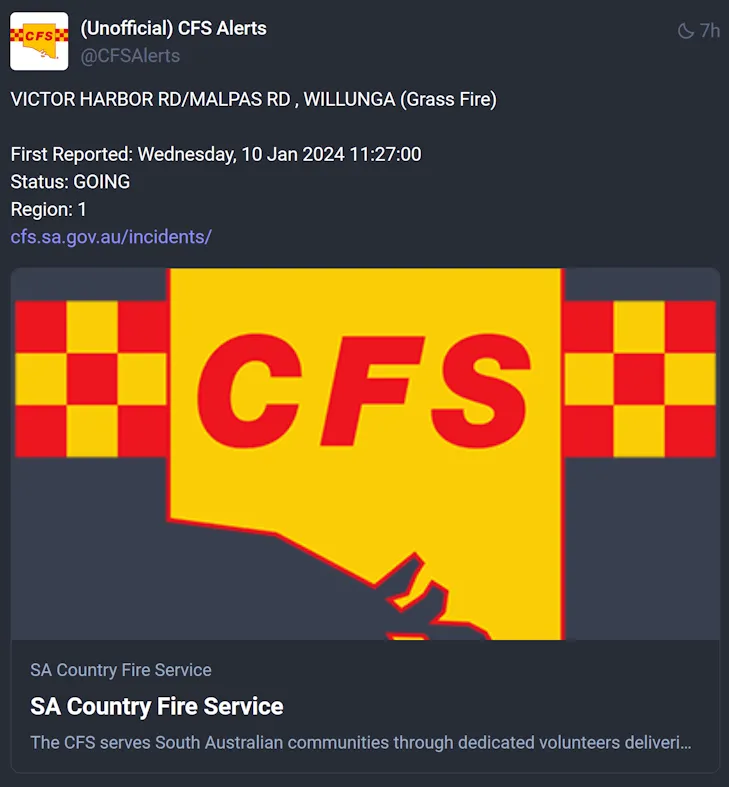
&lt;p&gt;&lt;img src=&quot;https://david.gardiner.net.au/_astro/cfs-alert.BOlotj3W_14HxRW.webp&quot; alt=&quot;Example CFS Alert posted to Mastodon&quot; /&gt;&lt;/p&gt;
&lt;p&gt;As it turns out, the CFS &lt;a href=&quot;https://cfs.sa.gov.au/warnings-restrictions/warnings/rss-feeds/&quot;&gt;publish some RSS feeds&lt;/a&gt;. My first attempt was to make use of a service like &lt;a href=&quot;https://mastofeed.org&quot;&gt;Mastofeed&lt;/a&gt;, which in theory can take an RSS feed and post updates to Mastodon. But as I discovered, the RSS feed from the CFS has a few oddities that seem to prevent this from working correctly - it posted one update but then stopped. Here&apos;s an example of the RSS feed:&lt;/p&gt;
&lt;pre&gt;&lt;code&gt;&amp;lt;?xml version=&apos;1.0&apos; ?&amp;gt;
&amp;lt;rss version=&apos;2.0&apos; xmlns:atom=&apos;http://www.w3.org/2005/Atom&apos;&amp;gt;
  &amp;lt;channel&amp;gt;
    &amp;lt;atom:link href=&apos;https://data.eso.sa.gov.au/prod/cfs/criimson/cfs_current_incidents.xml&apos; rel=&apos;self&apos; type=&apos;application/rss+xml&apos; /&amp;gt;
    &amp;lt;ttl&amp;gt;15&amp;lt;/ttl&amp;gt;
    &amp;lt;title&amp;gt;Country Fire Service - South Australia - Current Incidents&amp;lt;/title&amp;gt;
    &amp;lt;link&amp;gt;https://www.cfs.sa.gov.au/incidents/&amp;lt;/link&amp;gt;
    &amp;lt;description&amp;gt;Current Incidents&amp;lt;/description&amp;gt;
    &amp;lt;item&amp;gt;
      &amp;lt;link&amp;gt;https://www.cfs.sa.gov.au/incidents/&amp;lt;/link&amp;gt;
      &amp;lt;guid isPermaLink=&apos;false&apos;&amp;gt;https://data.eso.sa.gov.au/prod/cfs/criimson/1567212.&amp;lt;/guid&amp;gt;
      &amp;lt;title&amp;gt;TIERS ROAD, LENSWOOD (Tree Down)&amp;lt;/title&amp;gt;
      &amp;lt;identifier&amp;gt;1567212&amp;lt;/identifier&amp;gt;
      &amp;lt;description&amp;gt;First Reported: Saturday, 06 Jan 2024 15:41:00&amp;amp;lt;br&amp;amp;gt;Status: GOING&amp;amp;lt;br&amp;amp;gt;Region: 1&amp;lt;/description&amp;gt;
      &amp;lt;pubDate&amp;gt;Sat, 06 Jan 2024 16:15:03 +1030&amp;lt;/pubDate&amp;gt;
    &amp;lt;/item&amp;gt;
&lt;/code&gt;&lt;/pre&gt;
&lt;p&gt;There is the &lt;code&gt;identifier&lt;/code&gt; element that is non-standard, but I suspect the main issue is the &lt;code&gt;guid&lt;/code&gt; element. For some reason, the &lt;code&gt;isPermaLink&lt;/code&gt; attribute is set to false. On the face of it, that looks like a mistake. That URI (which incorporates the identifier value) does appear to be unique. With &lt;code&gt;isPermaLink&lt;/code&gt; set to false, it hints that the value can&apos;t be used as a unique identifier. I&apos;m guessing because of that, Mastofeed had no way to distinguish posts in the RSS feed.&lt;/p&gt;
&lt;p&gt;So we&apos;re out of luck using the simple option. My next thought was whether there was something that could transform/fix up the RSS on the fly - an &apos;XSLT proxy&apos; if you like, but I&apos;ve not found a free offering like that.&lt;/p&gt;
&lt;p&gt;Maybe I can write some code to do the job instead. Hosting it in an Azure Function should work, and ideally would be free (or really cheap).&lt;/p&gt;
&lt;h2&gt;An Azure Function&lt;/h2&gt;
&lt;p&gt;I ended up writing a relatively simple Azure Function in C# that polls the RSS feed every 15 minutes (as that&apos;s the value of the &lt;code&gt;ttl&lt;/code&gt; element). It then posts any new items to Mastodon. Here&apos;s the code (&lt;a href=&quot;https://github.com/flcdrg/cfsalerts-mastodon/blob/be9f1ddde2e121e047d9d6ed45a141263d05db58/src/CfsAlerts/CfsFunction.cs&quot;&gt;Link to GitHub repo&lt;/a&gt;):&lt;/p&gt;
&lt;pre&gt;&lt;code&gt;    [Function(nameof(CheckAlerts))]
    public async Task&amp;lt;List&amp;lt;CfsFeedItem&amp;gt;&amp;gt; CheckAlerts([ActivityTrigger] List&amp;lt;CfsFeedItem&amp;gt; oldList)
    {
        var newList = new List&amp;lt;CfsFeedItem&amp;gt;();

        var response = string.Empty;
        try
        {
            using var httpClient = _httpClientFactory.CreateClient();

            response = await httpClient.GetStringAsync(
                &quot;https://data.eso.sa.gov.au/prod/cfs/criimson/cfs_current_incidents.xml&quot;);

            var xml = XDocument.Parse(response);

            if (xml.Root.Element(&quot;channel&quot;) is null)
                throw new InvalidOperationException(&quot;No channel element found in feed&quot;);

            var xmlItems = xml.Root.Element(&quot;channel&quot;)?.Elements(&quot;item&quot;).ToList();

            if (xmlItems is not null)
                foreach (var item in xmlItems)
                {
                    var dateTime = DateTime.Parse(item.Element(&quot;pubDate&quot;).Value);

                    newList.Add(new CfsFeedItem(
                        item.Element(&quot;guid&quot;).Value,
                        item.Element(&quot;title&quot;).Value,
                        item.Element(&quot;description&quot;).Value,
                        item.Element(&quot;link&quot;).Value,
                        dateTime
                    ));
                }

            // Find items in newList that are not in oldList
            var newItems = newList.Except(oldList).ToList();

            if (newItems.Any())
            {
                var accessToken = _settings.Token;
                var client = new MastodonClient(_settings.Instance, accessToken);

                foreach (var item in newItems)
                {
                    var message = $&quot;{item.Title}\n\n{item.Description.Replace(&quot;&amp;lt;br&amp;gt;&quot;, &quot;\n&quot;)}\n{item.Link}&quot;;

                    _logger.LogInformation(&quot;Tooting: {item}&quot;, message);

#if RELEASE
                await client.PublishStatus(message, Visibility.Unlisted);
#endif
                }
            }
            else
            {
                _logger.LogInformation(&quot;No new items found&quot;);
            }
        }
        catch (Exception ex)
        {
            _logger.LogError(ex, &quot;Problems. Data: {data}&quot;, response);
        }

        return newList;
    }
&lt;/code&gt;&lt;/pre&gt;
&lt;p&gt;We keep a copy of the previous list of items, and then compare it to the new list. If there are any new items, we post them to Mastodon. Because we need to remember the previous run items, we need to use &lt;a href=&quot;https://learn.microsoft.com/azure/azure-functions/durable/durable-functions-overview?tabs=csharp&quot;&gt;Durable Functions&lt;/a&gt;. This was my first time creating a Durable Function, so that also made it a good learning experience. The &lt;a href=&quot;https://learn.microsoft.com/azure/azure-functions/durable/durable-functions-eternal-orchestrations?WT.mc_id=DOP-MVP-5001655&quot;&gt;&apos;eternal orchestration&apos; pattern&lt;/a&gt; is used, where the orchestration function calls itself, passing in the new list of items. Here&apos;s the orchestration function code:&lt;/p&gt;
&lt;pre&gt;&lt;code&gt;    [Function(nameof(MonitorJobStatus))]
    public static async Task Run(
        [OrchestrationTrigger] TaskOrchestrationContext context, List&amp;lt;CfsFeedItem&amp;gt; lastValue)
    {
        var newValue = await context.CallActivityAsync&amp;lt;List&amp;lt;CfsFeedItem&amp;gt;&amp;gt;(nameof(CfsFunction.CheckAlerts), lastValue);

#if RELEASE
        // Orchestration sleeps until this time (TTL is 15 minutes in RSS)
        var nextCheck = context.CurrentUtcDateTime.AddMinutes(15);
#else
        var nextCheck = context.CurrentUtcDateTime.AddSeconds(20);
#endif

        await context.CreateTimer(nextCheck, CancellationToken.None);

        context.ContinueAsNew(newValue);
    }
&lt;/code&gt;&lt;/pre&gt;
&lt;p&gt;The Durable Function infrastructure handles serialising and deserialising the list of items automatically. The Function takes a parameter that receives the list from the previous run. When the function completes, it returns the list that will be passed to the next run. The orchestration function passes in the list and sets things up to save the list so that it can be passed to the next run.&lt;/p&gt;
&lt;p&gt;One thing about this pattern is you need some way of kickstarting the process. The way I chose was to add a HTTP trigger function that calls the orchestration function. The release pipeline makes a call to the HTTP trigger endpoint after it publishes the function.&lt;/p&gt;
&lt;h2&gt;Durable + .NET 8 + isolated&lt;/h2&gt;
&lt;p&gt;The Durable Function targets .NET 8 and uses the isolated model. It was a little challenging figuring out how to get this combination to work, as most of the documentation is either for the in-process model or for earlier versions of .NET. Ensuring that the appropriate NuGet packages were being referenced was tricky, as there are often different packages to use depending on the model and version of .NET. I ended up using the following packages:&lt;/p&gt;
&lt;pre&gt;&lt;code&gt;    &amp;lt;PackageReference Include=&quot;Mastonet&quot; Version=&quot;2.3.1&quot; /&amp;gt;
    &amp;lt;PackageReference Include=&quot;Microsoft.Azure.Functions.Worker&quot; Version=&quot;1.20.0&quot; /&amp;gt;
    &amp;lt;PackageReference Include=&quot;Microsoft.Azure.Functions.Worker.Extensions.DurableTask&quot; Version=&quot;1.1.0&quot; /&amp;gt;
    &amp;lt;PackageReference Include=&quot;Microsoft.Azure.Functions.Worker.Extensions.Http&quot; Version=&quot;3.1.0&quot; /&amp;gt;
    &amp;lt;PackageReference Include=&quot;Microsoft.Azure.Functions.Worker.Extensions.Timer&quot; Version=&quot;4.3.0&quot; /&amp;gt;
    &amp;lt;PackageReference Include=&quot;Microsoft.Azure.Functions.Worker.Sdk&quot; Version=&quot;1.16.4&quot; /&amp;gt;
    &amp;lt;PackageReference Include=&quot;Microsoft.Extensions.Configuration.UserSecrets&quot; Version=&quot;8.0.0&quot; /&amp;gt;
&lt;/code&gt;&lt;/pre&gt;
&lt;h2&gt;Costs&lt;/h2&gt;
&lt;p&gt;To keep costs to a minimum, the Azure Function is running on a consumption plan. The intention is to keep it close to or under the &lt;a href=&quot;https://azure.microsoft.com/en-au/pricing/details/functions/&quot;&gt;free threshold&lt;/a&gt;.&lt;/p&gt;
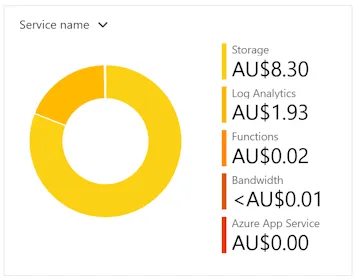
&lt;p&gt;As it turns out, so far the Function is not costing very much at all. It&apos;s actually the Storage Account that is the most significant. AUD8.30 so far and the total forecast for the month will be AUD17. An Azure Function needs to be linked to a Storage Account. It would be interesting to see if there are any changes I could make to reduce the cost further.&lt;/p&gt;
&lt;p&gt;&lt;img src=&quot;https://david.gardiner.net.au/_astro/cfs-azure-costs.DbgQn2Pm_1DCXII.webp&quot; alt=&quot;Azure cost summary&quot; /&gt;&lt;/p&gt;
&lt;p&gt;To see the latest posts from the Azure Function, you can go to &lt;a href=&quot;https://mastodon.online/@CFSAlerts&quot;&gt;https://mastodon.online/@CFSAlerts&lt;/a&gt; (and if you&apos;re on Mastodon, feel free to follow the account!)&lt;/p&gt;
&lt;h2&gt;Future enhancements&lt;/h2&gt;
&lt;p&gt;Apart from seeing if I can reduce the cost even more, the other thing that would be useful is to also track the daily fire bans. This data is &lt;a href=&quot;https://data.eso.sa.gov.au/prod/cfs/criimson/fireDangerRating.xml&quot;&gt;published as an XML file&lt;/a&gt;, so parsing that once a day should be pretty straightforward.&lt;/p&gt;
&lt;p&gt;You can find the full source code for the Azure Function in &lt;a href=&quot;https://github.com/flcdrg/cfsalerts-mastodon/&quot;&gt;this GitHub repo&lt;/a&gt;.&lt;/p&gt;
</content>
    <media:thumbnail url="https://david.gardiner.net.au/_astro/azure-function.B3FwAwqX.png" width="400" height="400"/>
    <media:content medium="image" url="https://david.gardiner.net.au/_astro/azure-function.B3FwAwqX.png" width="400" height="400"/>
  </entry>
  <entry>
    <id>https://david.gardiner.net.au/2023/04/find-freesubnets</id>
    <updated>2023-04-03T08:00:00.000+09:30</updated>
    <title>Finding free subnets in an Azure Virtual Network</title>
    <link href="https://david.gardiner.net.au/2023/04/find-freesubnets" rel="alternate" type="text/html" title="Finding free subnets in an Azure Virtual Network"/>
    <category term="Azure"/>
    <category term="PowerShell"/>
    <published>2023-04-03T08:00:00.000+09:30</published>
    <summary type="html">An Azure Virtual Network (as the docs say) is &quot;the fundamental building block for your private network in Azure&quot;. Often abbreviated to &quot;VNet&quot;. When a VNet is created, you specify the available IP address range using CIDR notation. If you create a VNET through the Azure Portal, it defaults to 10.1.0.0/16, which equates to 65536 IP addresses (10.1.0.0 - 10.1.255.255).</summary>
    <content type="html">&lt;p&gt;An &lt;a href=&quot;https://learn.microsoft.com/azure/virtual-network/virtual-networks-overview?WT.mc_id=DOP-MVP-5001655&quot;&gt;Azure Virtual Network&lt;/a&gt; (as the docs say) is &quot;the fundamental building block for your private network in Azure&quot;. Often abbreviated to &quot;VNet&quot;. When a VNet is created, you specify the available IP address range using &lt;a href=&quot;https://en.wikipedia.org/wiki/Classless_Inter-Domain_Routing&quot;&gt;CIDR&lt;/a&gt; notation. If you create a VNET through the Azure Portal, it defaults to 10.1.0.0/16, which equates to 65536 IP addresses (10.1.0.0 - 10.1.255.255).&lt;/p&gt;
&lt;p&gt;A VNet contains one or more subnets, where the IP range for each subnet is assigned from the VNet&apos;s allocation.
One thing to note - you can&apos;t resize a VNet. Once it has been created, that&apos;s it. If you use up all the available IP addresses, your only options are to create a new VNet and peer it to the original VNet, or if the newer VNet is larger, migrate all your services over to it (which may not be trivial).&lt;/p&gt;
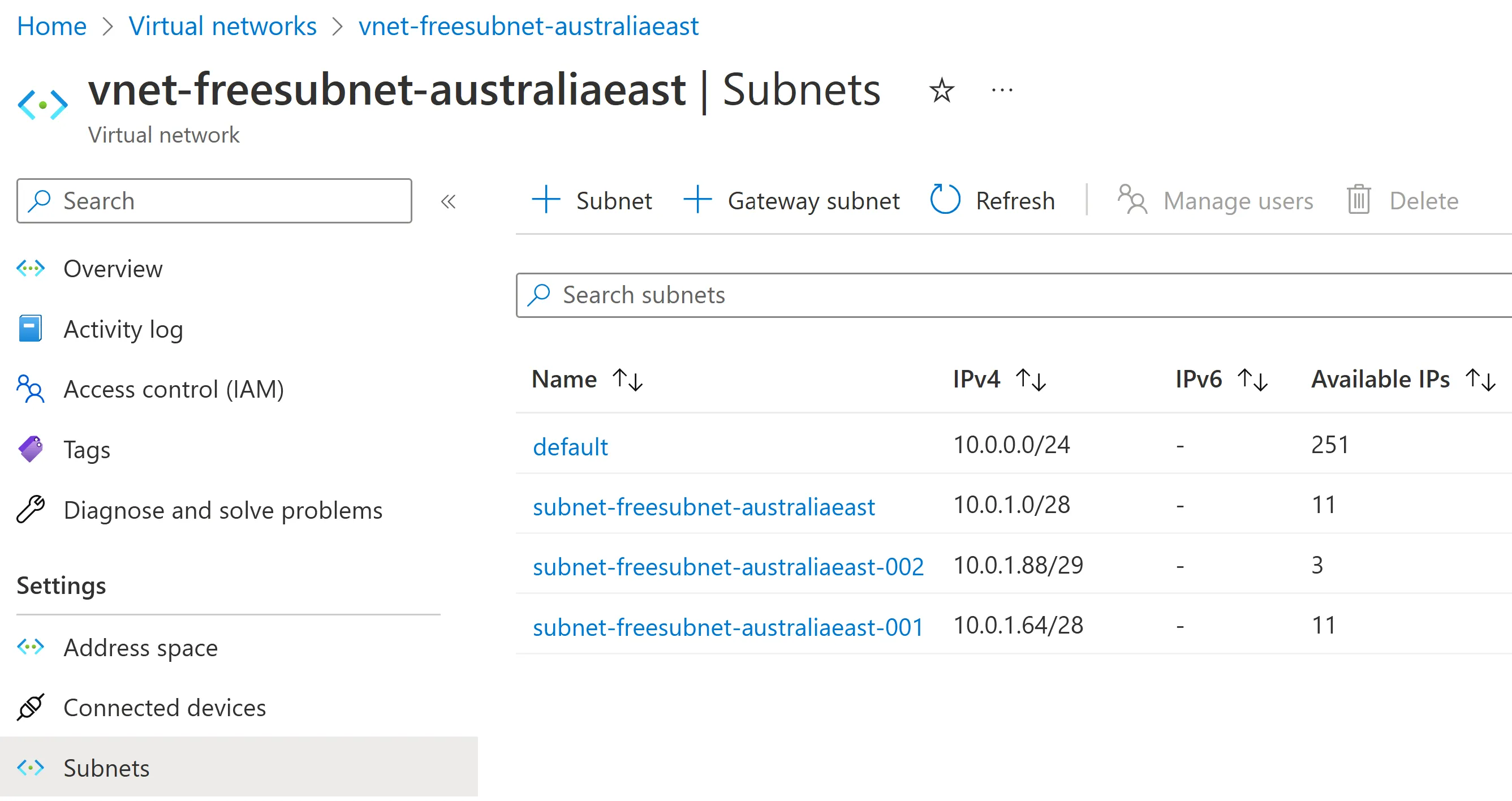
&lt;p&gt;If a VNet has been in use for some time or is used by multiple teams, you can end up with fragmentation - gaps between allocated subnets. This could happen because new subnets are allocated by choosing a &apos;nice&apos; number to start on (rather than following immediately from the last allocated), or from a previously allocated subnet being deleted. e.g.&lt;/p&gt;
&lt;p&gt;&lt;img src=&quot;https://david.gardiner.net.au/_astro/vnet-subnets-01.DKevnKyc_f2KCX.webp&quot; alt=&quot;Azure Virtual Network with a list of subnets&quot; /&gt;&lt;/p&gt;
&lt;p&gt;In this VNet it turns out we have some gaps. While the temptation might be to allocate the next subnet starting at 10.0.2.0, depending on the size required, we might be able to use one of the available gaps instead.&lt;/p&gt;
&lt;p&gt;Now maybe you can read CIDR IP addresses in your sleep and can not only spot the gaps but know intuitively what ranges you could allocate. For the rest of us, I&apos;d either resort to a pencil and paper or (more likely) see if I could script out the answer using PowerShell.&lt;/p&gt;
&lt;p&gt;And so I created a PowerShell script to query a VNet and list both the existing subnets and also the available gaps (and CIDR ranges that could use those gaps). I started sharing this script with a few of my SixPivot colleagues, as they were experiencing the same situation. I realised it would be good to make this more widely available, so the result is my first PowerShell module published to the PowerShell Gallery (under the SixPivot name) - &lt;a href=&quot;https://www.powershellgallery.com/packages/SixPivot.Azure/1.0.56&quot;&gt;SixPivot.Azure&lt;/a&gt;, which contains the &lt;code&gt;Find-FreeSubnets&lt;/code&gt; function.&lt;/p&gt;
&lt;h2&gt;Using the Find-FreeSubnets cmdlet&lt;/h2&gt;
&lt;p&gt;First off, install the module:&lt;/p&gt;
&lt;pre&gt;&lt;code&gt;Install-Module SixPivot.Azure
&lt;/code&gt;&lt;/pre&gt;
&lt;p&gt;If you haven&apos;t previously connected to Azure then you&apos;ll need to do this:&lt;/p&gt;
&lt;pre&gt;&lt;code&gt;Connect-AzAccount
&lt;/code&gt;&lt;/pre&gt;
&lt;p&gt;Now you can use Find-FreeSubnets. You need to know the resource group and VNET name. eg.&lt;/p&gt;
&lt;pre&gt;&lt;code&gt;Find-FreeSubnets -ResourceGroup rg-freesubnet-australiaeast -VNetName vnet-freesubnet-australiaeast
&lt;/code&gt;&lt;/pre&gt;
&lt;p&gt;This will produce output similar to the following:&lt;/p&gt;
&lt;pre&gt;&lt;code&gt;VNet Start VNet End     Available      Subnets
---------- --------     ---------      -------
10.0.0.0   10.0.255.255 {48, 8, 65184} {10.0.0.0/24, 10.0.1.0/28, 10.0.1.64/28, 10.0.1.88/29}
&lt;/code&gt;&lt;/pre&gt;
&lt;p&gt;The output is structured data. If you assign it to a variable, then you can dig down into the different parts.&lt;/p&gt;
&lt;pre&gt;&lt;code&gt;$vnet = Find-FreeSubnets -ResourceGroup rg-freesubnet-australiaeast -VNetName
&lt;/code&gt;&lt;/pre&gt;
&lt;p&gt;For the VNET itself, you can get the start and end addresses using &lt;code&gt;VNetStart&lt;/code&gt; and &lt;code&gt;VNetEnd&lt;/code&gt; properties.&lt;/p&gt;
&lt;pre&gt;&lt;code&gt;$vnet.VNetStart, $vnet.VNetEnd
10.0.0.0
10.0.255.255
&lt;/code&gt;&lt;/pre&gt;
&lt;p&gt;You can see the currently allocated subnets via the &lt;code&gt;Subnets&lt;/code&gt; property:&lt;/p&gt;
&lt;pre&gt;&lt;code&gt;$vnet.Subnets

Address space Range start Range end
------------- ----------- ---------
10.0.0.0/24   10.0.0.0    10.0.0.255
10.0.1.0/28   10.0.1.0    10.0.1.15
10.0.1.64/28  10.0.1.64   10.0.1.79
10.0.1.88/29  10.0.1.88   10.0.1.95
&lt;/code&gt;&lt;/pre&gt;
&lt;p&gt;And finally, (and this is the good bit!), the available subnets via the &lt;code&gt;Available&lt;/code&gt; property&lt;/p&gt;
&lt;pre&gt;&lt;code&gt;$vnet.Available

Start     End          Size  Available ranges
-----     ---          ----  ----------------
10.0.1.16 10.0.1.63    48    {10.0.1.16/28, 10.0.1.32/27, 10.0.1.32/28, 10.0.1.48/28}
10.0.1.80 10.0.1.87    8
10.0.1.96 10.0.255.255 65184 {10.0.1.96/27, 10.0.1.96/28, 10.0.1.112/28, 10.0.1.128/25…}
&lt;/code&gt;&lt;/pre&gt;
&lt;p&gt;For a particular &lt;code&gt;Start&lt;/code&gt; and &lt;code&gt;End&lt;/code&gt;, you can see potential CIDR ranges with the &lt;code&gt;CIDRAvailable&lt;/code&gt; property:&lt;/p&gt;
&lt;pre&gt;&lt;code&gt;$vnet.Available[0].CIDRAvailable
10.0.1.16/28
10.0.1.32/27
10.0.1.32/28
10.0.1.48/28

$vnet.Available[2].CIDRAvailable
10.0.1.96/27
10.0.1.96/28
10.0.1.112/28
10.0.1.128/25
10.0.1.128/26
10.0.1.128/27
10.0.1.128/28
10.0.1.144/28
...
&lt;/code&gt;&lt;/pre&gt;
&lt;p&gt;Possible prefix lengths of 25, 26, 27 or 28 are shown. The output for the second example actually scrolled way off the page, so watch out if the available &lt;code&gt;Size&lt;/code&gt; is quite large.&lt;/p&gt;
&lt;p&gt;From the first available range, I could use either:&lt;/p&gt;
&lt;ul&gt;
&lt;li&gt;10.0.1.16/28 and 10.0.1.32/27&lt;/li&gt;
&lt;li&gt;&lt;em&gt;or&lt;/em&gt; 10.0.1.16/28, 10.0.1.32/28 and 10.0.1.48/28&lt;/li&gt;
&lt;/ul&gt;
&lt;h2&gt;Future enhancements&lt;/h2&gt;
&lt;p&gt;The cmdlet is useful already, but one feature I&apos;d like to add is to be able to pass in one or more CIDR prefix lengths (eg. 28,28,27) and allow it to find compatible non-overlapping ranges automatically.&lt;/p&gt;
</content>
  </entry>
  <entry>
    <id>https://david.gardiner.net.au/2023/01/azure-vm-terraform</id>
    <updated>2023-01-19T20:30:00.000+10:30</updated>
    <title>Provision an Azure Virtual Machine with Terraform Cloud</title>
    <link href="https://david.gardiner.net.au/2023/01/azure-vm-terraform" rel="alternate" type="text/html" title="Provision an Azure Virtual Machine with Terraform Cloud"/>
    <category term="Azure"/>
    <category term="Terraform"/>
    <published>2023-01-19T20:30:00.000+10:30</published>
    <summary type="html">Sometimes I need to spin up a virtual machine to quickly test something out on a &apos;vanilla&apos; machine, for example, to test out a Chocolatey package that I maintain. Most of the time I log in to the Azure Portal and click around to create a VM. The addition of the choice to use the Azure Virtual Machine with preset configuration does make it a bit easier, but it&apos;s still lots of clicking. Maybe I should try automating this!</summary>
    <content type="html">&lt;p&gt;&lt;img src=&quot;https://david.gardiner.net.au/_astro/terraform-logo.CiRDK2M7_Z21UAf8.webp&quot; alt=&quot;Terraform logo&quot; /&gt;&lt;/p&gt;
&lt;p&gt;Sometimes I need to spin up a virtual machine to quickly test something out on a &apos;vanilla&apos; machine, for example, to test out a &lt;a href=&quot;https://github.com/flcdrg/au-packages&quot;&gt;Chocolatey package that I maintain&lt;/a&gt;.&lt;/p&gt;
&lt;p&gt;Most of the time I log in to the Azure Portal and click around to create a VM. The addition of the choice to use the Azure Virtual Machine with preset configuration does make it a bit easier, but it&apos;s still lots of clicking. Maybe I should try automating this!&lt;/p&gt;
&lt;p&gt;There are a few choices for automating, but seeing as I&apos;ve been using &lt;a href=&quot;https://developer.hashicorp.com/terraform&quot;&gt;Terraform&lt;/a&gt; lately I thought I&apos;d try that out, together with Terraform Cloud. As I&apos;ll be putting the Terraform files in a public repository on GitHub, I can use the free tier for Terraform Cloud.&lt;/p&gt;
&lt;p&gt;You can find the source for the Terraform files at &lt;a href=&quot;https://github.com/flcdrg/terraform-azure-vm/&quot;&gt;https://github.com/flcdrg/terraform-azure-vm/&lt;/a&gt;.&lt;/p&gt;
&lt;p&gt;You&apos;ll also need to have both the Azure CLI and Terraform CLI installed. You can do this easily via Chocolatey:&lt;/p&gt;
&lt;pre&gt;&lt;code&gt;choco install terraform
choco install azure-cli
&lt;/code&gt;&lt;/pre&gt;
&lt;h2&gt;Setting up Terraform Cloud Workspace with GitHub&lt;/h2&gt;
&lt;ol&gt;
&lt;li&gt;Log in (or sign up) to Terraform Cloud at &lt;a href=&quot;https://app.terraform.io&quot;&gt;https://app.terraform.io&lt;/a&gt;, select (or create) your organisation, then go to &lt;strong&gt;Workspaces&lt;/strong&gt; and click on &lt;strong&gt;Create a workspace&lt;/strong&gt;
 &lt;img src=&quot;https://david.gardiner.net.au/_astro/terraform-github-01.BBEqQkYu_1HA8LO.webp&quot; alt=&quot;Terraform Cloud - Workspaces tab&quot; /&gt;&lt;/li&gt;
&lt;li&gt;Select how you&apos;d like to trigger a workflow. To keep things simple, I chose &lt;strong&gt;Version control workflow&lt;/strong&gt;
 &lt;img src=&quot;https://david.gardiner.net.au/_astro/terraform-github-02.D9LbvB3v_1A1yG0.webp&quot; alt=&quot;Terraform Cloud - Create a new workspace&quot; /&gt;&lt;/li&gt;
&lt;li&gt;Select the version control provider - &lt;strong&gt;Github.com&lt;/strong&gt;.
 &lt;img src=&quot;https://david.gardiner.net.au/_astro/terraform-github-03.DTvyLPLj_1RoSSu.webp&quot; alt=&quot;Alt text&quot; /&gt;&lt;/li&gt;
&lt;li&gt;You will now need to authenticate with GitHub.
 &lt;img src=&quot;https://david.gardiner.net.au/_astro/terraform-github-04.tY80MKHc_2dKmh0.webp&quot; alt=&quot;Alt text&quot; /&gt;&lt;/li&gt;
&lt;li&gt;Watch out if you get a notification about a pop-up blocker.
 &lt;img src=&quot;https://david.gardiner.net.au/_astro/terraform-github-05.B2UKQtOe_ZtXGe4.webp&quot; alt=&quot;Alt text&quot; /&gt;
If you do, then enable pop-ups for this domain
 &lt;img src=&quot;https://david.gardiner.net.au/_astro/terraform-github-06.ODlbymuB_Z1pTTJT.webp&quot; alt=&quot;Alt text&quot; /&gt;&lt;/li&gt;
&lt;li&gt;Choose which GitHub account or organisation to use:
 &lt;img src=&quot;https://david.gardiner.net.au/_astro/terraform-github-07.Cz-_jMNJ_HiEmc.webp&quot; alt=&quot;Alt text&quot; /&gt;&lt;/li&gt;
&lt;li&gt;Select which repositories should be linked to Terraform Cloud.
 &lt;img src=&quot;https://david.gardiner.net.au/_astro/terraform-github-08.BN7v6H26_CIv3J.webp&quot; alt=&quot;Alt text&quot; /&gt;&lt;/li&gt;
&lt;li&gt;If you use multi-factor authentication then you&apos;ll need to approve the access.
 &lt;img src=&quot;https://david.gardiner.net.au/_astro/terraform-github-09.DZhVLwM7_v2t11.webp&quot; alt=&quot;Alt text&quot; /&gt;&lt;/li&gt;
&lt;li&gt;Now that your GitHub repositories are connected, you need to select the repository that Terraform Cloud will use for this workspace.
 &lt;img src=&quot;https://david.gardiner.net.au/_astro/terraform-github-10.Dx6fpseP_kCIly.webp&quot; alt=&quot;Alt text&quot; /&gt;&lt;/li&gt;
&lt;li&gt;Enter a workspace name (and optionally a description)
&lt;img src=&quot;https://david.gardiner.net.au/_astro/terraform-github-11.Ownw56zG_FmLIl.webp&quot; alt=&quot;Alt text&quot; /&gt;&lt;/li&gt;
&lt;li&gt;Now your workspace has been created!
&lt;img src=&quot;https://david.gardiner.net.au/_astro/terraform-github-12.BS-biQ19_ZL7j6S.webp&quot; alt=&quot;Alt text&quot; /&gt;&lt;/li&gt;
&lt;/ol&gt;
&lt;p&gt;You&apos;re now ready to add Terraform files to your GitHub repository. I like to use the Terraform CLI to validate and format my .tf files before I commit them to version control.&lt;/p&gt;
&lt;p&gt;After adding &lt;code&gt;versions.tf&lt;/code&gt; file that contains a &lt;code&gt;cloud&lt;/code&gt; definition (along with any providers), you can run &lt;code&gt;terraform login&lt;/code&gt;&lt;/p&gt;
&lt;pre&gt;&lt;code&gt;terraform {
  cloud {
    organization = &quot;flcdrg&quot;
    hostname     = &quot;app.terraform.io&quot;

    workspaces {
      name = &quot;terraform-azure-vm&quot;
    }
  }

  required_providers {
    azurerm = {
      source  = &quot;hashicorp/azurerm&quot;
      version = &quot;=3.39.1&quot;
    }
    random = {
      source  = &quot;hashicorp/random&quot;
      version = &quot;3.4.3&quot;
    }
  }
}

provider &quot;azurerm&quot; {
  features {}
}
&lt;/code&gt;&lt;/pre&gt;
&lt;p&gt;A browser window will launch to allow you to create an API token that you can then paste back into the CLI.
&lt;img src=&quot;https://david.gardiner.net.au/_astro/terraform-github-13.D0zlzHfX_22JDAk.webp&quot; alt=&quot;Terraform Cloud - Create API Token dialog&quot; /&gt;&lt;/p&gt;
&lt;p&gt;The next thing we need to do is create an Azure service principal that Terraform Cloud can use when deploying to Azure.&lt;/p&gt;
&lt;p&gt;In my case, I created a resource group and granted the service principal Contributor access to it (assuming that all the resources you want Terraform to create will live within that resource group). You could also allow the service principal access to the whole subscription if you prefer.&lt;/p&gt;
&lt;pre&gt;&lt;code&gt;az login
az group create --location westus --resource-group MyResourceGroup
az ad sp create-for-rbac --name &amp;lt;service_principal_name&amp;gt; --role Contributor --scopes /subscriptions/&amp;lt;subscription_id&amp;gt;/resourceGroups/&amp;lt;resourceGroupName&amp;gt;
&lt;/code&gt;&lt;/pre&gt;
&lt;p&gt;Now go back to Terraform Cloud, and after selecting the newly created workspace, select &lt;strong&gt;Variables&lt;/strong&gt;.&lt;/p&gt;
&lt;p&gt;Under &lt;strong&gt;Workspace variables&lt;/strong&gt;, click &lt;strong&gt;Add variable&lt;/strong&gt;, then select &lt;strong&gt;Environment variables&lt;/strong&gt;. Add a variable for each of the following (for &lt;code&gt;ARM_CLIENT_SECRET&lt;/code&gt; also check the &lt;strong&gt;Sensitive&lt;/strong&gt; checkbox), for the value copy the appropriate value from the output from creating the service principal:&lt;/p&gt;
&lt;ul&gt;
&lt;li&gt;&lt;code&gt;ARM_CLIENT_ID&lt;/code&gt; - appId&lt;/li&gt;
&lt;li&gt;&lt;code&gt;ARM_CLIENT_SECRET&lt;/code&gt; - password&lt;/li&gt;
&lt;li&gt;&lt;code&gt;ARM_SUBSCRIPTION_ID&lt;/code&gt; - id from &lt;code&gt;az account show&lt;/code&gt;&lt;/li&gt;
&lt;li&gt;&lt;code&gt;ARM_TENANT_ID&lt;/code&gt;&lt;/li&gt;
&lt;/ul&gt;
&lt;p&gt;&lt;img src=&quot;https://david.gardiner.net.au/_astro/terraform-github-15.B1xUhqQm_1R3cOu.webp&quot; alt=&quot;Workspace variables&quot; /&gt;&lt;/p&gt;
&lt;p&gt;With those variables set, you can now push your Terraform files to the GitHub repository.&lt;/p&gt;
&lt;p&gt;The Terraform Cloud workspace is configured to evaluate a plan on pull requests, and on pushes or merges to &lt;code&gt;main&lt;/code&gt; it will apply those changes.&lt;/p&gt;
&lt;p&gt;&lt;img src=&quot;https://david.gardiner.net.au/_astro/terraform-github-16.8Os8CkBH_nAxbW.webp&quot; alt=&quot;Terraform Cloud - Plan&quot; /&gt;&lt;/p&gt;
&lt;p&gt;By default, you need to manually confirm before &apos;apply&apos; will run (you can change the workspace to auto-approve to avoid this).
&lt;img src=&quot;https://david.gardiner.net.au/_astro/terraform-github-17.UmJ43VzI_ZgQdBo.webp&quot; alt=&quot;Confirm Plan dialog&quot; /&gt;&lt;/p&gt;
&lt;p&gt;After a short wait, all the Azure resources (including the VM) should have been created and ready to use.
&lt;img src=&quot;https://david.gardiner.net.au/_astro/terraform-github-18.Dc8KXHP6_Z21m3Dw.webp&quot; alt=&quot;Terraform Cloud - changes applied&quot; /&gt;&lt;/p&gt;
&lt;h2&gt;Virtual machine password&lt;/h2&gt;
&lt;p&gt;I&apos;m not hardcoding the password for the virtual machine - rather I&apos;m using the Terraform &lt;a href=&quot;https://registry.terraform.io/providers/hashicorp/random/latest/docs/resources/password&quot;&gt;&lt;code&gt;random_password&lt;/code&gt;&lt;/a&gt; resource to generate a random password. The password is not displayed in the logs as it is marked as &apos;sensitive&apos;. But I will actually need to know the password so I can RDP to the VM. It turns out the password value is saved in Terraform state, and you can examine this via the &lt;strong&gt;States&lt;/strong&gt; tab of the workspace.&lt;/p&gt;
&lt;p&gt;&lt;img src=&quot;https://david.gardiner.net.au/_astro/terraform-github-19.CMn6EC9g_Z1HwxoH.webp&quot; alt=&quot;Terraform Cloud - Workspace state&quot; /&gt;&lt;/p&gt;
&lt;p&gt;With that, I&apos;m now able to navigate to the VM resource in the Azure Portal and connect via RDP and do what I need to do.&lt;/p&gt;
&lt;p&gt;If you wanted to stick with the CLI, you can also use &lt;a href=&quot;https://learn.microsoft.com/azure/virtual-machines/windows/connect-rdp?WT.mc_id=DOP-MVP-5001655#connect-to-the-virtual-machine-using-powershell&quot;&gt;Azure PowerShell to launch an RDP session&lt;/a&gt;.&lt;/p&gt;
&lt;h2&gt;Extra configuration&lt;/h2&gt;
&lt;p&gt;If you review the Terraform in the repo, you&apos;ll notice I also make use of the &lt;a href=&quot;https://registry.terraform.io/providers/hashicorp/azurerm/latest/docs/resources/virtual_machine_extension&quot;&gt;&lt;code&gt;azurerm_virtual_machine_extension&lt;/code&gt;&lt;/a&gt; resource to run some PowerShell that installs Chocolatey. That just saves me from having to do it manually. If you can automate it, why not!&lt;/p&gt;
&lt;h2&gt;Cleaning up when you&apos;re done&lt;/h2&gt;
&lt;p&gt;For safety, the virtual machine is set to auto shutdown in the evening, which will reduce any costs. To completely remove the virtual machine and any associated storage you can run a &quot;destroy plan&quot;&lt;/p&gt;
&lt;p&gt;From the workspace, go to &lt;strong&gt;Settings&lt;/strong&gt;, then &lt;strong&gt;Destruction and deletion&lt;/strong&gt;, and click &lt;strong&gt;Queue destroy plan&lt;/strong&gt;.&lt;/p&gt;
&lt;p&gt;&lt;img src=&quot;https://david.gardiner.net.au/_astro/terraform-github-14.Bz_F0flW_Z1DGknQ.webp&quot; alt=&quot;Alt text&quot; /&gt;&lt;/p&gt;
</content>
    <media:thumbnail url="https://david.gardiner.net.au/_astro/terraform-logo.CiRDK2M7.png" width="309" height="312"/>
    <media:content medium="image" url="https://david.gardiner.net.au/_astro/terraform-logo.CiRDK2M7.png" width="309" height="312"/>
  </entry>
  <entry>
    <id>https://david.gardiner.net.au/2022/02/passed-az400</id>
    <updated>2022-02-23T19:30:00.000+10:30</updated>
    <title>Passed AZ-400</title>
    <link href="https://david.gardiner.net.au/2022/02/passed-az400" rel="alternate" type="text/html" title="Passed AZ-400"/>
    <category term="Azure"/>
    <category term="Azure DevOps"/>
    <category term="DevOps"/>
    <category term="GitHub"/>
    <category term="Training and Certification"/>
    <published>2022-02-23T19:30:00.000+10:30</published>
    <summary type="html">I&apos;m pleased to report that today I passed Microsoft exam AZ-400: Designing and Implementing Microsoft DevOps Solutions, which combined with AZ-201 that I took last year, now qualifies me for the Microsoft Certified: DevOps Engineer Expert certification.  View my verified achievement from Microsoft The exam is quite broad in the content it covers: Some areas I&apos;d been working with for quite a few years, but others were new to me. To help prepare I used a couple of resources: …</summary>
    <content type="html">&lt;p&gt;I&apos;m pleased to report that today I passed Microsoft exam &lt;a href=&quot;https://learn.microsoft.com/credentials/certifications/exams/az-400/?WT.mc_id=DOP-MVP-5001655&quot;&gt;AZ-400: Designing and Implementing Microsoft DevOps Solutions&lt;/a&gt;, which combined with &lt;a href=&quot;/2021/07/passed-az-204&quot;&gt;AZ-201 that I took last year&lt;/a&gt;, now qualifies me for the &lt;a href=&quot;https://learn.microsoft.com/credentials/certifications/devops-engineer/?WT.mc_id=DOP-MVP-5001655&quot;&gt;Microsoft Certified: DevOps Engineer Expert certification&lt;/a&gt;.&lt;/p&gt;
&lt;p&gt;&lt;a href=&quot;https://www.credly.com/badges/6f929582-8328-48d1-b65b-0dcd99fb7cd8/public_url&quot;&gt;&lt;img src=&quot;https://david.gardiner.net.au/_astro/microsoft-certified-devops-engineer-expert.DB_fO9io_2upomc.webp&quot; alt=&quot;Microsoft Certified: DevOps Engineer Expert badge&quot; /&gt;&lt;/a&gt;&lt;/p&gt;
&lt;p&gt;&lt;a href=&quot;https://www.credly.com/badges/6f929582-8328-48d1-b65b-0dcd99fb7cd8/public_url&quot;&gt;View my verified achievement from Microsoft&lt;/a&gt;&lt;/p&gt;
&lt;p&gt;The exam is quite broad in the content it covers:&lt;/p&gt;
&lt;ul&gt;
&lt;li&gt;Develop an instrumentation strategy (5-10%)&lt;/li&gt;
&lt;li&gt;Develop a Site Reliability Engineering (SRE) strategy (5-10%)&lt;/li&gt;
&lt;li&gt;Develop a security and compliance plan (10-15%)&lt;/li&gt;
&lt;li&gt;Manage source control (10-15%)&lt;/li&gt;
&lt;li&gt;Facilitate communication and collaboration (10-15%)&lt;/li&gt;
&lt;li&gt;Define and implement continuous integration (20-25%)&lt;/li&gt;
&lt;li&gt;Define and implement a continuous delivery and release management strategy (10-15%)&lt;/li&gt;
&lt;/ul&gt;
&lt;p&gt;Some areas I&apos;d been working with for quite a few years, but others were new to me. To help prepare I used a couple of resources:&lt;/p&gt;
&lt;ul&gt;
&lt;li&gt;&lt;a href=&quot;https://docs.microsoft.com/learn/certifications/exams/az-400?WT.mc_id=DOP-MVP-5001655#two-ways-to-prepare&quot;&gt;Microsoft Learn content&lt;/a&gt;&lt;/li&gt;
&lt;li&gt;&lt;a href=&quot;https://web.archive.org/web/20230522220903/https://www.pluralsight.com/paths/designing-and-implementing-microsoft-devops-solutions-az-400&quot;&gt;Pluralsight certification prep path&lt;/a&gt;&lt;/li&gt;
&lt;/ul&gt;
&lt;p&gt;Nice to get that one dusted.&lt;/p&gt;
</content>
    <media:thumbnail url="https://david.gardiner.net.au/_astro/microsoft-certified-devops-engineer-expert.DB_fO9io.png" width="300" height="300"/>
    <media:content medium="image" url="https://david.gardiner.net.au/_astro/microsoft-certified-devops-engineer-expert.DB_fO9io.png" width="300" height="300"/>
  </entry>
  <entry>
    <id>https://david.gardiner.net.au/2021/10/azure-resource-namer</id>
    <updated>2021-10-17T16:30:00.000+10:30</updated>
    <title>Azure Resource Namer tool</title>
    <link href="https://david.gardiner.net.au/2021/10/azure-resource-namer" rel="alternate" type="text/html" title="Azure Resource Namer tool"/>
    <category term="Azure"/>
    <published>2021-10-17T16:30:00.000+10:30</published>
    <summary type="html">If you host anything in Azure, then you&apos;ve probably had to think about resource naming conventions, even if your convention is not to have one! But any time you start building up a sizable collection of resources, having a naming convention can make it a lot easier to manage. Microsoft have a suggested convention as part of their Cloud Adoption Framework. It&apos;s pretty straightforward, and makes use of their list of recommended abbreviations for resource types. …</summary>
    <content type="html">&lt;p&gt;If you host anything in Azure, then you&apos;ve probably had to think about resource naming conventions, even if your convention is not to have one! But any time you start building up a sizable collection of resources, having a naming convention can make it a lot easier to manage.&lt;/p&gt;
&lt;p&gt;Microsoft have a suggested convention as part of their &lt;a href=&quot;https://learn.microsoft.com/azure/cloud-adoption-framework/ready/azure-best-practices/resource-naming&quot;&gt;Cloud Adoption Framework&lt;/a&gt;. It&apos;s pretty straightforward, and makes use of their &lt;a href=&quot;https://learn.microsoft.com/azure/cloud-adoption-framework/ready/azure-best-practices/resource-abbreviations&quot;&gt;list of recommended abbreviations&lt;/a&gt; for resource types.&lt;/p&gt;
&lt;p&gt;I thought I&apos;d have a go making a simple tool that could automate generating the name. There&apos;s lots of ways I could have built such a tool, but I figured a simple web page should be achievable and make it accessible to most people.&lt;/p&gt;
&lt;p&gt;Most of my time is spent working on back-end code, so here was a chance to play around with a frontend framework. I could have chosen one of the big names, but there&apos;s one I&apos;ve been keeping a keen eye on for a long time that I hadn&apos;t ever actually used - &lt;a href=&quot;https://aurelia.io/&quot;&gt;Aurelia&lt;/a&gt; - and this seemed like a nice opportunity to kick the tyres. I was really pleased with the result. This is not a complicated web application, but I do like the way Aurelia works. I used Aurelia v1, but I&apos;ll be keen to upgrade to v2 (it&apos;s currently in alpha).&lt;/p&gt;
&lt;p&gt;You can try out the tool at &lt;a href=&quot;https://flcdrg.github.io/azure-resource-namer/&quot;&gt;https://david.gardiner.net.au/azure-resource-namer/&lt;/a&gt;, with the source code at &lt;a href=&quot;https://github.com/flcdrg/azure-resource-namer&quot;&gt;https://github.com/flcdrg/azure-resource-namer&lt;/a&gt;. I made use of GitHub Pages for the publishing part. Later on I might get a custom domain and maybe run it with something like &lt;a href=&quot;https://azure.microsoft.com/services/app-service/static/?WT.mc_id=AZ-MVP-5001655&quot;&gt;Azure Static Web Apps&lt;/a&gt;, but this does the job for now.&lt;/p&gt;
&lt;p&gt;&lt;img src=&quot;https://david.gardiner.net.au/_astro/azure-resource-namer-screenshot.B6vtdfsC_Z13DgE9.webp&quot; alt=&quot;Screenshot&quot; /&gt;&lt;/p&gt;
&lt;p&gt;The naming convention consists of concatenating a number of fields together:&lt;/p&gt;
&lt;ul&gt;
&lt;li&gt;The Resource Type and Region fields are drop-down lists.&lt;/li&gt;
&lt;li&gt;The Workload and Environment fields are user-editable. The type of resource will determine what characters are allowed here.&lt;/li&gt;
&lt;li&gt;The Instance field is numeric. If you set it to zero then it will be excluded.&lt;/li&gt;
&lt;/ul&gt;
&lt;p&gt;There are a lot of different resource types. The tool supports all the types listed in the previously mentioned abbreviations page. I&apos;m slowly adding extra validation information for each resource, so that you get extra hints should you use an invalid character, the name ends up being too long, and also where there are particular formatting requirements (eg storage accounts).&lt;/p&gt;
&lt;p&gt;&lt;img src=&quot;https://david.gardiner.net.au/_astro/azure-resource-namer-screenshot-invalid1.B7A6GKQh_OtbHf.webp&quot; alt=&quot;Screenshot of invalid character&quot; /&gt;&lt;/p&gt;
&lt;p&gt;&lt;img src=&quot;https://david.gardiner.net.au/_astro/azure-resource-namer-screenshot-invalid2.qOcX7bKU_Z1WzmvL.webp&quot; alt=&quot;Screenshot of invalid too long&quot; /&gt;&lt;/p&gt;
&lt;p&gt;The resource types are listed in &lt;a href=&quot;https://github.com/flcdrg/azure-resource-namer/blob/main/src/resources.ts&quot;&gt;resources.ts&lt;/a&gt;. For example here&apos;s how the rules and information for the &apos;Resource Group&apos; resource type has been defined:&lt;/p&gt;
&lt;pre&gt;&lt;code&gt;{
    abbrev: &apos;rg&apos;,
    name: &apos;Resource group&apos;,
    minLength: 1,
    maxLength: 90,
    // https://docs.microsoft.com/en-us/rest/api/resources/resource-groups/create-or-update#uri-parameters
    regex: /^[-\w\._\(\)]+$/,
    description: &apos;Alphanumerics, underscores, parentheses, hyphens, periods, and unicode characters that match the regex documentation. Can\&apos;t end with period.&apos;
}
&lt;/code&gt;&lt;/pre&gt;
&lt;p&gt;Once I&apos;ve got all the resource type rules done, there&apos;s probably scope for more customisation options and other enhancements. I&apos;ve already had one of my SixPivot colleagues Dylan contribute the &apos;copy to clipboard&apos; button.&lt;/p&gt;
&lt;p&gt;&lt;a href=&quot;https://flcdrg.github.io/azure-resource-namer/&quot;&gt;Give it a try&lt;/a&gt; and let me know what you think in the comments. If you&apos;ve got some ideas or would like to contribute additional features, head over to the &lt;a href=&quot;https://github.com/flcdrg/azure-resource-namer&quot;&gt;repo&lt;/a&gt;!&lt;/p&gt;
</content>
    <media:thumbnail url="https://david.gardiner.net.au/_astro/azure-logo.BF5E_tzp.jpg" width="120" height="120"/>
    <media:content medium="image" url="https://david.gardiner.net.au/_astro/azure-logo.BF5E_tzp.jpg" width="120" height="120"/>
  </entry>
</feed>