<?xml version="1.0" encoding="UTF-8"?>
<feed xmlns="http://www.w3.org/2005/Atom" xml:lang="en-AU" xmlns:media="http://search.yahoo.com/mrss/">
  <id>https://david.gardiner.net.au/tags/Blogging.xml</id>
  <title type="html">David Gardiner - Blogging</title>
  <updated>2026-05-19T00:35:57.001Z</updated>
  <subtitle>Blog posts tagged with &apos;Blogging&apos; - A blog of software development, .NET and other interesting things</subtitle>
  <rights>Copyright 2026 David Gardiner</rights>
  <icon>https://www.gravatar.com/avatar/37edf2567185071646d62ba28b868fab?s=64</icon>
  <logo>https://www.gravatar.com/avatar/37edf2567185071646d62ba28b868fab?s=256</logo>
  <generator uri="https://github.com/flcdrg/astrojs-atom" version="3">astrojs-atom</generator>
  <author>
    <name>David Gardiner</name>
  </author>
  <link href="https://david.gardiner.net.au/tags/Blogging.xml" rel="self" type="application/atom+xml"/>
  <link href="https://david.gardiner.net.au/tags/Blogging" rel="alternate" type="text/html" hreflang="en-AU"/>
  <category term="Blogging"/>
  <category term="Software Development"/>
  <entry>
    <id>https://david.gardiner.net.au/2026/05/google-search-indexing</id>
    <updated>2026-05-10T17:00:00.000+09:30</updated>
    <title>Google, what happened!!?</title>
    <link href="https://david.gardiner.net.au/2026/05/google-search-indexing" rel="alternate" type="text/html" title="Google, what happened!!?"/>
    <category term="Blogging"/>
    <category term="WWW"/>
    <published>2026-05-10T17:00:00.000+09:30</published>
    <summary type="html">When I discovered that Google has stopped indexing pages on my blog.</summary>
    <content type="html">&lt;p&gt;I was working again with Aspire this week and hit another issue launching the solution under Visual Studio. It felt familiar, but I wasn&apos;t sure. A quick search online threw up some results, but nothing great.&lt;/p&gt;
&lt;p&gt;Did I make a note of the error in OneNote? No.&lt;/p&gt;
&lt;p&gt;What about my blog? Umm.. yes! And super embarrassing, it was &lt;a href=&quot;/2026/2026-04-10-vs-debugging-fatal-error.md&quot;&gt;my most recent post&lt;/a&gt;!&lt;/p&gt;
&lt;p&gt;So yay! I applied the workaround and was unblocked. But that got me thinking.. surely my post should have been somewhere in the search results by now?&lt;/p&gt;
&lt;p&gt;And that&apos;s how I discovered that starting in mid-April Google suddenly decided to stop indexing pages on my site!&lt;/p&gt;
&lt;p&gt;Here&apos;s the summary from &lt;a href=&quot;https://search.google.com/search-console&quot;&gt;Google Search Console&lt;/a&gt;:&lt;/p&gt;
&lt;p&gt;&lt;img src=&quot;https://david.gardiner.net.au/_astro/search-console-pages-indexed.CY_yX2PA_Z2nGuPB.webp&quot; alt=&quot;Screenshot from Google Search Console showing just 6 pages indexed&quot; /&gt;&lt;/p&gt;
&lt;p&gt;Only 6 pages currently being indexed? What on earth?&lt;/p&gt;
&lt;p&gt;Scrolling further down that page and it breaks down why pages aren&apos;t being indexed:&lt;/p&gt;
&lt;p&gt;&lt;img src=&quot;https://david.gardiner.net.au/_astro/search-console-why-not-indexed.Dprfn7nc_ZAO59c.webp&quot; alt=&quot;Screenshot from Google Search Console with &apos;Why pages aren’t indexed&apos; table&quot; /&gt;&lt;/p&gt;
&lt;p&gt;Pretty much all of my actual blog posts are under the &apos;Crawled - currently not indexed&apos; category.&lt;/p&gt;
&lt;p&gt;So for some reason (and they don&apos;t really say why) Google knows about the pages, but has not included them in the index, so that&apos;s why my search didn&apos;t show up my blog post.&lt;/p&gt;
&lt;p&gt;So what changed in April?&lt;/p&gt;
&lt;p&gt;I looked back at the Git history of my blog repo. There were some changes I merged late March. The only thing that was slightly interesting was I did upgrade from Astro 5 to 6 during that time.&lt;/p&gt;
&lt;p&gt;Looking at the source of the homepage, I noticed something curious:&lt;/p&gt;
&lt;pre&gt;&lt;code&gt;&amp;lt;!DOCTYPE html&amp;gt;
&amp;lt;html lang=&quot;en&quot;&amp;gt;
  &amp;lt;head&amp;gt;
    &amp;lt;meta charset=&quot;utf-8&quot;&amp;gt;
    &amp;lt;link rel=&quot;icon&quot; href=&quot;/favicon.ico&quot;&amp;gt;
    &amp;lt;meta name=&quot;viewport&quot; content=&quot;width=device-width, initial-scale=1&quot;&amp;gt;
    &amp;lt;meta name=&quot;generator&quot; content=&quot;Astro v6.3.1&quot;&amp;gt;
    &amp;lt;link rel=&quot;canonical&quot; href=&quot;https://david.gardiner.net.au/index&quot;&amp;gt;
    &amp;lt;link rel=&quot;sitemap&quot; href=&quot;/sitemap-index.xml&quot;&amp;gt;
    &amp;lt;title&amp;gt;David Gardiner&amp;lt;/title&amp;gt; 
&lt;/code&gt;&lt;/pre&gt;
&lt;p&gt;That &apos;canonical&apos; line looks wrong! The &lt;code&gt;href&lt;/code&gt; should be set to &lt;code&gt;https://david.gardiner.net.au/&lt;/code&gt;, but it has a &lt;code&gt;/index&lt;/code&gt; tacked on the end. I checked the canonical values for other pages, and they were all fine. So just the home page is wrong.&lt;/p&gt;
&lt;p&gt;Out of interest, I switched back to the revision of the repo before that change and rebuilt the website at that point in time. Sure enough it was correct back then:&lt;/p&gt;
&lt;pre&gt;&lt;code&gt;&amp;lt;!DOCTYPE html&amp;gt;
&amp;lt;html lang=&quot;en&quot;&amp;gt;
  &amp;lt;head&amp;gt;
    &amp;lt;meta charset=&quot;utf-8&quot;&amp;gt;
    &amp;lt;link rel=&quot;icon&quot; href=&quot;/favicon.ico&quot;&amp;gt;
    &amp;lt;meta name=&quot;viewport&quot; content=&quot;width=device-width, initial-scale=1&quot;&amp;gt;
    &amp;lt;meta name=&quot;generator&quot; content=&quot;Astro v5.18.1&quot;&amp;gt;
    &amp;lt;link rel=&quot;canonical&quot; href=&quot;https://david.gardiner.net.au/&quot;&amp;gt;
    &amp;lt;link rel=&quot;sitemap&quot; href=&quot;/sitemap-index.xml&quot;&amp;gt;
    &amp;lt;title&amp;gt;David Gardiner&amp;lt;/title&amp;gt;
&lt;/code&gt;&lt;/pre&gt;
&lt;p&gt;The code that created the canonical URL looked like this:&lt;/p&gt;
&lt;pre&gt;&lt;code&gt;    &amp;lt;link
      rel=&quot;canonical&quot;
      href={new URL(Astro.url.pathname.replace(&quot;.html&quot;, &quot;&quot;), Astro.site)}
    /&amp;gt;
&lt;/code&gt;&lt;/pre&gt;
&lt;p&gt;So it appears the functionality has changed in Astro 6 slightly. I created a new function that returns the correct value, including for the home page:&lt;/p&gt;

&lt;pre&gt;&lt;code&gt;export function getCanonicalUrl(astroUrl: URL, astroSite: URL | undefined): string | URL | null | undefined {
  const pathname = astroUrl.pathname.replace(&quot;.html&quot;, &quot;&quot;);
  if (pathname === &quot;/index&quot;) {
    return new URL(&quot;/&quot;, astroSite);
  }
  return new URL(pathname, astroSite);
}
&lt;/code&gt;&lt;/pre&gt;
&lt;p&gt;My blog site is rendered statically, and as a way of ensuring that no surprising changes to the generated HTML happen from component updates, I previously created a couple of snapshot tests using Verify CLI. In particular these check the contents of a specific blog post and also the RSS feed.&lt;/p&gt;
&lt;p&gt;But I realised I didn&apos;t have one in place for the home page. While that wouldn&apos;t work well for my main blog repository (which is private), as the home page content would change every time I published a new blog post, that isn&apos;t true for the public repo where I maintain the blog engine logic. There I have just a few old blog posts that i use for testing.&lt;/p&gt;
&lt;p&gt;I&apos;ve &lt;a href=&quot;https://github.com/flcdrg/astro-blog-engine/blob/main/.github/workflows/main.yml#L136-L139&quot;&gt;added that into the pipeline now&lt;/a&gt;, so that in the future if there are any unexpected changes from upgrades, the snapshot test will allow me to review them and decide if they are acceptable or not.&lt;/p&gt;
&lt;p&gt;Now whether this is the actual cause of Google taking a dislike to me, I have no idea. But it&apos;s the most obvious thing I can see so far. Time will tell if I get back in Google&apos;s good books or not.&lt;/p&gt;
&lt;p&gt;On the plus side, I did check with Bing&apos;s &lt;a href=&quot;https://www.bing.com/webmasters&quot;&gt;Webmaster tools&lt;/a&gt;, and that all looks fine (and Bing is returning results for my site), so at least it isn&apos;t everyone who doesn&apos;t like me.&lt;/p&gt;
</content>
  </entry>
  <entry>
    <id>https://david.gardiner.net.au/2025/09/package-json-powershell</id>
    <updated>2025-09-09T17:00:00.000+09:30</updated>
    <title>Cross-platform PowerShell commands in npm scripts</title>
    <link href="https://david.gardiner.net.au/2025/09/package-json-powershell" rel="alternate" type="text/html" title="Cross-platform PowerShell commands in npm scripts"/>
    <category term="Blogging"/>
    <category term="PowerShell"/>
    <published>2025-09-09T17:00:00.000+09:30</published>
    <summary type="html">Using inline PowerShell scripts from package.json scripts, and how to
solve the problem of PowerShell variables not working as expected.</summary>
    <content type="html">&lt;p&gt;I&apos;m a big fan of Bob the Builder&apos;s catchphrase &quot;Use the right tool for the job&quot;. Not that he first came up with it, but his song is quite catchy😃&lt;/p&gt;
&lt;p&gt;A tool I often reach for when needing to script functionality is PowerShell. What I really like is that often while you can achieve similar results with Bash stringing together various Unix tools, the PowerShell equivalent almost always much more readable.&lt;/p&gt;
&lt;p&gt;And that really matters when someone is trying to understand what a script is doing (and that someone is usually me a few days or weeks later!).&lt;/p&gt;
&lt;p&gt;&lt;img src=&quot;https://david.gardiner.net.au/_astro/powershell-logo.Ct6r75lr_ZhjNQw.webp&quot; alt=&quot;PowerShell logo&quot; /&gt;&lt;/p&gt;
&lt;p&gt;My blog uses Markdown (.md) files for posts, and I make use of the &lt;a href=&quot;https://marketplace.visualstudio.com/items?itemName=VisualZoran.vz-file-templates&quot;&gt;VZ File Templates&lt;/a&gt; Visual Studio Code extension, with a &lt;a href=&quot;https://github.com/flcdrg/astro-blog-engine/blob/main/_templates/post.md?plain=1&quot;&gt;template file&lt;/a&gt; to start new posts.&lt;/p&gt;
&lt;p&gt;The template contains a front-matter section that I then customise for the post:&lt;/p&gt;
&lt;pre&gt;&lt;code&gt;title: Blog post title
date: &apos;$year$-$monthPadded$-$dayPadded$T$hoursPadded$:$minutesPadded$:00.000+09:30&apos;
#image: /assets
#imageAlt: image description
# description: summary of post
tags:
- A Tag
&lt;/code&gt;&lt;/pre&gt;
&lt;p&gt;I wanted to add some simple validation to my blog to check that the front matter in post Markdown files was valid - where &quot;valid&quot; means that I had not forgotten to update those placeholder values appropriately.&lt;/p&gt;
&lt;p&gt;I came up with the following PowerShell to do this:&lt;/p&gt;
&lt;pre&gt;&lt;code&gt;if (Get-ChildItem -Path ./src/posts -Filter &apos;*.md&apos; -Recurse | Where-Object { 
    (Get-Content $_.FullName -Raw) -match &apos;^(description: summary of post|image: /assets|imageAlt: image description title: Blog post title)$&apos; 
    }
) { 
    Write-Host &apos;Front matter has not been updated&apos;; exit 1 
} else { 
    Write-Host &apos;All front matter is properly updated&apos; 
}
&lt;/code&gt;&lt;/pre&gt;
&lt;p&gt;So if the description, image, imageAlt or title lines aren&apos;t updated it will fail.&lt;/p&gt;
&lt;p&gt;I could just add this to a build pipeline, but I like the idea of being able to run the same logic locally, as well as from a pipeline. I could have put it into a &lt;code&gt;.ps1&lt;/code&gt; script, but given the script wasn&apos;t that long, and the project in question is already using Node and has a package.json file, using a npm (or pnpm) script seemed reasonable.&lt;/p&gt;
&lt;p&gt;I added the following to &lt;code&gt;package.json&lt;/code&gt;:&lt;/p&gt;
&lt;pre&gt;&lt;code&gt;  &quot;scripts&quot;: {
    &quot;validate-frontmatter&quot;: &quot;pwsh -noprofile -Command \&quot;if (Get-ChildItem -Path ./src/posts -Filter &apos;*.md&apos; -Recurse | Where-Object { (Get-Content $_.FullName -Raw) -match &apos;^(description: summary of post|image: /assets|imageAlt: image description|title: Blog post title)$&apos; }) { Write-Host &apos;Front matter has not been updated&apos;; exit 1 } else { Write-Host &apos;All front matter is properly updated&apos; }\&quot;&quot;,
  },
&lt;/code&gt;&lt;/pre&gt;
&lt;p&gt;and confirmed it worked locally by running &lt;code&gt;pnpm validate-frontmatter&lt;/code&gt;, and it also ran when called in the build pipeline.&lt;/p&gt;
&lt;p&gt;It was a while later that I bothered to review the details of the build step and to my surprise there were a whole bunch of errors being logged, though they didn&apos;t cause the step to fail:&lt;/p&gt;
&lt;pre&gt;&lt;code&gt; Get-Content: Cannot find path &apos;/home/runner/setup-pnpm/node_modules/.bin/pnpm.FullName&apos; because it does not exist.
&lt;/code&gt;&lt;/pre&gt;
&lt;p&gt;That is really strange!&lt;/p&gt;
&lt;ul&gt;
&lt;li&gt;Why is it trying to get the &lt;code&gt;FullName&lt;/code&gt; property of the &lt;code&gt;pnpm&lt;/code&gt; binary?&lt;/li&gt;
&lt;li&gt;The &lt;code&gt;Get-ChildItem&lt;/code&gt; is supposed to be only searching under &lt;code&gt;./src/posts&lt;/code&gt; for &lt;code&gt;*.md&lt;/code&gt; files, so how it it even ending up at that path?&lt;/li&gt;
&lt;/ul&gt;
&lt;p&gt;The only thing I could think of was maybe it related to the actual &quot;&lt;code&gt;Get-Content $_.FullName&lt;/code&gt;&quot; part?&lt;/p&gt;
&lt;p&gt;&lt;code&gt;$_&lt;/code&gt; in PowerShell is supposed to be the current item when you&apos;re iterating over items from a pipeline. The pipeline is running on an Ubuntu build agent with Bash as the default shell. So maybe, just maybe is there a chance that the &lt;code&gt;$_&lt;/code&gt; is being interpreted by Bash before it gets seen by PowerShell?&lt;/p&gt;
&lt;p&gt;My first attempt was to escape the &lt;code&gt;$&lt;/code&gt; with a backslash, but VS Code threw up a bunch of squigglies warning me that was invalid JSON. What about two backslashes? That seems valid:&lt;/p&gt;
&lt;pre&gt;&lt;code&gt;Get-Content -Raw \\$_.FullName
&lt;/code&gt;&lt;/pre&gt;
&lt;p&gt;BINGO! And that worked in the pipeline!&lt;/p&gt;
&lt;p&gt;But turns out it doesn&apos;t now when run in Windows.&lt;/p&gt;
&lt;p&gt;So how can we make it compatible with both Bash/Ubuntu and Windows? I don&apos;t think we can in the one line. The option I went with was to use a helper package &lt;a href=&quot;https://www.npmjs.com/package/run-script-os&quot;&gt;run-script-os&lt;/a&gt;. Our scripts now become the following:&lt;/p&gt;
&lt;pre&gt;&lt;code&gt;    &quot;validate-frontmatter&quot;: &quot;run-script-os&quot;,
    &quot;validate-frontmatter:default&quot;: &quot;pwsh -noprofile -Command \&quot;if (Get-ChildItem -Path ./src/posts -Filter &apos;*.md&apos; -Recurse | Where-Object { (Get-Content -Raw \\$_.FullName) -match &apos;^(description: summary of post|image: /assets|imageAlt: image description|title: Blog post title)$&apos; }) { Write-Host &apos;Front matter has not been updated&apos;; exit 1 } else { Write-Host &apos;All front matter is properly updated&apos; }\&quot;&quot;,
    &quot;validate-frontmatter:windows&quot;: &quot;pwsh -noprofile -Command \&quot;if (Get-ChildItem -Path ./src/posts -Filter &apos;*.md&apos; -Recurse | Where-Object { (Get-Content $_.FullName -Raw) -match &apos;^(description: summary of post|image: /assets|imageAlt: image description|title: Blog post title)$&apos; }) { Write-Host &apos;Front matter has not been updated&apos;; exit 1 } else { Write-Host &apos;All front matter is properly updated&apos; }\&quot;&quot;,
&lt;/code&gt;&lt;/pre&gt;
&lt;p&gt;&lt;code&gt;validate-frontmatter:windows&lt;/code&gt; is now the original version that works on Windows. &lt;code&gt;validate-frontmatter:default&lt;/code&gt; is the updated version that should work on non-Windows platforms. &lt;code&gt;validate-frontmatter&lt;/code&gt; now just calls &lt;code&gt;run-script-os&lt;/code&gt; which figures out which other script to defer to depending on the current platform.&lt;/p&gt;
&lt;p&gt;You can see the final version in my &lt;a href=&quot;https://github.com/flcdrg/astro-blog-engine/blob/main/package.json#L10-L12&quot;&gt;astro-blog-engine GitHub repository&lt;/a&gt;&lt;/p&gt;
&lt;h2&gt;Alternate solution&lt;/h2&gt;
&lt;p&gt;The alternative would be to not use inline PowerShell but move the logic to a separate &lt;code&gt;.ps1&lt;/code&gt; script file. That way the &lt;code&gt;package.json&lt;/code&gt; script line doesn&apos;t contain any &lt;code&gt;$_&lt;/code&gt; variables that are at risk of being interpreted by the wrong shell. If the script logic was any longer or complex then that would be a good solution.&lt;/p&gt;
</content>
    <media:thumbnail url="https://david.gardiner.net.au/_astro/powershell-logo.Ct6r75lr.png" width="256" height="256"/>
    <media:content medium="image" url="https://david.gardiner.net.au/_astro/powershell-logo.Ct6r75lr.png" width="256" height="256"/>
  </entry>
  <entry>
    <id>https://david.gardiner.net.au/2025/06/migrating-to-astro-quality</id>
    <updated>2025-06-10T08:00:00.000+09:30</updated>
    <title>Migrating my blog to Astro - Quality</title>
    <link href="https://david.gardiner.net.au/2025/06/migrating-to-astro-quality" rel="alternate" type="text/html" title="Migrating my blog to Astro - Quality"/>
    <category term="Blogging"/>
    <category term="GitHub Actions"/>
    <published>2025-06-10T08:00:00.000+09:30</published>
    <summary type="html">Enhancing the continuous integration and static analysis tooling to keep the quality of
scripts and content as high as possible for the website.</summary>
    <content type="html">&lt;p&gt;&lt;em&gt;This is part of a &lt;a href=&quot;/2025/06/migrating-from-jekyll-to-astro#other-posts-in-this-series&quot;&gt;series of posts&lt;/a&gt; on how I migrated my blog to Astro&lt;/em&gt;&lt;/p&gt;
&lt;p&gt;&lt;img src=&quot;https://david.gardiner.net.au/_astro/astro-logo-dark.Cy5TuUje_keRSU.webp&quot; alt=&quot;Astro logo&quot; /&gt;&lt;/p&gt;
&lt;p&gt;There were a few things I put in place, or updated to improve the quality of the code and content of my blog.&lt;/p&gt;
&lt;h2&gt;Lychee link checking&lt;/h2&gt;
&lt;p&gt;I&apos;ve &lt;a href=&quot;/2022/04/blog-fix-part2&quot;&gt;blogged previously about using Lychee to find and fix broken links on your website&lt;/a&gt;. I figured this was a good time to revisit that process and see if it could be updated.&lt;/p&gt;
&lt;p&gt;It turns out that &lt;a href=&quot;https://lychee.cli.rs/&quot;&gt;Lychee&lt;/a&gt; recently changed their output format, so some of my GitHub Actions were no longer working. I&apos;ve now fixed the &lt;a href=&quot;https://github.com/marketplace/actions/wayback-machine-query&quot;&gt;Wayback machine query&lt;/a&gt; GitHub Action so it is compatible with Lychee 0.18 and above.&lt;/p&gt;
&lt;p&gt;Here&apos;s an extract from my &lt;a href=&quot;https://github.com/flcdrg/astro-blog-engine/blob/main/.github/workflows/main.yml#L331-L378&quot;&gt;main GitHub workflow&lt;/a&gt; that runs Lychee:&lt;/p&gt;
&lt;pre&gt;&lt;code&gt;  linkChecker:
    runs-on: ubuntu-latest
    needs: build
    name: Link Checker
    steps:
      - name: Checkout
        uses: actions/checkout@v4

      # Cache lychee results (e.g. to avoid hitting rate limits)
      - name: Restore lychee cache
        uses: actions/cache@v4
        with:
          path: .lycheecache
          key: cache-lychee-${{ github.sha }}
          restore-keys: cache-lychee-

      - name: Download dist artifact
        uses: actions/download-artifact@v4
        with:
          name: dist
          path: dist

      - name: Link Checker
        id: lychee
        uses: lycheeverse/lychee-action@v2.4.1 # 2.4.0 has a bug. Don&apos;t upgrade until fixed
        with:
          fail: false
          output: ${{ github.workspace }}/output.json
          format: json
          token: ${{ secrets.CUSTOM_GITHUB_TOKEN }}
          args: --root-dir &quot;$(pwd)/dist/&quot; &apos;dist/**/*.html&apos; --cache --max-cache-age 7d --max-retries 0 --user-agent &quot;Mozilla/5.0 (Windows NT 10.0; Win64; x64; rv:137.0) Gecko/20100101 Firefox/137.0&quot; --fallback-extensions html -v --cache-exclude-status &apos;429&apos; --insecure --accept &apos;200..=204&apos;

      - name: Report results
        run: |
          ./Generate-LycheeReport.ps1 -InputJsonFile output.json -OutputMarkdownFile output.md

          ls -al

          cat output.md

          cat output.md &amp;gt;&amp;gt; $env:GITHUB_STEP_SUMMARY
        shell: pwsh

      - name: Publish results
        uses: actions/upload-artifact@v4
        with:
          name: link-checker-results
          path: output.*
&lt;/code&gt;&lt;/pre&gt;
&lt;p&gt;I created a PowerShell script &lt;a href=&quot;https://github.com/flcdrg/astro-blog-engine/blob/main/Generate-LycheeReport.ps1&quot;&gt;&lt;/a&gt; to generate a simple Markdown report that I could then output as a GitHub Actions summary.&lt;/p&gt;
&lt;p&gt;The data file is also published as a build artifact.&lt;/p&gt;
&lt;p&gt;I converted the &lt;a href=&quot;https://github.com/flcdrg/astro-blog-engine/blob/main/.github/workflows/links.yml&quot;&gt;links workflow&lt;/a&gt; so that it will now use that artifact as the source for creating a pull request with fixes for broken links where there is a match on archive.org.&lt;/p&gt;
&lt;h2&gt;Empty frontmatter&lt;/h2&gt;
&lt;p&gt;Sometimes I&apos;d uncomment some of the frontmatter properties in a blog post, but forget to replace the placeholder text.&lt;/p&gt;
&lt;p&gt;&lt;img src=&quot;https://david.gardiner.net.au/_astro/post-with-placeholder-text.N5iUY2rs_Z1pUXjp.webp&quot; alt=&quot;Example showing placeholder text was not changed&quot; /&gt;&lt;/p&gt;
&lt;p&gt;Whoops!&lt;/p&gt;
&lt;p&gt;So I added an &lt;a href=&quot;https://github.com/flcdrg/astro-blog-engine/blob/main/.github/workflows/main.yml#L41&quot;&gt;additional job&lt;/a&gt; to the main GitHub Actions workflow to validate frontmatter properties.&lt;/p&gt;
&lt;h2&gt;Lighthouse&lt;/h2&gt;
&lt;p&gt;&lt;a href=&quot;https://github.com/GoogleChrome/lighthouse&quot;&gt;Lighthouse&lt;/a&gt; is a popular tool for evaluating web page performance and accessibility.&lt;/p&gt;
&lt;p&gt;I added a job to my GitHub Actions workflow to run a &lt;a href=&quot;https://github.com/flcdrg/astro-blog-engine/blob/main/.github/workflows/main.yml#L224&quot;&gt;few key pages against Lighthouse&lt;/a&gt;.&lt;/p&gt;
&lt;p&gt;The job publishes a GitHub step summary to the build, and links are provided if you want to drill into review the analysis of each page tested.&lt;/p&gt;
&lt;p&gt;&lt;img src=&quot;https://david.gardiner.net.au/_astro/lighthouse-summary.tIPAhoZt_1eGLdq.webp&quot; alt=&quot;Screenshot of Lighthouse summary&quot; /&gt;&lt;/p&gt;
&lt;p&gt;The results are generally very good. The main thing bring down the blog post page score is because it includes the Disqus commenting addin. One day I&apos;ll see if there&apos;s better alternative to that which plays nicer with the way it interacts with your web pages.&lt;/p&gt;
&lt;h2&gt;Markdownlint&lt;/h2&gt;
&lt;p&gt;I make regular use of David Anson&apos;s &lt;a href=&quot;https://marketplace.visualstudio.com/items?itemName=DavidAnson.vscode-markdownlint&quot;&gt;Markdownlint extension for VS Code&lt;/a&gt;, and so it made sense that I incorporate checking the entire set of Markdown files with a &lt;a href=&quot;https://github.com/flcdrg/astro-blog-engine/blob/main/.github/workflows/lint.yml&quot;&gt;separate GitHub Actions workflow&lt;/a&gt;. I did have to do a bit of work to clean up some residual issues in older posts, but they&apos;re all fixed now and with this in place things should stay in good shape.&lt;/p&gt;
</content>
    <media:thumbnail url="https://david.gardiner.net.au/_astro/astro-logo-dark.Cy5TuUje.png" width="920" height="320"/>
    <media:content medium="image" url="https://david.gardiner.net.au/_astro/astro-logo-dark.Cy5TuUje.png" width="920" height="320"/>
  </entry>
  <entry>
    <id>https://david.gardiner.net.au/2025/06/migrating-to-astro-sitemap</id>
    <updated>2025-06-09T08:00:00.000+09:30</updated>
    <title>Migrating my blog to Astro - Sitemap</title>
    <link href="https://david.gardiner.net.au/2025/06/migrating-to-astro-sitemap" rel="alternate" type="text/html" title="Migrating my blog to Astro - Sitemap"/>
    <category term="Blogging"/>
    <published>2025-06-09T08:00:00.000+09:30</published>
    <summary type="html">Adding support for a sitemap to your site with Astro</summary>
    <content type="html">&lt;p&gt;&lt;em&gt;This is part of a &lt;a href=&quot;/2025/06/migrating-from-jekyll-to-astro#other-posts-in-this-series&quot;&gt;series of posts&lt;/a&gt; on how I migrated my blog to Astro&lt;/em&gt;&lt;/p&gt;
&lt;p&gt;&lt;img src=&quot;https://david.gardiner.net.au/_astro/astro-logo-dark.Cy5TuUje_keRSU.webp&quot; alt=&quot;Astro logo&quot; /&gt;&lt;/p&gt;
&lt;p&gt;Having a &lt;a href=&quot;https://www.sitemaps.org/protocol.html&quot;&gt;sitemap&lt;/a&gt; is a great way to ensure that search engines can quickly find all the content on your website, and also a way of indicating to them which pages have been updated and may need re-indexing.&lt;/p&gt;
&lt;p&gt;Astro has a &lt;a href=&quot;https://docs.astro.build/en/guides/integrations-guide/sitemap/&quot;&gt;sitemap package @astrojs/sitemap&lt;/a&gt; that you can use to generate sitemap files for your site.&lt;/p&gt;
&lt;p&gt;Configuration of the sitemap is done by modifying the &lt;a href=&quot;https://github.com/flcdrg/astro-blog-engine/blob/main/astro.config.ts&quot;&gt;&lt;code&gt;astro.config.ts&lt;/code&gt;&lt;/a&gt; file.&lt;/p&gt;
&lt;p&gt;In my case, I wanted to be able to set the &lt;code&gt;lastMod&lt;/code&gt; property for each blog post entry based on the Git &quot;last commit&quot; date. This is a little slow to evaluate as it need to do lots of git queries for every blog post file, but that&apos;s the best way I could think of doing it.&lt;/p&gt;
&lt;p&gt;The only other alternative would be to add a &apos;lastModified&apos; frontmatter property to every page, and then remember to update that value every time you modified the file. That just didn&apos;t seem feasible.&lt;/p&gt;
&lt;p&gt;I&apos;d be interested to hear if there are any other ways to achieve this, especially if they are more efficient.&lt;/p&gt;
&lt;pre&gt;&lt;code&gt;// @ts-check
import { defineConfig } from &apos;astro/config&apos;;
import { existsSync, globSync } from &apos;node:fs&apos;;
import { execSync } from &apos;child_process&apos;;
import { join, resolve } from &apos;path&apos;;

import sitemap, { type SitemapItem } from &quot;@astrojs/sitemap&quot;;

import mdx from &quot;@astrojs/mdx&quot;;

// https://astro.build/config
export default defineConfig({
  compressHTML: false,
  site: process.env.DEPLOY_PRIME_URL || &quot;https://david.gardiner.net.au&quot;,
  integrations: [sitemap({
    serialize(item) {

      // ensure we have no trailing slash for files
      item.url = item.url.replace(/\/$/, &apos;&apos;);

      try {
        // if item is a post, get last modified date from Git
        const urlPattern = /https:\/\/.*?\/(\d{4})\/(\d{2})\/(.+)/;
        const match = item.url.match(urlPattern);
        
        if (match &amp;amp;&amp;amp; match[1] &amp;amp;&amp;amp; match[2] &amp;amp;&amp;amp; match[3]) {
          const year = match[1];
          const month = match[2];
          const slug = match[3];
          
          // Create a glob pattern for the file
          const filePattern = `${year}-${month}-*-${slug}.md`;
          const postsDir = resolve(process.cwd(), &apos;src&apos;, &apos;posts&apos;, year);
          
          try {
            // First check if the directory exists
            if (existsSync(postsDir)) {
              // Use Node&apos;s built-in fs.globSync to find files matching the pattern
              const files = globSync(filePattern, { cwd: postsDir });
              
              if (files.length &amp;gt; 0 &amp;amp;&amp;amp; files[0]) {
                const filePath = join(postsDir, files[0]);
                
                updateLastModifiedFromGit(filePath, item);
              }
            }
          } catch (err) {
            // Handle errors without crashing
            console.error(`Error finding file for ${item.url}: ${err instanceof Error ? err.message : String(err)}`);
          }
        } // or specific root-level pages /about, /speaking
        else if (item.url.match(/\/about$/)) {
          const filePath = join(process.cwd(), &apos;src&apos;, &apos;pages&apos;, &apos;about.astro&apos;);
          updateLastModifiedFromGit(filePath, item);
        }
        else if (item.url.match(/\/speaking$/)) {
          const filePath = join(process.cwd(), &apos;src&apos;, &apos;pages&apos;, &apos;speaking.md&apos;);
          updateLastModifiedFromGit(filePath, item);
        }
      } catch (error) {
        // Catch any errors to prevent build failures
        console.error(`Error processing sitemap item ${item.url}: ${error instanceof Error ? error.message : String(error)}`);
      }
      
      return item;
    }
  }), mdx()],
  experimental: {
  },
  build: {
    format: &apos;file&apos;,
  }
});

function updateLastModifiedFromGit(filePath: string, item: SitemapItem) {
  if (existsSync(filePath)) {
    // Get last modified date from git
    const gitCmd = `git log -1 --pretty=&quot;format:%cI&quot; &quot;${filePath}&quot;`;
    const lastModified = execSync(gitCmd, { encoding: &apos;utf8&apos; }).trim();

    if (lastModified) {
      item.lastmod = new Date(lastModified).toISOString();
    }
  }
}
&lt;/code&gt;&lt;/pre&gt;
&lt;p&gt;Here&apos;s an example of the output it generates:&lt;/p&gt;
&lt;pre&gt;&lt;code&gt;&amp;lt;?xml version=&quot;1.0&quot; encoding=&quot;UTF-8&quot;?&amp;gt;
&amp;lt;urlset xmlns=&quot;http://www.sitemaps.org/schemas/sitemap/0.9&quot;
    xmlns:news=&quot;http://www.google.com/schemas/sitemap-news/0.9&quot;
    xmlns:xhtml=&quot;http://www.w3.org/1999/xhtml&quot;
    xmlns:image=&quot;http://www.google.com/schemas/sitemap-image/1.1&quot;
    xmlns:video=&quot;http://www.google.com/schemas/sitemap-video/1.1&quot;&amp;gt;
    &amp;lt;url&amp;gt;
        &amp;lt;loc&amp;gt;https://david.gardiner.net.au&amp;lt;/loc&amp;gt;
    &amp;lt;/url&amp;gt;
    &amp;lt;url&amp;gt;
        &amp;lt;loc&amp;gt;https://david.gardiner.net.au/2005&amp;lt;/loc&amp;gt;
    &amp;lt;/url&amp;gt;
    &amp;lt;url&amp;gt;
        &amp;lt;loc&amp;gt;https://david.gardiner.net.au/2005/10/simulating-workplace&amp;lt;/loc&amp;gt;
        &amp;lt;lastmod&amp;gt;2025-05-11T09:52:45.000Z&amp;lt;/lastmod&amp;gt;
    &amp;lt;/url&amp;gt;
    &amp;lt;url&amp;gt;
        &amp;lt;loc&amp;gt;https://david.gardiner.net.au/2024&amp;lt;/loc&amp;gt;
    &amp;lt;/url&amp;gt;
    &amp;lt;url&amp;gt;
        &amp;lt;loc&amp;gt;https://david.gardiner.net.au/2024/01/cfs-azure-function&amp;lt;/loc&amp;gt;
        &amp;lt;lastmod&amp;gt;2025-05-31T05:03:37.000Z&amp;lt;/lastmod&amp;gt;
    &amp;lt;/url&amp;gt;
    &amp;lt;url&amp;gt;
        &amp;lt;loc&amp;gt;https://david.gardiner.net.au/2024/01/dotnet8-source-link&amp;lt;/loc&amp;gt;
        &amp;lt;lastmod&amp;gt;2025-04-23T06:57:26.000Z&amp;lt;/lastmod&amp;gt;
    &amp;lt;/url&amp;gt;
&lt;/code&gt;&lt;/pre&gt;
&lt;p&gt;I&apos;d really like to be able to set the &lt;code&gt;lastmod&lt;/code&gt; property for the other pages on the site (like the home page and the year and tag pages). I think that should be possible by inferring the latest date from all the pages that those pages link to, but I haven&apos;t implemented that yet.&lt;/p&gt;
</content>
    <media:thumbnail url="https://david.gardiner.net.au/_astro/astro-logo-dark.Cy5TuUje.png" width="920" height="320"/>
    <media:content medium="image" url="https://david.gardiner.net.au/_astro/astro-logo-dark.Cy5TuUje.png" width="920" height="320"/>
  </entry>
  <entry>
    <id>https://david.gardiner.net.au/2025/06/migrating-to-astro-rss</id>
    <updated>2025-06-08T08:00:00.000+09:30</updated>
    <title>Migrating my blog to Astro - RSS/Atom syndication</title>
    <link href="https://david.gardiner.net.au/2025/06/migrating-to-astro-rss" rel="alternate" type="text/html" title="Migrating my blog to Astro - RSS/Atom syndication"/>
    <category term="Blogging"/>
    <published>2025-06-08T08:00:00.000+09:30</published>
    <summary type="html">Astro has an RSS package but my blog was previously using the Atom syndication format. 
I wanted to keep using Atom so I need to adapt the RSS package to generate Atom format.</summary>
    <content type="html">&lt;p&gt;&lt;em&gt;This is part of a &lt;a href=&quot;/2025/06/migrating-from-jekyll-to-astro#other-posts-in-this-series&quot;&gt;series of posts&lt;/a&gt; on how I migrated my blog to Astro&lt;/em&gt;&lt;/p&gt;
&lt;p&gt;&lt;img src=&quot;https://david.gardiner.net.au/_astro/astro-logo-dark.Cy5TuUje_keRSU.webp&quot; alt=&quot;Astro logo&quot; /&gt;&lt;/p&gt;
&lt;p&gt;One common sign that someone has changed or rebuilt their blog engine is that I get a flurry of notifications in &lt;a href=&quot;https://feedly.com/&quot;&gt;Feedly&lt;/a&gt; (my feed reader of choice) that there&apos;s a whole bunch of &quot;new&quot; posts from them. But when I look closer I realised they&apos;re old posts that I remember reading before, but Feedly thinks they&apos;re new because the underlying RSS feed has changed.&lt;/p&gt;
&lt;p&gt;Astro has an &lt;a href=&quot;https://docs.astro.build/en/recipes/rss/&quot;&gt;RSS package&lt;/a&gt; that you can choose to add to your site. But I realised the old Jekyll site (and I think Blogger before it) was actually generating an &lt;a href=&quot;http://www.atomenabled.org/developers/syndication/&quot;&gt;Atom&lt;/a&gt; format feed.&lt;/p&gt;
&lt;p&gt;Atom and RSS are two XML different syndication standards. Both are still widely used, and I figured if I wanted to keep my feed stable, I&apos;d need to stick with Atom if possible.&lt;/p&gt;
&lt;p&gt;A quick search didn&apos;t find any other implementation of Atom for Astro, so I figured I&apos;d see if I could translate the @astrojs/rss package into something that could generate Atom.&lt;/p&gt;
&lt;p&gt;I forked the @astrojs/rss source and created &lt;a href=&quot;https://github.com/flcdrg/astrojs-atom&quot;&gt;https://github.com/flcdrg/astrojs-atom&lt;/a&gt;. Well actually it turns out the rss package source lives at &lt;a href=&quot;https://github.com/withastro/astro/tree/main/packages/astro-rss&quot;&gt;https://github.com/withastro/astro/tree/main/packages/astro-rss&lt;/a&gt; so I selectively extracted just the history of that folder from that repo.&lt;/p&gt;
&lt;p&gt;I then had a bit of fun kicking the tyres of &lt;a href=&quot;https://code.visualstudio.com/docs/copilot/chat/copilot-chat&quot;&gt;GitHub Copilot Chat&apos;s agent mode&lt;/a&gt;. It seemed a good subject to try it out on, given I could provide an example of what the generated output should look like, and Copilot tends to be better at working with JavaScript projects.&lt;/p&gt;
&lt;p&gt;Within a day I had a working Atom package that integrated nicely with Astro. I decided it was worth publishing it to npmjs.org, and as such it&apos;s my first package that I&apos;ve published there. I should let the Astro folks know about it in case they&apos;re interested or there are others who want to use it.&lt;/p&gt;
&lt;p&gt;You can find the package at &lt;a href=&quot;https://www.npmjs.com/package/astrojs-atom&quot;&gt;https://www.npmjs.com/package/astrojs-atom&lt;/a&gt;&lt;/p&gt;
&lt;h2&gt;Integrating with Astro&lt;/h2&gt;
&lt;p&gt;We use the package in much the same way as the @astrojs/rss one. My intention was to make interchangeable at the package level (though obviously there&apos;s some different requirements for the data that you pass in).&lt;/p&gt;
&lt;p&gt;The feed is implemented by an Astro &lt;a href=&quot;https://docs.astro.build/en/guides/endpoints/#static-file-endpoints&quot;&gt;Static File Endpoint&lt;/a&gt; at &lt;a href=&quot;https://github.com/flcdrg/blog/blob/main/src/pages/feed.xml.ts&quot;&gt;&lt;code&gt;/src/pages/feed.xml.ts&lt;/code&gt;&lt;/a&gt;.&lt;/p&gt;
&lt;pre&gt;&lt;code&gt;import atom from &quot;astrojs-atom&quot;;
import type { AtomEntry } from &quot;astrojs-atom&quot;;
import { getCollection } from &quot;astro:content&quot;;
import sanitizeHtml from &quot;sanitize-html&quot;;
import MarkdownIt from &quot;markdown-it&quot;;
import type { APIContext } from &quot;astro&quot;;
import getExcerpt from &quot;../scripts/getExcerpt&quot;;
import onlyCurrent from &quot;../scripts/filters&quot;;
import { parse as htmlParser } from &quot;node-html-parser&quot;;
import { getImage } from &quot;astro:assets&quot;;

// From https://billyle.dev/posts/adding-rss-feed-content-and-fixing-markdown-image-paths-in-astro

// get dynamic import of images as a map collection
const imagesGlob = import.meta.glob&amp;lt;{ default: ImageMetadata }&amp;gt;(
  &quot;/src/assets/**/*.{jpeg,jpg,png,gif}&quot; // add more image formats if needed
);

const parser = new MarkdownIt();

export async function GET(context: APIContext) {
  if (!context.site) {
    throw Error(&quot;site not set&quot;);
  }

  const posts = (await getCollection(&quot;blog&quot;)).filter(onlyCurrent);

  const sortedPosts = posts.sort(
    (a, b) =&amp;gt; new Date(b.data.date).getTime() - new Date(a.data.date).getTime()
  );
  const postsToInclude = sortedPosts.filter((post) =&amp;gt; post.body).slice(0, 10); // Get the latest 10 posts

  const siteUrl = context.site?.toString();

  if (!siteUrl) {
    throw new Error(&quot;Site URL is not defined&quot;);
  }

  const feed: AtomEntry[] = [];

  for (const post of postsToInclude) {
    // convert markdown to html string
    const body = parser.render(post.body!);
    // convert html string to DOM-like structure
    const html = htmlParser.parse(body);
    // hold all img tags in variable images
    const images = html.querySelectorAll(&quot;img&quot;);

    for (const img of images) {
      const src = img.getAttribute(&quot;src&quot;)!;

      // Relative paths that are optimized by Astro build
      if (src.startsWith(&quot;../../assets/&quot;)) {
        // remove prefix of `./`
        const prefixRemoved = src.replace(&quot;../../assets/&quot;, &quot;&quot;);
        // create prefix absolute path from root dir
        const imagePathPrefix = `/src/assets/${prefixRemoved}`;

        // call the dynamic import and return the module
        const imagePath = await imagesGlob[imagePathPrefix]?.()?.then(
          (res) =&amp;gt; res.default
        );

        if (imagePath) {
          const optimizedImg = await getImage({ src: imagePath });
          const newSrc = context.site + optimizedImg.src.replace(&quot;/&quot;, &quot;&quot;);

          // set the correct path to the optimized image
          img.setAttribute(&quot;src&quot;, newSrc);
        }
      } else if (src.startsWith(&quot;/images&quot;)) {
        // images starting with `/images/` is the public dir
        img.setAttribute(&quot;src&quot;, context.site + src.replace(&quot;/&quot;, &quot;&quot;));
      } else {
        throw Error(`src unknown: ${src}`);
      }
    }

    const htmlContent = sanitizeHtml(html.toString(), {
      allowedTags: sanitizeHtml.defaults.allowedTags.concat([&quot;img&quot;]),
    });

    feed.push({
      id: `${new URL(post.id, context.site).toString()}`,
      updated: post.data.date,
      published: post.data.date,
      title: post.data.title,
      content: {
        type: &quot;html&quot;,
        value: htmlContent,
      },
      summary: {
        type: &quot;html&quot;,
        value: post.data.description || getExcerpt(htmlContent, 500),
      },
      category: post.data.tags.map((tag) =&amp;gt; ({
        term: tag,
      })),
      link: [
        {
          rel: &quot;alternate&quot;,
          href: new URL(post.id, context.site).toString(),
          type: &quot;text/html&quot;,
          title: post.data.title,
        },
      ],
      thumbnail: post.data.image
        ? {
            url: `${new URL(post.data.image.src, context.site).toString()}`,
          }
        : undefined,
    });
  }

  const atomFeedUrl = `${siteUrl}feed.xml`;

  return atom({
    id: atomFeedUrl,
    title: {
      value: &quot;David Gardiner&quot;,
      type: &quot;html&quot;,
    },
    author: [
      {
        name: &quot;David Gardiner&quot;,
      },
    ],
    updated: new Date().toISOString(),
    subtitle:
      &quot;A blog of software development, .NET and other interesting things&quot;,
    link: [
      {
        rel: &quot;self&quot;,
        href: atomFeedUrl,
        type: &quot;application/atom+xml&quot;,
      },
      {
        rel: &quot;alternate&quot;,
        href: siteUrl,
        type: &quot;text/html&quot;,
        hreflang: &quot;en-AU&quot;,
      },
    ],
    lang: &quot;en-AU&quot;,
    entry: feed,
  });
}
&lt;/code&gt;&lt;/pre&gt;
&lt;h2&gt;Complexities&lt;/h2&gt;
&lt;p&gt;There&apos;s one thing that makes it slightly more complex than I&apos;d like - including full blog post content in the feed&lt;/p&gt;
&lt;p&gt;Unfortunately Astro doesn&apos;t provide you access to the rendered content for each page when you&apos;re looking at the page data from a call to &lt;code&gt;getCollection&lt;/code&gt; in a static file endpoint. Because of this we have to rerender each page ourselves.&lt;/p&gt;
&lt;p&gt;This also means we need to deal with fixing links to images, and there&apos;s always the risk that what we end up rendering isn&apos;t quite the same as how the actual web page is rendered.&lt;/p&gt;
&lt;p&gt;It&apos;s not ideal and there an &lt;a href=&quot;https://github.com/withastro/roadmap/discussions/419&quot;&gt;existing discussion&lt;/a&gt; tracking possible solutions. Ironically there used to be a way in earlier versions of Astro but that approach is no longer possible.&lt;/p&gt;
</content>
    <media:thumbnail url="https://david.gardiner.net.au/_astro/astro-logo-dark.Cy5TuUje.png" width="920" height="320"/>
    <media:content medium="image" url="https://david.gardiner.net.au/_astro/astro-logo-dark.Cy5TuUje.png" width="920" height="320"/>
  </entry>
  <entry>
    <id>https://david.gardiner.net.au/2025/06/migrating-to-astro-older-posts</id>
    <updated>2025-06-07T08:00:00.000+09:30</updated>
    <title>Migrating my blog to Astro - Older posts</title>
    <link href="https://david.gardiner.net.au/2025/06/migrating-to-astro-older-posts" rel="alternate" type="text/html" title="Migrating my blog to Astro - Older posts"/>
    <category term="Blogging"/>
    <published>2025-06-07T08:00:00.000+09:30</published>
    <summary type="html">How do you navigate to older posts on a blog site. The previous approach was using lots of /pageN pages, which got rewritten regularly, causing confusion for search engines.
I came up with a simpler strategy.</summary>
    <content type="html">&lt;p&gt;&lt;em&gt;This is part of a &lt;a href=&quot;/2025/06/migrating-from-jekyll-to-astro#other-posts-in-this-series&quot;&gt;series of posts&lt;/a&gt; on how I migrated my blog to Astro&lt;/em&gt;&lt;/p&gt;
&lt;p&gt;&lt;img src=&quot;https://david.gardiner.net.au/_astro/astro-logo-dark.Cy5TuUje_keRSU.webp&quot; alt=&quot;Astro logo&quot; /&gt;&lt;/p&gt;
&lt;p&gt;The old Jekyll engine would create these continuous &lt;code&gt;/page2&lt;/code&gt;, &lt;code&gt;/page3&lt;/code&gt;, &lt;code&gt;/page100&lt;/code&gt; pages, that allowed you to navigate further back in time. The problem as I see it with these is that the content of these pages is regenerated every time you add a new post. It&apos;s like using the metaphor of a stack of paper, and each time you write a new post you add it to the top of the stack. That then becomes the new page1, and every page underneath that needs to get renumbered. It&apos;s the complete opposite of how a book or journal is written.&lt;/p&gt;
&lt;p&gt;Now it is true that the consumers of a blog don&apos;t need to read it linearly. In fact unless they started reading it when you first started writing, it&apos;s unlikely that anyone will ever do that. Instead they&apos;ll probably just follow along with your latest posts, or maybe they&apos;ll jump directly to a post after finding it through a search engine recommendation or linked from another website.&lt;/p&gt;
&lt;p&gt;So I determined to do away with the &lt;code&gt;/pageN&lt;/code&gt; metaphor completely, and replace it with a year-based archive indexing approach:&lt;/p&gt;
&lt;ul&gt;
&lt;li&gt;Have an /archive index page&lt;/li&gt;
&lt;li&gt;This in turn links to separate per-year index pages&lt;/li&gt;
&lt;li&gt;These each have a list of the posts from that year.&lt;/li&gt;
&lt;/ul&gt;
&lt;h2&gt;Archive page&lt;/h2&gt;
&lt;p&gt;This is created via the &lt;a href=&quot;https://github.com/flcdrg/blog/blob/main/src/pages/archive.astro&quot;&gt;&lt;code&gt;/src/pages/archive.astro&lt;/code&gt;&lt;/a&gt; file.&lt;/p&gt;
&lt;pre&gt;&lt;code&gt;---
import { getCollection } from &quot;astro:content&quot;;
import BaseLayout from &quot;../layouts/BaseLayout.astro&quot;;
import getPostsByGroupCondition from &quot;../scripts/getPostsByGroupCondition&quot;;
import { DateTime } from &quot;luxon&quot;;
import onlyCurrent from &quot;../scripts/filters&quot;;

const pageTitle = &quot;Archive&quot;;

const posts = (await getCollection(&quot;blog&quot;)).filter(onlyCurrent);
---

&amp;lt;BaseLayout pageTitle={pageTitle}&amp;gt;
  &amp;lt;h1&amp;gt;Posts by year&amp;lt;/h1&amp;gt;
  &amp;lt;ul&amp;gt;
    {
      Object.entries(
        getPostsByGroupCondition(
          posts,
          (post) =&amp;gt; DateTime.fromISO(post.data.date).year
        )
      )
        .sort(([yearA], [yearB]) =&amp;gt; Number(yearB) - Number(yearA))
        .map(([year]) =&amp;gt; (
          &amp;lt;li&amp;gt;
            &amp;lt;a href={`/${year}`}&amp;gt;{year}&amp;lt;/a&amp;gt;
          &amp;lt;/li&amp;gt;
        ))
    }
  &amp;lt;/ul&amp;gt;
&amp;lt;/BaseLayout&amp;gt;
&lt;/code&gt;&lt;/pre&gt;
&lt;p&gt;We extract a distinct list of years from the blog content collection and use that to generate a list of links to the per-year pages.&lt;/p&gt;
&lt;p&gt;You can see the end result here &lt;a href=&quot;/archive&quot;&gt;/archive&lt;/a&gt;.&lt;/p&gt;
&lt;h2&gt;Year pages&lt;/h2&gt;
&lt;p&gt;Whereas the tag index page is at &lt;code&gt;/tags&lt;/code&gt; and each tag page is under that eg. &lt;code&gt;/tags/Azure&lt;/code&gt;, for the posts I realised it made more sense to have them appear to reside within the blog post hierarchy. eg. &lt;code&gt;/2005&lt;/code&gt;.&lt;/p&gt;
&lt;p&gt;To achieve this, we create a file &lt;a href=&quot;https://github.com/flcdrg/blog/blob/main/src/pages/%5Byear%5D/index.astro&quot;&gt;&lt;code&gt;/src/pages/[year]/index.astro&lt;/code&gt;&lt;/a&gt;. So yes, the subdirectory is named &lt;code&gt;[year]&lt;/code&gt;.&lt;/p&gt;
&lt;p&gt;Again, we leverage Astro&apos;s dynamic routes, and infer the year as a parameter from the directory name. Dynamic routes allow you to do that for directories as well as files.&lt;/p&gt;
&lt;p&gt;We group all the posts by year, and then ensure that for each year they&apos;re sorted chronologically. A link is then made back to the original post.&lt;/p&gt;
&lt;pre&gt;&lt;code&gt;---
import { getCollection } from &quot;astro:content&quot;;
import getPostsByGroupCondition from &quot;../../scripts/getPostsByGroupCondition&quot;;
import { DateTime } from &quot;luxon&quot;;
import BaseLayout from &quot;../../layouts/BaseLayout.astro&quot;;

import type {
  InferGetStaticParamsType,
  InferGetStaticPropsType,
  GetStaticPaths,
} from &quot;astro&quot;;
import onlyCurrent from &quot;../../scripts/filters&quot;;

export const getStaticPaths = (async () =&amp;gt; {
  const posts = (await getCollection(&quot;blog&quot;)).filter(onlyCurrent);

  const years = Object.entries(
    getPostsByGroupCondition(posts, (post) =&amp;gt;
      DateTime.fromISO(post.data.date).toJSDate().getFullYear()
    )
  )
    .sort(([yearA], [yearB]) =&amp;gt; Number(yearB) - Number(yearA))
    .map(([year, yearGroup]) =&amp;gt; ({
      params: { year },
      props: {
        posts: yearGroup.sort(
          (a, b) =&amp;gt;
            DateTime.fromISO(a.data.date).toJSDate().getTime() -
            DateTime.fromISO(b.data.date).toJSDate().getTime()
        ),
      },
    }));

  return years;
}) satisfies GetStaticPaths;

type Params = InferGetStaticParamsType&amp;lt;typeof getStaticPaths&amp;gt;;
type Props = InferGetStaticPropsType&amp;lt;typeof getStaticPaths&amp;gt;;

const { year } = Astro.params as Params;
const { posts } = Astro.props as Props;
const pageTitle = `Posts from ${year}`;
const frontmatter = {
  description: `Summary list of posts from the year ${year}`,
};

function formatDateWithSuffix(dateString: string) {
  const date = DateTime.fromISO(dateString);
  const day = date.day;
  const suffix =
    day % 10 === 1 &amp;amp;&amp;amp; day !== 11
      ? &quot;st&quot;
      : day % 10 === 2 &amp;amp;&amp;amp; day !== 12
        ? &quot;nd&quot;
        : day % 10 === 3 &amp;amp;&amp;amp; day !== 13
          ? &quot;rd&quot;
          : &quot;th&quot;;
  return `${date.toFormat(&quot;d&quot;)}${suffix} ${date.toFormat(&quot;MMMM&quot;)}`;
}
---

&amp;lt;BaseLayout pageTitle={pageTitle} frontmatter={frontmatter}&amp;gt;
  &amp;lt;h1&amp;gt;{year}&amp;lt;/h1&amp;gt;

  &amp;lt;ul class=&quot;list-none&quot;&amp;gt;
    {
      posts.map((post) =&amp;gt; (
        &amp;lt;li&amp;gt;
          &amp;lt;time datetime={post.data.date} class=&quot;text-gray-500&quot;&amp;gt;
            {formatDateWithSuffix(post.data.date)}
          &amp;lt;/time&amp;gt;
          - &amp;lt;a href={`/${post.id}`}&amp;gt;{post.data.title}&amp;lt;/a&amp;gt;
        &amp;lt;/li&amp;gt;
      ))
    }
  &amp;lt;/ul&amp;gt;
&amp;lt;/BaseLayout&amp;gt;
&lt;/code&gt;&lt;/pre&gt;
&lt;p&gt;Here&apos;s the live version for &lt;a href=&quot;/2025&quot;&gt;/2025&lt;/a&gt;.&lt;/p&gt;
&lt;p&gt;If I wanted, I could do something similar for months in the year. I think it&apos;s fine just at the year level but I don&apos;t think it would be too tricky to add later on.&lt;/p&gt;
</content>
    <media:thumbnail url="https://david.gardiner.net.au/_astro/astro-logo-dark.Cy5TuUje.png" width="920" height="320"/>
    <media:content medium="image" url="https://david.gardiner.net.au/_astro/astro-logo-dark.Cy5TuUje.png" width="920" height="320"/>
  </entry>
  <entry>
    <id>https://david.gardiner.net.au/2025/06/migrating-to-astro-tags</id>
    <updated>2025-06-06T08:00:00.000+09:30</updated>
    <title>Migrating my blog to Astro - Tags</title>
    <link href="https://david.gardiner.net.au/2025/06/migrating-to-astro-tags" rel="alternate" type="text/html" title="Migrating my blog to Astro - Tags"/>
    <category term="Blogging"/>
    <published>2025-06-06T08:00:00.000+09:30</published>
    <summary type="html">How to display and organise blog post tags on my new Astro-based blog</summary>
    <content type="html">&lt;p&gt;&lt;em&gt;This is part of a &lt;a href=&quot;/2025/06/migrating-from-jekyll-to-astro#other-posts-in-this-series&quot;&gt;series of posts&lt;/a&gt; on how I migrated my blog to Astro&lt;/em&gt;&lt;/p&gt;
&lt;p&gt;&lt;img src=&quot;https://david.gardiner.net.au/_astro/astro-logo-dark.Cy5TuUje_keRSU.webp&quot; alt=&quot;Astro logo&quot; /&gt;&lt;/p&gt;
&lt;p&gt;Tags were something that never really worked properly with Jekyll. This was something I was hoping to implement much better this time around.&lt;/p&gt;
&lt;p&gt;My goals:&lt;/p&gt;
&lt;ol&gt;
&lt;li&gt;Use tags as defined in each post&apos;s frontmatter.&lt;/li&gt;
&lt;li&gt;Highlight tags for each post on the home page and on each blog post page.&lt;/li&gt;
&lt;li&gt;Create a single &lt;code&gt;/tags&lt;/code&gt; index page that lists all the available tags.&lt;/li&gt;
&lt;li&gt;Create a separate file underneath this path for each tag. eg. &lt;code&gt;/tags/Azure&lt;/code&gt;, &lt;code&gt;/tags/.NET&lt;/code&gt; etc. that include a list of all posts referencing that tag.&lt;/li&gt;
&lt;/ol&gt;
&lt;p&gt;1 and 2 are pretty straightforward. As you can see in the &lt;a href=&quot;https://github.com/flcdrg/astro-blog-engine/blob/main/src/layouts/MarkdownPostLayout.astro&quot;&gt;MarkdownPostLayout.astro&lt;/a&gt; layout component, we can get the tags of the current page from frontmatter, and then loop over them using &lt;code&gt;map&lt;/code&gt; to render them out:&lt;/p&gt;
&lt;pre&gt;&lt;code&gt;---
import DateTimeComponent from &quot;../components/DateTimeComponent.astro&quot;;
import BaseLayout from &quot;./BaseLayout.astro&quot;;
import { Disqus } from &quot;astro-disqus&quot;;

interface Props {
  frontmatter: {
    title: string;
    date: string;
    description?: undefined | string;
    tags: string[];
  };
}
const { frontmatter } = Astro.props;
---

&amp;lt;BaseLayout pageTitle={frontmatter.title}&amp;gt;
  &amp;lt;slot name=&quot;head&quot; slot=&quot;head&quot; /&amp;gt;
  {frontmatter.description &amp;amp;&amp;amp; (
    &amp;lt;meta name=&quot;description&quot; content={frontmatter.description} slot=&quot;head&quot; /&amp;gt;
  )}
  
  &amp;lt;h1&amp;gt;{frontmatter.title}&amp;lt;/h1&amp;gt;

  &amp;lt;p&amp;gt;&amp;lt;DateTimeComponent date={frontmatter.date} /&amp;gt;&amp;lt;/p&amp;gt;

  &amp;lt;p&amp;gt;&amp;lt;em&amp;gt;{frontmatter.description}&amp;lt;/em&amp;gt;&amp;lt;/p&amp;gt;

  &amp;lt;div class=&quot;tags&quot;&amp;gt;
    {
      frontmatter.tags.map((tag: string) =&amp;gt; (
        &amp;lt;p class=&quot;tag&quot;&amp;gt;
          &amp;lt;a href={`/tags/${tag}`}&amp;gt;{tag}&amp;lt;/a&amp;gt;
        &amp;lt;/p&amp;gt;
      ))
    }
  &amp;lt;/div&amp;gt;

  &amp;lt;slot /&amp;gt;

  &amp;lt;Disqus
    embed=&quot;https://davidgardiner.disqus.com/embed.js&quot;
    url={Astro.url.toString()}
  /&amp;gt;
&amp;lt;/BaseLayout&amp;gt;
&lt;/code&gt;&lt;/pre&gt;
&lt;h2&gt;The /tags page&lt;/h2&gt;
&lt;p&gt;This is defined by &lt;a href=&quot;https://github.com/flcdrg/astro-blog-engine/blob/main/src/pages/tags/index.astro&quot;&gt;&lt;code&gt;src/pages/tags/index.astro&lt;/code&gt;&lt;/a&gt;.&lt;/p&gt;
&lt;p&gt;The logic here is to make use of the existing blog content collection, and collate all the tags (and calculate totals for each tag).&lt;/p&gt;
&lt;pre&gt;&lt;code&gt;---
import { getCollection } from &quot;astro:content&quot;;
import BaseLayout from &quot;../../layouts/BaseLayout.astro&quot;;
import onlyCurrent from &quot;../../scripts/filters&quot;;
const pageTitle = &quot;Tags&quot;;
const allPosts = (await getCollection(&quot;blog&quot;)).filter(onlyCurrent);

// Collate all tags from all posts and count posts per tag
const tagCounts = allPosts
  .flatMap((post: any) =&amp;gt; post.data.tags)
  .reduce((acc: Record&amp;lt;string, number&amp;gt;, tag: string) =&amp;gt; {
    acc[tag] = (acc[tag] || 0) + 1;
    return acc;
  }, {});

const tags = Object.entries(tagCounts).sort(([tagA], [tagB]) =&amp;gt;
  tagA.localeCompare(tagB)
);
---

&amp;lt;BaseLayout pageTitle={pageTitle}&amp;gt;
  &amp;lt;div class=&quot;tags&quot;&amp;gt;
    {
      tags.map(([tag, count]) =&amp;gt; (
        &amp;lt;p class=&quot;tag&quot;&amp;gt;
          &amp;lt;a href={`/tags/${tag}`}&amp;gt;{tag}&amp;lt;/a&amp;gt; ({count})
        &amp;lt;/p&amp;gt;
      ))
    }
  &amp;lt;/div&amp;gt;
&amp;lt;/BaseLayout&amp;gt;

...
&lt;/code&gt;&lt;/pre&gt;
&lt;p&gt;You can see the end result at &lt;a href=&quot;/tags&quot;&gt;/tags&lt;/a&gt;.&lt;/p&gt;
&lt;h2&gt;Individual tag summary pages&lt;/h2&gt;
&lt;p&gt;But how do we create individual pages for each tag? It feels similar to what we did with blog posts, but in that case there was a one-to-one relationship between the &lt;code&gt;.md&lt;/code&gt; file and the generated &lt;code&gt;.html&lt;/code&gt; file.&lt;/p&gt;
&lt;p&gt;The solution is again to to use Astro&apos;s &lt;a href=&quot;https://docs.astro.build/en/guides/routing/#dynamic-routes&quot;&gt;dynamic routes&lt;/a&gt;. By creating a file named &lt;a href=&quot;https://github.com/flcdrg/astro-blog-engine/blob/main/src/pages/tags/%5Btag%5D.astro&quot;&gt;&lt;code&gt;src/pages/tags/[tag].astro&lt;/code&gt;&lt;/a&gt;, we can then use the &lt;code&gt;[tag]&lt;/code&gt; placeholder to inject in the tag name.&lt;/p&gt;
&lt;p&gt;As we do for posts, we provide an implementation of &lt;code&gt;getStaticPaths&lt;/code&gt; to return the list of tags and for each tag the list of posts that have that tag.&lt;/p&gt;
&lt;pre&gt;&lt;code&gt;---
import BlogPost from &quot;../../components/BlogPost.astro&quot;;
import BaseLayout from &quot;../../layouts/BaseLayout.astro&quot;;
import { getCollection } from &quot;astro:content&quot;;
import DateTimeComponent from &quot;../../components/DateTimeComponent.astro&quot;;

import type {
  InferGetStaticParamsType,
  InferGetStaticPropsType,
  GetStaticPaths,
} from &quot;astro&quot;;
import onlyCurrent from &quot;../../scripts/filters&quot;;

export const getStaticPaths = (async () =&amp;gt; {
  const allPosts = (await getCollection(&quot;blog&quot;)).filter(onlyCurrent);

  const uniqueTags = [
    ...new Set(allPosts.map((post: any) =&amp;gt; post.data.tags).flat()),
  ];

  return uniqueTags.map((tag) =&amp;gt; {
    const filteredPosts = allPosts
      .filter((post: any) =&amp;gt; post.data.tags.includes(tag))
      .sort(
        (a: any, b: any) =&amp;gt;
          new Date(b.data.date).getTime() - new Date(a.data.date).getTime()
      );
    return {
      params: { tag },
      props: { posts: filteredPosts },
    };
  });
}) satisfies GetStaticPaths;

type Params = InferGetStaticParamsType&amp;lt;typeof getStaticPaths&amp;gt;;
type Props = InferGetStaticPropsType&amp;lt;typeof getStaticPaths&amp;gt;;

const { tag } = Astro.params as Params;
const { posts } = Astro.props as Props;
---

&amp;lt;BaseLayout pageTitle={tag}&amp;gt;
  &amp;lt;p&amp;gt;Posts tagged with {tag}&amp;lt;/p&amp;gt;
  &amp;lt;ul&amp;gt;
    {
      posts.map((post: any) =&amp;gt; (
        &amp;lt;li&amp;gt;
          &amp;lt;BlogPost url={`/${post.id}`} title={post.data.title} /&amp;gt; (
          &amp;lt;DateTimeComponent date={post.data.date} /&amp;gt;)
        &amp;lt;/li&amp;gt;
      ))
    }
  &amp;lt;/ul&amp;gt;
&amp;lt;/BaseLayout&amp;gt;
&lt;/code&gt;&lt;/pre&gt;
&lt;p&gt;Notice that we get the current tag value from the &lt;code&gt;params&lt;/code&gt; property.&lt;/p&gt;
&lt;p&gt;And so this is how we get pages like &lt;a href=&quot;/tags/.NET&quot;&gt;/tags/.NET&lt;/a&gt;&lt;/p&gt;
</content>
    <media:thumbnail url="https://david.gardiner.net.au/_astro/astro-logo-dark.Cy5TuUje.png" width="920" height="320"/>
    <media:content medium="image" url="https://david.gardiner.net.au/_astro/astro-logo-dark.Cy5TuUje.png" width="920" height="320"/>
  </entry>
  <entry>
    <id>https://david.gardiner.net.au/2025/06/migrating-to-astro-posts</id>
    <updated>2025-06-05T08:00:00.000+09:30</updated>
    <title>Migrating my blog to Astro - Blog posts</title>
    <link href="https://david.gardiner.net.au/2025/06/migrating-to-astro-posts" rel="alternate" type="text/html" title="Migrating my blog to Astro - Blog posts"/>
    <category term="Blogging"/>
    <published>2025-06-05T08:00:00.000+09:30</published>
    <summary type="html">Blog posts are the main ingredient of a blog. How do we generate the web pages for each post while preserving links so that we don&apos;t &apos;break the web&apos;, all while still fitting within the new Astro structure?</summary>
    <content type="html">&lt;p&gt;&lt;em&gt;This is part of a &lt;a href=&quot;/2025/06/migrating-from-jekyll-to-astro#other-posts-in-this-series&quot;&gt;series of posts&lt;/a&gt; on how I migrated my blog to Astro&lt;/em&gt;&lt;/p&gt;
&lt;p&gt;&lt;img src=&quot;https://david.gardiner.net.au/_astro/astro-logo-dark.Cy5TuUje_keRSU.webp&quot; alt=&quot;Astro logo&quot; /&gt;&lt;/p&gt;
&lt;p&gt;In regards to blog posts, remember the original files look like &lt;code&gt;src/posts/2025/2025-05-13-bbs.md&lt;/code&gt;, but you will navigate to the corresponding webpage at &lt;code&gt;/2025/05/bbs&lt;/code&gt;.&lt;/p&gt;
&lt;p&gt;By default Astro will create an output file for each file under &lt;code&gt;/src/pages&lt;/code&gt;. So If I had &lt;code&gt;/src/pages/2025/bbs.md&lt;/code&gt; then it would generate the desired path. But as I mentioned, I&apos;m storing them in &lt;code&gt;/src/posts/&lt;/code&gt;. I could completely change my naming convention, but I was used to the existing one, so would prefer to stick with it if possible.&lt;/p&gt;
&lt;p&gt;What I really wanted was for Astro to generate the YYYY/MM output directory structure dynamically.&lt;/p&gt;
&lt;p&gt;Eventually I figured out that by leveraging Astro&apos;s &lt;a href=&quot;https://docs.astro.build/en/guides/routing/#dynamic-routes&quot;&gt;dynamic routes&lt;/a&gt; feature, I could do just that.&lt;/p&gt;
&lt;p&gt;We create the curiously named &lt;a href=&quot;https://github.com/flcdrg/astro-blog-engine/blob/main/src/pages/%5B...slug%5D.astro&quot;&gt;&lt;code&gt;src/pages/[...slug].astro&lt;/code&gt;&lt;/a&gt; file. The &lt;code&gt;...&lt;/code&gt; prefix is signifiant here. It&apos;s a &lt;a href=&quot;https://docs.astro.build/en/guides/routing/#rest-parameters&quot;&gt;rest parameter&lt;/a&gt;.&lt;/p&gt;
&lt;pre&gt;&lt;code&gt;---
import { getCollection, render } from &quot;astro:content&quot;;
import { DateTime } from &quot;luxon&quot;;
import MarkdownPostLayout from &quot;../layouts/MarkdownPostLayout.astro&quot;;
import type {
  InferGetStaticParamsType,
  InferGetStaticPropsType,
  GetStaticPaths,
} from &quot;astro&quot;;
import onlyCurrent from &quot;../scripts/filters&quot;;

export const getStaticPaths = (async () =&amp;gt; {
  const posts = (await getCollection(&quot;blog&quot;))
    .filter(onlyCurrent)
    .sort((a, b) =&amp;gt; {
      return DateTime.fromISO(a.data.date).toMillis() -
        DateTime.fromISO(b.data.date).toMillis();
    });

  return posts.map((post) =&amp;gt; {

    return ({
      params: {
        slug: post.id
      },
      props: {
        post: post
      }
    });
  });
}) satisfies GetStaticPaths;

type Params = InferGetStaticParamsType&amp;lt;typeof getStaticPaths&amp;gt;;
type Props = InferGetStaticPropsType&amp;lt;typeof getStaticPaths&amp;gt;;

const { post } = Astro.props as Props;
const { } = Astro.params as Params;

if (!post) {
  throw new Error(&quot;Post not found&quot;);
}

const { Content } = await render(post);
---

{
  post &amp;amp;&amp;amp; (
    &amp;lt;MarkdownPostLayout frontmatter={post.data}&amp;gt;
      &amp;lt;Content /&amp;gt;
    &amp;lt;/MarkdownPostLayout&amp;gt;
  )
}
&lt;/code&gt;&lt;/pre&gt;
&lt;p&gt;As the Astro documentation states:&lt;/p&gt;
&lt;blockquote&gt;
&lt;p&gt;a dynamic route must export a &lt;code&gt;getStaticPaths()&lt;/code&gt; that returns an array of objects with a params property. Each of these objects will generate a corresponding route.&lt;/p&gt;
&lt;/blockquote&gt;
&lt;p&gt;The &lt;code&gt;params&lt;/code&gt; property sets the &lt;code&gt;slug&lt;/code&gt; value to the &lt;code&gt;post.id&lt;/code&gt;. This will be the value defined by the &lt;code&gt;generateId&lt;/code&gt; function that we implemented in the blogs content collection.&lt;/p&gt;
&lt;p&gt;The &lt;code&gt;props&lt;/code&gt; property is used to pass through the actual post.&lt;/p&gt;
&lt;h2&gt;Blog post layout&lt;/h2&gt;
&lt;p&gt;The blog post page layout &lt;code&gt;MarkdownPostLayout&lt;/code&gt; is defined in &lt;a href=&quot;https://github.com/flcdrg/astro-blog-engine/blob/main/src/layouts/MarkdownPostLayout.astro&quot;&gt;src/layouts/MarkdownPostLayout.astro&lt;/a&gt;&lt;/p&gt;
&lt;p&gt;It&apos;s not particularly complicated. The actual Markdown content from the post is rendered via the &lt;code&gt;&amp;lt;slot /&amp;gt;&lt;/code&gt; element.&lt;/p&gt;
&lt;p&gt;One interesting thing is how we can get access to the &lt;code&gt;&amp;lt;head&amp;gt;&lt;/code&gt; element to be able to set the description metadata. That&apos;s actually set back up in the &lt;a href=&quot;https://github.com/flcdrg/astro-blog-engine/blob/main/src/layouts/BaseLayout.astro&quot;&gt;&lt;code&gt;BaseLayout.astro&lt;/code&gt;&lt;/a&gt; layout. It defined a &lt;a href=&quot;https://docs.astro.build/en/basics/astro-components/#named-slots&quot;&gt;named slot&lt;/a&gt;, that we can access here by including the &lt;code&gt;slot=&quot;head&quot;&lt;/code&gt; attribute. That way we can opt in to setting the description to a unique value for each blog post page, but not interfere with the ability of other pages that might use the &lt;code&gt;BaseLayout&lt;/code&gt; component and set the description separately.&lt;/p&gt;
&lt;pre&gt;&lt;code&gt;---
import DateTimeComponent from &quot;../components/DateTimeComponent.astro&quot;;
import BaseLayout from &quot;./BaseLayout.astro&quot;;
import { Disqus } from &quot;astro-disqus&quot;;

interface Props {
  frontmatter: {
    title: string;
    date: string;
    description?: undefined | string;
    tags: string[];
  };
}
const { frontmatter } = Astro.props;
---

&amp;lt;BaseLayout pageTitle={frontmatter.title}&amp;gt;
  &amp;lt;slot name=&quot;head&quot; slot=&quot;head&quot; /&amp;gt;
  {frontmatter.description &amp;amp;&amp;amp; (
    &amp;lt;meta name=&quot;description&quot; content={frontmatter.description} slot=&quot;head&quot; /&amp;gt;
  )}
  
  &amp;lt;h1&amp;gt;{frontmatter.title}&amp;lt;/h1&amp;gt;

  &amp;lt;p&amp;gt;&amp;lt;DateTimeComponent date={frontmatter.date} /&amp;gt;&amp;lt;/p&amp;gt;

  &amp;lt;p&amp;gt;&amp;lt;em&amp;gt;{frontmatter.description}&amp;lt;/em&amp;gt;&amp;lt;/p&amp;gt;

  &amp;lt;div class=&quot;tags&quot;&amp;gt;
    {
      frontmatter.tags.map((tag: string) =&amp;gt; (
        &amp;lt;p class=&quot;tag&quot;&amp;gt;
          &amp;lt;a href={`/tags/${tag}`}&amp;gt;{tag}&amp;lt;/a&amp;gt;
        &amp;lt;/p&amp;gt;
      ))
    }
  &amp;lt;/div&amp;gt;

  &amp;lt;slot /&amp;gt;

  &amp;lt;Disqus
    embed=&quot;https://davidgardiner.disqus.com/embed.js&quot;
    url={Astro.url.toString()}
  /&amp;gt;
&amp;lt;/BaseLayout&amp;gt;
&lt;/code&gt;&lt;/pre&gt;
</content>
    <media:thumbnail url="https://david.gardiner.net.au/_astro/astro-logo-dark.Cy5TuUje.png" width="920" height="320"/>
    <media:content medium="image" url="https://david.gardiner.net.au/_astro/astro-logo-dark.Cy5TuUje.png" width="920" height="320"/>
  </entry>
  <entry>
    <id>https://david.gardiner.net.au/2025/06/migrating-to-astro-collections</id>
    <updated>2025-06-04T08:00:00.000+09:30</updated>
    <title>Migrating my blog to Astro - Content collections</title>
    <link href="https://david.gardiner.net.au/2025/06/migrating-to-astro-collections" rel="alternate" type="text/html" title="Migrating my blog to Astro - Content collections"/>
    <category term="Blogging"/>
    <published>2025-06-04T08:00:00.000+09:30</published>
    <summary type="html">Content collections are a key feature of Astro. This post describes how I defined
a content collection for all the blog posts.</summary>
    <content type="html">&lt;p&gt;&lt;em&gt;This is part of a &lt;a href=&quot;/2025/06/migrating-from-jekyll-to-astro#other-posts-in-this-series&quot;&gt;series of posts&lt;/a&gt; on how I migrated my blog to Astro&lt;/em&gt;&lt;/p&gt;
&lt;p&gt;&lt;img src=&quot;https://david.gardiner.net.au/_astro/astro-logo-dark.Cy5TuUje_keRSU.webp&quot; alt=&quot;Astro logo&quot; /&gt;&lt;/p&gt;
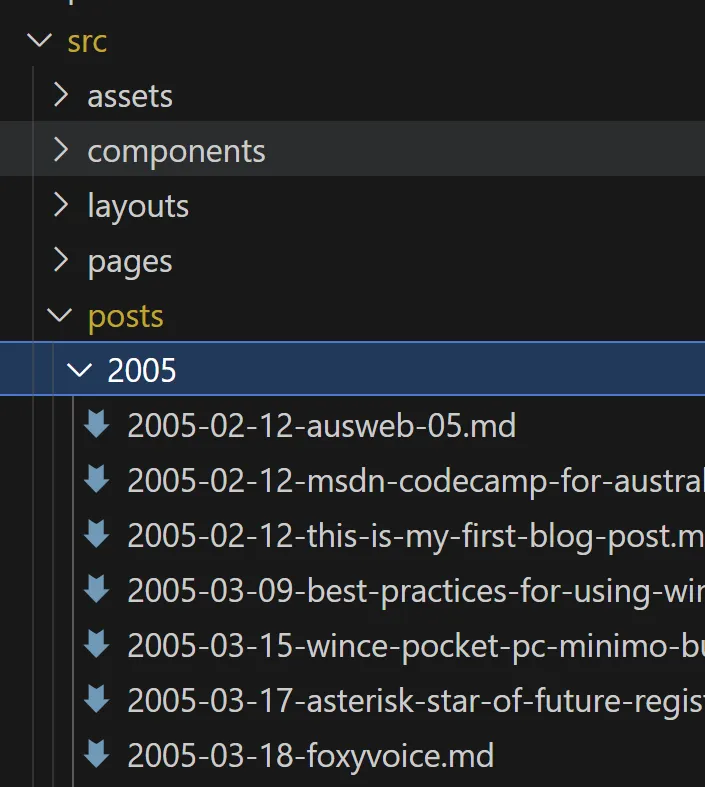
&lt;p&gt;The convention I adopted is that all blog posts will live under &lt;code&gt;src/posts&lt;/code&gt;. There&apos;s a subdirectory for each year, and then each individual post&apos;s filename includes the date (which means they end up being sorted in date order).&lt;/p&gt;
&lt;p&gt;&lt;img src=&quot;https://david.gardiner.net.au/_astro/blog-post-directories.KNl8zvbC_21cGJm.webp&quot; alt=&quot;Screenshot of posts directory structure&quot; /&gt;&lt;/p&gt;
&lt;p&gt;One of the core concepts of Astro is the idea of &lt;a href=&quot;https://docs.astro.build/en/guides/content-collections/&quot;&gt;content collections&lt;/a&gt;. Rather than creating individual custom pages for every post, you can create logical sets of content, and in turn those collections can be queried as part of generating web pages.&lt;/p&gt;
&lt;p&gt;Content collections are defined in &lt;a href=&quot;https://github.com/flcdrg/astro-blog-engine/blob/main/src/content.config.ts&quot;&gt;&lt;code&gt;src/content.config.ts&lt;/code&gt;&lt;/a&gt;&lt;/p&gt;
&lt;p&gt;In my case, I need a content collection which includes all the blog posts. Astro has a &lt;code&gt;glob&lt;/code&gt; loader that can match files which is just the ticket.&lt;/p&gt;
&lt;pre&gt;&lt;code&gt;import { glob } from &quot;astro/loaders&quot;;
import { defineCollection, z } from &quot;astro:content&quot;;
import { DateTime } from &quot;luxon&quot;;

const blog = defineCollection({
  type: &quot;content_layer&quot;,
  loader: glob({ 
    pattern: &quot;**/*.{md,mdx}&quot;, 
    base: &quot;./src/posts&quot;,
    generateId: ({ entry, data }) =&amp;gt; {
      const date = DateTime.fromISO(data.date as string, { setZone: true });

      const id = entry.substring(16);
      const slug = `${date.toFormat(&quot;yyyy&quot;)}/${date.toFormat(&quot;MM&quot;)}/${id}`;

      return slug.replace(/\.mdx?$/, &apos;&apos;);
    },
  }),
  schema: ({ image }) =&amp;gt;
    z.object({
      date: z.string().datetime({ offset: true }),
      title: z.string(),
      draft: z.boolean().optional().default(false),
      tags: z.array(z.string()).default([&quot;others&quot;]),
      image: image().optional(),
      imageAlt: z.string().optional(),
      description: z.string().optional(),
    }),
});

export const collections = { blog };
&lt;/code&gt;&lt;/pre&gt;
&lt;p&gt;I also need to take into account that while the source path of a post might be &lt;code&gt;src/posts/2025/2025-05-13-bbs.md&lt;/code&gt;, the final URL relative URL for that page should be &lt;code&gt;/2025/05/bbs&lt;/code&gt;. That&apos;s the reason for the custom &lt;code&gt;generateId&lt;/code&gt; function.&lt;/p&gt;
&lt;p&gt;The schema allows me to define some additional frontmatter properties, that I&apos;ll take advantage of if present when rendering the pages.&lt;/p&gt;
</content>
    <media:thumbnail url="https://david.gardiner.net.au/_astro/astro-logo-dark.Cy5TuUje.png" width="920" height="320"/>
    <media:content medium="image" url="https://david.gardiner.net.au/_astro/astro-logo-dark.Cy5TuUje.png" width="920" height="320"/>
  </entry>
  <entry>
    <id>https://david.gardiner.net.au/2025/06/migrating-to-astro-separation</id>
    <updated>2025-06-03T08:00:00.000+09:30</updated>
    <title>Migrating my blog to Astro - Separation of code and data</title>
    <link href="https://david.gardiner.net.au/2025/06/migrating-to-astro-separation" rel="alternate" type="text/html" title="Migrating my blog to Astro - Separation of code and data"/>
    <category term="Blogging"/>
    <published>2025-06-03T08:00:00.000+09:30</published>
    <summary type="html">I want to keep my primary blog repository on GitHub private, but still make the Astro scripts
and structure public.</summary>
    <content type="html">&lt;p&gt;&lt;em&gt;This is part of a &lt;a href=&quot;/2025/06/migrating-from-jekyll-to-astro#other-posts-in-this-series&quot;&gt;series of posts&lt;/a&gt; on how I migrated my blog to Astro&lt;/em&gt;&lt;/p&gt;
&lt;p&gt;&lt;img src=&quot;https://david.gardiner.net.au/_astro/astro-logo-dark.Cy5TuUje_keRSU.webp&quot; alt=&quot;Astro logo&quot; /&gt;&lt;/p&gt;
&lt;p&gt;Since I moved my blog from Blogger to GitHub, all the content and Jekyll files have lived in the same Git repository. Initially the GitHub repository was public, but then I realised that sometimes when you&apos;re drafting future posts, you want them to stay private until the appropriate time. True, this is a rare thing, but it&apos;s better to be safe.&lt;/p&gt;
&lt;p&gt;On the other hand, I really like the concept of open source software. The main way I learned how to use Astro was looking at other people&apos;s efforts on GitHub. If I can &apos;give back&apos; to the community in the same way then I would like to do that.&lt;/p&gt;
&lt;p&gt;It took a bit of thinking on best to do this. Git submodules wouldn&apos;t work as they assume that it&apos;s a specific subdirectory that points to a different repository.&lt;/p&gt;
&lt;p&gt;What I ended up with was this:&lt;/p&gt;

&lt;ul&gt;
&lt;li&gt;&lt;a href=&quot;https://github.com/flcdrg/astro-blog-engine&quot;&gt;https://github.com/flcdrg/astro-blog-engine&lt;/a&gt; is the public repository for my Astro-based blog engine. It defines the structure and contains all the Astro pages and scripts that are also used by the private repo.&lt;/li&gt;
&lt;li&gt;github.&lt;a&gt;&lt;/a&gt;com/flcdrg/blog is the private repository. It was based on &lt;a href=&quot;https://github.com/barryclark/jekyll-now&quot;&gt;https://github.com/barryclark/jekyll-now&lt;/a&gt; which I forked back in 2019, though there&apos;s history there going back to 2014.&lt;/li&gt;
&lt;/ul&gt;
&lt;p&gt;However, if you look at &lt;a href=&quot;https://github.com/flcdrg/astro-blog-engine&quot;&gt;https://github.com/flcdrg/astro-blog-engine&lt;/a&gt;, the Git history only goes back to 1st February (as part of completing the Astro tutorial). So it&apos;s completely unrelated to github.&lt;a&gt;&lt;/a&gt;com/flcdrg/blog. So how&apos;s that going to work?&lt;/p&gt;
&lt;p&gt;What I did was tell git to allow me to merge changes from astro-blog-engine, even though their histories were unrelated by doing this:&lt;/p&gt;
&lt;pre&gt;&lt;code&gt;git pull --strategy-option=ours astro-blog-engine main --allow-unrelated-histories
&lt;/code&gt;&lt;/pre&gt;
&lt;p&gt;Now, every time I have enhancements or updates that I&apos;ve tested in astro-blog-engine, I follow these steps in the blog repo:&lt;/p&gt;
&lt;pre&gt;&lt;code&gt;git fetch astro-blog-engine
git checkout -b updates-from-astro-blog-engine
git pull astro-blog-engine main
git push
&lt;/code&gt;&lt;/pre&gt;
&lt;p&gt;Then create a pull request and merge the changes in.&lt;/p&gt;
&lt;p&gt;As long as I am careful to only make code/structural changes in the public repo and the merge them into the private repo, everything should be fine and I shouldn&apos;t encounter any conflicts.&lt;/p&gt;
&lt;p&gt;The second advantage of maintaining the core functionality in a different repository is that it is much quicker to test out changes. I have somehow accumulated over 1,000 posts, and that can take a few seconds (or sometimes minutes) to process.&lt;/p&gt;
&lt;p&gt;To allow me to try out changes quickly without waiting for my full blog to rebuild, I&apos;ve copied over just a few of the recent blog posts to the public repo. It&apos;s enough to validate that everything works and there&apos;s no regressions when updating a package or tweaking the TypeScript or layout.&lt;/p&gt;
</content>
    <media:thumbnail url="https://david.gardiner.net.au/_astro/astro-logo-dark.Cy5TuUje.png" width="920" height="320"/>
    <media:content medium="image" url="https://david.gardiner.net.au/_astro/astro-logo-dark.Cy5TuUje.png" width="920" height="320"/>
  </entry>
</feed>