<?xml version="1.0" encoding="UTF-8"?>
<feed xmlns="http://www.w3.org/2005/Atom" xml:lang="en-AU">
  <id>https://david.gardiner.net.au/tags/Excel.xml</id>
  <title type="html">David Gardiner - Excel</title>
  <updated>2026-04-15T00:26:29.228Z</updated>
  <subtitle>Blog posts tagged with &apos;Excel&apos; - A blog of software development, .NET and other interesting things</subtitle>
  <rights>Copyright 2026 David Gardiner</rights>
  <icon>https://www.gravatar.com/avatar/37edf2567185071646d62ba28b868fab?s=64</icon>
  <logo>https://www.gravatar.com/avatar/37edf2567185071646d62ba28b868fab?s=256</logo>
  <generator uri="https://github.com/flcdrg/astrojs-atom" version="3">astrojs-atom</generator>
  <author>
    <name>David Gardiner</name>
  </author>
  <link href="https://david.gardiner.net.au/tags/Excel.xml" rel="self" type="application/atom+xml"/>
  <link href="https://david.gardiner.net.au/tags/Excel" rel="alternate" type="text/html" hreflang="en-AU"/>
  <category term="Excel"/>
  <category term="Software Development"/>
  <entry>
    <id>https://david.gardiner.net.au/2017/10/conditionally-format-rows-in-excel</id>
    <updated>2017-10-17T10:55:00.001+10:30</updated>
    <title>Conditionally format rows in Excel depending on date range</title>
    <link href="https://david.gardiner.net.au/2017/10/conditionally-format-rows-in-excel" rel="alternate" type="text/html" title="Conditionally format rows in Excel depending on date range"/>
    <category term="Excel"/>
    <published>2017-10-17T10:55:00.001+10:30</published>
    <summary type="html">Sometimes I get asked Excel questions. This is one of those times! Given a spreadsheet with rows that contain a start and finish date, format the rows in the past, present and future in different colours, so that it looks like this:</summary>
    <content type="html">&lt;p&gt;Sometimes I get asked Excel questions. This is one of those times!&lt;/p&gt;
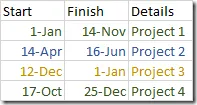
&lt;p&gt;Given a spreadsheet with rows that contain a start and finish date, format the rows in the past, present and future in different colours, so that it looks like this:&lt;/p&gt;
&lt;p&gt;&lt;img src=&quot;https://david.gardiner.net.au/_astro/rows-different-colours.B4th9dbc_YbK3O.webp&quot; alt=&quot;Spreadsheet showing rows with different colours&quot; /&gt;&lt;/p&gt;
&lt;p&gt;I initially tried using a formula with Excel’s Conditional Formatting feature. Despite this being the recommended solution in some search results, I just found it set the one format for all the rows – not what I wanted. &lt;a href=&quot;https://www.clounce.com/office/highlight-a-set-of-rows-in-excel-based-on-date-range&quot;&gt;This post by Joseph D’Emanuele&lt;/a&gt; put me on the right track.&lt;/p&gt;
&lt;p&gt;Here’s what I ended up doing:&lt;/p&gt;
&lt;ol&gt;
&lt;li&gt;Add a new column next to your existing data
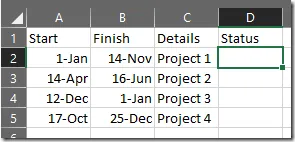
 &lt;img src=&quot;https://david.gardiner.net.au/_astro/extra-status-column.D-ZYrHlX_Z2qU5iK.webp&quot; alt=&quot;Spreadsheet with extra Status column added&quot; /&gt;&lt;/li&gt;
&lt;li&gt;In the first cell of this new column, insert the formula
 &lt;strong&gt;&lt;code&gt;=IF(B2 &amp;lt; TODAY(), &quot;Past&quot;, IF(A2 &amp;gt; TODAY(), &quot;Future&quot;, &quot;Current&quot;))&lt;/code&gt;&lt;/strong&gt;&lt;/li&gt;
&lt;li&gt;Copy this formula down to the remaining rows. eg.
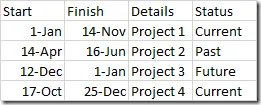
 &lt;img src=&quot;https://david.gardiner.net.au/_astro/status-column-populated.Dh5g_C1O_1odB0E.webp&quot; alt=&quot;Spreadsheet with Status column populated&quot; /&gt;&lt;/li&gt;
&lt;li&gt;Now select all the rows you want to format (for me that’s A2:D5)&lt;/li&gt;
&lt;li&gt;On the &lt;strong&gt;Home&lt;/strong&gt; menu tab, select &lt;strong&gt;Conditional Formatting&lt;/strong&gt;, then &lt;strong&gt;Manage Rules&lt;/strong&gt;&lt;/li&gt;
&lt;li&gt;You will add 3 rules – one for each status.&lt;/li&gt;
&lt;li&gt;Click &lt;strong&gt;New Rule&lt;/strong&gt;&lt;/li&gt;
&lt;li&gt;Select &lt;strong&gt;Use a formula to determine which cells to format&lt;/strong&gt;&lt;/li&gt;
&lt;li&gt;In &lt;strong&gt;Format values where this formula is true&lt;/strong&gt;, enter &lt;strong&gt;=INDIRECT(&quot;D&quot; &amp;amp;ROW()) = &quot;Future&quot;&lt;/strong&gt;&lt;/li&gt;
&lt;li&gt;Click &lt;strong&gt;Format&lt;/strong&gt; and choose the desired formatting to apply for Future dates&lt;/li&gt;
&lt;li&gt;Click &lt;strong&gt;OK&lt;/strong&gt; and repeat adding new rules for “Current” and “Past”&lt;/li&gt;
&lt;li&gt;You should end up with something like this:
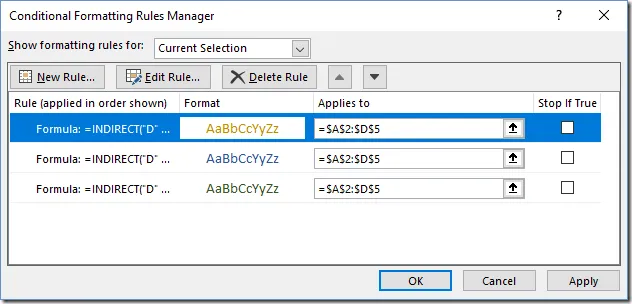
&lt;img src=&quot;https://david.gardiner.net.au/_astro/conditional-formatting-dialog.Cmspvd8r_1jhqUS.webp&quot; alt=&quot;Excel&apos;s Conditional Formatting Rules Manager dialog box&quot; /&gt;&lt;/li&gt;
&lt;li&gt;Click &lt;strong&gt;OK&lt;/strong&gt; and you should have rows formatted different colours depending on whether the start/finish date is in the past, current or in the future!&lt;/li&gt;
&lt;li&gt;You can optionally choose to hide the Status row if you’d rather not see it all the time.&lt;/li&gt;
&lt;/ol&gt;
&lt;p&gt;Note that the formula in the conditional formatting (=INDIRECT(&quot;D&quot; &amp;amp;ROW()) = &quot;Future&quot;) is hard-coded to the column – “D” in my case. If you move data around, you’ll need to update this to refer to the new column letter.&lt;/p&gt;
</content>
  </entry>
  <entry>
    <id>https://david.gardiner.net.au/2010/09/conditional-text-in-excel-when-range</id>
    <updated>2010-09-21T17:29:00.001+09:30</updated>
    <title>Conditional text in Excel when a range has a value</title>
    <link href="https://david.gardiner.net.au/2010/09/conditional-text-in-excel-when-range" rel="alternate" type="text/html" title="Conditional text in Excel when a range has a value"/>
    <category term="Excel"/>
    <published>2010-09-21T17:29:00.001+09:30</published>
    <summary type="html">Unusually busy on the Excel helpdesk today – Jane&apos;s follow-up question was how to do the same thing with a range of cells. eg.  My initial suggestion was to use COUNTIF(range, criteria) where the criteria is &quot;*&quot;, but it turns out there&apos;s a better answer – COUNTA(range) which counts the number of cells in the range with are non-empty. So the formula becomes: =IF(COUNTA(B3:C3), &quot;Y&quot;, &quot;N&quot;)</summary>
    <content type="html">&lt;p&gt;Unusually busy on the Excel helpdesk today – Jane&apos;s follow-up question was &lt;a href=&quot;/2010/09/conditional-text-in-excel-when-cell-has&quot;&gt;how to do the same thing&lt;/a&gt; with a range of cells. eg.&lt;/p&gt;
&lt;p&gt;&lt;img src=&quot;../../assets/2010/09/image%5B2%5D.png&quot; alt=&quot;image&quot; /&gt;&lt;/p&gt;
&lt;p&gt;My initial suggestion was to use &lt;a href=&quot;https://support.microsoft.com/en-us/excel?legRedir=true&quot;&gt;COUNTIF(range, criteria)&lt;/a&gt; where the criteria is &quot;*&quot;, but it turns out there&apos;s a better answer – &lt;a href=&quot;https://support.microsoft.com/en-us/excel?legRedir=true&quot;&gt;COUNTA(range)&lt;/a&gt; which counts the number of cells in the range with are non-empty. So the formula becomes:&lt;/p&gt;
&lt;p&gt;&lt;code&gt;=IF(COUNTA(B3:C3), &quot;Y&quot;, &quot;N&quot;)&lt;/code&gt;&lt;/p&gt;
&lt;p&gt;If you wanted to do the inverse and only return &quot;Y&quot; if all values in the range are blank, then &lt;a href=&quot;https://support.microsoft.com/en-us/excel?legRedir=true&quot;&gt;COUNTBLANK(range)&lt;/a&gt; will do the job. Also check out &lt;a href=&quot;https://web.archive.org/web/20130608205835/http://support.microsoft.com:80/kb/274537/en-au&quot;&gt;KB 274537&lt;/a&gt; for details on some scenarios when COUNTBLANK doesn&apos;t work so well.&lt;/p&gt;
</content>
  </entry>
  <entry>
    <id>https://david.gardiner.net.au/2010/09/conditional-text-in-excel-when-cell-has</id>
    <updated>2010-09-21T11:17:00.001+09:30</updated>
    <title>Conditional text in Excel when a cell has a value</title>
    <link href="https://david.gardiner.net.au/2010/09/conditional-text-in-excel-when-cell-has" rel="alternate" type="text/html" title="Conditional text in Excel when a cell has a value"/>
    <category term="Excel"/>
    <published>2010-09-21T11:17:00.001+09:30</published>
    <summary type="html">This might seem trivial to us &apos;developer&apos; types, but it was today&apos;s &quot;Jane&apos;s Excel question&quot;. You have one or more cells in a spread sheet. You want to display some text &quot;Y&quot; or &quot;N&quot; depending on whether the cell has anything in it. eg.  One solution is to use this formula: =IF(LEN(B3)&amp;gt;0, &quot;Y&quot;, &quot;N&quot;) This checks the length of the text in the cell. An empty cell will have a length of zero. Anything greater than zero means the cell has something in it. …</summary>
    <content type="html">&lt;p&gt;This might seem trivial to us &apos;developer&apos; types, but it was today&apos;s &quot;Jane&apos;s Excel question&quot;.&lt;/p&gt;
&lt;p&gt;You have one or more cells in a spread sheet. You want to display some text &quot;Y&quot; or &quot;N&quot; depending on whether the cell has anything in it. eg.&lt;/p&gt;
&lt;p&gt;&lt;img src=&quot;../../assets/2010/09/image%5B2%5D.png&quot; alt=&quot;image&quot; /&gt;&lt;/p&gt;
&lt;p&gt;One solution is to use this formula:&lt;/p&gt;
&lt;p&gt;&lt;code&gt;=IF(LEN(B3)&amp;gt;0, &quot;Y&quot;, &quot;N&quot;)&lt;/code&gt;&lt;/p&gt;
&lt;p&gt;This checks the length of the text in the cell. An empty cell will have a length of zero. Anything greater than zero means the cell has something in it.&lt;/p&gt;
</content>
  </entry>
  <entry>
    <id>https://david.gardiner.net.au/2010/09/book-ordering-from-borders</id>
    <updated>2010-09-14T11:40:00.001+09:30</updated>
    <title>Book ordering from Borders</title>
    <link href="https://david.gardiner.net.au/2010/09/book-ordering-from-borders" rel="alternate" type="text/html" title="Book ordering from Borders"/>
    <category term="Excel"/>
    <category term="Books"/>
    <published>2010-09-14T11:40:00.001+09:30</published>
    <summary type="html">I was looking for a book on learning about Excel pivot tables to give as a gift recently (makes a change from chocolates or a gift voucher – I know!) I found Pivot Table Data Crunching For Microsoft Office Excel 2007 on Amazon for $AU37.14 (25.93 + 11.21P&amp;amp;P). Figuring it would be quicker to get it from a real bookshop, I dropped into the Adelaide Borders bookshop, but they didn&apos;t have it on the shelf 😢</summary>
    <content type="html">&lt;p&gt;I was looking for a book on learning about Excel pivot tables to give as a gift recently (makes a change from chocolates or a gift voucher – I know!) I found &lt;a href=&quot;https://www.amazon.com/Pivot-Table-Crunching-Microsoft-Office/dp/0789736012?ie=UTF8&amp;amp;tag=davesdayd-20&amp;amp;link_code=btl&amp;amp;camp=213689&amp;amp;creative=392969&quot;&gt;Pivot Table Data Crunching For Microsoft Office Excel 2007&lt;/a&gt; on Amazon for $AU37.14 (25.93 + 11.21P&amp;amp;P).&lt;/p&gt;
&lt;p&gt;Figuring it would be quicker to get it from a real bookshop, I dropped into the Adelaide Borders bookshop, but they didn&apos;t have it on the shelf 😢&lt;/p&gt;
&lt;p&gt;I then tried the &lt;a href=&quot;http://www.borders.com.au/book/pivot-table-data-crunching-for-microsoft-office-excel-2007/731296/&quot;&gt;Borders website&lt;/a&gt; - their online price for the same book is just $AU35.95, and they also happen to have an online price guarantee that they&apos;ll beat Amazon&apos;s standard price + shipping (not required in this case).&lt;/p&gt;
&lt;p&gt;It would have been interesting to compare Borders online price to in-store price to see if they were the same. In any case, I ordered from them so we&apos;ll see how quickly they deliver.&lt;/p&gt;
&lt;p&gt;This all does make me wonder with the advent of &lt;a href=&quot;https://www.amazon.com/Kindle-Wireless-Reader-3G-Wifi-Graphite/dp/B002FQJT3Q?ie=UTF8&amp;amp;tag=davesdayd-20&amp;amp;link_code=btl&amp;amp;camp=213689&amp;amp;creative=392969&quot;&gt;Kindle&lt;/a&gt; eBook readers and downloadable movies what the future is for traditional book shops and video rental stores. Not particularly bright I suspect.&lt;/p&gt;
&lt;p&gt;&lt;em&gt;Update 3pm&lt;/em&gt;&lt;/p&gt;
&lt;p&gt;BenMc suggested I have a look at &lt;a href=&quot;https://web.archive.org/web/20140408025307/https://www.bookdepository.co.uk/&quot;&gt;The Book Depository&lt;/a&gt;. They have the &lt;a href=&quot;http://www.bookdepository.co.uk/book/9780789736017/Pivot-Table-Data-Crunching-for-Microsoft-Office-Excel-2007&quot;&gt;same book&lt;/a&gt; for $AU25.33 with free shipping. Might try them next time!&lt;/p&gt;
</content>
  </entry>
  <entry>
    <id>https://david.gardiner.net.au/2010/05/bad-old-days-of-vba-and-opening-word</id>
    <updated>2010-05-27T09:23:00.001+09:30</updated>
    <title>The bad old days of VBA, and opening Word from Excel</title>
    <link href="https://david.gardiner.net.au/2010/05/bad-old-days-of-vba-and-opening-word" rel="alternate" type="text/html" title="The bad old days of VBA, and opening Word from Excel"/>
    <category term="Excel"/>
    <published>2010-05-27T09:23:00.001+09:30</published>
    <summary type="html">You tend to forget how good Visual Studio has become as a development environment, until you jump back into something like writing VBA macros in Excel. This is pretty much a VB6 environment, but maybe it&apos;s just my memory but I didn&apos;t think VB6 was as bad as VBA is. Even more amazing is that if you open up Excel 2010 and click on the Visual Basic icon in the Developer tab, nothing has changed. There&apos;s good old VBA in all its glory.</summary>
    <content type="html">&lt;p&gt;You tend to forget how good Visual Studio has become as a development environment, until you jump back into something like writing VBA macros in Excel.&lt;/p&gt;
&lt;p&gt;This is pretty much a VB6 environment, but maybe it&apos;s just my memory but I didn&apos;t think VB6 was as bad as VBA is. Even more amazing is that if you open up Excel 2010 and click on the Visual Basic icon in the Developer tab, nothing has changed. There&apos;s good old &lt;a href=&quot;https://learn.microsoft.com/previous-versions/office/developer/office-2010/ee814737(v=office.14)&quot;&gt;VBA in all its glory&lt;/a&gt;.&lt;/p&gt;
&lt;p&gt;Sure, you can use .NET with Excel, but only to &lt;a href=&quot;https://web.archive.org/web/20130608155249/http://support.microsoft.com/kb/302901/EN-US&quot;&gt;write add-ins&lt;/a&gt;. These are installed separately, so you can&apos;t just send a spreadsheet off to a colleague and expect it to work if they don&apos;t also have the add-in installed. Another option would be to write a &lt;a href=&quot;https://learn.microsoft.com/previous-versions/office/developer/office-2003/aa168292(v=office.11)&quot;&gt;full-blown .NET application that used COM Interop&lt;/a&gt; to call out to Word and Excel.&lt;/p&gt;
&lt;p&gt;So what lead me to be messing around in VBA? The scenario involves aggregating data from a large number of spreadsheets into a single Word document. If you&apos;re thinking this sounds like something better handled with SharePoint or an intranet web application, you&apos;d be right. Probably the &quot;.NET application with COM Interop&quot; would also have been a better choice,  but for now resource constraints meant that the &quot;improvised&quot; solution was the best that could be done, and as a proof of concept it appears to be doing the job.&lt;/p&gt;
&lt;p&gt;Just to be clear, this isn&apos;t for a LobsterPot client, rather I&apos;m just helping out a friend. The particular problem I was asked to advise on was that the Excel VBA code was launching Word, but Word would be opened in the background. The request was to make the new Word document appear in front of Excel so that the end-user could more easily see it. Sure, they could Alt-Tab or click on the Windows task bar to bring it into focus, but anything you can do to make things easier and more obvious for users is usually a good thing.&lt;/p&gt;
&lt;p&gt;The original code opened Word like this:&lt;/p&gt;
&lt;p&gt;`&lt;/p&gt;
&lt;p&gt;Dim wordApplication&lt;/p&gt;
&lt;p&gt;Set wordApplication = CreateObject(&quot;Word.Application&quot;)&lt;/p&gt;
&lt;p&gt;`&lt;/p&gt;
&lt;p&gt;This works fine, but Excel (where the VBA code is running from) stays in the foreground. Adding one extra line to the code solves the problem:&lt;/p&gt;
&lt;p&gt;`&lt;/p&gt;
&lt;p&gt;Dim wordApplication&lt;/p&gt;
&lt;p&gt;Set wordApplication = CreateObject(&quot;Word.Application&quot;)&lt;/p&gt;
&lt;p&gt;Application.ActivateMicrosoftApp xlMicrosoftWord&lt;/p&gt;
&lt;p&gt;`&lt;/p&gt;
&lt;p&gt;The call to &lt;a href=&quot;https://learn.microsoft.com/previous-versions/office/developer/office-2003/aa221684(v=office.11)&quot;&gt;ActivateMicrosoftApp&lt;/a&gt; does the trick. One trap to be aware of is calling that method before CreateObject. That does work, but it results in &lt;strong&gt;2&lt;/strong&gt; instances of Word opening, which is usually not desirable.&lt;/p&gt;
</content>
  </entry>
  <entry>
    <id>https://david.gardiner.net.au/2008/05/converting-minutes-from-midnight</id>
    <updated>2008-05-07T16:31:00.001+09:30</updated>
    <title>Converting minutes from midnight</title>
    <link href="https://david.gardiner.net.au/2008/05/converting-minutes-from-midnight" rel="alternate" type="text/html" title="Converting minutes from midnight"/>
    <category term="Excel"/>
    <published>2008-05-07T16:31:00.001+09:30</published>
    <summary type="html">Jane asked me how to convert &quot;minutes from midnight&quot; into hours and minutes in Excel. Turns out the TIME() function can do this for you. Say you have 585 minutes. Use it like this: =TIME(0, 585, 0) Then format the cell for time, eg. &quot;h:mm&quot;, and you get &quot;9:45 AM&quot; Just what the doctor ordered! Before you ask, no I&apos;m not an Excel expert, but I am pretty good at knowing where to find the answer most of the time.</summary>
    <content type="html">&lt;p&gt;Jane asked me how to convert &quot;minutes from midnight&quot; into hours and minutes in Excel.&lt;/p&gt;
&lt;p&gt;Turns out the &lt;a href=&quot;https://www.microsoft.com/en-us/microsoft-365/excel/?legRedir=true&quot;&gt;TIME&lt;/a&gt;() function can do this for you.&lt;/p&gt;
&lt;p&gt;Say you have 585 minutes. Use it like this:&lt;/p&gt;
&lt;p&gt;=TIME(0, 585, 0)&lt;/p&gt;
&lt;p&gt;Then format the cell for time, eg. &quot;h:mm&quot;, and you get&lt;/p&gt;
&lt;p&gt;&quot;9:45 AM&quot;&lt;/p&gt;
&lt;p&gt;Just what the doctor ordered!&lt;/p&gt;
&lt;p&gt;Before you ask, no I&apos;m not an Excel expert, but I am pretty good at knowing where to find the answer most of the time.&lt;/p&gt;
</content>
  </entry>
</feed>