<?xml version="1.0" encoding="UTF-8"?>
<feed xmlns="http://www.w3.org/2005/Atom" xml:lang="en-AU" xmlns:media="http://search.yahoo.com/mrss/">
  <id>https://david.gardiner.net.au/tags/GitHub.xml</id>
  <title type="html">David Gardiner - GitHub</title>
  <updated>2026-04-15T00:26:29.542Z</updated>
  <subtitle>Blog posts tagged with &apos;GitHub&apos; - A blog of software development, .NET and other interesting things</subtitle>
  <rights>Copyright 2026 David Gardiner</rights>
  <icon>https://www.gravatar.com/avatar/37edf2567185071646d62ba28b868fab?s=64</icon>
  <logo>https://www.gravatar.com/avatar/37edf2567185071646d62ba28b868fab?s=256</logo>
  <generator uri="https://github.com/flcdrg/astrojs-atom" version="3">astrojs-atom</generator>
  <author>
    <name>David Gardiner</name>
  </author>
  <link href="https://david.gardiner.net.au/tags/GitHub.xml" rel="self" type="application/atom+xml"/>
  <link href="https://david.gardiner.net.au/tags/GitHub" rel="alternate" type="text/html" hreflang="en-AU"/>
  <category term="GitHub"/>
  <category term="Software Development"/>
  <entry>
    <id>https://david.gardiner.net.au/2026/03/delete-github-action-artifacts</id>
    <updated>2026-03-21T16:00:00.000+10:30</updated>
    <title>Delete old GitHub Actions artifacts with PowerShell</title>
    <link href="https://david.gardiner.net.au/2026/03/delete-github-action-artifacts" rel="alternate" type="text/html" title="Delete old GitHub Actions artifacts with PowerShell"/>
    <category term="GitHub"/>
    <category term="PowerShell"/>
    <published>2026-03-21T16:00:00.000+10:30</published>
    <summary type="html">My GitHub Actions artifact usage was nearing the maximum quota for the month, so I needed a script to delete old artifacts</summary>
    <content type="html">&lt;p&gt;I received an email from GitHub overnight saying:&lt;/p&gt;
&lt;blockquote&gt;
&lt;p&gt;You have used 90% of the Actions storage included for the flcdrg account&lt;/p&gt;
&lt;p&gt;Your plan includes 2 GB of Actions storage per month at no extra cost. You have used 90% so far this billing cycle. 1.8 GB used / 2 GB included&lt;/p&gt;
&lt;/blockquote&gt;
&lt;p&gt;Oh dear, that&apos;s not good. Time for some Spring (or Autumn as it is in Australia) cleaning!&lt;/p&gt;
&lt;p&gt;I found a useful post by &lt;a href=&quot;https://www.eliostruyf.com&quot;&gt;Elio Struyf&lt;/a&gt; - &lt;a href=&quot;https://www.eliostruyf.com/clean-github-actions-artifacts-script/&quot;&gt;Clean up old GitHub Actions artifacts with a script&lt;/a&gt;, which contains a Bash script to delete old artifacts. PowerShell is my preferred scripting language so I first asked Copilot to convert the Bash script to PowerShell.&lt;/p&gt;
&lt;p&gt;I then ran it on some repositories that I new had lots of artifacts, but noticed that the paging was not working quite right, and that it was skipping artifacts if it couldn&apos;t parse the date field.&lt;/p&gt;
&lt;p&gt;I made two changes:&lt;/p&gt;
&lt;ol&gt;
&lt;li&gt;Read all the data in one go using the &lt;code&gt;--paginate --slurp&lt;/code&gt; parameters. This solves the problem that I think was happening when you read a page of results, then deleted them, and then asked the API for the next page, but the counts would now be out due to the deleted items.&lt;/li&gt;
&lt;li&gt;Ensure the date string is parsed using US date format (as it was defaulting to Australian format and then getting confused with dates that didn&apos;t make sense)&lt;/li&gt;
&lt;/ol&gt;
&lt;p&gt;Here&apos;s the final script:&lt;/p&gt;
&lt;pre&gt;&lt;code&gt;param(
    [Parameter(Position = 0)]
    [string]$Repo,

    [Parameter(Position = 1)]
    [int]$DaysOld = 5
)

if (-not (Get-Command gh -ErrorAction SilentlyContinue)) {
    Write-Error &quot;GitHub CLI (gh) is not installed or not available in PATH.&quot;
    exit 1
}

$null = gh auth status *&amp;gt; $null
if ($LASTEXITCODE -ne 0) {
    Write-Host &quot;Please authenticate with the GitHub CLI using &apos;gh auth login&apos;.&quot;
    exit 1
}

if ([string]::IsNullOrWhiteSpace($Repo)) {
    Write-Host &quot;Usage: .\delete-github-action-artifacts.ps1 &amp;lt;owner/repo&amp;gt; [days-old]&quot;
    Write-Host &quot;Example: .\delete-github-action-artifacts.ps1 owner/repo 5&quot;
    exit 1
}

Write-Host &quot;Cleaning up artifacts older than $DaysOld days for repository: $Repo&quot;

$pagesResponse = gh api --paginate --slurp -H &quot;Accept: application/vnd.github+json&quot; &quot;/repos/$Repo/actions/artifacts?per_page=100&quot; | ConvertFrom-Json
$allArtifacts = @()

foreach ($pageResponse in @($pagesResponse)) {
    if ($null -ne $pageResponse.artifacts) {
        $allArtifacts += @($pageResponse.artifacts)
    }
}

if (-not $allArtifacts -or $allArtifacts.Count -eq 0) {
    Write-Host &quot;No artifacts found.&quot;
}
else {
    foreach ($artifact in $allArtifacts) {
        $id = $artifact.id
        $name = $artifact.name
        $createdAt = $artifact.created_at

        if ($null -eq $id -or [string]::IsNullOrWhiteSpace($name) -or [string]::IsNullOrWhiteSpace($createdAt)) {
            $artifactJson = $artifact | ConvertTo-Json -Compress
            Write-Host &quot;Skipping invalid artifact data: $artifactJson&quot;
            continue
        }

        try {
            $createdAtUtc = [DateTimeOffset]::Parse($createdAt, [System.Globalization.CultureInfo]::InvariantCulture).UtcDateTime

            $ageDays = [int][Math]::Floor(([DateTime]::UtcNow - $createdAtUtc).TotalDays)

            if ($ageDays -gt $DaysOld) {
                Write-Host &quot;Deleting artifact: $name (ID: $id, Age: $ageDays days)&quot;
                $null = gh api -X DELETE &quot;/repos/$Repo/actions/artifacts/$id&quot; 2&amp;gt;$null

                if ($LASTEXITCODE -ne 0) {
                    Write-Host &quot;Failed to delete artifact: $name (ID: $id)&quot;
                }
            }
            else {
                Write-Host &quot;Keeping artifact: $name (ID: $id, Age: $ageDays days, Created At: $createdAt)&quot;
            }

        }
        catch {
            Write-Host &quot;Deleting artifact: $name (ID: $id, Created At: $createdAt)&quot;
            $null = gh api -X DELETE &quot;/repos/$Repo/actions/artifacts/$id&quot; 2&amp;gt;$null

            if ($LASTEXITCODE -ne 0) {
                Write-Host &quot;Failed to delete artifact: $name (ID: $id)&quot;
            }

        }

    }
}

Write-Host &quot;Cleanup completed.&quot;
&lt;/code&gt;&lt;/pre&gt;
&lt;p&gt;I&apos;ve also published it as a GitHub Gist at &lt;a href=&quot;https://gist.github.com/flcdrg/f204fc3f84247fe6247d654c0a673b73&quot;&gt;https://gist.github.com/flcdrg/f204fc3f84247fe6247d654c0a673b73&lt;/a&gt;&lt;/p&gt;
&lt;h2&gt;Prevention&lt;/h2&gt;
&lt;p&gt;The main cause of accumulating artifacts is by using the &lt;a href=&quot;https://github.com/marketplace/actions/upload-a-build-artifact&quot;&gt;&lt;code&gt;actions/upload-artifact&lt;/code&gt;&lt;/a&gt; action in GitHub Actions workflows. I&apos;ve now updated those actions to include the &lt;a href=&quot;https://github.com/marketplace/actions/upload-a-build-artifact#retention-period&quot;&gt;&lt;code&gt;retention-days&lt;/code&gt; property&lt;/a&gt; so that artifacts are automatically deleted after a few days.&lt;/p&gt;
&lt;p&gt;eg.&lt;/p&gt;
&lt;pre&gt;&lt;code&gt;      - name: Upload wrangler.jsonc
        uses: actions/upload-artifact@v7
        with:
          name: wrangler.jsonc
          path: wrangler.jsonc
          retention-days: 2
&lt;/code&gt;&lt;/pre&gt;
</content>
  </entry>
  <entry>
    <id>https://david.gardiner.net.au/2022/02/passed-az400</id>
    <updated>2022-02-23T19:30:00.000+10:30</updated>
    <title>Passed AZ-400</title>
    <link href="https://david.gardiner.net.au/2022/02/passed-az400" rel="alternate" type="text/html" title="Passed AZ-400"/>
    <category term="Azure"/>
    <category term="Azure DevOps"/>
    <category term="DevOps"/>
    <category term="GitHub"/>
    <category term="Training and Certification"/>
    <published>2022-02-23T19:30:00.000+10:30</published>
    <summary type="html">I&apos;m pleased to report that today I passed Microsoft exam AZ-400: Designing and Implementing Microsoft DevOps Solutions, which combined with AZ-201 that I took last year, now qualifies me for the Microsoft Certified: DevOps Engineer Expert certification.  View my verified achievement from Microsoft The exam is quite broad in the content it covers: Some areas I&apos;d been working with for quite a few years, but others were new to me. To help prepare I used a couple of resources: …</summary>
    <content type="html">&lt;p&gt;I&apos;m pleased to report that today I passed Microsoft exam &lt;a href=&quot;https://learn.microsoft.com/credentials/certifications/exams/az-400/?WT.mc_id=DOP-MVP-5001655&quot;&gt;AZ-400: Designing and Implementing Microsoft DevOps Solutions&lt;/a&gt;, which combined with &lt;a href=&quot;/2021/07/passed-az-204&quot;&gt;AZ-201 that I took last year&lt;/a&gt;, now qualifies me for the &lt;a href=&quot;https://learn.microsoft.com/credentials/certifications/devops-engineer/?WT.mc_id=DOP-MVP-5001655&quot;&gt;Microsoft Certified: DevOps Engineer Expert certification&lt;/a&gt;.&lt;/p&gt;
&lt;p&gt;&lt;a href=&quot;https://www.credly.com/badges/6f929582-8328-48d1-b65b-0dcd99fb7cd8/public_url&quot;&gt;&lt;img src=&quot;https://david.gardiner.net.au/_astro/microsoft-certified-devops-engineer-expert.DB_fO9io_2upomc.webp&quot; alt=&quot;Microsoft Certified: DevOps Engineer Expert badge&quot; /&gt;&lt;/a&gt;&lt;/p&gt;
&lt;p&gt;&lt;a href=&quot;https://www.credly.com/badges/6f929582-8328-48d1-b65b-0dcd99fb7cd8/public_url&quot;&gt;View my verified achievement from Microsoft&lt;/a&gt;&lt;/p&gt;
&lt;p&gt;The exam is quite broad in the content it covers:&lt;/p&gt;
&lt;ul&gt;
&lt;li&gt;Develop an instrumentation strategy (5-10%)&lt;/li&gt;
&lt;li&gt;Develop a Site Reliability Engineering (SRE) strategy (5-10%)&lt;/li&gt;
&lt;li&gt;Develop a security and compliance plan (10-15%)&lt;/li&gt;
&lt;li&gt;Manage source control (10-15%)&lt;/li&gt;
&lt;li&gt;Facilitate communication and collaboration (10-15%)&lt;/li&gt;
&lt;li&gt;Define and implement continuous integration (20-25%)&lt;/li&gt;
&lt;li&gt;Define and implement a continuous delivery and release management strategy (10-15%)&lt;/li&gt;
&lt;/ul&gt;
&lt;p&gt;Some areas I&apos;d been working with for quite a few years, but others were new to me. To help prepare I used a couple of resources:&lt;/p&gt;
&lt;ul&gt;
&lt;li&gt;&lt;a href=&quot;https://docs.microsoft.com/learn/certifications/exams/az-400?WT.mc_id=DOP-MVP-5001655#two-ways-to-prepare&quot;&gt;Microsoft Learn content&lt;/a&gt;&lt;/li&gt;
&lt;li&gt;&lt;a href=&quot;https://web.archive.org/web/20230522220903/https://www.pluralsight.com/paths/designing-and-implementing-microsoft-devops-solutions-az-400&quot;&gt;Pluralsight certification prep path&lt;/a&gt;&lt;/li&gt;
&lt;/ul&gt;
&lt;p&gt;Nice to get that one dusted.&lt;/p&gt;
</content>
    <media:thumbnail url="https://david.gardiner.net.au/_astro/microsoft-certified-devops-engineer-expert.DB_fO9io.png" width="300" height="300"/>
    <media:content medium="image" url="https://david.gardiner.net.au/_astro/microsoft-certified-devops-engineer-expert.DB_fO9io.png" width="300" height="300"/>
  </entry>
  <entry>
    <id>https://david.gardiner.net.au/2021/05/dependabot-nuget-lockfiles</id>
    <updated>2021-05-27T08:00:00.000+09:30</updated>
    <title>Using GitHub Actions to update packages.lock.json for Dependabot PRs</title>
    <link href="https://david.gardiner.net.au/2021/05/dependabot-nuget-lockfiles" rel="alternate" type="text/html" title="Using GitHub Actions to update packages.lock.json for Dependabot PRs"/>
    <category term="GitHub"/>
    <category term="GitHub Actions"/>
    <published>2021-05-27T08:00:00.000+09:30</published>
    <summary type="html">I like using Dependabot to keep my package dependencies up to date. But it does have one problem if you&apos;re using packages.lock.json files with NuGet packages - it doesn&apos;t update them. So your csproj will be modified but the packages.lock.json file won&apos;t, which can lead to broken failing.  Here&apos;s one approach to working around this. Hopefully GitHub will fix this properly in the future.</summary>
    <content type="html">
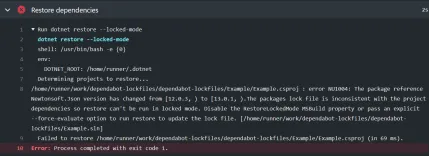
&lt;p&gt;I like using &lt;a href=&quot;https://docs.github.com/en/code-security/concepts/supply-chain-security/about-dependabot-version-updates&quot;&gt;Dependabot&lt;/a&gt; to keep my package dependencies up to date. But it does have one problem if you&apos;re using &lt;code&gt;packages.lock.json&lt;/code&gt; files with NuGet packages - &lt;a href=&quot;https://github.com/dependabot/dependabot-core/issues/1303&quot;&gt;it doesn&apos;t update them&lt;/a&gt;. So your csproj will be modified but the packages.lock.json file won&apos;t, which can lead to broken failing.&lt;/p&gt;
&lt;p&gt;&lt;img src=&quot;https://david.gardiner.net.au/_astro/github-lockfiles-error.ClTPmNnL_iplk6.webp&quot; alt=&quot;Build failure&quot; /&gt;&lt;/p&gt;
&lt;p&gt;Here&apos;s one approach to working around this. Hopefully GitHub will fix this properly in the future.&lt;/p&gt;
&lt;h2&gt;ChatOps&lt;/h2&gt;
&lt;p&gt;I&apos;m going to make use of Peter Evans&apos; &lt;a href=&quot;https://github.com/peter-evans/slash-command-dispatch&quot;&gt;Slash Command Dispatch&lt;/a&gt; GitHub Action to enable triggering by entering &lt;code&gt;/lockfiles&lt;/code&gt; as a comment on the pull request. This action is extensible and can be used to create all kinds of &apos;slash&apos; commands.&lt;/p&gt;
&lt;p&gt;First up, I created a new workflow that uses this action:&lt;/p&gt;
&lt;pre&gt;&lt;code&gt;name: Slash Command Dispatch
on:
  issue_comment:
    types: [created]
jobs:
  slashCommandDispatch:
    runs-on: ubuntu-latest
    steps:

      - uses: xt0rted/pull-request-comment-branch@v1
        id: comment-branch

      - name: Slash Command Dispatch
        uses: peter-evans/slash-command-dispatch@v2
        id: slash-command
        with:
          token: ${{ secrets.PAT_REPO_FULL }}
          commands: |
            lockfiles
          permission: write
          issue-type: pull-request
          dispatch-type: workflow
          static-args: ref=${{ steps.comment-branch.outputs.head_ref }}
&lt;/code&gt;&lt;/pre&gt;
&lt;p&gt;Things to note:&lt;/p&gt;
&lt;ul&gt;
&lt;li&gt;We&apos;re triggering on a new comment being added to a pull request&lt;/li&gt;
&lt;li&gt;We use &lt;a href=&quot;https://github.com/marketplace/actions/pull-request-comment-branch&quot;&gt;Pull Request Comment Branch&lt;/a&gt; Action to obtain the name of the branch that is linked to the pull request for the triggering comment.&lt;/li&gt;
&lt;li&gt;The &lt;code&gt;dispatch-type&lt;/code&gt; is set to &lt;code&gt;workflow&lt;/code&gt; as we want the secondary workflow to run against the pull request branch (not the default branch)&lt;/li&gt;
&lt;li&gt;We set the &lt;code&gt;ref&lt;/code&gt; argument to the branch name. This will be picked up by the second workflow.&lt;/li&gt;
&lt;/ul&gt;
&lt;p&gt;The second workflow is named &lt;code&gt;lockfiles-command.yml&lt;/code&gt;. It needs to follow the convention of &lt;em&gt;commandname&lt;/em&gt;-command.yml.&lt;/p&gt;
&lt;pre&gt;&lt;code&gt;name: Update lockfiles
on:
  workflow_dispatch:

jobs:
  lockfiles:
    runs-on: ubuntu-latest
    steps:

      - uses: actions/checkout@v2
        with:
          fetch-depth: 0
          token: ${{ secrets.PAT_REPO_FULL }}

      - name: Setup .NET 5
        uses: actions/setup-dotnet@v1
        with:
          dotnet-version: 5.0.x

      - name: Restore dependencies
        run: dotnet restore --force-evaluate

      - uses: stefanzweifel/git-auto-commit-action@v4
        with:
          commit_message: Update lockfiles
&lt;/code&gt;&lt;/pre&gt;
&lt;p&gt;Things to note:&lt;/p&gt;
&lt;ul&gt;
&lt;li&gt;This workflow uses the workflow_dispatch trigger.&lt;/li&gt;
&lt;li&gt;The checkout action notices that the ref value was set in the first workflow and so will checkout the pull request branch.&lt;/li&gt;
&lt;li&gt;We use the &lt;a href=&quot;https://github.com/marketplace/actions/git-auto-commit&quot;&gt;git-auto-commit&lt;/a&gt; Action to commit and push any changes made by the earlier &lt;code&gt;dotnet restore&lt;/code&gt; command.&lt;/li&gt;
&lt;/ul&gt;
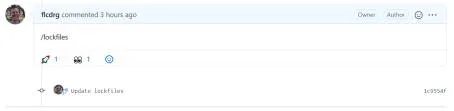
&lt;p&gt;To trigger the workflow, add a new comment to a pull request with &lt;code&gt;/lockfiles&lt;/code&gt;. eg.&lt;/p&gt;
&lt;p&gt;&lt;img src=&quot;https://david.gardiner.net.au/_astro/github-lockfiles-comment.Rx5sKxZp_Z1awAEB.webp&quot; alt=&quot;GitHub pull request comment&quot; /&gt;&lt;/p&gt;
&lt;p&gt;You can see a complete repo with example pull request over at &lt;a href=&quot;https://github.com/flcdrg/dependabot-lockfiles/pull/1&quot;&gt;https://github.com/flcdrg/dependabot-lockfiles/pull/1&lt;/a&gt;&lt;/p&gt;
&lt;h2&gt;Future ideas&lt;/h2&gt;
&lt;p&gt;It could be possible to have this workflow trigger automatically after Dependabot creates the pull request if you wanted to completely automate this approach, rather than needing to add the comment manually.&lt;/p&gt;
</content>
    <media:thumbnail url="https://david.gardiner.net.au/_astro/github-lockfiles-error.ClTPmNnL.png" width="429" height="156"/>
    <media:content medium="image" url="https://david.gardiner.net.au/_astro/github-lockfiles-error.ClTPmNnL.png" width="429" height="156"/>
  </entry>
  <entry>
    <id>https://david.gardiner.net.au/2021/01/holiday-learning</id>
    <updated>2021-01-07T16:00:00.000+10:30</updated>
    <title>Holiday learning</title>
    <link href="https://david.gardiner.net.au/2021/01/holiday-learning" rel="alternate" type="text/html" title="Holiday learning"/>
    <category term="Azure"/>
    <category term="GitHub"/>
    <category term="Training and Certification"/>
    <published>2021-01-07T16:00:00.000+10:30</published>
    <summary type="html">I&apos;m in the middle of 3 weeks of annual leave. It&apos;s great to just put work aside for a bit and take time to unwind. I&apos;ve been out walking, cycling, drying apricots and making apricot jam, catching up with friends and family, amongst other things. I thought I&apos;d use some of my time off get more familiar with Azure and GitHub and have been pleasantly surprised by the learning materials available over at docs.microsoft.com.</summary>
    <content type="html">&lt;p&gt;&lt;img src=&quot;https://david.gardiner.net.au/_astro/apricots-drying.DgUnN7-Q_Z1q0AU.webp&quot; alt=&quot;Apricots on trays drying in the sun&quot; /&gt; I&apos;m in the middle of 3 weeks of annual leave. It&apos;s great to just put work aside for a bit and take time to unwind. I&apos;ve been out walking, cycling, drying apricots and making apricot jam, catching up with friends and family, amongst other things.&lt;/p&gt;
&lt;p&gt;I thought I&apos;d use some of my time off get more familiar with Azure and GitHub and have been pleasantly surprised by the learning materials available over at &lt;a href=&quot;https://docs.microsoft.com&quot;&gt;docs.microsoft.com&lt;/a&gt;.&lt;/p&gt;
&lt;p&gt;Learning content is organised in modules - these are self-contained units of work. Modules might be grouped together in a &apos;Learning Path&apos;. Some content relates to specific Microsoft exams, so if you&apos;re interested in gaining a specific certification you can work back from the exam requirements to help ensure you&apos;ve covered all the areas.&lt;/p&gt;
&lt;p&gt;eg. To achieve the &lt;a href=&quot;https://learn.microsoft.com/credentials/certifications/devops-engineer/?WT.mc_id=AZ-MVP-5001655&quot;&gt;Microsoft Certified: DevOps Engineer Expert&lt;/a&gt; certification, after you&apos;ve achieved one of the associate pre-requisites, you then need to pass &lt;a href=&quot;https://learn.microsoft.com/credentials/certifications/exams/az-400/?WT.mc_id=AZ-MVP-5001655&quot;&gt;Exam AZ-400: Designing and Implementing Microsoft DevOps Solutions&lt;/a&gt;.&lt;/p&gt;
&lt;p&gt;One of the learning paths for this exam is &lt;a href=&quot;https://learn.microsoft.com/training/paths/az-400-manage-source-control/?WT.mc_id=AZ-MVP-5001655&quot;&gt;AZ-400: Manage source control&lt;/a&gt;.&lt;/p&gt;
&lt;p&gt;In that learning path is the module &lt;a href=&quot;https://learn.microsoft.com/training/modules/release-based-workflow-github/?WT.mc_id=AZ-MVP-5001655&quot;&gt;Manage software delivery by using a release based workflow on GitHub&lt;/a&gt;.&lt;/p&gt;
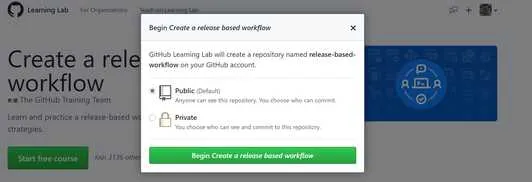
&lt;p&gt;The GitHub-related content usually has an overview and some introductory content. Then they include a practical exercise which actually uses GitHub. These are cleverly done by automatically cloning a repository into your own GitHub account, and then stepping you through using GitHub issues (and sometimes pull requests) with automated responses updating the issues or moving you to the next step once you&apos;ve performed the necessary steps. It&apos;s really quite clever!&lt;/p&gt;
&lt;p&gt;&lt;img src=&quot;https://david.gardiner.net.au/_astro/github-training-create-repo.BeJcEpAk_Z1bTzyu.webp&quot; alt=&quot;Create training repository&quot; /&gt;&lt;/p&gt;
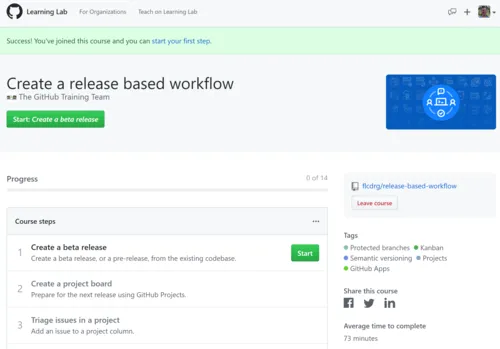
&lt;p&gt;Now the repository has been created, you can click on &lt;strong&gt;Start&lt;/strong&gt; to begin the process. As you complete each step it will be marked as complete (so you can come back to finish the exercise later if you don&apos;t finish it in one sitting)&lt;/p&gt;
&lt;p&gt;&lt;img src=&quot;https://david.gardiner.net.au/_astro/github-training-start.DwszxsWK_J6CAc.webp&quot; alt=&quot;Ready to start&quot; /&gt;&lt;/p&gt;
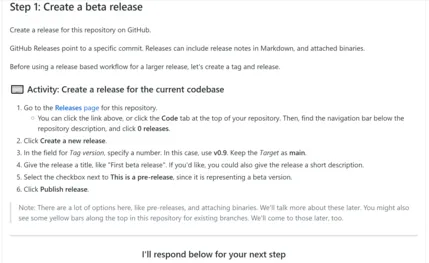
&lt;p&gt;There&apos;s some instructions to follow. I found it&apos;s easiest to right-click on the link to open it in another tab, follow the instructions..&lt;/p&gt;
&lt;p&gt;&lt;img src=&quot;https://david.gardiner.net.au/_astro/github-training-step1.DGi4NzwY_2g1Sxd.webp&quot; alt=&quot;Step 1&quot; /&gt;&lt;/p&gt;
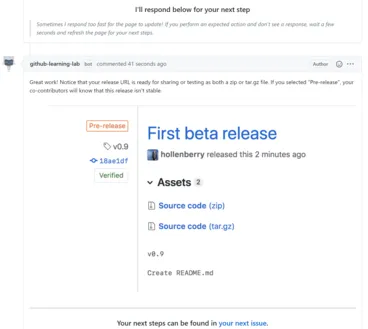
&lt;p&gt;and then come back to this tab to wait for the next bit (which will be added as a comment to the issue)&lt;/p&gt;
&lt;p&gt;&lt;img src=&quot;https://david.gardiner.net.au/_astro/github-training-step1b.DWPunDQO_ZKtzgr.webp&quot; alt=&quot;Step 1 response&quot; /&gt;&lt;/p&gt;
&lt;p&gt;Then click on the link to the next issue to follow on with the next step.&lt;/p&gt;
&lt;p&gt;At the conclusion of the exercise, you head back to the docs site for a knowledge check with a multiple choice quiz to check that you&apos;ve understood the main concepts for the module, and then you&apos;re done!&lt;/p&gt;
&lt;p&gt;Some modules covered concepts I was already familiar with so if I felt the practical exercise didn&apos;t contain anything new then I&apos;d just skip directly to knowledge check.&lt;/p&gt;
&lt;p&gt;Azure learning modules are similar, except that instead of using GitHub, they often including access to temporary Azure resources. Some modules might embed an Azure cloud shell right in your browser on the same page as the instructions. Others will ask you to log in to the Azure Portal so you can follow through creating or manipulating resources there.&lt;/p&gt;
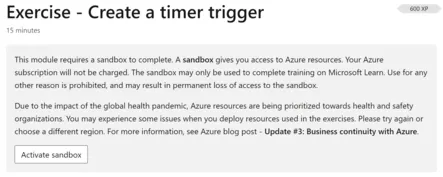
&lt;p&gt;You&apos;ll be asked to active the sandbox (and probably will need to review permissions)&lt;/p&gt;
&lt;p&gt;&lt;img src=&quot;https://david.gardiner.net.au/_astro/azure-sandbox-activate.D75XLvFe_ZvgYKc.webp&quot; alt=&quot;Activate sandbox&quot; /&gt;&lt;/p&gt;
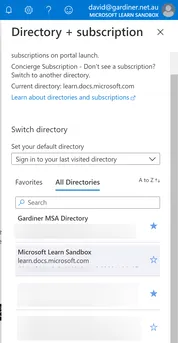
&lt;p&gt;Here you can see the &quot;Microsoft Learn Sandbox&quot; subscription, which is used for the learning activities. It is only a temporary subscription and will disappear after a few hours, and more importantly means any resources used there don&apos;t cost you anything.
&lt;img src=&quot;https://david.gardiner.net.au/_astro/azure-portal-subscriptions.BYNQX54a_ZXQlvn.webp&quot; alt=&quot;Azure subscriptions&quot; /&gt;&lt;/p&gt;
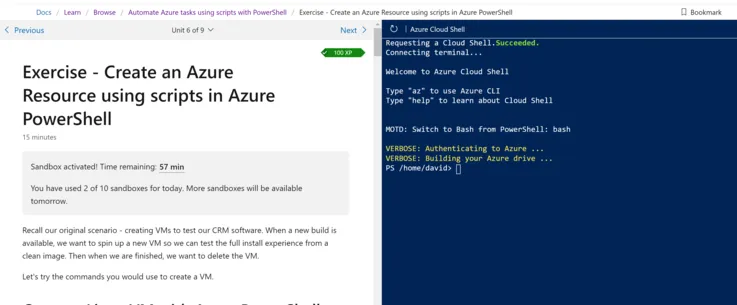
&lt;p&gt;Here&apos;s an example of a page using the Azure Cloud Shell. Many modules wil use bash, but this specific example is using PowerShell:&lt;/p&gt;
&lt;p&gt;&lt;img src=&quot;https://david.gardiner.net.au/_astro/azure-cloud-shell.Dfj-W9WU_1tfmwT.webp&quot; alt=&quot;Azure cloud shell&quot; /&gt;&lt;/p&gt;
&lt;p&gt;The modules will often check your work to confirm that you&apos;ve followed the instructions correctly:&lt;/p&gt;
&lt;p&gt;&lt;img src=&quot;https://david.gardiner.net.au/_astro/azure-training-check-your-work.D6aGGmtx_Z28SdIL.webp&quot; alt=&quot;Check your work button&quot; /&gt;&lt;/p&gt;
&lt;p&gt;Also worth mentioning if you&apos;d like some free instructor-led training then check out the &lt;a href=&quot;https://www.microsoft.com/enterprise&quot;&gt;Microsoft Azure Virtual Training Day: Fundamentals&lt;/a&gt; that are are being run during January and February. As a bonus, attendees will be eligible to take the &lt;a href=&quot;https://learn.microsoft.com/credentials/certifications/azure-fundamentals/?WT.mc_id=AZ-MVP-5001655&quot;&gt;Microsoft Azure Fundamentals certification exam&lt;/a&gt; for free! (Credit to &lt;a href=&quot;https://twitter.com/BronwenZ/status/1345900106524946438?s=20&quot;&gt;Bronwen Zande for tweeting about this&lt;/a&gt;)&lt;/p&gt;
&lt;p&gt;So if you&apos;re looking to upskill, or just deepen your knowledge of Azure and GitHub then now is a great time to dive in.&lt;/p&gt;
&lt;p&gt;&lt;em&gt;8-Jan-2021 - Added screenshot of Azure cloud shell&lt;/em&gt;&lt;/p&gt;
</content>
  </entry>
  <entry>
    <id>https://david.gardiner.net.au/2020/05/github-actions-future-posts</id>
    <updated>2020-05-04T08:00:00.000+09:30</updated>
    <title>Publishing future blog posts with GitHub Pages and GitHub Actions</title>
    <link href="https://david.gardiner.net.au/2020/05/github-actions-future-posts" rel="alternate" type="text/html" title="Publishing future blog posts with GitHub Pages and GitHub Actions"/>
    <category term="GitHub"/>
    <category term="GitHub Actions"/>
    <published>2020-05-04T08:00:00.000+09:30</published>
    <summary type="html">I switched to using GitHub Pages and Jekyll for my blog a while ago. There was one deficiency I noticed - the lack of being able to publish future blog posts. Because the site is static, the Jekyll processing is only performed when a new commit is pushed, and it only publishes content &apos;in the past&apos;. The problem is a future post has already been committed to Git, but there&apos;s no subsequent commit to republish the site once the publish date comes around. …</summary>
    <content type="html">&lt;p&gt;I switched to using GitHub Pages and Jekyll for my blog &lt;a href=&quot;/2019/06/migrating-from-blogger&quot;&gt;a while ago&lt;/a&gt;. There was one deficiency I noticed - the lack of being able to publish future blog posts. Because the site is static, the Jekyll processing is only performed when a new commit is pushed, and it only publishes content &apos;in the past&apos;. The problem is a future post has already been committed to Git, but there&apos;s no subsequent commit to republish the site once the publish date comes around.&lt;/p&gt;
&lt;p&gt;There&apos;s been various hacks around (usually involving an scheduled commit followed by a revert), but after listening to a &lt;a href=&quot;https://hanselminutes.com/733/devops-and-github-actions-with-edward-thomson&quot;&gt;recent podcast from Scott Hanselman&lt;/a&gt; talking to Edward Thomson about &lt;a href=&quot;https://github.com/features/actions&quot;&gt;GitHub Actions&lt;/a&gt;, I wondered if they might offer a way to automate refreshing the site on a daily schedule.&lt;/p&gt;
&lt;p&gt;I started by adding a GitHub Action workflow to the website and took a look at some of the existing actions others had already written, figuring someone might have solved this problem already. I discovered that GitHub Pages treats &apos;user&apos; sites like mine differently to &apos;product&apos; sites. The actions I found seemed suited more to the &apos;product&apos; kind (as they wanted to commit the static content to the master branch).&lt;/p&gt;
&lt;p&gt;I then resorted to Twitter..&lt;/p&gt;
&lt;blockquote&gt;
&lt;p&gt;You can use the api to trigger a rebuild, doesn’t that work?&lt;a href=&quot;https://t.co/2gaaIIMfWB&quot;&gt;https://t.co/2gaaIIMfWB&lt;/a&gt;&lt;/p&gt;
&lt;p&gt;— Rob Bos (@RobBos81) &lt;a href=&quot;https://twitter.com/RobBos81/status/1256092278734704640?ref_src=twsrc%5Etfw&quot;&gt;May 1, 2020&lt;/a&gt;&lt;/p&gt;
&lt;/blockquote&gt;
&lt;p&gt;Rob (who I know through the Global DevOps Bootcamp) gave a good suggestion - using the &lt;a href=&quot;https://developer.github.com/v3/repos/pages/#request-a-page-build&quot;&gt;Request a page build REST API&lt;/a&gt;. It took a few goes to get the API call working with &lt;a href=&quot;https://github.com/octokit/request-action&quot;&gt;octokit/request-action&lt;/a&gt;, but a test post later and I confirmed it worked!&lt;/p&gt;
&lt;p&gt;Here&apos;s the current version:&lt;/p&gt;
&lt;pre&gt;&lt;code&gt;name: Build GitHub Pages

on:
  schedule:
    - cron:  &apos;0 */12 * * *&apos; # Rebuild twice a day (every twelve hours on the hour).

jobs:
  logLatestRelease:
    runs-on: ubuntu-latest
    steps:
      - uses: octokit/request-action@v2.x
        id: post_build
        with:
          route: POST /repos/flcdrg/flcdrg.github.io/pages/builds
        env:
          GITHUB_TOKEN: ${{ secrets.GH_PAGES_TOKEN }}
&lt;/code&gt;&lt;/pre&gt;
&lt;p&gt;Nice, now I can schedule blog posts in the future, and know that they&apos;ll be published as intended.&lt;/p&gt;
</content>
  </entry>
  <entry>
    <id>https://david.gardiner.net.au/2020/05/future-post</id>
    <updated>2020-05-01T21:00:00.000+09:30</updated>
    <title>Future post</title>
    <link href="https://david.gardiner.net.au/2020/05/future-post" rel="alternate" type="text/html" title="Future post"/>
    <category term="GitHub"/>
    <published>2020-05-01T21:00:00.000+09:30</published>
    <summary type="html">If I coded the GitHub Action correctly, this blog post should get published even though I&apos;ve dated it 40 minutes in the future from when I committed it to the repository.</summary>
    <content type="html">&lt;p&gt;If I coded the GitHub Action correctly, this blog post should get published even though I&apos;ve dated it 40 minutes in the future from when I committed it to the repository.&lt;/p&gt;
</content>
  </entry>
  <entry>
    <id>https://david.gardiner.net.au/2019/06/migrating-from-blogger</id>
    <updated>2019-06-11T08:00:00.000+09:30</updated>
    <title>Migrating from Blogger to Jekyll and GitHub Pages</title>
    <link href="https://david.gardiner.net.au/2019/06/migrating-from-blogger" rel="alternate" type="text/html" title="Migrating from Blogger to Jekyll and GitHub Pages"/>
    <category term="Blogging"/>
    <category term="Jekyll"/>
    <category term="GitHub"/>
    <published>2019-06-11T08:00:00.000+09:30</published>
    <summary type="html">I&apos;ve been in a bit of a blogging slump the last few months. Partly because I&apos;ve been particularly busy, but also I&apos;ve been a bit frustrated with Blogger. I used Windows Live Writer (later Open Live Writer), but sadly after all the effort to make it open-source, the project has kind of floundered with no one apparently leading the project now.</summary>
    <content type="html">

&lt;p&gt;I&apos;ve been in a bit of a blogging slump the last few months. Partly because I&apos;ve been particularly busy, but also I&apos;ve been a bit frustrated with Blogger. I used Windows Live Writer (later Open Live Writer), but sadly after all the effort to make it open-source, the project has kind of floundered with no one apparently leading the project now.&lt;/p&gt;
&lt;p&gt;So what to do? Well maybe it&apos;s time to move to a different platform. I&apos;d see a few people with their blogs on GitHub, and after a bit of research I settled on using Jekyll with GitHub pages.&lt;/p&gt;
&lt;h2&gt;How I migrated from Blogger&lt;/h2&gt;
&lt;p&gt;I followed this useful checklist - &lt;a href=&quot;https://thefriendlytester.co.uk/2017/07/blogger-to-jekyll-migration-timeline&quot;&gt;https://thefriendlytester.co.uk/2017/07/blogger-to-jekyll-migration-timeline&lt;/a&gt;. Note that the &lt;code&gt;jekyll-importer&lt;/code&gt; does &lt;em&gt;not&lt;/em&gt; convert Blogger content to Markdown (that had me confused for a few hours).&lt;/p&gt;
&lt;p&gt;I stuck with the same URL format for posts, so that should mean no broken links.&lt;/p&gt;
&lt;p&gt;I made use of Windows Subsystem for Linux to run Jekyll locally (as I&apos;d read it wasn&apos;t so easy to get running natively on Windows). See below for more details of getting that all running.&lt;/p&gt;
&lt;p&gt;Update Cloudflare to point to flcdrg.github.io - &lt;a href=&quot;https://blog.cloudflare.com/secure-and-fast-github-pages-with-cloudflare/&quot;&gt;https://blog.cloudflare.com/secure-and-fast-github-pages-with-cloudflare/&lt;/a&gt;&lt;/p&gt;
&lt;p&gt;Update FeedBurner settings to point to new source RSS feed.&lt;/p&gt;
&lt;h2&gt;What I forgot&lt;/h2&gt;
&lt;p&gt;I use dlvr.it to post to Twitter about new blog posts. I should have disabled that as it got confused by the change and thought I&apos;d posted some new articles.&lt;/p&gt;
&lt;h2&gt;Still to do&lt;/h2&gt;
&lt;p&gt;The Blogger migration only copied text. Images are still living in their original locations. It would be good to migrate them over too.&lt;/p&gt;
&lt;p&gt;My old blog had a nice Archive/history listing. I&apos;ve started looking at Jekyll equivalents, but not found one that&apos;s similar yet.&lt;/p&gt;
&lt;h2&gt;Getting Jekyll running on WSL&lt;/h2&gt;
&lt;pre&gt;&lt;code&gt;sudo apt update
sudo apt upgrade
sudo apt install ruby
sudo apt install ruby-dev
sudo apt install make gcc
sudo apt install g++
sudo apt install zlibc
sudo gem install pkg-config -v &quot;~&amp;gt; 1.1&quot;
sudo apt install libxml2-dev
sudo apt install libxslt-dev
sudo gem install nokogiri -- --use-system-libraries
sudo gem install jekyll-import
sudo gem install jekyll
&lt;/code&gt;&lt;/pre&gt;
&lt;p&gt;With my locally cloned Git repo at &lt;code&gt;C:\dev\git\flcdrg.github.io&lt;/code&gt; in Windows, in WSL I could change to the equivalent path at &lt;code&gt;/mnt/c/dev/git/&lt;/code&gt;flcdrg.github.io, and then run &lt;code&gt;jekyll server&lt;/code&gt;.&lt;/p&gt;
&lt;h2&gt;Anything else?&lt;/h2&gt;
&lt;p&gt;Let me know in the comments if something is broken that used to work!&lt;/p&gt;
</content>
  </entry>
</feed>