<?xml version="1.0" encoding="UTF-8"?>
<feed xmlns="http://www.w3.org/2005/Atom" xml:lang="en-AU" xmlns:media="http://search.yahoo.com/mrss/">
  <id>https://david.gardiner.net.au/tags/Internet.xml</id>
  <title type="html">David Gardiner - Internet</title>
  <updated>2026-04-10T02:36:14.530Z</updated>
  <subtitle>Blog posts tagged with &apos;Internet&apos; - A blog of software development, .NET and other interesting things</subtitle>
  <rights>Copyright 2026 David Gardiner</rights>
  <icon>https://www.gravatar.com/avatar/37edf2567185071646d62ba28b868fab?s=64</icon>
  <logo>https://www.gravatar.com/avatar/37edf2567185071646d62ba28b868fab?s=256</logo>
  <generator uri="https://github.com/flcdrg/astrojs-atom" version="3">astrojs-atom</generator>
  <author>
    <name>David Gardiner</name>
  </author>
  <link href="https://david.gardiner.net.au/tags/Internet.xml" rel="self" type="application/atom+xml"/>
  <link href="https://david.gardiner.net.au/tags/Internet" rel="alternate" type="text/html" hreflang="en-AU"/>
  <category term="Internet"/>
  <category term="Software Development"/>
  <entry>
    <id>https://david.gardiner.net.au/2025/09/faster-internet</id>
    <updated>2025-09-15T10:00:00.000+09:30</updated>
    <title>Internet speed upgrade</title>
    <link href="https://david.gardiner.net.au/2025/09/faster-internet" rel="alternate" type="text/html" title="Internet speed upgrade"/>
    <category term="Internet"/>
    <category term="Synology"/>
    <published>2025-09-15T10:00:00.000+09:30</published>
    <summary type="html">Our home Internet got a nice speed boost over the weekend.</summary>
    <content type="html">&lt;p&gt;Last year the National Broadband Network (NBN Co), who manage most of the wholesale broadband infrastructure in Australia, &lt;a href=&quot;https://www.nbnco.com.au/corporate-information/media-centre/media-statements/higher-speed-tiers-multi-gigabit-speeds-in-2025&quot;&gt;announced that they&apos;d be upgrading the speeds&lt;/a&gt; on their wholesale internet plans, including the 100/20Mbps plan. This is what we&apos;ve been using since switching our ISP to &lt;a href=&quot;https://leaptel.com.au?referral=1000545050&quot;&gt;Leaptel&lt;/a&gt; and being &lt;a href=&quot;/2024/08/fttp&quot;&gt;upgraded to Fibre to our house&lt;/a&gt; last year.&lt;/p&gt;
&lt;p&gt;&lt;img src=&quot;https://david.gardiner.net.au/_astro/leaptel-logo-small.C2_5TWMm_Z1eG90e.webp&quot; alt=&quot;Leaptel logo with jumping frog&quot; /&gt;&lt;/p&gt;
&lt;p&gt;Then last month I got an email from Leaptel confirming that indeed our plan was being upgraded to 500/50Mbps on September 14th.&lt;/p&gt;
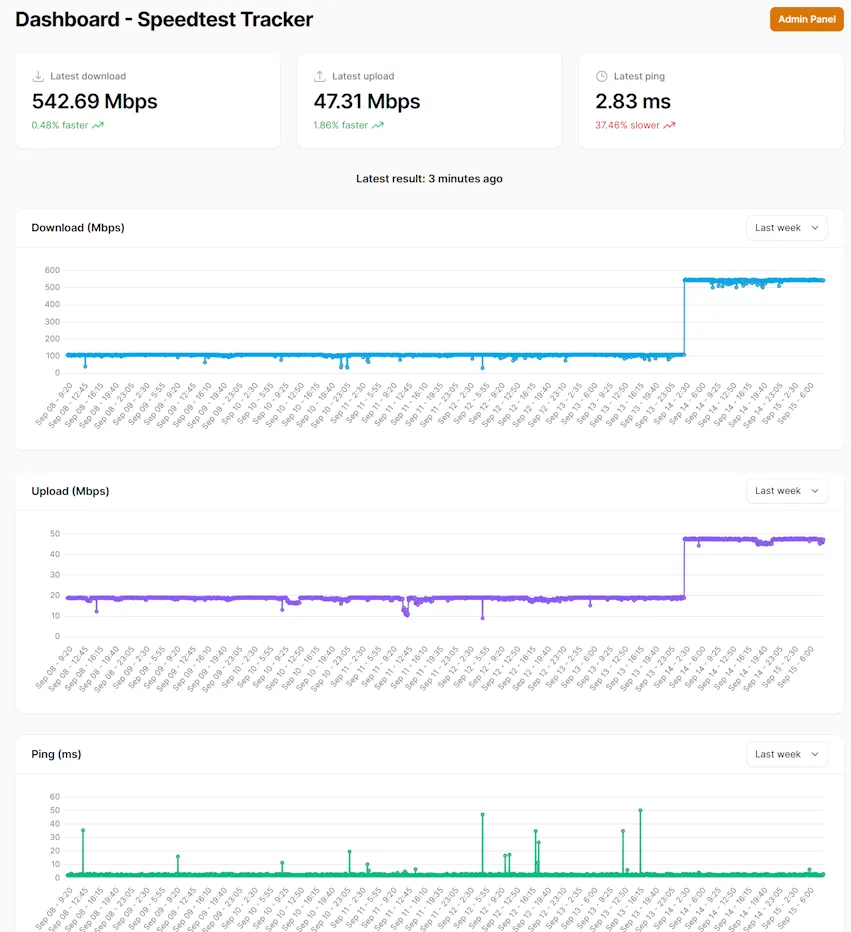
&lt;p&gt;I have Alex Justesen&apos;s &lt;a href=&quot;https://docs.speedtest-tracker.dev/&quot;&gt;Speedtest Tracker&lt;/a&gt; running on my Synology NAS, so it has captured a nice record of our Internet speeds:&lt;/p&gt;
&lt;p&gt;&lt;img src=&quot;https://david.gardiner.net.au/_astro/home-internet-speeds.B3LO5lm7_Z4mzn8.webp&quot; alt=&quot;Screenshot of Speedtest history, showing download and upload speed increases on September 14&quot; /&gt;&lt;/p&gt;
&lt;p&gt;That jump in the early hours of Sunday morning is really nice to see!&lt;/p&gt;
&lt;p&gt;Have I noticed any difference? It&apos;s too early to say, though I think now the bottlenecks for speed are either going to be internally within our house (some older CAT 5 cabling and/or WiFi signal strength), or further up the line waiting for content from some remote server. But it is nice that our link to the outside world is now unlikely to be the significant constraint.&lt;/p&gt;
&lt;p&gt;I&apos;m a happy Leaptel customer and would recommend them. &lt;a href=&quot;https://leaptel.com.au?referral=1000545050&quot;&gt;Use this link&lt;/a&gt; and we both get a $50 credit.&lt;/p&gt;
</content>
    <media:thumbnail url="https://david.gardiner.net.au/_astro/leaptel-logo-small.C2_5TWMm.webp" width="258" height="111"/>
    <media:content medium="image" url="https://david.gardiner.net.au/_astro/leaptel-logo-small.C2_5TWMm.webp" width="258" height="111"/>
  </entry>
  <entry>
    <id>https://david.gardiner.net.au/2024/09/fttp2</id>
    <updated>2024-09-01T22:30:00.000+09:30</updated>
    <title>FTTP (part 2)</title>
    <link href="https://david.gardiner.net.au/2024/09/fttp2" rel="alternate" type="text/html" title="FTTP (part 2)"/>
    <category term="Internet"/>
    <published>2024-09-01T22:30:00.000+09:30</published>
    <summary type="html">Last time I described how I&apos;d upgraded our home internet from Fibre to the node (FTTN) to Fibre to the premises (FTTP). I&apos;ve since made a minor changes to the gateway settings after getting some feedback from the folks in the Leaptel thread on Whirlpool. I had configured my gateway to use PPP to authenticate with the FTTN connection, and initially when I switched to FTTP I kept that in place. But I&apos;ve since learned that there&apos;s another option to consider: d-m-z said: …</summary>
    <content type="html">&lt;p&gt;Last time I described how I&apos;d &lt;a href=&quot;/2024/08/fttp&quot;&gt;upgraded our home internet from Fibre to the node (FTTN) to Fibre to the premises (FTTP)&lt;/a&gt;. I&apos;ve since made a minor changes to the gateway settings after getting some feedback from the folks in the &lt;a href=&quot;https://web.archive.org/web/20250426201718/https://forums.whirlpool.net.au/thread/9062r7z9&quot;&gt;Leaptel thread&lt;/a&gt; on Whirlpool.&lt;/p&gt;
&lt;p&gt;I had configured my gateway to use PPP to authenticate with the FTTN connection, and initially when I switched to FTTP I kept that in place. But I&apos;ve since learned that there&apos;s another option to consider:&lt;/p&gt;
&lt;p&gt;d-m-z &lt;a href=&quot;https://forums.whirlpool.net.au/archive/9062r7z9-23&quot;&gt;said&lt;/a&gt;:&lt;/p&gt;
&lt;blockquote&gt;
&lt;p&gt;Looks like you&apos;re using PPPoE? You&apos;re probably better off with DHCP, as PPPoE adds extra overhead.&lt;/p&gt;
&lt;/blockquote&gt;
&lt;p&gt;and went on to explain:&lt;/p&gt;
&lt;blockquote&gt;
&lt;p&gt;PPPoE encapsulates your traffic. There&apos;s an 8-byte header on each packet. Packets can be up to 1500 bytes, but aren&apos;t always that big. So as a percentage, the overhead varies. This part isn&apos;t that big of a deal though.&lt;/p&gt;
&lt;p&gt;The other thing you can run into is the CPU required to run PPPoE. On the 100/20 plan that you have, it&apos;s probably not an issue. If you moved to a faster plan, you will likely find a bunch of routers can&apos;t do PPPoE at gigabit speeds.&lt;/p&gt;
&lt;p&gt;In your Leaptel portal, as long as IPoE is enabled (it is by default), you should simply be able to switch your router over to the DHCP mode. You might need to kick your session and/or reboot the router. And that should be it.&lt;/p&gt;
&lt;/blockquote&gt;
&lt;p&gt;Matt E (Leaptel CEO) &lt;a href=&quot;https://forums.whirlpool.net.au/archive/9062r7z9-23&quot;&gt;clarified&lt;/a&gt;:&lt;/p&gt;
&lt;blockquote&gt;
&lt;p&gt;There are advantages to PPPoE over DHCP. If you router handles the speeds well on PPPoE you get extra error correction as well as any network changes which force you to re-auth you are back online within a 90 seconds. But there is overhead issues as well as if your router&apos;s CPU can handle it.&lt;/p&gt;
&lt;/blockquote&gt;
&lt;p&gt;So it seems there are a couple of options:&lt;/p&gt;
&lt;ol&gt;
&lt;li&gt;Stick with the PPP configuration and maybe get a bit more reliability, or&lt;/li&gt;
&lt;li&gt;Switch to DHCP and lessen the overhead on your gateway and maybe get a tiny bit more throughput on your connection&lt;/li&gt;
&lt;/ol&gt;
&lt;p&gt;I decided I&apos;d try out the DHCP option to see what it was like:&lt;/p&gt;
&lt;p&gt;Firstly, I turned off the &lt;strong&gt;auto WAN sensing&lt;/strong&gt; option and disabled the &lt;strong&gt;PPP connection&lt;/strong&gt;.&lt;/p&gt;
&lt;p&gt;&lt;img src=&quot;https://david.gardiner.net.au/_astro/internet-dhcp1.BqEi5AjF_Z1abeCI.webp&quot; alt=&quot;text&quot; /&gt;&lt;/p&gt;
&lt;p&gt;This then enabled me to select &lt;strong&gt;DHCP routed mode&lt;/strong&gt;. Saving those changes and then reloading the &lt;strong&gt;Internet Access&lt;/strong&gt; page then showed the DHCP connection was up:&lt;/p&gt;
&lt;p&gt;&lt;img src=&quot;https://david.gardiner.net.au/_astro/internet-dhcp3.CBsru-d4_ZYMQDA.webp&quot; alt=&quot;text&quot; /&gt;&lt;/p&gt;
&lt;p&gt;And now the gateway&apos;s main status page showed it was in &apos;DHCP&apos; mode.&lt;/p&gt;
&lt;p&gt;&lt;img src=&quot;https://david.gardiner.net.au/_astro/internet-dhcp4.D9bBWeuZ_19DJ0k.webp&quot; alt=&quot;text&quot; /&gt;&lt;/p&gt;
&lt;p&gt;Regarding DHCP - it&apos;s my impression that this essentially telling the gateway to be a DHCP client to configure itself. Not to be confused with choosing to run a DHCP server on your local network (quite often on the gateway itself), servicing devices on your network.&lt;/p&gt;
&lt;p&gt;So far, so good!&lt;/p&gt;
</content>
    <media:thumbnail url="https://david.gardiner.net.au/_astro/leaptel_logo.C-e5Q0BU.png" width="289" height="152"/>
    <media:content medium="image" url="https://david.gardiner.net.au/_astro/leaptel_logo.C-e5Q0BU.png" width="289" height="152"/>
  </entry>
  <entry>
    <id>https://david.gardiner.net.au/2024/08/fttp</id>
    <updated>2024-08-24T08:08:00.000+09:30</updated>
    <title>Farewell FTTN, Hello FTTP</title>
    <link href="https://david.gardiner.net.au/2024/08/fttp" rel="alternate" type="text/html" title="Farewell FTTN, Hello FTTP"/>
    <category term="Internet"/>
    <published>2024-08-24T08:08:00.000+09:30</published>
    <summary type="html">It&apos;s all happening here on the Internet front. Last week I switched ISPs, and today we&apos;ve upgraded from copper to fibre (or &apos;fiber&apos; for North Americans!). I had a few concerns about how it was going to go, but TL;DR it went really well.</summary>
    <content type="html">&lt;p&gt;It&apos;s all happening here on the Internet front. Last week &lt;a href=&quot;/2024/08/leaptel&quot;&gt;I switched ISPs&lt;/a&gt;, and today we&apos;ve upgraded from copper to fibre (or &apos;fiber&apos; for North Americans!). I had a few concerns about how it was going to go, but TL;DR it went really well.&lt;/p&gt;
&lt;p&gt;&lt;img src=&quot;https://david.gardiner.net.au/_astro/house-diagram.StZyP_Tg_22D9pm.webp&quot; alt=&quot;Diagram of pit, existing conduit into house, and storeroom at back of house&quot; /&gt;&lt;/p&gt;
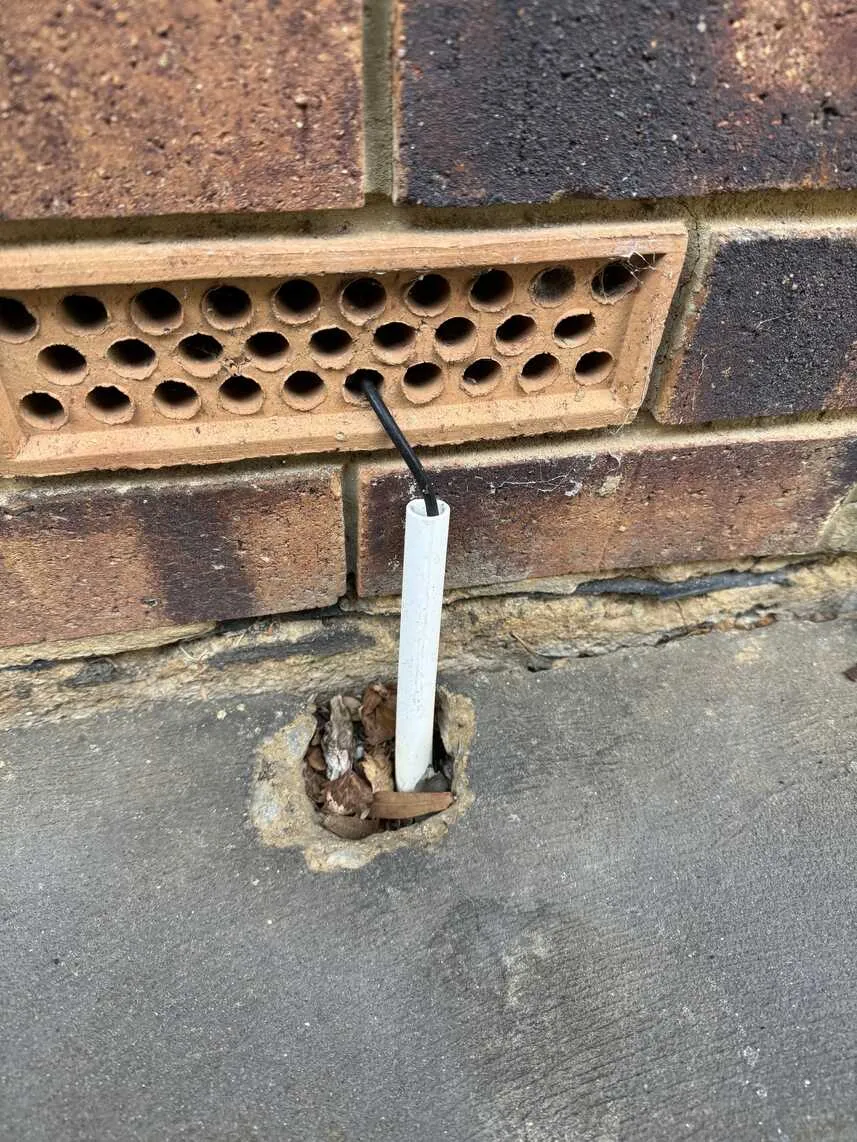
&lt;p&gt;First off, the existing conduit that runs to the house is pretty narrow, so I was worried that it wouldn&apos;t be suitable for pulling the fibre, in which case they&apos;d likely need to install a new conduit - digging up the front garden and maybe either cutting through our concrete path or lifting up lots of pavers. Messy and disruptive options.&lt;/p&gt;
&lt;p&gt;&lt;img src=&quot;https://david.gardiner.net.au/_astro/conduit-before.CrUEyh6A_fXTnC.webp&quot; alt=&quot;Existing conduit with copper cable&quot; /&gt;&lt;/p&gt;
&lt;p&gt;Secondly, when NBN fibre is installed, they install two boxes. One on the outside of the house (the &apos;NBN utility box&apos;), and the second inside (the &apos;NBN connection box&apos; which terminates the fibre and gives you an Ethernet port to plug into). Ideally I really wanted the latter to be located right up the back of our house in a storeroom where all my other networking gear lives. However it&apos;s a fair distance internally so I wasn&apos;t sure if they would agree to go that far.&lt;/p&gt;
&lt;p&gt;Step one was locating the small communications pit that was hiding in our front garden under quite a few layers of leaves and tree bark. I didn&apos;t even know this existed until the initial NBN survey of our street almost two years ago uncovered it. It&apos;s roughly under the big stick in the photo 😀.
&lt;img src=&quot;https://david.gardiner.net.au/_astro/hidden-pit.Ct6jmYPM_GT8nB.webp&quot; alt=&quot;Somewhere under here is a communications pit!&quot; /&gt;&lt;/p&gt;
&lt;p&gt;The NBN technicians tested the existing conduit that runs from this pit up to the house for blockages by squirting some water from the hose down it. I gather this was successful, so they were happy that the conduit was usable.&lt;/p&gt;
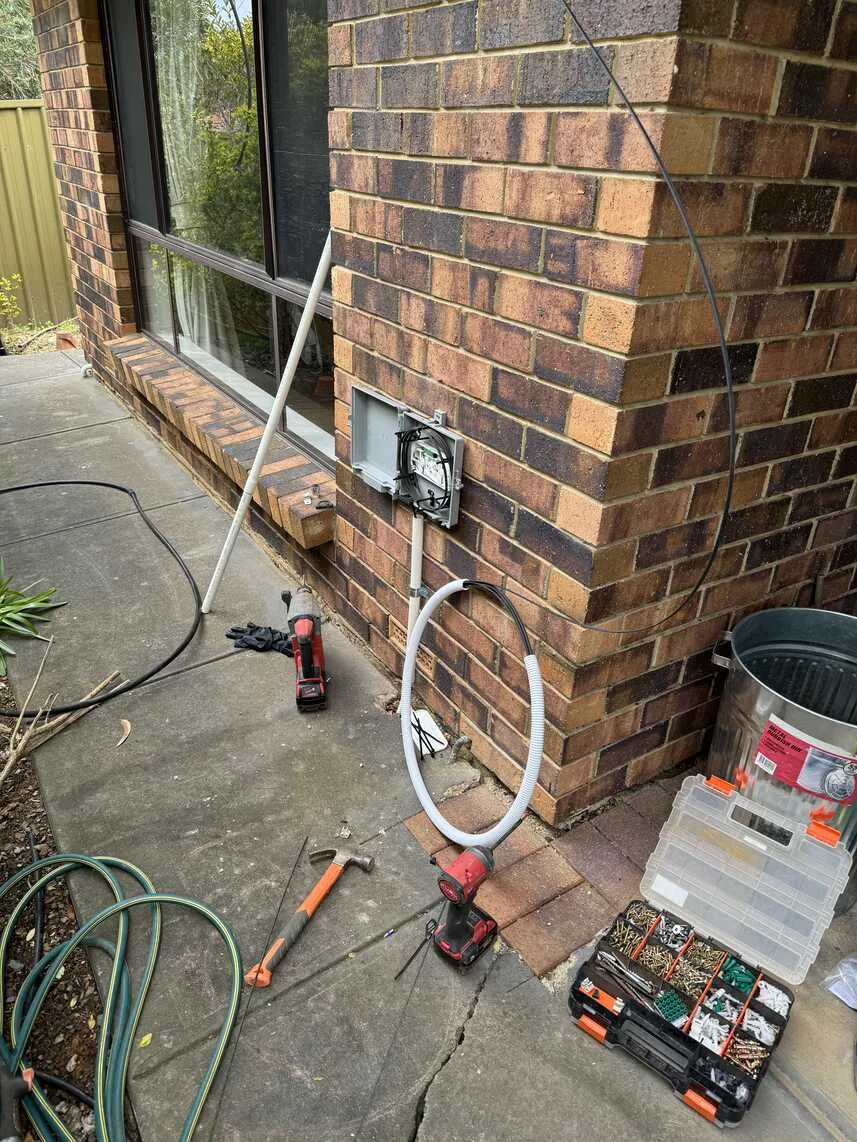
&lt;p&gt;The external box was mounted on the outside wall just above where the old conduit came out of the ground. The old copper wire was kept in place. In my case the copper goes into the wall cavity via a brick air vent and up to the fascia underneath the roof gutter where there&apos;s a little box that then connects to the internal telephony wiring (in my case I had a &lt;a href=&quot;/2006/10/central-splitter-installed&quot;&gt;central splitter&lt;/a&gt; just inside the roof and then CAT5 cabling running back up to the aforementioned storeroom).&lt;/p&gt;
&lt;p&gt;&lt;img src=&quot;https://david.gardiner.net.au/_astro/nbn-utility-box-installation.BOmdlsGP_Z1Fj0x1.webp&quot; alt=&quot;NBN utility box being installed on exterior wall&quot; /&gt;&lt;/p&gt;
&lt;p&gt;Rather than pulling the fibre up through the wall cavity following the copper line (I suspect it&apos;s probably too risky getting a kink in the fibre), they added extra conduit runs up to the roof and it enters the roof space.&lt;/p&gt;
&lt;p&gt;&lt;img src=&quot;https://david.gardiner.net.au/_astro/nbn-utility-box-complete.BH6D7J0X_ZeBMHF.webp&quot; alt=&quot;NBN utility box completed&quot; /&gt;&lt;/p&gt;
&lt;p&gt;Crawling around inside our roof is not fun, but they managed to get the fibre all the way over to the storeroom and used an existing hole in the ceiling (from when I&apos;d previously run network cables to two wireless access). If I&apos;d been thinking ahead when that room was built, I would have put in a proper large conduit from the wall up to the ceiling so that all those cables could use that!&lt;/p&gt;
&lt;p&gt;They installed the &apos;NBN connection box&apos; on the wall of the storeroom right next to my modem/gateway, network switches and Synology, exactly where I&apos;d hoped it could go.&lt;/p&gt;
&lt;p&gt;There was a short outage while they were doing the install - I gather they disconnected the copper for a bit when they were using it to pull the fibre. But it was reconnected and I was back online after a few minutes.&lt;/p&gt;
&lt;p&gt;While they were finishing up, I received a text from Leaptel confirming that the new fibre connection was ready.&lt;/p&gt;
&lt;p&gt;I&apos;ve been using a Technicolor MediaAccess TG789vac v2 modem/gateway since we switched from ADSL to FTTN. It was supplied by Internode, but it isn&apos;t locked, and it has a WAN port so I was confident it would work as a gateway once our fibre was live.&lt;/p&gt;
&lt;p&gt;I pulled out the telephone cable from the back of the gateway and confirmed that there was just a LAN patch cable from the &apos;NBN connection box&apos; plugged into the gateway WAN port.&lt;/p&gt;
&lt;p&gt;Opening the gateway configuration, I navigated to the &apos;Internet Access&apos; page and clicked on &lt;strong&gt;show advanced&lt;/strong&gt;.&lt;/p&gt;
&lt;p&gt;&lt;img src=&quot;https://david.gardiner.net.au/_astro/technicolor-config.X_eUnCTp_15sHKz.webp&quot; alt=&quot;Screenshot of &apos;Internet access&apos; page in Technicolor gateway admin portal&quot; /&gt;&lt;/p&gt;
&lt;p&gt;I then enabled &lt;strong&gt;Auto WAN sensing&lt;/strong&gt; and clicked &lt;strong&gt;Save&lt;/strong&gt;, then &lt;strong&gt;Close&lt;/strong&gt;.&lt;/p&gt;
&lt;p&gt;After a few seconds, the status updated to show the gateway using the WAN connection&lt;/p&gt;
&lt;p&gt;&lt;img src=&quot;https://david.gardiner.net.au/_astro/technicolor-status.B_JU9MTP_ZCyzkd.webp&quot; alt=&quot;Technicolor gatway status showing WAN connection&quot; /&gt;&lt;/p&gt;
&lt;p&gt;And finally, a quick speed test, and wow, isn&apos;t that awesome - 106.74Mbs download and 18.1Mbps upload!&lt;/p&gt;
&lt;p&gt;&lt;img src=&quot;https://david.gardiner.net.au/_astro/speedtest.Dkx8X_ta_Z106Yjl.webp&quot; alt=&quot;Speedtest&quot; /&gt;&lt;/p&gt;
&lt;p&gt;Down the track, upgrading the gateway to something like a &lt;a href=&quot;https://store.ui.com/us/en/category/cloud-gateways-compact/products/ucg-ultra&quot;&gt;Ubiquiti UniFi Cloud Gateway Ultra&lt;/a&gt; could be nice.&lt;/p&gt;
</content>
    <media:thumbnail url="https://david.gardiner.net.au/_astro/leaptel_logo.C-e5Q0BU.png" width="289" height="152"/>
    <media:content medium="image" url="https://david.gardiner.net.au/_astro/leaptel_logo.C-e5Q0BU.png" width="289" height="152"/>
  </entry>
  <entry>
    <id>https://david.gardiner.net.au/2024/08/leaptel</id>
    <updated>2024-08-19T07:00:00.000+09:30</updated>
    <title>Farewell Internode, hello Leaptel</title>
    <link href="https://david.gardiner.net.au/2024/08/leaptel" rel="alternate" type="text/html" title="Farewell Internode, hello Leaptel"/>
    <category term="Internet"/>
    <published>2024-08-19T07:00:00.000+09:30</published>
    <summary type="html">I&apos;ve been using Internode as our home ISP for quite a long time. I&apos;m struggling to find when we first signed up with them, but extrapolating back from the last invoice I can find, it might be around 2002/2003? That&apos;s probably when I upgraded from my work dial-up to ADSL1. They were the first ISP in Australia to offer ADSL2+, and we upgraded in 2006. Internode introduced IPv6, which I wrote about in 2010. In 2012 I shifted to &apos;Naked ADSL&apos; and migrated our home phone number to VoIP. …</summary>
    <content type="html">&lt;p&gt;I&apos;ve been using &lt;a href=&quot;https://en.wikipedia.org/wiki/Internode_(ISP)&quot;&gt;Internode&lt;/a&gt; as our home ISP for quite a long time. I&apos;m struggling to find when we first signed up with them, but extrapolating back from the last invoice I can find, it might be around 2002/2003? That&apos;s probably when I upgraded from my work dial-up to ADSL1.&lt;/p&gt;
&lt;p&gt;They were the first ISP in Australia to offer ADSL2+, and &lt;a href=&quot;/2006/04/adsl2-is-here&quot;&gt;we upgraded in 2006&lt;/a&gt;.&lt;/p&gt;
&lt;p&gt;Internode introduced IPv6, which I &lt;a href=&quot;/2010/09/ipv6-is-coming-soon-sometime-almost&quot;&gt;wrote about in 2010&lt;/a&gt;.&lt;/p&gt;
&lt;p&gt;In &lt;a href=&quot;/2012/04/naked-adsl-and-voip-2012-style&quot;&gt;2012 I shifted to &apos;Naked ADSL&apos;&lt;/a&gt; and migrated our home phone number to VoIP.&lt;/p&gt;
&lt;p&gt;In &lt;a href=&quot;/2017/09/on-nbn&quot;&gt;2017&lt;/a&gt; the first NBN (National Broadband Network) rollout in our neighbourhood meant I could upgrade to Fibre To The Node (FTTN). Frustratingly, this was originally planned to be full Fibre To The Premises (FTTP), but a change of government meant going for a cheaper (and short-sighted in my opinion) option. Unfortunately for me, our house was on the end of a long copper run from our nearest &apos;Node&apos;, so the best speed we&apos;d ever achieve would be ~45Mbps.&lt;/p&gt;
&lt;p&gt;Finally, 7 years later the NBN has provisioned FTTP in our suburb. You need to register with your ISP to request a (free) upgrade from the existing copper and get the fibre from the street into your house (and termination equipment installed).&lt;/p&gt;
&lt;p&gt;After the NBN was rolled out in Australia, there was a period of consolidation among ISPs. In 2011 Internode was bought by iiNet, which in turn was acquired by TPG Telecom in 2015.&lt;/p&gt;
&lt;p&gt;For the most part, things just kept working, though there were some signs of change. The rare time I needed to call support, they now appeared to be offshore rather than Adelaide-based. Last year they dropped support for hosted email and then stopped accepting new customers under the Internode brand. I suspect it won&apos;t be long before it&apos;s gone completely.&lt;/p&gt;
&lt;p&gt;So rather than just move by default to iiNet (which I believe is what would happen if I requested FTTP through Internode), I thought this was a good opportunity to check out what other providers were in the market.&lt;/p&gt;
&lt;p&gt;And so after some research and reading comments and reviews on the &lt;a href=&quot;https://web.archive.org/web/20250502133546/https://forums.whirlpool.net.au/&quot;&gt;Whirlpool forums&lt;/a&gt;, I settled on a newer ISP called &lt;a href=&quot;https://leaptel.com.au?referral=1000545050&quot;&gt;Leaptel&lt;/a&gt;.&lt;/p&gt;
&lt;p&gt;There were a couple of things that interested me about Leaptel. For one, their prices were competitive, but secondly, their CEO Matt hangs out in the &lt;a href=&quot;https://web.archive.org/web/20250426201718/https://forums.whirlpool.net.au/thread/9062r7z9&quot;&gt;Whirlpool forum and is really responsive to questions from other posters&lt;/a&gt;. In many ways, it is quite reminiscent of that other ISP that I signed up for all those years ago.&lt;/p&gt;
&lt;p&gt;So step one, I&apos;ve switched to Leaptel as our FTTN provider. But as part of the sign-up process, I also requested they initiate the upgrade to FTTP.&lt;/p&gt;
&lt;p&gt;I was a bit unsure how the fibre would be installed to our house (given my observation of where our copper line comes in), so I thought it would be wise to wait until a neighbour or two had gone through the process first. That happened in the last couple of weeks, and interestingly the NBN folks ended up spending quite a few days in our street sorting out issues with tree roots, as well as having to negotiate how to run the new fibre to their houses.&lt;/p&gt;
&lt;p&gt;In one case they wanted to dig up a neighbour&apos;s brand new concrete driveway. Not surprisingly, that neighbour said no, so they ended up running it alongside the driveway (which honestly seems like a simpler option anyway!)&lt;/p&gt;
&lt;p&gt;I&apos;ve now been notified that the NBN techs are due to come this Friday to start our upgrade. There&apos;s a few things I&apos;ll be interested to find out:&lt;/p&gt;
&lt;ul&gt;
&lt;li&gt;Can they reuse the existing copper conduit to pull the fibre to our house? If they can&apos;t, then will they be digging up my front garden and/or the concrete path we have around our house?&lt;/li&gt;
&lt;li&gt;Can they install the &apos;NBN connection box&apos; in our storeroom (where I have our current modem and networking gear)? It is right at the back of our house, so there is a risk it could be too far from the &apos;NBN utility box&apos; that they apparently put on an external wall of your house.&lt;/li&gt;
&lt;/ul&gt;
&lt;p&gt;I should have some answers to those questions soon.&lt;/p&gt;
</content>
    <media:thumbnail url="https://david.gardiner.net.au/_astro/leaptel_logo.C-e5Q0BU.png" width="289" height="152"/>
    <media:content medium="image" url="https://david.gardiner.net.au/_astro/leaptel_logo.C-e5Q0BU.png" width="289" height="152"/>
  </entry>
  <entry>
    <id>https://david.gardiner.net.au/2017/09/on-nbn</id>
    <updated>2017-09-01T09:00:00.000+09:30</updated>
    <title>On the NBN</title>
    <link href="https://david.gardiner.net.au/2017/09/on-nbn" rel="alternate" type="text/html" title="On the NBN"/>
    <category term="Hardware"/>
    <category term="Internet"/>
    <published>2017-09-01T09:00:00.000+09:30</published>
    <summary type="html">We switched over to the NBN at home a couple of months ago. Unfortunately since the last change of Government in Australia, it appears that all NBN rollouts are getting fibre to the node (FTTN) rather than original plan of fibre to the premises (FTTP). So with the node servicing our neighbourhood being a fair distance from our house, it looks like the best we can expect for the foreseeable future is ~40MB. That is a 4x increase on what we used to get with ADSL2+, but it is a shame we can’t get the full 100MB if we wanted to pay for it. …</summary>
    <content type="html">&lt;p&gt;We switched over to the NBN at home a couple of months ago. Unfortunately since the last change of Government in Australia, it appears that all NBN rollouts are getting fibre to the node (FTTN) rather than original plan of fibre to the premises (FTTP). So with the node servicing our neighbourhood being a fair distance from our house, it looks like the best we can expect for the foreseeable future is ~40MB. That is a 4x increase on what we used to get with ADSL2+, but it is a shame we can’t get the full 100MB if we wanted to pay for it.&lt;/p&gt;
&lt;p&gt;40MB isn’t too bad – I know of others that are only getting 20 (and there’s stories of some that switch over from ADSL to get a slower speed than what they used to have). Just seems a lost opportunity that if everyone had got fibre, I’m sure that would be capable of being upgraded in the future to even beyond 100MB.&lt;/p&gt;
</content>
  </entry>
  <entry>
    <id>https://david.gardiner.net.au/2012/06/improving-my-home-wireless-network</id>
    <updated>2012-06-08T06:29:00.001+09:30</updated>
    <title>Improving my home wireless network</title>
    <link href="https://david.gardiner.net.au/2012/06/improving-my-home-wireless-network" rel="alternate" type="text/html" title="Improving my home wireless network"/>
    <category term="Hardware"/>
    <category term="Internet"/>
    <published>2012-06-08T06:29:00.001+09:30</published>
    <summary type="html">I noticed my wireless connection was a bit slow this morning, so after restarting the router (standard &quot;IT Crowd – Have you tried turning it off and on again&quot; approach), I thought it would be worth seeing what other wireless networks were nearby and whether they might be causing some contention for bandwidth.</summary>
    <content type="html">&lt;p&gt;I noticed my wireless connection was a bit slow this morning, so after restarting the router (standard &quot;IT Crowd – Have you tried turning it off and on again&quot; approach), I thought it would be worth seeing what other wireless networks were nearby and whether they might be causing some contention for bandwidth.&lt;/p&gt;
&lt;p&gt;Years ago I used NetStumbler to do this kind of thing, but it hasn&apos;t been updated in a long time and doesn&apos;t work with the wireless card on my laptop. Instead I found &lt;a href=&quot;https://www.oscium.com/&quot;&gt;inSSIDer&lt;/a&gt;. It does the job nicely - this is what it revealed:&lt;/p&gt;
&lt;p&gt;&lt;img src=&quot;../../assets/2012/06/wireless%20channels%20before%5B8%5D.png&quot; alt=&quot;wireless channels before&quot; /&gt;&lt;/p&gt;
&lt;p&gt;My network is the orange one named &apos;Gardiner&apos;. I&apos;ve obscured some of the labels to protect privacy.&lt;/p&gt;
&lt;p&gt;After switching my router&apos;s wireless settings to channel 5, it now looks like this:&lt;/p&gt;
&lt;p&gt;&lt;img src=&quot;../../assets/2012/06/wireless%20channels%20after%5B4%5D.png&quot; alt=&quot;wireless channels after&quot; /&gt;&lt;/p&gt;
&lt;p&gt;That looks better.&lt;/p&gt;
&lt;p&gt;Other options for improving my wireless performance would be upgrading the router to something that support 802.11n (my trusty old Billion only handles 11b + 11g), and maybe getting a wireless repeater to improve coverage around the house.&lt;/p&gt;
</content>
  </entry>
  <entry>
    <id>https://david.gardiner.net.au/2012/04/naked-adsl-and-voip-2012-style</id>
    <updated>2012-04-02T22:46:00.001+09:30</updated>
    <title>Naked ADSL and VoIP 2012-style</title>
    <link href="https://david.gardiner.net.au/2012/04/naked-adsl-and-voip-2012-style" rel="alternate" type="text/html" title="Naked ADSL and VoIP 2012-style"/>
    <category term="VoIP"/>
    <category term="Internet"/>
    <published>2012-04-02T22:46:00.001+09:30</published>
    <summary type="html">Last month I decided to take the plunge and switch over to a Naked ADSL service. Late last year Internode had announced that they&apos;d sorted out number porting for customers on existing ADSL2+ connections (like myself). More recently they also introduced a new tier in their Naked plans, so that leaving my old 50G ADSL2+ plan was now viable.</summary>
    <content type="html">&lt;p&gt;Last month I decided to take the plunge and switch over to a Naked ADSL service. Late last year &lt;a href=&quot;http://www.internode.on.net&quot;&gt;Internode&lt;/a&gt; had announced that they&apos;d sorted out number porting for customers on existing ADSL2+ connections (like myself). More recently they also introduced a new tier in their Naked plans, so that leaving my old 50G ADSL2+ plan was now viable.&lt;/p&gt;
&lt;p&gt;The switch to a naked line happened on the scheduled day. I didn&apos;t realise however that the porting of the phone number would take a few extra days. Not a huge problem, but something to be aware of.&lt;/p&gt;
&lt;p&gt;Going naked means you have no dial-tone. If you want to keep your phone number, it needs to be ported to a VoIP service. In this case to NodePhone (Internode&apos;s VoIP offering), with $10/month call credit. I&apos;ve been using first FreeCall and more recently PennyTel as outgoing VoIP providers for a number of years. It will be interesting to see how NodePhone compares.&lt;/p&gt;
&lt;p&gt;Two nice features that I discovered was it comes with voicemail (you can customise the greeting, and you can get email notifications), and caller ID is included (instead of paying $6/month for the privilege)&lt;/p&gt;
&lt;p&gt;I configured my trusty ATA (a Sipura SPA-3000) with new settings to work with NodePhone. All seemed fine, but it didn&apos;t work – the registration was failing. A call to Internode Support didn&apos;t identify any issues other than I was using more recent firmware than they were aware of, and that I was using relatively &apos;old&apos; hardware. In any case just when I was about to give up for the evening, I noticed that it had started working all by itself.&lt;/p&gt;
&lt;p&gt;All seemed fine for a few days, then I noticed that we were getting calls going to voicemail but no missed calls were on the phone. Strangely the ATA was still saying it was registered but most calls never rang the phone – they just redirected to voicemail.&lt;/p&gt;
&lt;p&gt;Another call to Internode support, but again no joy. Nothing looked out of place with my settings, but they could see the registration was dropping out regularly (which would explain the calls not coming through to the handset). Their final suggestion – get some new hardware.&lt;/p&gt;
&lt;p&gt;It turns out I bought the Sipura SPA-3000 way back in 2005. 7 years is a good innings for consumer hardware, so maybe it was time to update to something more current. The &lt;a href=&quot;https://web.archive.org/web/20130103082130/http://gigaset.com:80/hq/en/product/GIGASETC610.html&quot;&gt;Gigaset C610&lt;/a&gt; seemed to be well regarded so I picked up one from Internode&apos;s Adelaide office.&lt;/p&gt;
&lt;p&gt;It was pretty straightforward to configure, but annoyingly I then discovered I was having the same problem still. Another call to Internode Support, but this time they said they had TWO active registrations – one for the Gigaset and one for the SPA! That didn&apos;t make sense, as the SPA was now sitting on a shelf – no power, no network. They reviewed the modem and Gigaset settings and things seemed to settle down, and I received an incoming call ok.&lt;/p&gt;
&lt;p&gt;So hopefully that&apos;s the way things will stay for now on 😀&lt;/p&gt;
</content>
  </entry>
  <entry>
    <id>https://david.gardiner.net.au/2011/11/is-it-worth-going-naked-2011</id>
    <updated>2011-11-26T20:25:00.001+10:30</updated>
    <title>Is it worth going naked (2011)</title>
    <link href="https://david.gardiner.net.au/2011/11/is-it-worth-going-naked-2011" rel="alternate" type="text/html" title="Is it worth going naked (2011)"/>
    <category term="VoIP"/>
    <category term="Internet"/>
    <published>2011-11-26T20:25:00.001+10:30</published>
    <summary type="html">Internode have just announced that for customers with existing ADSL2+ broadband, transferring to a Naked plan whilst keeping your existing phone number is now possible. Just over a year ago I compared the costs, and decided it wasn&apos;t worth it. So has anything changed since then? Current monthly expenses (Nov 2011) * – &apos;grandfathered&apos; plan no longer available to new customers. Price includes 5% discount.</summary>
    <content type="html">&lt;p&gt;&lt;a href=&quot;https://www.internode.on.net&quot;&gt;Internode&lt;/a&gt; have &lt;a href=&quot;https://web.archive.org/web/20240916100439/https://www.internode.on.net/news/2011/11/255.php&quot;&gt;just announced&lt;/a&gt; that for customers with existing ADSL2+ broadband, transferring to a Naked plan whilst keeping your existing phone number is now possible.&lt;/p&gt;
&lt;p&gt;Just over a year ago I &lt;a href=&quot;/2010/10/is-it-worth-going-naked&quot;&gt;compared the costs&lt;/a&gt;, and decided it wasn&apos;t worth it. So has anything changed since then?&lt;/p&gt;
&lt;p&gt;Current monthly expenses (Nov 2011)&lt;/p&gt;
&lt;table&gt;
&lt;thead&gt;
&lt;tr&gt;
&lt;th&gt;Service&lt;/th&gt;
&lt;th&gt;Description&lt;/th&gt;
&lt;th&gt;Cost&lt;/th&gt;
&lt;/tr&gt;
&lt;/thead&gt;
&lt;tbody&gt;&lt;tr&gt;
&lt;td&gt;Broadband&lt;/td&gt;
&lt;td&gt;Internode Easy-Broadband-Classic (50GB)*&lt;/td&gt;
&lt;td&gt;47.45&lt;/td&gt;
&lt;/tr&gt;
&lt;tr&gt;
&lt;td&gt;Telephone&lt;/td&gt;
&lt;td&gt;HomeLine® Budget#&lt;/td&gt;
&lt;td&gt;28.95&lt;/td&gt;
&lt;/tr&gt;
&lt;tr&gt;
&lt;td&gt;Total&lt;/td&gt;
&lt;td&gt;&lt;/td&gt;
&lt;td&gt;76.40&lt;/td&gt;
&lt;/tr&gt;
&lt;/tbody&gt;&lt;/table&gt;
&lt;p&gt;* – &apos;grandfathered&apos; plan no longer available to new customers. Price includes 5% discount.&lt;/p&gt;
&lt;p&gt;# – HomeLine Budget plan activated before &lt;a href=&quot;https://web.archive.org/web/20110621020114/http://www.telstra.com.au:80/homephone/plans/homeline_budget.html&quot;&gt;newer conditions were introduced&lt;/a&gt; which disallow non-BigPond ADSL providers, and also includes $6 to enable Caller Number Display.&lt;/p&gt;
&lt;p&gt;This is almost the same as last year, with the only change being Telstra are charging $2 more per month than they used to.&lt;/p&gt;
&lt;p&gt;Easy Naked monthly expenses (Nov 2011)&lt;/p&gt;
&lt;table&gt;
&lt;thead&gt;
&lt;tr&gt;
&lt;th&gt;Service&lt;/th&gt;
&lt;th&gt;Description&lt;/th&gt;
&lt;th&gt;Cost&lt;/th&gt;
&lt;/tr&gt;
&lt;/thead&gt;
&lt;tbody&gt;&lt;tr&gt;
&lt;td&gt;Broadband&lt;/td&gt;
&lt;td&gt;Internode Easy Naked Broadband (30GB)*&lt;/td&gt;
&lt;td&gt;56.95&lt;/td&gt;
&lt;/tr&gt;
&lt;tr&gt;
&lt;td&gt;Telephone&lt;/td&gt;
&lt;td&gt;Internode NodePhone2-Special&lt;/td&gt;
&lt;td&gt;0.00&lt;/td&gt;
&lt;/tr&gt;
&lt;tr&gt;
&lt;td&gt;Total&lt;/td&gt;
&lt;td&gt;&lt;/td&gt;
&lt;td&gt;56.95&lt;/td&gt;
&lt;/tr&gt;
&lt;/tbody&gt;&lt;/table&gt;
&lt;p&gt;* – price includes 5% discount&lt;/p&gt;
&lt;p&gt;Whereas last year I could have got 150GB/month, now for the same price now I&apos;d get only 30! There&apos;s also a one-off setup fee of $79 (for 2 year contract) or $129 outright.&lt;/p&gt;
&lt;p&gt;So all other things being equal, there&apos;s a saving of $19.45/month, but with the downside being 20GB less quota. So, could I survive on only 30GB/month? Well looking at the last 12 months, apparently not always:&lt;/p&gt;
&lt;p&gt;&lt;img src=&quot;../../assets/2011/11/monthly%20usage_thumb%5B7%5D.png&quot; alt=&quot;Graph of monthly internet usage&quot; /&gt;&lt;/p&gt;
&lt;p&gt;The next step up is the 200GB plan for $75.95 with 5% disc included. This pretty much nullifies the savings. It&apos;s a pity they don&apos;t offer something between the 30 and 200.&lt;/p&gt;
&lt;p&gt;The other thing I&apos;d need to figure out is how this would work with my existing PennyTel VoIP account. As I understand it, my trusty old Sipura SPA 3000 only supports receiving calls from one VoIP provider, and I assume that would need to be NodePhone for the number porting to work correctly. A bit more investigating is required on this front.&lt;/p&gt;
</content>
  </entry>
  <entry>
    <id>https://david.gardiner.net.au/2010/12/internode-usage-meter-for-windows-phone</id>
    <updated>2010-12-28T21:34:00.001+10:30</updated>
    <title>Internode Usage meter for Windows Phone 7</title>
    <link href="https://david.gardiner.net.au/2010/12/internode-usage-meter-for-windows-phone" rel="alternate" type="text/html" title="Internode Usage meter for Windows Phone 7"/>
    <category term="Windows Phone"/>
    <category term="Internet"/>
    <published>2010-12-28T21:34:00.001+10:30</published>
    <summary type="html">My first application for Windows Phone 7 has now been published to the marketplace! It&apos;s a free usage meter for Internode&apos;s broadband customers. Want to check how your much quota you have left on your ADSL plan? This app will tell you. The first version is pretty simple. It displays two sections. The first (shown above) displays your total quota, amount used so far, and the time the data was retrieved. The second section displays details for your account (see below). …</summary>
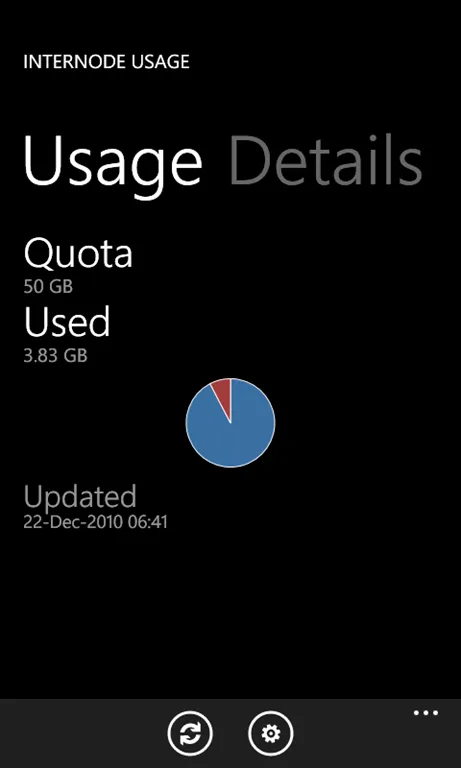
    <content type="html">&lt;p&gt;&lt;img src=&quot;https://david.gardiner.net.au/_astro/screengrab1.834tGJI__ZLNcNr.webp&quot; alt=&quot;Screen grab of Internode Usage app&quot; /&gt;My first application for Windows Phone 7 has now been published to the marketplace!&lt;/p&gt;
&lt;p&gt;It&apos;s a free usage meter for &lt;a href=&quot;http://www.internode.on.net&quot;&gt;Internode&lt;/a&gt;&apos;s broadband customers. Want to check how your much quota you have left on your ADSL plan? This app will tell you.&lt;/p&gt;
&lt;p&gt;The first version is pretty simple. It displays two sections. The first (shown above) displays your total quota, amount used so far, and the time the data was retrieved. The second section displays details for your account (see below).&lt;/p&gt;
&lt;p&gt;To install it on your Windows Phone 7 device, go to &lt;a href=&quot;https://www.xbox.com/en-US/?type=phoneApp&amp;amp;id=c9ebe665-de0d-e011-9264-00237de2db9e&quot;&gt;http://social.zune.net/redirect?type=phoneApp&amp;amp;id=c9ebe665-de0d-e011-9264-00237de2db9e&lt;/a&gt; (Opens in Zune)&lt;/p&gt;
&lt;h2&gt;Overview&lt;/h2&gt;
&lt;h3&gt;&lt;img src=&quot;../../assets/2010/12/screengrab-welcome%5B4%5D.png&quot; alt=&quot;ScreenGrab-Welcome&quot; /&gt;Welcome screen&lt;/h3&gt;
&lt;p&gt;When you first run the app, a welcome screen is displayed and you are prompted to go to the settings page to enter your username and password. (In version 1.0, there&apos;s a bug where the big &apos;Settings&apos; button doesn&apos;t do anything – you&apos;ll have to click on the settings icon &lt;img src=&quot;../../assets/2010/12/appbar.feature.settings.rest%5B9%5D.png&quot; alt=&quot;Settings icon&quot; /&gt; instead. This will be fixed in the next update)&lt;/p&gt;
&lt;h2&gt;&lt;img src=&quot;../../assets/2010/12/screengrab-settings%5B4%5D.png&quot; alt=&quot;ScreenGrab-Settings&quot; /&gt;&lt;/h2&gt;
&lt;h3&gt;Settings&lt;/h3&gt;
&lt;p&gt;Enter your Internode username (just the bit before the @ works for me)and password.&lt;/p&gt;
&lt;p&gt;Click on the &apos;Save&apos; icon to store these credentials.&lt;/p&gt;
&lt;h3&gt;&lt;img src=&quot;../../assets/2010/12/screengrab-details%5B4%5D.png&quot; alt=&quot;ScreenGrab-Details&quot; /&gt;Details&lt;/h3&gt;
&lt;p&gt;Your account details, including full username, monthly quota, plan name and plan speed.&lt;/p&gt;
&lt;h2&gt;Coming next&lt;/h2&gt;
&lt;p&gt;Features I&apos;m thinking of adding for the next update:&lt;/p&gt;
&lt;ul&gt;
&lt;li&gt;Usage history – graphs of last 12 months and detailed graph of last 30 days&lt;/li&gt;
&lt;li&gt;Improved icons (hopefully the Internode logo if permission can be obtained)&lt;/li&gt;
&lt;/ul&gt;
&lt;p&gt;I&apos;m also keen to hear of any other suggestions.&lt;/p&gt;
&lt;h2&gt;Acknowledgements&lt;/h2&gt;
&lt;p&gt;This application uses the Internode API, however for the canonical source for your usage, please always refer to &lt;a href=&quot;https://web.archive.org/web/20260107232212/https://secure.internode.on.net/myinternode/sys0/login&quot;&gt;My Internode&lt;/a&gt;.&lt;/p&gt;
&lt;p&gt;In many ways, the app is inspired by Angus Johnson&apos;s &lt;a href=&quot;https://web.archive.org/web/20101203032704/http://www.users.on.net/~johnson/internode/&quot;&gt;Internode Monthly Usage Meter&lt;/a&gt; (MUM). I&apos;ve been a happy MUM user for as long as I&apos;ve had Internode ADSL.&lt;/p&gt;
</content>
  </entry>
  <entry>
    <id>https://david.gardiner.net.au/2010/10/is-it-worth-going-naked</id>
    <updated>2010-10-08T15:24:00.001+10:30</updated>
    <title>Is it worth going naked?</title>
    <link href="https://david.gardiner.net.au/2010/10/is-it-worth-going-naked" rel="alternate" type="text/html" title="Is it worth going naked?"/>
    <category term="VoIP"/>
    <category term="Internet"/>
    <published>2010-10-08T15:24:00.001+10:30</published>
    <summary type="html">Following on from yesterday&apos;s post I thought I&apos;d run through the numbers to see what savings are possible with a change to a &apos;naked&apos; Internode ADSL service and porting our home phone number to VoIP. Current monthly expenses * – &apos;grandfathered&apos; plan no longer available to new customers. Price includes 5% discount. # – HomeLine Budget plan activated before newer conditions were introduced which disallow non-BigPond ADSL providers, and also includes $6 to enable Caller Number Display. …</summary>
    <content type="html">&lt;p&gt;Following on from &lt;a href=&quot;/2010/10/internode-introduced-phone-number&quot;&gt;yesterday&apos;s post&lt;/a&gt; I thought I&apos;d run through the numbers to see what savings are possible with a change to a &apos;naked&apos; &lt;a href=&quot;http://www.internode.on.net&quot;&gt;Internode&lt;/a&gt; ADSL service and porting our home phone number to VoIP.&lt;/p&gt;
&lt;p&gt;Current monthly expenses&lt;/p&gt;
&lt;table&gt;
&lt;thead&gt;
&lt;tr&gt;
&lt;th&gt;Service&lt;/th&gt;
&lt;th&gt;Description&lt;/th&gt;
&lt;th&gt;Cost&lt;/th&gt;
&lt;/tr&gt;
&lt;/thead&gt;
&lt;tbody&gt;&lt;tr&gt;
&lt;td&gt;Broadband&lt;/td&gt;
&lt;td&gt;Internode Easy-Broadband-Classic (50GB)*&lt;/td&gt;
&lt;td&gt;47.45&lt;/td&gt;
&lt;/tr&gt;
&lt;tr&gt;
&lt;td&gt;Telephone&lt;/td&gt;
&lt;td&gt;HomeLine® Budget#&lt;/td&gt;
&lt;td&gt;26.95&lt;/td&gt;
&lt;/tr&gt;
&lt;tr&gt;
&lt;td&gt;Total&lt;/td&gt;
&lt;td&gt;&lt;/td&gt;
&lt;td&gt;74.40&lt;/td&gt;
&lt;/tr&gt;
&lt;/tbody&gt;&lt;/table&gt;
&lt;p&gt;* – &apos;grandfathered&apos; plan no longer available to new customers. Price includes 5% discount.&lt;/p&gt;
&lt;p&gt;# – HomeLine Budget plan activated before &lt;a href=&quot;https://web.archive.org/web/20110621020114/http://www.telstra.com.au:80/homephone/plans/homeline_budget.html&quot;&gt;newer conditions were introduced&lt;/a&gt; which disallow non-BigPond ADSL providers, and also includes $6 to enable Caller Number Display.&lt;/p&gt;
&lt;p&gt;There seems to be two possibilities – the &quot;Easy&quot; plan (which also counts uploads but tend to have larger overall quotas) or the &quot;Extreme&quot; (which don&apos;t count uploads). I&apos;ve applied the 5% discount to the broadband plans.&lt;/p&gt;
&lt;p&gt;Easy Naked monthly expenses&lt;/p&gt;
&lt;table&gt;
&lt;thead&gt;
&lt;tr&gt;
&lt;th&gt;Service&lt;/th&gt;
&lt;th&gt;Description&lt;/th&gt;
&lt;th&gt;Cost&lt;/th&gt;
&lt;/tr&gt;
&lt;/thead&gt;
&lt;tbody&gt;&lt;tr&gt;
&lt;td&gt;Broadband&lt;/td&gt;
&lt;td&gt;Internode Easy Naked Pure Broadband S :: 150 Gigabytes&lt;/td&gt;
&lt;td&gt;56.95&lt;/td&gt;
&lt;/tr&gt;
&lt;tr&gt;
&lt;td&gt;Telephone&lt;/td&gt;
&lt;td&gt;Internode NodePhone2-Starter&lt;/td&gt;
&lt;td&gt;5.00&lt;/td&gt;
&lt;/tr&gt;
&lt;tr&gt;
&lt;td&gt;Total&lt;/td&gt;
&lt;td&gt;&lt;/td&gt;
&lt;td&gt;61.95&lt;/td&gt;
&lt;/tr&gt;
&lt;/tbody&gt;&lt;/table&gt;
&lt;p&gt;NakedExtreme monthly expenses&lt;/p&gt;
&lt;table&gt;
&lt;thead&gt;
&lt;tr&gt;
&lt;th&gt;Service&lt;/th&gt;
&lt;th&gt;Description&lt;/th&gt;
&lt;th&gt;Cost&lt;/th&gt;
&lt;/tr&gt;
&lt;/thead&gt;
&lt;tbody&gt;&lt;tr&gt;
&lt;td&gt;Broadband&lt;/td&gt;
&lt;td&gt;Internode NakedExtreme ADSL2+ Pure Broadband 60 Gigabytes&lt;/td&gt;
&lt;td&gt;66.46&lt;/td&gt;
&lt;/tr&gt;
&lt;tr&gt;
&lt;td&gt;Telephone&lt;/td&gt;
&lt;td&gt;Internode NodePhone2-Starter&lt;/td&gt;
&lt;td&gt;5.00&lt;/td&gt;
&lt;/tr&gt;
&lt;tr&gt;
&lt;td&gt;Total&lt;/td&gt;
&lt;td&gt;&lt;/td&gt;
&lt;td&gt;71.46&lt;/td&gt;
&lt;/tr&gt;
&lt;/tbody&gt;&lt;/table&gt;
&lt;p&gt;So unless I&apos;ve overlooked something, it looks like there&apos;s an opportunity to save up to $12/month.&lt;/p&gt;
&lt;p&gt;One thing to be careful of – there does appear to be a risk if you choose the &quot;Easy Naked&quot; plan. Turns out that you could end up on either an &lt;a href=&quot;https://web.archive.org/web/20101212040333/http://www.internode.on.net/residential/broadband/adsl/extreme/faq/&quot;&gt;Agile OR Optus DSLAM&lt;/a&gt;, and if you&apos;re not on an Agile DSLAM then I believe that &lt;a href=&quot;https://www.iinet.net.au/internet-product?ref=internode&quot;&gt;NodePhone isn&apos;t an option&lt;/a&gt;. I&apos;m &lt;a href=&quot;http://forums.whirlpool.net.au/forum-replies.cfm?t=1548489&amp;amp;p=4#r62&quot;&gt;waiting for clarification of this in the Whirlpool forums&lt;/a&gt;.&lt;/p&gt;
</content>
  </entry>
</feed>