<?xml version="1.0" encoding="UTF-8"?>
<feed xmlns="http://www.w3.org/2005/Atom" xml:lang="en-AU" xmlns:media="http://search.yahoo.com/mrss/">
  <id>https://david.gardiner.net.au/tags/PowerShell.xml</id>
  <title type="html">David Gardiner - PowerShell</title>
  <updated>2026-04-10T02:36:14.461Z</updated>
  <subtitle>Blog posts tagged with &apos;PowerShell&apos; - A blog of software development, .NET and other interesting things</subtitle>
  <rights>Copyright 2026 David Gardiner</rights>
  <icon>https://www.gravatar.com/avatar/37edf2567185071646d62ba28b868fab?s=64</icon>
  <logo>https://www.gravatar.com/avatar/37edf2567185071646d62ba28b868fab?s=256</logo>
  <generator uri="https://github.com/flcdrg/astrojs-atom" version="3">astrojs-atom</generator>
  <author>
    <name>David Gardiner</name>
  </author>
  <link href="https://david.gardiner.net.au/tags/PowerShell.xml" rel="self" type="application/atom+xml"/>
  <link href="https://david.gardiner.net.au/tags/PowerShell" rel="alternate" type="text/html" hreflang="en-AU"/>
  <category term="PowerShell"/>
  <category term="Software Development"/>
  <entry>
    <id>https://david.gardiner.net.au/2026/03/delete-github-action-artifacts</id>
    <updated>2026-03-21T16:00:00.000+10:30</updated>
    <title>Delete old GitHub Actions artifacts with PowerShell</title>
    <link href="https://david.gardiner.net.au/2026/03/delete-github-action-artifacts" rel="alternate" type="text/html" title="Delete old GitHub Actions artifacts with PowerShell"/>
    <category term="GitHub"/>
    <category term="PowerShell"/>
    <published>2026-03-21T16:00:00.000+10:30</published>
    <summary type="html">My GitHub Actions artifact usage was nearing the maximum quota for the month, so I needed a script to delete old artifacts</summary>
    <content type="html">&lt;p&gt;I received an email from GitHub overnight saying:&lt;/p&gt;
&lt;blockquote&gt;
&lt;p&gt;You have used 90% of the Actions storage included for the flcdrg account&lt;/p&gt;
&lt;p&gt;Your plan includes 2 GB of Actions storage per month at no extra cost. You have used 90% so far this billing cycle. 1.8 GB used / 2 GB included&lt;/p&gt;
&lt;/blockquote&gt;
&lt;p&gt;Oh dear, that&apos;s not good. Time for some Spring (or Autumn as it is in Australia) cleaning!&lt;/p&gt;
&lt;p&gt;I found a useful post by &lt;a href=&quot;https://www.eliostruyf.com&quot;&gt;Elio Struyf&lt;/a&gt; - &lt;a href=&quot;https://www.eliostruyf.com/clean-github-actions-artifacts-script/&quot;&gt;Clean up old GitHub Actions artifacts with a script&lt;/a&gt;, which contains a Bash script to delete old artifacts. PowerShell is my preferred scripting language so I first asked Copilot to convert the Bash script to PowerShell.&lt;/p&gt;
&lt;p&gt;I then ran it on some repositories that I new had lots of artifacts, but noticed that the paging was not working quite right, and that it was skipping artifacts if it couldn&apos;t parse the date field.&lt;/p&gt;
&lt;p&gt;I made two changes:&lt;/p&gt;
&lt;ol&gt;
&lt;li&gt;Read all the data in one go using the &lt;code&gt;--paginate --slurp&lt;/code&gt; parameters. This solves the problem that I think was happening when you read a page of results, then deleted them, and then asked the API for the next page, but the counts would now be out due to the deleted items.&lt;/li&gt;
&lt;li&gt;Ensure the date string is parsed using US date format (as it was defaulting to Australian format and then getting confused with dates that didn&apos;t make sense)&lt;/li&gt;
&lt;/ol&gt;
&lt;p&gt;Here&apos;s the final script:&lt;/p&gt;
&lt;pre&gt;&lt;code&gt;param(
    [Parameter(Position = 0)]
    [string]$Repo,

    [Parameter(Position = 1)]
    [int]$DaysOld = 5
)

if (-not (Get-Command gh -ErrorAction SilentlyContinue)) {
    Write-Error &quot;GitHub CLI (gh) is not installed or not available in PATH.&quot;
    exit 1
}

$null = gh auth status *&amp;gt; $null
if ($LASTEXITCODE -ne 0) {
    Write-Host &quot;Please authenticate with the GitHub CLI using &apos;gh auth login&apos;.&quot;
    exit 1
}

if ([string]::IsNullOrWhiteSpace($Repo)) {
    Write-Host &quot;Usage: .\delete-github-action-artifacts.ps1 &amp;lt;owner/repo&amp;gt; [days-old]&quot;
    Write-Host &quot;Example: .\delete-github-action-artifacts.ps1 owner/repo 5&quot;
    exit 1
}

Write-Host &quot;Cleaning up artifacts older than $DaysOld days for repository: $Repo&quot;

$pagesResponse = gh api --paginate --slurp -H &quot;Accept: application/vnd.github+json&quot; &quot;/repos/$Repo/actions/artifacts?per_page=100&quot; | ConvertFrom-Json
$allArtifacts = @()

foreach ($pageResponse in @($pagesResponse)) {
    if ($null -ne $pageResponse.artifacts) {
        $allArtifacts += @($pageResponse.artifacts)
    }
}

if (-not $allArtifacts -or $allArtifacts.Count -eq 0) {
    Write-Host &quot;No artifacts found.&quot;
}
else {
    foreach ($artifact in $allArtifacts) {
        $id = $artifact.id
        $name = $artifact.name
        $createdAt = $artifact.created_at

        if ($null -eq $id -or [string]::IsNullOrWhiteSpace($name) -or [string]::IsNullOrWhiteSpace($createdAt)) {
            $artifactJson = $artifact | ConvertTo-Json -Compress
            Write-Host &quot;Skipping invalid artifact data: $artifactJson&quot;
            continue
        }

        try {
            $createdAtUtc = [DateTimeOffset]::Parse($createdAt, [System.Globalization.CultureInfo]::InvariantCulture).UtcDateTime

            $ageDays = [int][Math]::Floor(([DateTime]::UtcNow - $createdAtUtc).TotalDays)

            if ($ageDays -gt $DaysOld) {
                Write-Host &quot;Deleting artifact: $name (ID: $id, Age: $ageDays days)&quot;
                $null = gh api -X DELETE &quot;/repos/$Repo/actions/artifacts/$id&quot; 2&amp;gt;$null

                if ($LASTEXITCODE -ne 0) {
                    Write-Host &quot;Failed to delete artifact: $name (ID: $id)&quot;
                }
            }
            else {
                Write-Host &quot;Keeping artifact: $name (ID: $id, Age: $ageDays days, Created At: $createdAt)&quot;
            }

        }
        catch {
            Write-Host &quot;Deleting artifact: $name (ID: $id, Created At: $createdAt)&quot;
            $null = gh api -X DELETE &quot;/repos/$Repo/actions/artifacts/$id&quot; 2&amp;gt;$null

            if ($LASTEXITCODE -ne 0) {
                Write-Host &quot;Failed to delete artifact: $name (ID: $id)&quot;
            }

        }

    }
}

Write-Host &quot;Cleanup completed.&quot;
&lt;/code&gt;&lt;/pre&gt;
&lt;p&gt;I&apos;ve also published it as a GitHub Gist at &lt;a href=&quot;https://gist.github.com/flcdrg/f204fc3f84247fe6247d654c0a673b73&quot;&gt;https://gist.github.com/flcdrg/f204fc3f84247fe6247d654c0a673b73&lt;/a&gt;&lt;/p&gt;
&lt;h2&gt;Prevention&lt;/h2&gt;
&lt;p&gt;The main cause of accumulating artifacts is by using the &lt;a href=&quot;https://github.com/marketplace/actions/upload-a-build-artifact&quot;&gt;&lt;code&gt;actions/upload-artifact&lt;/code&gt;&lt;/a&gt; action in GitHub Actions workflows. I&apos;ve now updated those actions to include the &lt;a href=&quot;https://github.com/marketplace/actions/upload-a-build-artifact#retention-period&quot;&gt;&lt;code&gt;retention-days&lt;/code&gt; property&lt;/a&gt; so that artifacts are automatically deleted after a few days.&lt;/p&gt;
&lt;p&gt;eg.&lt;/p&gt;
&lt;pre&gt;&lt;code&gt;      - name: Upload wrangler.jsonc
        uses: actions/upload-artifact@v7
        with:
          name: wrangler.jsonc
          path: wrangler.jsonc
          retention-days: 2
&lt;/code&gt;&lt;/pre&gt;
</content>
  </entry>
  <entry>
    <id>https://david.gardiner.net.au/2025/09/package-json-powershell</id>
    <updated>2025-09-09T17:00:00.000+09:30</updated>
    <title>Cross-platform PowerShell commands in npm scripts</title>
    <link href="https://david.gardiner.net.au/2025/09/package-json-powershell" rel="alternate" type="text/html" title="Cross-platform PowerShell commands in npm scripts"/>
    <category term="Blogging"/>
    <category term="PowerShell"/>
    <published>2025-09-09T17:00:00.000+09:30</published>
    <summary type="html">Using inline PowerShell scripts from package.json scripts, and how to
solve the problem of PowerShell variables not working as expected.</summary>
    <content type="html">&lt;p&gt;I&apos;m a big fan of Bob the Builder&apos;s catchphrase &quot;Use the right tool for the job&quot;. Not that he first came up with it, but his song is quite catchy😃&lt;/p&gt;
&lt;p&gt;A tool I often reach for when needing to script functionality is PowerShell. What I really like is that often while you can achieve similar results with Bash stringing together various Unix tools, the PowerShell equivalent almost always much more readable.&lt;/p&gt;
&lt;p&gt;And that really matters when someone is trying to understand what a script is doing (and that someone is usually me a few days or weeks later!).&lt;/p&gt;
&lt;p&gt;&lt;img src=&quot;https://david.gardiner.net.au/_astro/powershell-logo.Ct6r75lr_ZhjNQw.webp&quot; alt=&quot;PowerShell logo&quot; /&gt;&lt;/p&gt;
&lt;p&gt;My blog uses Markdown (.md) files for posts, and I make use of the &lt;a href=&quot;https://marketplace.visualstudio.com/items?itemName=VisualZoran.vz-file-templates&quot;&gt;VZ File Templates&lt;/a&gt; Visual Studio Code extension, with a &lt;a href=&quot;https://github.com/flcdrg/astro-blog-engine/blob/main/_templates/post.md?plain=1&quot;&gt;template file&lt;/a&gt; to start new posts.&lt;/p&gt;
&lt;p&gt;The template contains a front-matter section that I then customise for the post:&lt;/p&gt;
&lt;pre&gt;&lt;code&gt;title: Blog post title
date: &apos;$year$-$monthPadded$-$dayPadded$T$hoursPadded$:$minutesPadded$:00.000+09:30&apos;
#image: /assets
#imageAlt: image description
# description: summary of post
tags:
- A Tag
&lt;/code&gt;&lt;/pre&gt;
&lt;p&gt;I wanted to add some simple validation to my blog to check that the front matter in post Markdown files was valid - where &quot;valid&quot; means that I had not forgotten to update those placeholder values appropriately.&lt;/p&gt;
&lt;p&gt;I came up with the following PowerShell to do this:&lt;/p&gt;
&lt;pre&gt;&lt;code&gt;if (Get-ChildItem -Path ./src/posts -Filter &apos;*.md&apos; -Recurse | Where-Object { 
    (Get-Content $_.FullName -Raw) -match &apos;^(description: summary of post|image: /assets|imageAlt: image description title: Blog post title)$&apos; 
    }
) { 
    Write-Host &apos;Front matter has not been updated&apos;; exit 1 
} else { 
    Write-Host &apos;All front matter is properly updated&apos; 
}
&lt;/code&gt;&lt;/pre&gt;
&lt;p&gt;So if the description, image, imageAlt or title lines aren&apos;t updated it will fail.&lt;/p&gt;
&lt;p&gt;I could just add this to a build pipeline, but I like the idea of being able to run the same logic locally, as well as from a pipeline. I could have put it into a &lt;code&gt;.ps1&lt;/code&gt; script, but given the script wasn&apos;t that long, and the project in question is already using Node and has a package.json file, using a npm (or pnpm) script seemed reasonable.&lt;/p&gt;
&lt;p&gt;I added the following to &lt;code&gt;package.json&lt;/code&gt;:&lt;/p&gt;
&lt;pre&gt;&lt;code&gt;  &quot;scripts&quot;: {
    &quot;validate-frontmatter&quot;: &quot;pwsh -noprofile -Command \&quot;if (Get-ChildItem -Path ./src/posts -Filter &apos;*.md&apos; -Recurse | Where-Object { (Get-Content $_.FullName -Raw) -match &apos;^(description: summary of post|image: /assets|imageAlt: image description|title: Blog post title)$&apos; }) { Write-Host &apos;Front matter has not been updated&apos;; exit 1 } else { Write-Host &apos;All front matter is properly updated&apos; }\&quot;&quot;,
  },
&lt;/code&gt;&lt;/pre&gt;
&lt;p&gt;and confirmed it worked locally by running &lt;code&gt;pnpm validate-frontmatter&lt;/code&gt;, and it also ran when called in the build pipeline.&lt;/p&gt;
&lt;p&gt;It was a while later that I bothered to review the details of the build step and to my surprise there were a whole bunch of errors being logged, though they didn&apos;t cause the step to fail:&lt;/p&gt;
&lt;pre&gt;&lt;code&gt; Get-Content: Cannot find path &apos;/home/runner/setup-pnpm/node_modules/.bin/pnpm.FullName&apos; because it does not exist.
&lt;/code&gt;&lt;/pre&gt;
&lt;p&gt;That is really strange!&lt;/p&gt;
&lt;ul&gt;
&lt;li&gt;Why is it trying to get the &lt;code&gt;FullName&lt;/code&gt; property of the &lt;code&gt;pnpm&lt;/code&gt; binary?&lt;/li&gt;
&lt;li&gt;The &lt;code&gt;Get-ChildItem&lt;/code&gt; is supposed to be only searching under &lt;code&gt;./src/posts&lt;/code&gt; for &lt;code&gt;*.md&lt;/code&gt; files, so how it it even ending up at that path?&lt;/li&gt;
&lt;/ul&gt;
&lt;p&gt;The only thing I could think of was maybe it related to the actual &quot;&lt;code&gt;Get-Content $_.FullName&lt;/code&gt;&quot; part?&lt;/p&gt;
&lt;p&gt;&lt;code&gt;$_&lt;/code&gt; in PowerShell is supposed to be the current item when you&apos;re iterating over items from a pipeline. The pipeline is running on an Ubuntu build agent with Bash as the default shell. So maybe, just maybe is there a chance that the &lt;code&gt;$_&lt;/code&gt; is being interpreted by Bash before it gets seen by PowerShell?&lt;/p&gt;
&lt;p&gt;My first attempt was to escape the &lt;code&gt;$&lt;/code&gt; with a backslash, but VS Code threw up a bunch of squigglies warning me that was invalid JSON. What about two backslashes? That seems valid:&lt;/p&gt;
&lt;pre&gt;&lt;code&gt;Get-Content -Raw \\$_.FullName
&lt;/code&gt;&lt;/pre&gt;
&lt;p&gt;BINGO! And that worked in the pipeline!&lt;/p&gt;
&lt;p&gt;But turns out it doesn&apos;t now when run in Windows.&lt;/p&gt;
&lt;p&gt;So how can we make it compatible with both Bash/Ubuntu and Windows? I don&apos;t think we can in the one line. The option I went with was to use a helper package &lt;a href=&quot;https://www.npmjs.com/package/run-script-os&quot;&gt;run-script-os&lt;/a&gt;. Our scripts now become the following:&lt;/p&gt;
&lt;pre&gt;&lt;code&gt;    &quot;validate-frontmatter&quot;: &quot;run-script-os&quot;,
    &quot;validate-frontmatter:default&quot;: &quot;pwsh -noprofile -Command \&quot;if (Get-ChildItem -Path ./src/posts -Filter &apos;*.md&apos; -Recurse | Where-Object { (Get-Content -Raw \\$_.FullName) -match &apos;^(description: summary of post|image: /assets|imageAlt: image description|title: Blog post title)$&apos; }) { Write-Host &apos;Front matter has not been updated&apos;; exit 1 } else { Write-Host &apos;All front matter is properly updated&apos; }\&quot;&quot;,
    &quot;validate-frontmatter:windows&quot;: &quot;pwsh -noprofile -Command \&quot;if (Get-ChildItem -Path ./src/posts -Filter &apos;*.md&apos; -Recurse | Where-Object { (Get-Content $_.FullName -Raw) -match &apos;^(description: summary of post|image: /assets|imageAlt: image description|title: Blog post title)$&apos; }) { Write-Host &apos;Front matter has not been updated&apos;; exit 1 } else { Write-Host &apos;All front matter is properly updated&apos; }\&quot;&quot;,
&lt;/code&gt;&lt;/pre&gt;
&lt;p&gt;&lt;code&gt;validate-frontmatter:windows&lt;/code&gt; is now the original version that works on Windows. &lt;code&gt;validate-frontmatter:default&lt;/code&gt; is the updated version that should work on non-Windows platforms. &lt;code&gt;validate-frontmatter&lt;/code&gt; now just calls &lt;code&gt;run-script-os&lt;/code&gt; which figures out which other script to defer to depending on the current platform.&lt;/p&gt;
&lt;p&gt;You can see the final version in my &lt;a href=&quot;https://github.com/flcdrg/astro-blog-engine/blob/main/package.json#L10-L12&quot;&gt;astro-blog-engine GitHub repository&lt;/a&gt;&lt;/p&gt;
&lt;h2&gt;Alternate solution&lt;/h2&gt;
&lt;p&gt;The alternative would be to not use inline PowerShell but move the logic to a separate &lt;code&gt;.ps1&lt;/code&gt; script file. That way the &lt;code&gt;package.json&lt;/code&gt; script line doesn&apos;t contain any &lt;code&gt;$_&lt;/code&gt; variables that are at risk of being interpreted by the wrong shell. If the script logic was any longer or complex then that would be a good solution.&lt;/p&gt;
</content>
    <media:thumbnail url="https://david.gardiner.net.au/_astro/powershell-logo.Ct6r75lr.png" width="256" height="256"/>
    <media:content medium="image" url="https://david.gardiner.net.au/_astro/powershell-logo.Ct6r75lr.png" width="256" height="256"/>
  </entry>
  <entry>
    <id>https://david.gardiner.net.au/2025/04/touchpad-settings</id>
    <updated>2025-04-13T19:00:00.000+09:30</updated>
    <title>Changing the Windows touchpad settings programmatically</title>
    <link href="https://david.gardiner.net.au/2025/04/touchpad-settings" rel="alternate" type="text/html" title="Changing the Windows touchpad settings programmatically"/>
    <category term=".NET"/>
    <category term="PowerShell"/>
    <category term="Windows 11"/>
    <published>2025-04-13T19:00:00.000+09:30</published>
    <summary type="html">Now that I&apos;ve got a reliable process for reinstalling Windows, I do have a list of things that I&apos;d like to automate to get it configured &quot;just right&quot;. As such, I&apos;ve created a new repository on GitHub and added issues to track each one of these. While my Boxstarter scripts will remain for now as GitHub Gists, I think it&apos;s going to be easier to manage all of these things together in the one Git repository.</summary>
    <content type="html">&lt;p&gt;Now that I&apos;ve got &lt;a href=&quot;/2025/04/reinstalling-laptop&quot;&gt;a reliable process for reinstalling Windows&lt;/a&gt;, I do have a list of things that I&apos;d like to automate to get it configured &quot;just right&quot;. As such, I&apos;ve created a new repository on GitHub and &lt;a href=&quot;https://github.com/flcdrg/reinstall-windows/issues&quot;&gt;added issues to track each one of these&lt;/a&gt;. While my &lt;a href=&quot;https://gist.github.com/flcdrg/87802af4c92527eb8a30&quot;&gt;Boxstarter scripts&lt;/a&gt; will remain for now as GitHub Gists, I think it&apos;s going to be easier to manage all of these things together in the one &lt;a href=&quot;https://github.com/flcdrg/reinstall-windows&quot;&gt;Git repository&lt;/a&gt;.&lt;/p&gt;
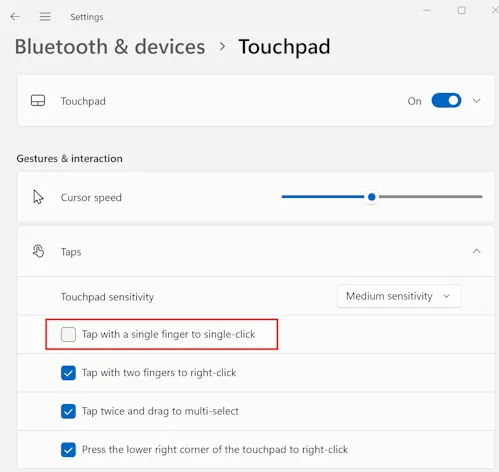
&lt;p&gt;One customisation I like to make to Windows is to disable the &apos;Tap with a single finger to single-click&apos; for the touchpad. I find I&apos;m less likely to accidentally click on something when I was just tapping the touch pad to move the cursor if I turn this off.&lt;/p&gt;
&lt;p&gt;&lt;img src=&quot;https://david.gardiner.net.au/_astro/touchpad-settings.QcmMTYok_1np360.webp&quot; alt=&quot;Screenshot of Windows Settings, showing Touchpad configuration, with &apos;Tap for a single finger to single-click&apos; unchecked&quot; /&gt;&lt;/p&gt;
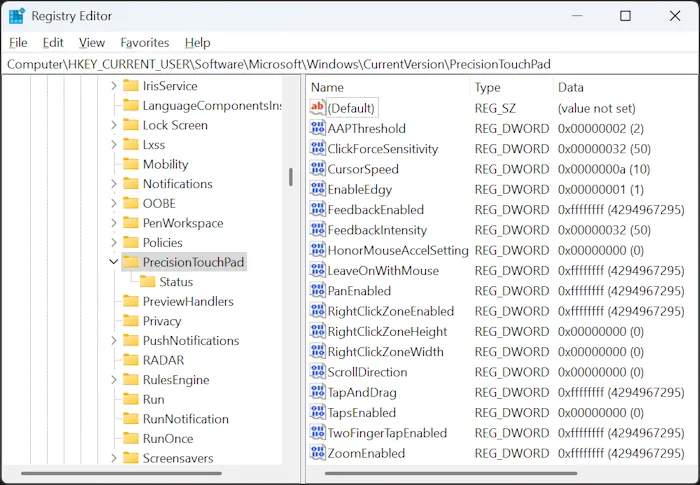
&lt;p&gt;I found some &lt;a href=&quot;https://learn.microsoft.com/answers/questions/1258054/how-to-turn-off-touch-gestures-in-windows-10-11-%28d?WT.mc_id=DOP-MVP-5001655&quot;&gt;online articles&lt;/a&gt; that suggested this was managed by the Registry setting &lt;code&gt;HKEY_CURRENT_USER\Software\Microsoft\Windows\CurrentVersion\PrecisionTouchPad&lt;/code&gt;. Experimenting with this seems to be partly true. I can see the Registry value &lt;code&gt;TapsEnabled&lt;/code&gt; is updated when I enable or disable the checkbox in Windows Settings. But the reverse did not seem to be true - if I modified the Registry key, Windows Settings doesn&apos;t change, nor does the touchpad behaviour.&lt;/p&gt;
&lt;p&gt;&lt;img src=&quot;https://david.gardiner.net.au/_astro/registry-editor.DJW3oChB_AQFGB.webp&quot; alt=&quot;Windows Registry Editor showing keys for PrecisionTouchPad&quot; /&gt;&lt;/p&gt;
&lt;p&gt;Further searching lead me to the &lt;a href=&quot;https://learn.microsoft.com/windows-hardware/design/component-guidelines/touchpad-tuning-guidelines?WT.mc_id=DOP-MVP-5001655&quot;&gt;Tuning Guidelines&lt;/a&gt; page of the Windows Hardware Precision Touchpad Implementation Guide. I&apos;m no hardware manufacturer, but this does document the &lt;a href=&quot;https://learn.microsoft.com/windows-hardware/design/component-guidelines/touchpad-tuning-guidelines?WT.mc_id=DOP-MVP-5001655#tap-with-a-single-finger-to-single-click&quot;&gt;&lt;code&gt;TapsEnabled&lt;/code&gt;&lt;/a&gt; setting. Interestinly, down the bottom of that page it does also mention:&lt;/p&gt;
&lt;blockquote&gt;
&lt;p&gt;As of Windows 11, build 26027, the user&apos;s touchpad settings can be queried and modified dynamically via the SystemParametersInfo API&lt;/p&gt;
&lt;/blockquote&gt;
&lt;p&gt;I&apos;m running Windows 11 24H2, which is build 26100, so that &lt;a href=&quot;https://learn.microsoft.com/windows/win32/api/winuser/nf-winuser-systemparametersinfoa?WT.mc_id=DOP-MVP-5001655&quot;&gt;&apos;SystemParametersInfo&apos;&lt;/a&gt; API should be available to me. Let&apos;s see if calling that does the trick.&lt;/p&gt;
&lt;p&gt;My C/C++ is pretty rusty, whereas I&apos;m quite at home in C# or PowerShell. My preference would be to use &lt;a href=&quot;https://learn.microsoft.com/dotnet/standard/native-interop/pinvoke?WT.mc_id=DOP-MVP-5001655&quot;&gt;.NET P/Invoke&lt;/a&gt; to call the Windows API.&lt;/p&gt;
&lt;p&gt;As I&apos;ve learned from previous times using P/Invoke, The trick to getting it working properly is to make sure you have the method signature(s) and data structures correct.&lt;/p&gt;
&lt;p&gt;While my final goal is to call this from a PowerShell script, prototyping in a simple .NET console application should allow me to quickly test my definitions, plus get C# syntax highlighting and code completion within my IDE.&lt;/p&gt;
&lt;p&gt;Let&apos;s try and find an existing definition of &lt;code&gt;SystemParametersInfo&lt;/code&gt;. I searched for &quot;.NET PInvoke&quot; and noticed &lt;a href=&quot;https://github.com/dotnet/pinvoke&quot;&gt;https://github.com/dotnet/pinvoke&lt;/a&gt;, but that repository is archived and you are instead pointed to &lt;a href=&quot;https://github.com/microsoft/CsWin32&quot;&gt;https://github.com/microsoft/CsWin32&lt;/a&gt;. This project provides a .NET source generator that will create Win32 P/Invoke methods for you, based off of the latest metadata from the Windows team. That sounds perfect!&lt;/p&gt;
&lt;p&gt;As per &lt;a href=&quot;https://microsoft.github.io/CsWin32/docs/getting-started.html&quot;&gt;the documentation&lt;/a&gt;, I added a package reference&lt;/p&gt;
&lt;pre&gt;&lt;code&gt;dotnet add package Microsoft.Windows.CsWin32
&lt;/code&gt;&lt;/pre&gt;
&lt;p&gt;Then created a &lt;code&gt;NativeMethods.txt&lt;/code&gt; file and added &lt;code&gt;SystemParametersInfo&lt;/code&gt; to it.&lt;/p&gt;
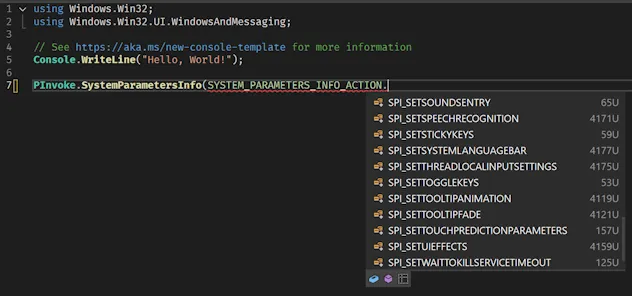
&lt;p&gt;I then edited &lt;code&gt;Program.cs&lt;/code&gt; and tried to use my new method:&lt;/p&gt;
&lt;p&gt;&lt;img src=&quot;https://david.gardiner.net.au/_astro/visual-studio-missing-enum.B4AvDanC_2jLSIq.webp&quot; alt=&quot;Screenshot of editing Program.cs in Visual Studio&quot; /&gt;&lt;/p&gt;
&lt;p&gt;Except &lt;code&gt;SPI_GETTOUCHPADPARAMETERS&lt;/code&gt; isn&apos;t available!&lt;/p&gt;
&lt;p&gt;The documentation suggested you can get newer metadata for the source generator to use by adding a reference to the latest prerelease &lt;code&gt;Microsoft.Windows.SDK.Win32Metadata&lt;/code&gt; package. I tried that, but still no joy. I&apos;ve &lt;a href=&quot;https://github.com/microsoft/win32metadata/issues/2079&quot;&gt;raised an issue&lt;/a&gt; in the &lt;a href=&quot;https://github.com/microsoft/win32metadata&quot;&gt;microsoft/win32metadata&lt;/a&gt; repo, but for now it looks like I&apos;ll need to hand-roll a few of the types myself.&lt;/p&gt;
&lt;p&gt;The docs for SPI_GETTOUCHPADPARAMETERS say the following:&lt;/p&gt;
&lt;ul&gt;
&lt;li&gt;The &lt;code&gt;pvParam&lt;/code&gt; parameter must point to a &lt;code&gt;TOUCHPAD_PARAMETERS&lt;/code&gt; structure.&lt;/li&gt;
&lt;li&gt;The &lt;code&gt;uiParam&lt;/code&gt; parameter must specify the size of the structure.&lt;/li&gt;
&lt;li&gt;The value of the &lt;code&gt;versionNumber&lt;/code&gt; field in the &lt;code&gt;TOUCHPAD_PARAMETERS&lt;/code&gt; structure must be set to the appropriate value for the version of the structure being used.&lt;/li&gt;
&lt;/ul&gt;
&lt;p&gt;The &lt;a href=&quot;https://learn.microsoft.com/windows/win32/api/winuser/ns-winuser-touchpad_parameters?WT.mc_id=DOP-MVP-5001655&quot;&gt;TOUCHPAD_PARAMETERS structure&lt;/a&gt; is documented using C++. I asked GitHub Copilot if it could translate that into equivalent C# for me. It came up with this:&lt;/p&gt;
&lt;pre&gt;&lt;code&gt;// DO NOT USE THIS - IT IS INCORRECT!!
[StructLayout(LayoutKind.Sequential)]
public struct TOUCHPAD_PARAMETERS
{
    public uint VersionNumber;
    public uint MaxSupportedContacts;
    public LEGACY_TOUCHPAD_FEATURES LegacyTouchpadFeatures;

    // Bit fields are represented as individual boolean fields in C#
    public bool TouchpadPresent;
    public bool LegacyTouchpadPresent;
    public bool ExternalMousePresent;
    public bool TouchpadEnabled;
    public bool TouchpadActive;
    public bool FeedbackSupported;
    public bool ClickForceSupported;

    [MarshalAs(UnmanagedType.ByValArray, SizeConst = 25)]
    public bool[] Reserved1;

    public bool AllowActiveWhenMousePresent;
    public bool FeedbackEnabled;
    public bool TapEnabled;
    public bool TapAndDragEnabled;
    public bool TwoFingerTapEnabled;
    public bool RightClickZoneEnabled;
    public bool MouseAccelSettingHonored;
    public bool PanEnabled;
    public bool ZoomEnabled;
    public bool ScrollDirectionReversed;

    [MarshalAs(UnmanagedType.ByValArray, SizeConst = 22)]
    public bool[] Reserved2;

    public TOUCHPAD_SENSITIVITY_LEVEL SensitivityLevel;
    public uint CursorSpeed;
    public uint FeedbackIntensity;
    public uint ClickForceSensitivity;
    public uint RightClickZoneWidth;
    public uint RightClickZoneHeight;
}
&lt;/code&gt;&lt;/pre&gt;
&lt;p&gt;And likewise for the two enums &lt;a href=&quot;https://learn.microsoft.com/windows/win32/api/winuser/ne-winuser-legacy_touchpad_features?WT.mc_id=DOP-MVP-5001655&quot;&gt;LEGACY_TOUCHPAD_FEATURES enumeration&lt;/a&gt; and &lt;a href=&quot;https://learn.microsoft.com/windows/win32/api/winuser/ne-winuser-touchpad_sensitivity_level?WT.mc_id=DOP-MVP-5001655&quot;&gt;TOUCHPAD_SENSITIVITY_LEVEL enumeration&lt;/a&gt;.&lt;/p&gt;
&lt;p&gt;One thing you need to do is set the &lt;code&gt;VersionNumber&lt;/code&gt; property to &lt;code&gt;TOUCHPAD_PARAMETERS_LATEST_VERSION&lt;/code&gt;. Except I searched to find out what the value of that is, and no results. I ended up resorting to installing the Windows 11 SDK so I could locate WinUser.h and then I found this:&lt;/p&gt;
&lt;pre&gt;&lt;code&gt;#define TOUCHPAD_PARAMETERS_LATEST_VERSION 1
#define TOUCHPAD_PARAMETERS_VERSION_1 1
&lt;/code&gt;&lt;/pre&gt;
&lt;p&gt;But then trying to call SystemParametersInfo was not working. That lead me down a bit of a rabbit hole to finally conclude that something is still wrong with the mapping in &lt;code&gt;TOUCHPAD_PARAMETERS&lt;/code&gt;. The original structure in C++ is this:&lt;/p&gt;
&lt;pre&gt;&lt;code&gt;typedef struct TOUCHPAD_PARAMETERS {
  UINT                       versionNumber;
  UINT                       maxSupportedContacts;
  LEGACY_TOUCHPAD_FEATURES   legacyTouchpadFeatures;
  BOOL                       touchpadPresent : 1;
  BOOL                       legacyTouchpadPresent : 1;
  BOOL                       externalMousePresent : 1;
  BOOL                       touchpadEnabled : 1;
  BOOL                       touchpadActive : 1;
  BOOL                       feedbackSupported : 1;
  BOOL                       clickForceSupported : 1;
  BOOL                       Reserved1 : 25;
  BOOL                       allowActiveWhenMousePresent : 1;
  BOOL                       feedbackEnabled : 1;
  BOOL                       tapEnabled : 1;
  BOOL                       tapAndDragEnabled : 1;
  BOOL                       twoFingerTapEnabled : 1;
  BOOL                       rightClickZoneEnabled : 1;
  BOOL                       mouseAccelSettingHonored : 1;
  BOOL                       panEnabled : 1;
  BOOL                       zoomEnabled : 1;
  BOOL                       scrollDirectionReversed : 1;
  BOOL                       Reserved2 : 22;
  TOUCHPAD_SENSITIVITY_LEVEL sensitivityLevel;
  UINT                       cursorSpeed;
  UINT                       feedbackIntensity;
  UINT                       clickForceSensitivity;
  UINT                       rightClickZoneWidth;
  UINT                       rightClickZoneHeight;
} TOUCHPAD_PARAMETERS, *PTOUCH_PAD_PARAMETERS, TOUCHPAD_PARAMETERS_V1, *PTOUCHPAD_PARAMETERS_V1;
&lt;/code&gt;&lt;/pre&gt;
&lt;p&gt;Notice all those numbers after many of the fields? Those indicate it is a &lt;a href=&quot;https://learn.microsoft.com/cpp/c-language/c-bit-fields?view=msvc-170&amp;amp;WT.mc_id=DOP-MVP-5001655&quot;&gt;C bit field&lt;/a&gt;. And guess what feature &lt;a href=&quot;https://github.com/dotnet/csharplang/discussions/465&quot;&gt;C# doesn&apos;t currently support&lt;/a&gt;?&lt;/p&gt;
&lt;p&gt;In that discussion though &lt;a href=&quot;https://github.com/dotnet/csharplang/discussions/465#discussioncomment-8399377&quot;&gt;there is a suggestion&lt;/a&gt; that you can use &lt;a href=&quot;https://learn.microsoft.com/dotnet/api/system.collections.specialized.bitvector32?view=net-9.0&amp;amp;WT.mc_id=DOP-MVP-5001655&quot;&gt;&lt;code&gt;BitVector32&lt;/code&gt;&lt;/a&gt; or &lt;a href=&quot;https://learn.microsoft.com/dotnet/api/system.collections.bitarray?view=net-9.0&amp;amp;WT.mc_id=DOP-MVP-5001655&quot;&gt;&lt;code&gt;BitArray&lt;/code&gt;&lt;/a&gt; as a workaround. For usability, we can add properties in to expose access to the individual bits in the &lt;code&gt;BitVector32&lt;/code&gt; field. Also note that the values passed in via the &lt;code&gt;[]&lt;/code&gt; is a bitmask, not an array index. (Yes, that tricked me the first time too!)&lt;/p&gt;
&lt;pre&gt;&lt;code&gt;[StructLayout(LayoutKind.Sequential)]
public struct TOUCHPAD_PARAMETERS
{
    public uint VersionNumber;
    public uint MaxSupportedContacts;
    public LEGACY_TOUCHPAD_FEATURES LegacyTouchpadFeatures;

    private BitVector32 First;

    public bool TouchpadPresent
    {
        get =&amp;gt; First[1];
        set =&amp;gt; First[1] = value;
    }

    public bool LegacyTouchpadPresent
    {
        get =&amp;gt; First[2];
        set =&amp;gt; First[2] = value;
    }
&lt;/code&gt;&lt;/pre&gt;
&lt;p&gt;With that done, we can now call &lt;code&gt;SystemParametersInfo&lt;/code&gt; like this:&lt;/p&gt;
&lt;pre&gt;&lt;code&gt;const uint SPI_GETTOUCHPADPARAMETERS = 0x00AE;

unsafe
{
    TOUCHPAD_PARAMETERS param;
    param.VersionNumber = 1;

    var size = (uint)Marshal.SizeOf&amp;lt;TOUCHPAD_PARAMETERS&amp;gt;();
    var result = PInvoke.SystemParametersInfo((SYSTEM_PARAMETERS_INFO_ACTION)SPI_GETTOUCHPADPARAMETERS,
        size, &amp;amp;param, 0);
&lt;/code&gt;&lt;/pre&gt;

&lt;p&gt;And it works! Now curiously, the Windows Settings page doesn&apos;t update in real time, but if you go to a different page and then navigate back to the Touchpad page, the setting has updated!&lt;/p&gt;
&lt;p&gt;We can refactor the code slightly to put it into a helper static class, so it&apos;s easier to call from PowerShell. To make this easier I created a second Console application, but this time I didn&apos;t add any source generators, so I would be forced to ensure that all required code was available You can &lt;a href=&quot;https://github.com/flcdrg/reinstall-windows/blob/main/StandaloneApp/Program.cs&quot;&gt;view the source code here&lt;/a&gt;.&lt;/p&gt;
&lt;p&gt;I could then copy the C# into a PowerShell script and use the &lt;code&gt;Add-Type&lt;/code&gt; command to include it in the current PowerShell session. Note the use of &lt;code&gt;-CompilerOptions &quot;/unsafe&quot;&lt;/code&gt;, which we need to specify as we&apos;re using the &lt;code&gt;unsafe&lt;/code&gt; keyword in our C# code.&lt;/p&gt;
&lt;pre&gt;&lt;code&gt;$source=@&apos;
using System;
using System.Collections.Specialized;
using System.Runtime.InteropServices;
using System.Runtime.Versioning;

public static class SystemParametersInfoHelper
{
    [DllImport(&quot;USER32.dll&quot;, ExactSpelling = true, EntryPoint = &quot;SystemParametersInfoW&quot;, SetLastError = true), DefaultDllImportSearchPaths(DllImportSearchPath.System32)]
    [SupportedOSPlatform(&quot;windows5.0&quot;)]
    internal static extern unsafe bool SystemParametersInfo(uint uiAction, uint uiParam, [Optional] void* pvParam, uint fWinIni);

    public static void DisableSingleTap()
    {
        const uint SPI_GETTOUCHPADPARAMETERS = 0x00AE;
        const uint SPI_SETTOUCHPADPARAMETERS = 0x00AF;

        unsafe
        {
            // Use a fixed buffer to handle the managed type issue  
            TOUCHPAD_PARAMETERS param;
            param.VersionNumber = 1;

            var size = (uint)Marshal.SizeOf&amp;lt;TOUCHPAD_PARAMETERS&amp;gt;();
            var result = SystemParametersInfo(SPI_GETTOUCHPADPARAMETERS, size, &amp;amp;param, 0);

            if (param.TapEnabled)
            {
                param.TapEnabled = false;

                result = SystemParametersInfo(SPI_SETTOUCHPADPARAMETERS, size, &amp;amp;param, 3);
            }
        }
    }
}

[StructLayout(LayoutKind.Sequential)]
public struct TOUCHPAD_PARAMETERS
{
    ...
&apos;@

Add-Type -TypeDefinition $source -Language CSharp -PassThru -CompilerOptions &quot;/unsafe&quot; | Out-Null
[SystemParametersInfoHelper]::DisableSingleTap()
&lt;/code&gt;&lt;/pre&gt;
&lt;p&gt;The complete version of the script is &lt;a href=&quot;https://github.com/flcdrg/reinstall-windows/blob/main/Set-Touchpad.ps1&quot;&gt;available here&lt;/a&gt;.&lt;/p&gt;
&lt;p&gt;&lt;img src=&quot;https://david.gardiner.net.au/_astro/touchpad-settings-demo.iszIrUx__MTfLT.webp&quot; alt=&quot;Demo of script disabling touchpad&apos;s &apos;tap with single finger to single-click&apos;&quot; /&gt;&lt;/p&gt;
&lt;p&gt;That&apos;s one problem solved. Just a few more to go!&lt;/p&gt;
</content>
    <media:thumbnail url="https://david.gardiner.net.au/_astro/touchpad-settings.QcmMTYok.png" width="499" height="472"/>
    <media:content medium="image" url="https://david.gardiner.net.au/_astro/touchpad-settings.QcmMTYok.png" width="499" height="472"/>
  </entry>
  <entry>
    <id>https://david.gardiner.net.au/2025/04/reinstalling-laptop</id>
    <updated>2025-04-08T20:30:00.000+09:30</updated>
    <title>Customising and optimising Windows 11 installation</title>
    <link href="https://david.gardiner.net.au/2025/04/reinstalling-laptop" rel="alternate" type="text/html" title="Customising and optimising Windows 11 installation"/>
    <category term="Hardware"/>
    <category term="PowerShell"/>
    <category term="Windows 11"/>
    <published>2025-04-08T20:30:00.000+09:30</published>
    <summary type="html">In theory, I&apos;d like to reinstall my laptop regularly - say every couple of months? In practise, it&apos;s easy to keep putting it off. One of the detractions was not just the time to re-install Windows, but also to then install all the various device drivers. So time goes by and next you realise it&apos;s been a year or longer.</summary>
    <content type="html">&lt;p&gt;In theory, I&apos;d like to reinstall my laptop regularly - say every couple of months? In practise, it&apos;s easy to keep putting it off. One of the detractions was not just the time to re-install Windows, but also to then install all the various device drivers. So time goes by and next you realise it&apos;s been a year or longer.&lt;/p&gt;
&lt;p&gt;&lt;img src=&quot;https://david.gardiner.net.au/_astro/Windows-11-Logo-1000x404.B7euyBZy_Z1gQFiY.webp&quot; alt=&quot;Windows 11 logo&quot; /&gt;&lt;/p&gt;
&lt;p&gt;If you use the built in &lt;a href=&quot;https://support.microsoft.com/en-au/windows/reset-your-pc-0ef73740-b927-549b-b7c9-e6f2b48d275e&quot;&gt;Windows Reset feature&lt;/a&gt;, then it&apos;s been my observation that this seems to preserve not only any OEM drivers, but also any OEM bloatware too. I was interested in the idea of installing a &apos;vanilla&apos; Windows OS, with just the OEM drivers, but no bloat. And while I&apos;m at it, can I automate a few of the other installation steps?&lt;/p&gt;
&lt;h2&gt;Step 0. Partition your disk&lt;/h2&gt;
&lt;p&gt;If you want to make this whole process easier, having a separate partition (or second physical drive) for all your data/documents/files will mean you can completely blow away your C: drive where Windows is installed, and all those files in the other partition will be untouched.&lt;/p&gt;
&lt;p&gt;In my case, I partitioned my SSD to have D: as my &lt;a href=&quot;https://learn.microsoft.com/windows/dev-drive/?WT.mc_id=DOP-MVP-5001655&quot;&gt;Dev Drive&lt;/a&gt; (which uses the newer &lt;a href=&quot;https://learn.microsoft.com/windows-server/storage/refs/refs-overview?WT.mc_id=DOP-MVP-5001655&quot;&gt;ReFS file system&lt;/a&gt;).&lt;/p&gt;
&lt;p&gt;Having a full system backup is another great idea. Knowing that if something goes wrong and you have a way to restore your system back to how it was before you started it process is reassuring. I take advantage of &lt;a href=&quot;https://www.synology.com/en-global/dsm/feature/active-backup-business/pc&quot;&gt;Synology Active Backup for Business&lt;/a&gt; to take full backups of my machines, as well as taking using OneDrive for storing other important files and documents.&lt;/p&gt;
&lt;h2&gt;Step 1. Create a bootable Windows USB drive&lt;/h2&gt;
&lt;p&gt;Head over to &lt;a href=&quot;https://www.microsoft.com/en-au/software-download/windows11&quot;&gt;https://www.microsoft.com/en-au/software-download/windows11&lt;/a&gt; and follow the steps to download the Windows 11 ISO image.&lt;/p&gt;
&lt;p&gt;Next, get &lt;a href=&quot;https://rufus.ie/en/&quot;&gt;Rufus&lt;/a&gt; and use that to create a bootable USB drive. You probably want to select NTFS for the format, as you will likely need to store more data than can fit in FAT32.&lt;/p&gt;
&lt;p&gt;Why do this instead of using Microsoft&apos;s Media Creator Tool? The results are similar, but the tool creates a &lt;code&gt;sources\install.esd&lt;/code&gt; file. If you create a bootable USB from the ISO, then the file created is &lt;code&gt;sources\install.wim&lt;/code&gt;. Yes, it is possible to convert an &lt;code&gt;.esd&lt;/code&gt; to &lt;code&gt;.wim&lt;/code&gt;, but this way you don&apos;t need to bother, and your USB is formatted in a way it can fit larger files.&lt;/p&gt;
&lt;h2&gt;Step 2. Create a working directory&lt;/h2&gt;
&lt;pre&gt;&lt;code&gt;mkdir c:\MachineImaging
cd c:\MachineImaging
&lt;/code&gt;&lt;/pre&gt;
&lt;h2&gt;Step 3. Mount the .WIM file&lt;/h2&gt;
&lt;p&gt;The Windows Image .WIM file is a special file format that can contain one or more Windows images. There&apos;s a tool built in to Windows - &lt;code&gt;DISM.EXE&lt;/code&gt; that is used for working with .WIM files. Conveniently, there&apos;s also a &lt;a href=&quot;https://learn.microsoft.com/powershell/module/dism/?view=windowsserver2025-ps&amp;amp;WT.mc_id=DOP-MVP-5001655&quot;&gt;Dism PowerShell module&lt;/a&gt; with equivalent cmdlets. I find these a bit friendlier to use, as you get parameter completion etc.&lt;/p&gt;
&lt;p&gt;We&apos;re going to copy the .WIM file from the ISO (or bootable USB we just created), but I&apos;m also going to extract out just the particular image index I plan to use. This will make things simpler later on.&lt;/p&gt;
&lt;p&gt;We can list all the images included in a .WIM file like this:&lt;/p&gt;
&lt;pre&gt;&lt;code&gt;Get-WindowsImage -ImagePath d:\sources\install.wim
&lt;/code&gt;&lt;/pre&gt;
&lt;pre&gt;&lt;code&gt;ImageIndex       : 1
ImageName        : Windows 11 Home
ImageDescription : Windows 11 Home
ImageSize        : 18,727,965,088 bytes

ImageIndex       : 2
ImageName        : Windows 11 Home N
ImageDescription : Windows 11 Home N
ImageSize        : 18,190,503,625 bytes

ImageIndex       : 3
ImageName        : Windows 11 Home Single Language
ImageDescription : Windows 11 Home Single Language
ImageSize        : 18,725,453,549 bytes

ImageIndex       : 4
ImageName        : Windows 11 Education
ImageDescription : Windows 11 Education
ImageSize        : 19,230,378,207 bytes

ImageIndex       : 5
ImageName        : Windows 11 Education N
ImageDescription : Windows 11 Education N
ImageSize        : 18,698,289,981 bytes

ImageIndex       : 6
ImageName        : Windows 11 Pro
ImageDescription : Windows 11 Pro
ImageSize        : 19,250,929,144 bytes

ImageIndex       : 7
ImageName        : Windows 11 Pro N
ImageDescription : Windows 11 Pro N
ImageSize        : 18,700,496,532 bytes

ImageIndex       : 8
ImageName        : Windows 11 Pro Education
ImageDescription : Windows 11 Pro Education
ImageSize        : 19,230,428,845 bytes

ImageIndex       : 9
ImageName        : Windows 11 Pro Education N
ImageDescription : Windows 11 Pro Education N
ImageSize        : 18,698,315,750 bytes

ImageIndex       : 10
ImageName        : Windows 11 Pro for Workstations
ImageDescription : Windows 11 Pro for Workstations
ImageSize        : 19,230,479,483 bytes

ImageIndex       : 11
ImageName        : Windows 11 Pro N for Workstations
ImageDescription : Windows 11 Pro N for Workstations
ImageSize        : 18,698,341,519 bytes
&lt;/code&gt;&lt;/pre&gt;
&lt;p&gt;&quot;Windows 11 Pro&quot; has ImageIndex 6. That&apos;s the one I&apos;m interested in.&lt;/p&gt;
&lt;p&gt;Now we can export just that image:&lt;/p&gt;
&lt;pre&gt;&lt;code&gt;Export-WindowsImage -SourceImagePath d:\sources\install.wim -SourceIndex 6 -DestinationImagePath install.wim -CompressionType max
&lt;/code&gt;&lt;/pre&gt;
&lt;p&gt;For good measure, we&apos;ll keep a &apos;known good version&apos; copy, so that if we discover our install has problems, we can roll back to the previous known good.&lt;/p&gt;
&lt;pre&gt;&lt;code&gt;Copy-Item install.wim knowngood.wim
&lt;/code&gt;&lt;/pre&gt;
&lt;h2&gt;Step 4. Add drivers&lt;/h2&gt;
&lt;p&gt;I should point out that I originally was following the instructions outlined in &lt;a href=&quot;https://web.archive.org/web/20250423213648/https://www.tenforums.com/tutorials/95008-dism-add-remove-drivers-offline-image.html&quot;&gt;this post&lt;/a&gt;. Those instructions cover how to capture the currently installed drivers on a machine, exporting them out, and then adding them to an install image. I tried this but my install hung. I&apos;m not really sure why - probably one of the drivers wasn&apos;t happy tring to install at OS install time? I&apos;m not sure - it should work in theory.&lt;/p&gt;
&lt;p&gt;So instead I remembered that most OEM manufacturers not only make the latest device drivers available for their hardware, but often they also provide a &apos;bundle&apos; download with all the current drivers in one .zip, intended for just this scenario.&lt;/p&gt;
&lt;p&gt;My current laptop is a Dell XPS 9530, and their Windows 11 Driver Pack is listed &lt;a href=&quot;https://www.dell.com/support/kbdoc/en-au/000214839/xps-15-9530-windows-11-driver-pack&quot;&gt;here&lt;/a&gt; with a download link. It 2.8GB!&lt;/p&gt;
&lt;p&gt;Unzip that into a subdirectory (c:\MachineImaging\DeployDriverPack)&lt;/p&gt;
&lt;p&gt;Now we can add all the drivers in one go using this command&lt;/p&gt;
&lt;pre&gt;&lt;code&gt;Add-WindowsDriver -Recurse -Path mount -Driver .\DeployDriverPack
&lt;/code&gt;&lt;/pre&gt;
&lt;p&gt;If you&apos;re more conservative, you could add a single driver (by removing the &lt;code&gt;-Recurse&lt;/code&gt; parameter and changing the path) or just the audio drivers, and test out the image before adding more.&lt;/p&gt;
&lt;h2&gt;Step 5. Enable or disable Windows optional features&lt;/h2&gt;
&lt;p&gt;You also have the ability to select which Windows features are enabled or disabled by default.&lt;/p&gt;
&lt;p&gt;You can query what features are available and their current status using:&lt;/p&gt;
&lt;pre&gt;&lt;code&gt;Get-WindowsOptionalFeature -Path mount | Sort-Object -Property FeatureName
&lt;/code&gt;&lt;/pre&gt;
&lt;p&gt;To enable a feature, do this:&lt;/p&gt;
&lt;pre&gt;&lt;code&gt;Enable-WindowsOptionalFeature -Path mount -FeatureName VirtualMachinePlatform
&lt;/code&gt;&lt;/pre&gt;
&lt;p&gt;(The &lt;code&gt;VirtualMachinePlatform&lt;/code&gt; feature is used by WSL, so by ensuring it is enabled that should mean that WSL installs quicker later on)&lt;/p&gt;
&lt;p&gt;I also enabled &lt;code&gt;Telnet&lt;/code&gt; and &lt;code&gt;NetFx4Extended-ASPNET45&lt;/code&gt;&lt;/p&gt;
&lt;p&gt;Likewise you can disable features that you don&apos;t anticipate needing using &lt;code&gt;Disable-WindowsOptionalFeature&lt;/code&gt;&lt;/p&gt;
&lt;h2&gt;Step 6. Copy the updated WIM back to your USB&lt;/h2&gt;
&lt;p&gt;First we need to unmount the image:&lt;/p&gt;
&lt;pre&gt;&lt;code&gt;Dismount-WindowsImage -Path mount -Save
&lt;/code&gt;&lt;/pre&gt;
&lt;p&gt;This will take a few minutes to complete. When it does, the &lt;code&gt;C:\MachineImaging\install.wim&lt;/code&gt; file will have grown quite a bit.&lt;/p&gt;
&lt;p&gt;Now copy this file back to the USB (assuming your bootable Windows USB drive is &lt;code&gt;E:&lt;/code&gt;)&lt;/p&gt;
&lt;pre&gt;&lt;code&gt;Copy-Item install.wim E:\sources
&lt;/code&gt;&lt;/pre&gt;
&lt;h2&gt;Step 7. Extra automation with an &lt;code&gt;autounattend.xml&lt;/code&gt; file&lt;/h2&gt;
&lt;p&gt;The image we&apos;ve got is a good start, but we&apos;re still going to be asked lots of questions during the install. Wouldn&apos;t it be nice to have most of those pre-answered? The way to do this is to create an &lt;a href=&quot;https://learn.microsoft.com/windows-hardware/manufacture/desktop/automate-windows-setup?view=windows-11&amp;amp;WT.mc_id=DOP-MVP-5001655&quot;&gt;&lt;code&gt;autounattend.xml&lt;/code&gt; file&lt;/a&gt;. There are Microsoft-provided tools to do this, which are included as part of the &lt;a href=&quot;https://learn.microsoft.com/windows-hardware/get-started/adk-install?WT.mc_id=DOP-MVP-5001655&quot;&gt;Windows ADK&lt;/a&gt;, but that&apos;s really intended for folks running large Windows networks.&lt;/p&gt;
&lt;p&gt;An easier alternative is this very nifty &lt;a href=&quot;https://schneegans.de/windows/unattend-generator/&quot;&gt;&lt;code&gt;autounattend.xml&lt;/code&gt; generator website&lt;/a&gt;.&lt;/p&gt;
&lt;p&gt;I set the following settings:&lt;/p&gt;
&lt;ul&gt;
&lt;li&gt;&lt;p&gt;Language - English (Australian)&lt;/p&gt;
&lt;/li&gt;
&lt;li&gt;&lt;p&gt;Home location - Australia&lt;/p&gt;
&lt;/li&gt;
&lt;li&gt;&lt;p&gt;Computer name&lt;/p&gt;
&lt;/li&gt;
&lt;li&gt;&lt;p&gt;Time zone - Adelaide&lt;/p&gt;
&lt;/li&gt;
&lt;li&gt;&lt;p&gt;Use custom diskpart to configure Windows partition. In my case I know that partition 3 of disk 0 is where I want Windows to be installed, and I also want to do a clean format of the partition&lt;/p&gt;
&lt;pre&gt;&lt;code&gt;SELECT DISK=0
SELECT PARTITION=3
FORMAT QUICK FS=NTFS LABEL=&quot;Windows&quot;
&lt;/code&gt;&lt;/pre&gt;
&lt;/li&gt;
&lt;li&gt;&lt;p&gt;Use generic product key and install &apos;Pro&apos;&lt;/p&gt;
&lt;/li&gt;
&lt;li&gt;&lt;p&gt;Always show file extensions&lt;/p&gt;
&lt;/li&gt;
&lt;li&gt;&lt;p&gt;Show End task command in the taskbar&lt;/p&gt;
&lt;/li&gt;
&lt;li&gt;&lt;p&gt;Configure icons in the taskbar to just show Windows Explorer and Windows Terminal (Ideally I&apos;d pin a few other applications but they aren&apos;t installed until after the OS install so you can&apos;t use this for that)&lt;/p&gt;
&lt;pre&gt;&lt;code&gt;&amp;lt;LayoutModificationTemplate xmlns=&quot;http://schemas.microsoft.com/Start/2014/LayoutModification&quot; xmlns:defaultlayout=&quot;http://schemas.microsoft.com/Start/2014/FullDefaultLayout&quot; xmlns:start=&quot;http://schemas.microsoft.com/Start/2014/StartLayout&quot; xmlns:taskbar=&quot;http://schemas.microsoft.com/Start/2014/TaskbarLayout&quot; Version=&quot;1&quot;&amp;gt;
&amp;lt;CustomTaskbarLayoutCollection PinListPlacement=&quot;Replace&quot;&amp;gt;
    &amp;lt;defaultlayout:TaskbarLayout&amp;gt;
    &amp;lt;taskbar:TaskbarPinList&amp;gt;
        &amp;lt;taskbar:DesktopApp DesktopApplicationID=&quot;Microsoft.Windows.Explorer&quot; /&amp;gt;
        &amp;lt;taskbar:UWA AppUserModelID=&quot;Microsoft.WindowsTerminal_8wekyb3d8bbwe!App&quot; /&amp;gt;        
    &amp;lt;/taskbar:TaskbarPinList&amp;gt;
    &amp;lt;/defaultlayout:TaskbarLayout&amp;gt;
&amp;lt;/CustomTaskbarLayoutCollection&amp;gt;
&amp;lt;/LayoutModificationTemplate&amp;gt;
&lt;/code&gt;&lt;/pre&gt;
&lt;/li&gt;
&lt;li&gt;&lt;p&gt;Disable widgets&lt;/p&gt;
&lt;/li&gt;
&lt;li&gt;&lt;p&gt;Don&apos;t show Bing results&lt;/p&gt;
&lt;/li&gt;
&lt;li&gt;&lt;p&gt;Remove all pins in the start menu&lt;/p&gt;
&lt;/li&gt;
&lt;li&gt;&lt;p&gt;Enable long paths&lt;/p&gt;
&lt;/li&gt;
&lt;li&gt;&lt;p&gt;Allow execution of PowerShell scripts&lt;/p&gt;
&lt;/li&gt;
&lt;li&gt;&lt;p&gt;Hide Edge first run experience&lt;/p&gt;
&lt;/li&gt;
&lt;li&gt;&lt;p&gt;Delete empty c:\Windows.old folder&lt;/p&gt;
&lt;/li&gt;
&lt;li&gt;&lt;p&gt;Remove bloatware&lt;/p&gt;
&lt;ul&gt;
&lt;li&gt;3D Viewer&lt;/li&gt;
&lt;li&gt;Bing search&lt;/li&gt;
&lt;li&gt;Clock&lt;/li&gt;
&lt;li&gt;Cortana&lt;/li&gt;
&lt;li&gt;Family&lt;/li&gt;
&lt;li&gt;Get Help&lt;/li&gt;
&lt;li&gt;Handwriting&lt;/li&gt;
&lt;li&gt;Mail and Calendar&lt;/li&gt;
&lt;li&gt;Maps&lt;/li&gt;
&lt;li&gt;Math input&lt;/li&gt;
&lt;li&gt;Mixed reality&lt;/li&gt;
&lt;li&gt;Movies and TV&lt;/li&gt;
&lt;li&gt;News&lt;/li&gt;
&lt;li&gt;Office 365&lt;/li&gt;
&lt;li&gt;Paint&lt;/li&gt;
&lt;li&gt;Paint 3D&lt;/li&gt;
&lt;li&gt;People&lt;/li&gt;
&lt;li&gt;Photos&lt;/li&gt;
&lt;li&gt;Power Automate&lt;/li&gt;
&lt;li&gt;PowerShell ISE&lt;/li&gt;
&lt;li&gt;Quick Assist&lt;/li&gt;
&lt;li&gt;Skype&lt;/li&gt;
&lt;li&gt;Solitaire&lt;/li&gt;
&lt;li&gt;Speech&lt;/li&gt;
&lt;li&gt;Sticky notes&lt;/li&gt;
&lt;li&gt;Teams&lt;/li&gt;
&lt;li&gt;Tips&lt;/li&gt;
&lt;li&gt;To do&lt;/li&gt;
&lt;li&gt;Voice recorder&lt;/li&gt;
&lt;li&gt;Wallet&lt;/li&gt;
&lt;li&gt;Weather&lt;/li&gt;
&lt;li&gt;Windows Fax and Scan&lt;/li&gt;
&lt;li&gt;Windows media player&lt;/li&gt;
&lt;li&gt;Wordpad&lt;/li&gt;
&lt;li&gt;XBox apps&lt;/li&gt;
&lt;li&gt;Your Phone&lt;/li&gt;
&lt;/ul&gt;
&lt;/li&gt;
&lt;li&gt;&lt;p&gt;Scripts to run when first user logs in after Windows has been installed (I&apos;m installing &lt;a href=&quot;https://chocolatey.org/&quot;&gt;Chocolatey&lt;/a&gt;, as I&apos;ll be using that almost immediately once I sign in the first time).&lt;/p&gt;
&lt;pre&gt;&lt;code&gt;Set-ExecutionPolicy Bypass -Scope Process -Force; [System.Net.ServicePointManager]::SecurityProtocol = [System.Net.ServicePointManager]::SecurityProtocol -bor 3072; iex ((New-Object System.Net.WebClient).DownloadString(&apos;https://community.chocolatey.org/install.ps1&apos;))
&lt;/code&gt;&lt;/pre&gt;
&lt;pre&gt;&lt;code&gt;choco feature enable -n=allowGlobalConfirmation
choco feature enable -n=useRememberedArgumentsForUpgrades
&lt;/code&gt;&lt;/pre&gt;
&lt;/li&gt;
&lt;/ul&gt;
&lt;p&gt;And then download the file and save it in the root of your bootable USB&lt;/p&gt;
&lt;h2&gt;Step 8. Try it out&lt;/h2&gt;
&lt;p&gt;You will need to restart your target machine and get it to boot off the USB drive. For my laptop, the easiest way to do that is to hit &lt;kbd&gt;F12&lt;/kbd&gt; when the Dell logo appears while powering up. You may also have to go into your BIOS/UEFI settings to disable secure boot mode and enable booting from USB. The Rufus instructions suggest that it may work without disabling secure boot mode, but I did it anyway.&lt;/p&gt;
&lt;p&gt;If all goes well, you&apos;ll see a few different Windows installation screens, but won&apos;t get prompted where to install, which keyboard or location to use.&lt;/p&gt;
&lt;p&gt;You will still get some UI prompts that can&apos;t be avoided (like entering your Microsoft Account details), but at the end after a few reboots you should be greeted by a clean install of Windows, and if you check the Windows Device Manager, there should not be any unknown devices. Likewise, looking in Settings | Apps, should show either no or the bare minimum of applications. No bloatware to be seen!&lt;/p&gt;
&lt;p&gt;You&apos;ll still need to allow the latest Windows cumulative updates to install (adding that to the WIM file is a task for another day), and there may still be some driver updates that Windows discovers that are newer, but not too many.&lt;/p&gt;
&lt;p&gt;I timed it and the entire OS install process (including unavoidable manual steps) took only 15 minutes!&lt;/p&gt;
&lt;p&gt;After that you&apos;re ready to install and run &lt;a href=&quot;https://boxstarter.org/&quot;&gt;Boxstarter&lt;/a&gt; to install all your tools and other applications. You can see my Boxstarter scripts in this &lt;a href=&quot;https://gist.github.com/flcdrg/87802af4c92527eb8a30&quot;&gt;GitHub Gist&lt;/a&gt;.&lt;/p&gt;
&lt;h2&gt;Future plans&lt;/h2&gt;
&lt;p&gt;It&apos;s worth thinking about what else could be include in the custom Windows image or the autounattend.xml file, to further streamline the installation process. For example, the latest cumulative updates?&lt;/p&gt;
&lt;p&gt;The other part that would be great to automate is all the numerous tasks you need to perform to finish setting up application software, signing into things, setting up your web browser, have Git configured correctly, OneDrive(s) and the list goes on. Some of these (especially the signing in/authenticating) ones may always require manual intervention, but the others may be able to be scripted, if not totally then at least partially.&lt;/p&gt;
</content>
    <media:thumbnail url="https://david.gardiner.net.au/_astro/Windows-11-Logo-1000x404.B7euyBZy.jpg" width="1000" height="404"/>
    <media:content medium="image" url="https://david.gardiner.net.au/_astro/Windows-11-Logo-1000x404.B7euyBZy.jpg" width="1000" height="404"/>
  </entry>
  <entry>
    <id>https://david.gardiner.net.au/2025/02/powershell-command-arguments</id>
    <updated>2025-02-14T12:00:00.000+10:30</updated>
    <title>Why is PowerShell not expanding variables for a command?</title>
    <link href="https://david.gardiner.net.au/2025/02/powershell-command-arguments" rel="alternate" type="text/html" title="Why is PowerShell not expanding variables for a command?"/>
    <category term="PowerShell"/>
    <published>2025-02-14T12:00:00.000+10:30</published>
    <summary type="html">This had me perplexed. I have a PowerShell script that calls Docker and passes in some build arguments like this: But it was failing with this error: It should be evaluating the $($env:USERPROFILE) expression to the current user&apos;s profile/home directory, but it isn&apos;t. Is there some recent breaking change in how PowerShell evaluates arguments to a native command? I skimmed the release notes but nothing jumped out.</summary>
    <content type="html">&lt;p&gt;This had me perplexed. I have a PowerShell script that calls Docker and passes in some build arguments like this:&lt;/p&gt;
&lt;pre&gt;&lt;code&gt;docker build --secret id=npm,src=$($env:USERPROFILE)/.npmrc --progress=plain -t imagename .
&lt;/code&gt;&lt;/pre&gt;
&lt;p&gt;But it was failing with this error:&lt;/p&gt;
&lt;pre&gt;&lt;code&gt;ERROR: failed to stat $($env:USERPROFILE)/.npmrc: CreateFile $($env:USERPROFILE)/.npmrc: The filename, directory name, or volume label syntax is incorrect.
&lt;/code&gt;&lt;/pre&gt;
&lt;p&gt;It should be evaluating the &lt;code&gt;$($env:USERPROFILE)&lt;/code&gt; expression to the current user&apos;s profile/home directory, but it isn&apos;t.&lt;/p&gt;
&lt;p&gt;Is there some recent breaking change in how PowerShell evaluates arguments to a native command? I skimmed the release notes but nothing jumped out.&lt;/p&gt;
&lt;p&gt;I know you can use the &lt;a href=&quot;https://learn.microsoft.com/powershell/module/microsoft.powershell.core/about/about_parsing?view=powershell-7.5&amp;amp;WT.mc_id=DOP-MVP-5001655#the-stop-parsing-token&quot;&gt;&quot;stop-parsing token&quot; &lt;code&gt;--%&lt;/code&gt;&lt;/a&gt; to stop PowerShell from interpreting subsequent text on the line as commands or expressions, but I wasn&apos;t using that.&lt;/p&gt;
&lt;p&gt;In fact the whole &lt;a href=&quot;https://learn.microsoft.com/powershell/module/microsoft.powershell.core/about/about_parsing?view=powershell-7.5&amp;amp;WT.mc_id=DOP-MVP-5001655&quot;&gt;about_Parsing&lt;/a&gt; documentation is a good read to understand the different modes and how PowerShell passes arguments to native and PowerShell commands. But I still couldn&apos;t figure it out.&lt;/p&gt;
&lt;p&gt;So what&apos;s going on?&lt;/p&gt;
&lt;p&gt;Another tool I find useful when trying to diagnose issues with passing arguments is &lt;a href=&quot;https://community.chocolatey.org/packages/echoargs&quot;&gt;EchoArgs&lt;/a&gt;. It too reported the argument was not being evaluated.&lt;/p&gt;
&lt;p&gt;But then I noticed something curious on the command line:&lt;/p&gt;
&lt;p&gt;&lt;img src=&quot;https://david.gardiner.net.au/_astro/echoargs-command-line.CQ6I5ZUF_1MfXVT.webp&quot; alt=&quot;Screenshot of echoargs command line with comma separating arguments in grey colour&quot; /&gt;&lt;/p&gt;
&lt;p&gt;That comma is being rendered in my command line in grey, but the rest of the arguments are white (with the exception of the variable expression). Could that be the problem?&lt;/p&gt;
&lt;p&gt;Let&apos;s try enclosing the arguments in double quotes..&lt;/p&gt;
&lt;pre&gt;&lt;code&gt;docker build --secret &quot;id=npm,src=$($env:USERPROFILE)/.npmrc&quot; --progress=plain -t imagename .
&lt;/code&gt;&lt;/pre&gt;
&lt;p&gt;Notice the colours on the command line - the comma is not different now:&lt;/p&gt;
&lt;p&gt;&lt;img src=&quot;https://david.gardiner.net.au/_astro/echoargs-command-line2.Dq7CjtrV_25jXJp.webp&quot; alt=&quot;Screenshot of echo args command line, now with double quotes and the comma not in a different colour&quot; /&gt;&lt;/p&gt;
&lt;p&gt;And the colouring on the command line also hints that it is not treating the comma as something special.&lt;/p&gt;
&lt;p&gt;And now our Docker command works!&lt;/p&gt;
</content>
    <media:thumbnail url="https://david.gardiner.net.au/_astro/powershell-logo.Ct6r75lr.png" width="256" height="256"/>
    <media:content medium="image" url="https://david.gardiner.net.au/_astro/powershell-logo.Ct6r75lr.png" width="256" height="256"/>
  </entry>
  <entry>
    <id>https://david.gardiner.net.au/2025/01/npm-and-powershell</id>
    <updated>2025-01-31T12:00:00.000+10:30</updated>
    <title>Passing arguments to npm in PowerShell</title>
    <link href="https://david.gardiner.net.au/2025/01/npm-and-powershell" rel="alternate" type="text/html" title="Passing arguments to npm in PowerShell"/>
    <category term="PowerShell"/>
    <published>2025-01-31T12:00:00.000+10:30</published>
    <summary type="html">This just caught me out. I was following the tutorial for the Astro web framework and it contains instructions to run this command: The tutorial suggested you would then be prompted to enter a target directory. Except I wasn&apos;t - I was seeing an interactive menu asking me to choose a template. This seemed weird as it kind of looks like the arguments above are telling it which template to use.</summary>
    <content type="html">&lt;p&gt;&lt;img src=&quot;https://david.gardiner.net.au/_astro/npm.CNDCMVVP_2lSK1t.webp&quot; alt=&quot;npm logo&quot; /&gt;&lt;/p&gt;
&lt;p&gt;This just caught me out. I was following &lt;a href=&quot;https://docs.astro.build/en/tutorial/1-setup/2/&quot;&gt;the tutorial for the Astro web framework&lt;/a&gt; and it contains instructions to run this command:&lt;/p&gt;
&lt;pre&gt;&lt;code&gt;npm create astro@latest -- --template minimal
&lt;/code&gt;&lt;/pre&gt;
&lt;p&gt;The tutorial suggested you would then be prompted to enter a target directory.&lt;/p&gt;
&lt;p&gt;Except I wasn&apos;t - I was seeing an interactive menu asking me to choose a template. This seemed weird as it kind of looks like the arguments above are telling it which template to use.&lt;/p&gt;
&lt;p&gt;After a bit of experimenting I narrowed down the problem to running the command from PowerShell! (The command works fine in Bash or CMD). There&apos;s something in that line that PowerShell must be interpreting rather than just passing through to npm.&lt;/p&gt;
&lt;p&gt;The solution that worked for me was to escape the dash. eg.&lt;/p&gt;
&lt;pre&gt;&lt;code&gt;npm create astro@latest `-- --template minimal
&lt;/code&gt;&lt;/pre&gt;
&lt;p&gt;With that, npm seems to see the correct arguments and runs as per the tutorial instructions.&lt;/p&gt;
</content>
    <media:thumbnail url="https://david.gardiner.net.au/_astro/npm.CNDCMVVP.png" width="200" height="200"/>
    <media:content medium="image" url="https://david.gardiner.net.au/_astro/npm.CNDCMVVP.png" width="200" height="200"/>
  </entry>
  <entry>
    <id>https://david.gardiner.net.au/2024/03/au-dotnet</id>
    <updated>2024-03-31T17:00:00.000+10:30</updated>
    <title>Automatic updating of Chocolatey packages with .NET</title>
    <link href="https://david.gardiner.net.au/2024/03/au-dotnet" rel="alternate" type="text/html" title="Automatic updating of Chocolatey packages with .NET"/>
    <category term=".NET"/>
    <category term="Chocolatey"/>
    <category term="GitHub Actions"/>
    <category term="PowerShell"/>
    <published>2024-03-31T17:00:00.000+10:30</published>
    <summary type="html">I maintain quite a few Chocolatey packages. The source for these packages lives in https://github.com/flcdrg/au-packages/, and until recently I used the AU PowerShell module to detect and publish updated versions of the packages.  The first issue was that unfortunately, the original maintainer of the AU module archived the project on GitHub. The Chocolatey Community stepped in and is now maintaining a fork here.</summary>
    <content type="html">&lt;p&gt;I maintain quite a few &lt;a href=&quot;https://community.chocolatey.org/profiles/flcdrg&quot;&gt;Chocolatey packages&lt;/a&gt;. The source for these packages lives in &lt;a href=&quot;https://github.com/flcdrg/au-packages/&quot;&gt;https://github.com/flcdrg/au-packages/&lt;/a&gt;, and until recently I used the &lt;a href=&quot;https://www.powershellgallery.com/packages/AU/2022.10.24&quot;&gt;AU PowerShell module&lt;/a&gt; to detect and publish updated versions of the packages.&lt;/p&gt;
&lt;p&gt;&lt;img src=&quot;https://david.gardiner.net.au/_astro/chocolatey-logo.q-2VblLS_1Bkbou.webp&quot; alt=&quot;Chocolatey logo&quot; /&gt;&lt;/p&gt;
&lt;p&gt;The first issue was that unfortunately, the original maintainer of the AU module archived the project on GitHub. The Chocolatey Community stepped in and is now maintaining a fork &lt;a href=&quot;https://github.com/chocolatey-community/chocolatey-au&quot;&gt;here&lt;/a&gt;.&lt;/p&gt;
&lt;p&gt;The second issue I hit that was causing issues was a compatibility issue with newer versions of PowerShell 7. AU was originally written for Windows PowerShell 5, but I have made extensive use of features of PowerShell 6 and 7 in my update scripts. That didn&apos;t seem to cause issues until the GitHub Actions agents were &lt;a href=&quot;https://github.com/actions/runner-images/issues/9115&quot;&gt;updated from PowerShell 7.2 to 7.4 in January&lt;/a&gt;.&lt;/p&gt;
&lt;p&gt;The specific problem would reveal itself like this:&lt;/p&gt;
&lt;pre&gt;&lt;code&gt;Chocolatey had an error occur: System.ArgumentException: File specified is either not found or not a .nupkg file. &apos;D:\a\au-packages\au-packages\microsoft-teams.install\microsoft-teams.install.1.7.0.3653.nupkg &apos;
&lt;/code&gt;&lt;/pre&gt;
&lt;p&gt;For some reason, the AU module was able to generate a new version of a package, but when it called the Chocolatey CLI (&lt;code&gt;choco.exe&lt;/code&gt;) and passed the path to the nupkg file, it appeared that there was a trailing space in the filename!&lt;/p&gt;
&lt;p&gt;I spent hours trying to debug this to no avail. This was not made any easier by the fact that AU uses &lt;a href=&quot;https://learn.microsoft.com/powershell/module/microsoft.powershell.core/about/about_jobs?view=powershell-7.4&amp;amp;WT.mc_id=DOP-MVP-5001655&quot;&gt;PowerShell Jobs&lt;/a&gt; to spin up separate processes for each package so they can be processed in parallel. I could not get debugging to work inside a Job when using the Visual Studio Code PowerShell debugger. Even the old-style debugging approach of &lt;code&gt;Write-Host &quot;I got here&quot;&lt;/code&gt; didn&apos;t work very well as all output of the job is captured isn&apos;t easy to extract (let alone being able to inspect the original variables as proper objects rather than serialised strings)&lt;/p&gt;
&lt;p&gt;Eventually, I decided I was wasting my time trying to solve this, and maybe if I rewrote the updating logic myself I could mitigate the issue.&lt;/p&gt;
&lt;p&gt;There are essentially two parts to the AU module - the bits that support updating an individual package, and then there are the bits that run over all your packages. It&apos;s that second part that makes use of PowerShell Jobs and I suspected was the source of the problem.&lt;/p&gt;
&lt;p&gt;I figured rewriting that part in C#/.NET would mean I had a much nicer debugging experience (should I need it). I wanted to leave the individual package updating alone - it would be a significant effort to migrate all the custom &lt;code&gt;update.ps1&lt;/code&gt; scripts to something else.&lt;/p&gt;
&lt;h2&gt;au-dotnet&lt;/h2&gt;
&lt;p&gt;And so &lt;a href=&quot;https://github.com/flcdrg/au-dotnet&quot;&gt;au-dotnet&lt;/a&gt; was born.&lt;/p&gt;
&lt;p&gt;It is a reasonably simple .NET 8 console application that iterates over all the packages in my au-packages repository, and then calls the PowerShell &lt;code&gt;update.ps1&lt;/code&gt; script in each to see if there is a new version to generate and publish.&lt;/p&gt;
&lt;p&gt;Rather than just call out to the operating system to run each &lt;code&gt;update.ps1&lt;/code&gt; script, I decided to embed PowerShell in the application. This gives me a bit more control over how the scripts are run and the ability to capture any script output (and errors) from each run.&lt;/p&gt;
&lt;h3&gt;Hosting PowerShell&lt;/h3&gt;
&lt;p&gt;Figuring out how to host PowerShell in a .NET 8 application took a little bit of research. Many of the articles you find (and even some of the official documentation) are still aimed at Windows PowerShell.&lt;/p&gt;
&lt;p&gt;The key was to reference these three NuGet packages (and use the same version of each package):&lt;/p&gt;
&lt;ul&gt;
&lt;li&gt;Microsoft.PowerShell.Commands.Diagnostics&lt;/li&gt;
&lt;li&gt;Microsoft.PowerShell.SDK&lt;/li&gt;
&lt;li&gt;System.Management.Automation&lt;/li&gt;
&lt;/ul&gt;
&lt;p&gt;You can then create a &lt;a href=&quot;https://learn.microsoft.com/dotnet/api/system.management.automation.powershell?view=powershellsdk-7.4.0&amp;amp;WT.mc_id=DOP-MVP-5001655&quot;&gt;PowerShell Class&lt;/a&gt; instance like this:&lt;/p&gt;
&lt;pre&gt;&lt;code&gt;var iss = InitialSessionState.CreateDefault2();
iss.ExecutionPolicy = Microsoft.PowerShell.ExecutionPolicy.RemoteSigned;

var ps = PowerShell.Create(iss);
&lt;/code&gt;&lt;/pre&gt;
&lt;p&gt;You can capture any output via the &lt;a href=&quot;https://learn.microsoft.com/dotnet/api/system.management.automation.powershell.streams?view=powershellsdk-7.4.0&amp;amp;WT.mc_id=DOP-MVP-5001655&quot;&gt;&lt;code&gt;Streams&lt;/code&gt;&lt;/a&gt; property. eg. Here I am logging any errors from PowerShell as a GitHub Action error:&lt;/p&gt;
&lt;pre&gt;&lt;code&gt;ps.Streams.Error.DataAdded += (_, args) =&amp;gt;
{
    core.WriteError(ps.Streams.Error[args.Index].ToString());
};
&lt;/code&gt;&lt;/pre&gt;
&lt;p&gt;Running specific PowerShell cmdlets can be done via the &lt;a href=&quot;https://learn.microsoft.com/dotnet/api/system.management.automation.powershell.addcommand?view=powershellsdk-7.4.0&amp;amp;WT.mc_id=DOP-MVP-5001655&quot;&gt;&lt;code&gt;AddCommand&lt;/code&gt;&lt;/a&gt; method. eg.&lt;/p&gt;
&lt;pre&gt;&lt;code&gt;ps.AddCommand(&quot;Set-Location&quot;).AddParameter(&quot;Path&quot;, directory).Invoke();
&lt;/code&gt;&lt;/pre&gt;
&lt;p&gt;Whereas running arbitrary PowerShell scripts is done via the &lt;a href=&quot;https://learn.microsoft.com/dotnet/api/system.management.automation.powershell.addscript?view=powershellsdk-7.4.0&amp;amp;WT.mc_id=DOP-MVP-5001655&quot;&gt;&lt;code&gt;AddScript&lt;/code&gt;&lt;/a&gt; method. eg.&lt;/p&gt;
&lt;pre&gt;&lt;code&gt;ps.AddScript(&quot;$ErrorView = &apos;DetailedView&apos;&quot;).Invoke();
&lt;/code&gt;&lt;/pre&gt;
&lt;p&gt;If the script is in a separate &lt;code&gt;.ps1&lt;/code&gt; file, the only way I&apos;ve found so far is to load that file into a string and pass it in. It would be nicer if you could point it at the file (so debugging/errors could include line numbers) but I have yet to find a way to do that.&lt;/p&gt;
&lt;pre&gt;&lt;code&gt;var output = ps.AddScript(File.ReadAllText(Path.Combine(directory, &quot;update.ps1&quot;)))
.Invoke();
&lt;/code&gt;&lt;/pre&gt;
&lt;p&gt;One thing to remember is you must call the &lt;a href=&quot;https://learn.microsoft.com/dotnet/api/system.management.automation.powershell.invoke?view=powershellsdk-7.4.0&amp;amp;WT.mc_id=DOP-MVP-5001655&quot;&gt;&lt;code&gt;Invoke&lt;/code&gt;&lt;/a&gt; method to actually run the scripts or commands you&apos;ve just added.&lt;/p&gt;
&lt;h3&gt;GitHub Action logging and summary&lt;/h3&gt;
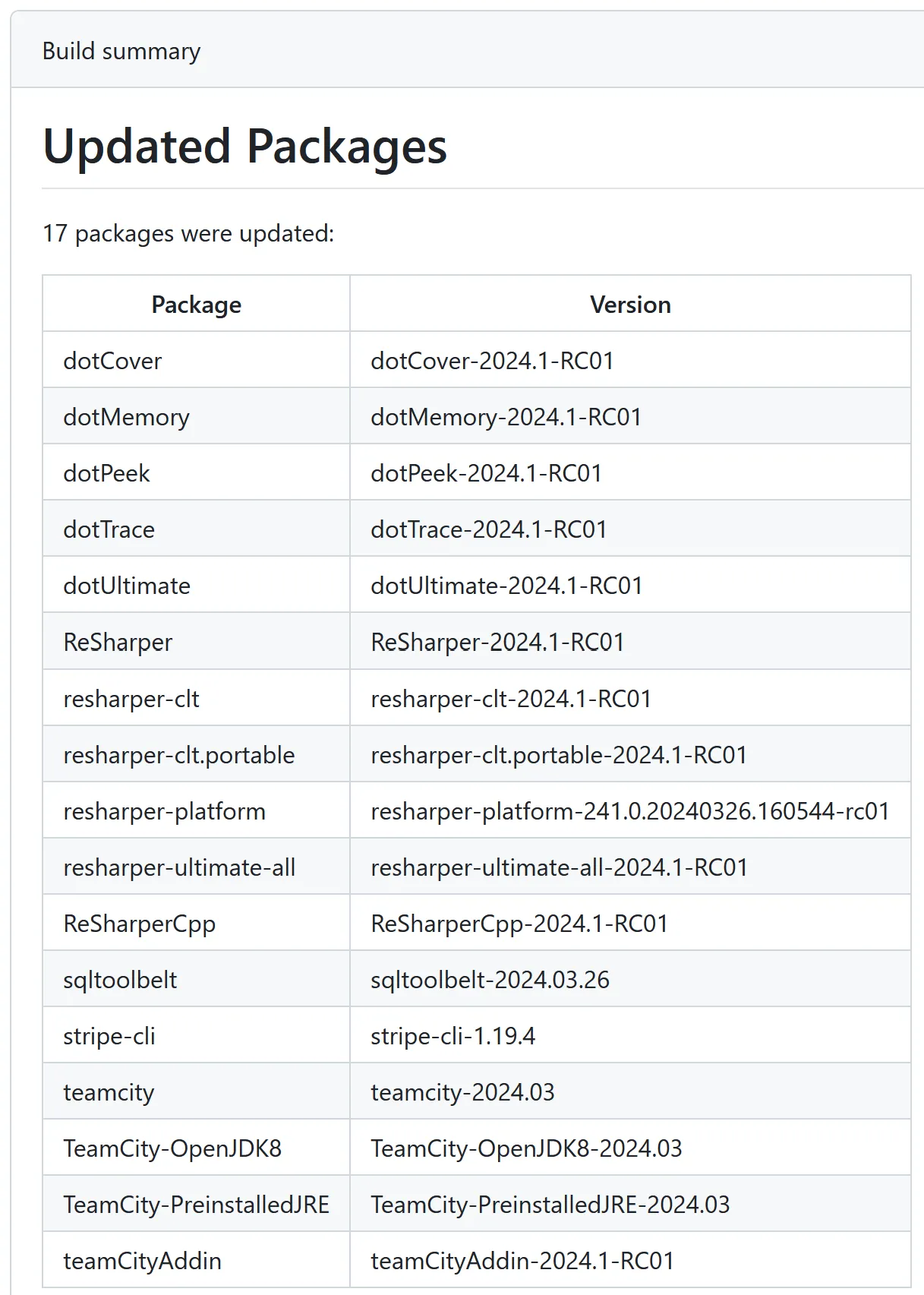
&lt;p&gt;Because I know the application will be run in a GitHub Actions workflow, I made use of the excellent &lt;a href=&quot;https://www.nuget.org/packages/GitHub.Actions.Core&quot;&gt;GitHub.Actions.Core&lt;/a&gt; NuGet package for formatting output, as well as generating a nice build summary that lists all packages that were updated in the current run.&lt;/p&gt;
&lt;p&gt;&lt;img src=&quot;https://david.gardiner.net.au/_astro/build-summary.BBYF1cs__Z18vxyw.webp&quot; alt=&quot;Screenshot of GitHub Actions build summary, showing 17 packages updated and a table with the package names and versions&quot; /&gt;&lt;/p&gt;
&lt;h3&gt;Commit and publish&lt;/h3&gt;
&lt;p&gt;If a new package is created (eg. a &lt;code&gt;.nupkg&lt;/code&gt; file now exists) then we assume this file can be submitted to the Chocolatey Community Repository. &lt;code&gt;choco push&lt;/code&gt; is then called to upload the package. Remember this was where we hit that error with the trailing space? Pleasingly the .NET version doesn&apos;t exhibit this behaviour, so that problem is solved.&lt;/p&gt;
&lt;p&gt;Assuming the package is submitted successfully then we call `git`` to stage any modified files from this package and add a tag indicating the package that was updated.&lt;/p&gt;
&lt;p&gt;After all packages have been processed, we will commit all staged files and push the commit back to the repo, so that we get a version history of all the package changes.&lt;/p&gt;
&lt;h3&gt;Enhancements&lt;/h3&gt;
&lt;p&gt;I am currently using my fork of the chocolatey-au module, which has one minor enhancement. It adds a &lt;code&gt;Files&lt;/code&gt; collection property to the &lt;code&gt;AUPackage&lt;/code&gt; PowerShell class. This collection is populated with the paths of all the files that were downloaded (and had their checksums calculated).&lt;/p&gt;
&lt;p&gt;I make use of this for some of my packages to pre-emptively upload the files to VirusTotal. This can help fast-track the packages being approved by Chocolatey as it means the Chocolatey virus scanning step is already completed. Because I use the &lt;a href=&quot;https://community.chocolatey.org/packages/vt-cli&quot;&gt;VirusTotal CLI&lt;/a&gt; tool for this, it also means I can upload files &lt;a href=&quot;https://github.com/VirusTotal/vt-cli/issues/33#issuecomment-850213255&quot;&gt;up to 650MB&lt;/a&gt; (compared to Chocolatey&apos;s current 200MB limit due to using an older API).&lt;/p&gt;
&lt;p&gt;I have &lt;a href=&quot;https://github.com/chocolatey-community/chocolatey-au/pull/53&quot;&gt;submitted the Files property enhancement&lt;/a&gt; to chocolatey-au.&lt;/p&gt;
&lt;h3&gt;Summary&lt;/h3&gt;
&lt;p&gt;You can see this in action in the latest workflow runs at &lt;a href=&quot;https://github.com/flcdrg/au-packages/actions&quot;&gt;https://github.com/flcdrg/au-packages/actions&lt;/a&gt;.&lt;/p&gt;
</content>
    <media:thumbnail url="https://david.gardiner.net.au/_astro/chocolatey-logo.q-2VblLS.png" width="403" height="275"/>
    <media:content medium="image" url="https://david.gardiner.net.au/_astro/chocolatey-logo.q-2VblLS.png" width="403" height="275"/>
  </entry>
  <entry>
    <id>https://david.gardiner.net.au/2024/02/wd-red-nas</id>
    <updated>2024-02-26T07:00:00.000+10:30</updated>
    <title>Which Western Digital Red NAS hard disk should I buy? (2024 update)</title>
    <link href="https://david.gardiner.net.au/2024/02/wd-red-nas" rel="alternate" type="text/html" title="Which Western Digital Red NAS hard disk should I buy? (2024 update)"/>
    <category term="Hardware"/>
    <category term="PowerShell"/>
    <category term="Synology"/>
    <published>2024-02-26T07:00:00.000+10:30</published>
    <summary type="html">Back in 2021, I first reviewed the options for Western Digital Red 4TB NAS hard disks. My Synology DS1621xs+ NAS has recently started warning me that storage space is getting low, so let&apos;s review the prices (and also consider the larger capacities) currently available from Western Digital in 2024.  Western Digital differentiates its Red NAS drives into three groups/recommended workloads: Red (lighter SOHO), Red Plus (write-intensive), and Red Pro (highest-intensity). …</summary>
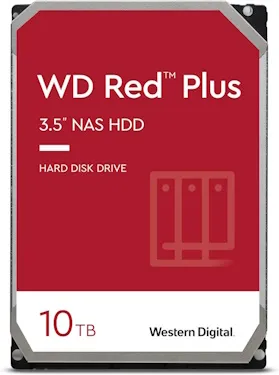
    <content type="html">&lt;p&gt;Back in 2021, I first reviewed the options for &lt;a href=&quot;/2021/07/ws-red-nas-hdd&quot;&gt;Western Digital Red 4TB NAS hard disks&lt;/a&gt;. My &lt;a href=&quot;/2021/04/synology-DS1621xs-review&quot;&gt;Synology DS1621xs+ NAS&lt;/a&gt; has recently started warning me that storage space is getting low, so let&apos;s review the prices (and also consider the larger capacities) currently available from Western Digital in 2024.&lt;/p&gt;
&lt;p&gt;&lt;img src=&quot;https://david.gardiner.net.au/_astro/wd-WD101EFBX.CxHBOdAD_1Iwmob.webp&quot; alt=&quot;Western Digital WD Red Plus 10TB hard drive&quot; /&gt;&lt;/p&gt;
&lt;p&gt;Western Digital &lt;a href=&quot;https://blog.westerndigital.com/wd-red-nas-drives/&quot;&gt;differentiates its Red NAS drives&lt;/a&gt; into three groups/recommended workloads: Red (lighter SOHO), Red Plus (write-intensive), and Red Pro (highest-intensity).&lt;/p&gt;
&lt;table&gt;
&lt;thead&gt;
&lt;tr&gt;
&lt;th&gt;Model number&lt;/th&gt;
&lt;th&gt;Product Number&lt;/th&gt;
&lt;th&gt;Capacity (TB)&lt;/th&gt;
&lt;th&gt;Internal rate (MB/s)&lt;/th&gt;
&lt;th&gt;Cache (MB)&lt;/th&gt;
&lt;th&gt;RPM&lt;/th&gt;
&lt;th&gt;Recording Technology&lt;/th&gt;
&lt;th&gt;Approx. Date&lt;/th&gt;
&lt;th&gt;Spec sheet&lt;/th&gt;
&lt;th&gt;Price (AUD)&lt;/th&gt;
&lt;th&gt;Price (USD)&lt;/th&gt;
&lt;/tr&gt;
&lt;/thead&gt;
&lt;tbody&gt;&lt;tr&gt;
&lt;td&gt;Red&lt;/td&gt;
&lt;td&gt;WD40EFAX&lt;/td&gt;
&lt;td&gt;4&lt;/td&gt;
&lt;td&gt;180&lt;/td&gt;
&lt;td&gt;256&lt;/td&gt;
&lt;td&gt;5400&lt;/td&gt;
&lt;td&gt;SMR&lt;/td&gt;
&lt;td&gt;Aug-20&lt;/td&gt;
&lt;td&gt;&lt;a href=&quot;https://products.wdc.com/library/SpecSheet/ENG/2579-810238.pdf&quot;&gt;Link&lt;/a&gt;&lt;/td&gt;
&lt;td&gt;&lt;a href=&quot;https://www.amazon.com.au/Red-4TB-Hard-Drive-WD40EFAX/dp/B083XVY99B?dchild=1&amp;amp;keywords=WD40EFAX&amp;amp;qid=1626346773&amp;amp;s=computers&amp;amp;sr=1-1&amp;amp;th=1&amp;amp;linkCode=ll1&amp;amp;tag=flcdrg07-22&amp;amp;linkId=d74f62bc00a92d80a696b34cc98f54b9&amp;amp;language=en_AU&amp;amp;ref_=as_li_ss_tl&quot;&gt;230&lt;/a&gt;&lt;/td&gt;
&lt;td&gt;&lt;a href=&quot;https://www.amazon.com/Red-4TB-Internal-Hard-Drive/dp/B083XVY99B?th=1&amp;amp;linkCode=ll1&amp;amp;tag=flcdrg0e-20&amp;amp;linkId=0f26c5d4d7be6c1eb61875482a35e5be&amp;amp;language=en_US&amp;amp;ref_=as_li_ss_tl&quot;&gt;n/a&lt;/a&gt;&lt;/td&gt;
&lt;/tr&gt;
&lt;tr&gt;
&lt;td&gt;Red Plus&lt;/td&gt;
&lt;td&gt;WD40EFZX&lt;/td&gt;
&lt;td&gt;4&lt;/td&gt;
&lt;td&gt;175&lt;/td&gt;
&lt;td&gt;128&lt;/td&gt;
&lt;td&gt;5400&lt;/td&gt;
&lt;td&gt;CMR&lt;/td&gt;
&lt;td&gt;Jan-21&lt;/td&gt;
&lt;td&gt;&lt;a href=&quot;https://documents.westerndigital.com/content/dam/doc-library/en_us../../assets/public/western-digital/product/internal-drives/wd-red-plus-hdd/product-brief-western-digital-wd-red-plus-hdd.pdf&quot;&gt;Link&lt;/a&gt;&lt;/td&gt;
&lt;td&gt;&lt;a href=&quot;https://www.amazon.com.au/Western-Digital-Plus-Internal-Drive-dp-B08VH8C3WZ/dp/B08VH8C3WZ?th=1&amp;amp;linkCode=ll1&amp;amp;tag=flcdrg07-22&amp;amp;linkId=74727ee5a46beb6f7943f833a2f00838&amp;amp;language=en_AU&amp;amp;ref_=as_li_ss_tl&quot;&gt;257&lt;/a&gt;&lt;/td&gt;
&lt;td&gt;&lt;a href=&quot;https://www.amazon.com/Western-Digital-Plus-Internal-Drive/dp/B08VH8C3WZ?th=1&amp;amp;linkCode=ll1&amp;amp;tag=flcdrg0e-20&amp;amp;linkId=f31e48f0c116c6bbcf372e00c57a7968&amp;amp;language=en_US&amp;amp;ref_=as_li_ss_tl&quot;&gt;111&lt;/a&gt;&lt;/td&gt;
&lt;/tr&gt;
&lt;tr&gt;
&lt;td&gt;Red Plus&lt;/td&gt;
&lt;td&gt;WD40EFPX&lt;/td&gt;
&lt;td&gt;4&lt;/td&gt;
&lt;td&gt;180&lt;/td&gt;
&lt;td&gt;256&lt;/td&gt;
&lt;td&gt;5400&lt;/td&gt;
&lt;td&gt;CMR&lt;/td&gt;
&lt;td&gt;Sep-22&lt;/td&gt;
&lt;td&gt;&lt;a href=&quot;https://www.westerndigital.com/products/internal-drives/wd-red-plus-sata-3-5-hdd?sku=WD40EFPX&quot;&gt;Link&lt;/a&gt;&lt;/td&gt;
&lt;td&gt;&lt;a href=&quot;https://www.amazon.com.au/Western-Digital-10TB-Internal-Drive-dp-B08V13TGP4/dp/B0BDXSK2K7?th=1&amp;amp;linkCode=ll1&amp;amp;tag=flcdrg07-22&amp;amp;linkId=b63b9624074ab09b2cf289d64742c694&amp;amp;language=en_AU&amp;amp;ref_=as_li_ss_tl&quot;&gt;202&lt;/a&gt;&lt;/td&gt;
&lt;td&gt;&lt;a href=&quot;https://www.amazon.com/Western-Digital-Plus-Internal-Drive/dp/B0BDXSK2K7?th=1&amp;amp;linkCode=ll1&amp;amp;tag=flcdrg0e-20&amp;amp;linkId=9637a9c251a77de3d05ccbbb7df490e2&amp;amp;language=en_US&amp;amp;ref_=as_li_ss_tl&quot;&gt;n/a&lt;/a&gt;&lt;/td&gt;
&lt;/tr&gt;
&lt;tr&gt;
&lt;td&gt;Red Plus&lt;/td&gt;
&lt;td&gt;WD60EFPX&lt;/td&gt;
&lt;td&gt;6&lt;/td&gt;
&lt;td&gt;180&lt;/td&gt;
&lt;td&gt;256&lt;/td&gt;
&lt;td&gt;5400&lt;/td&gt;
&lt;td&gt;CMR&lt;/td&gt;
&lt;td&gt;Sep-22&lt;/td&gt;
&lt;td&gt;&lt;a href=&quot;https://www.westerndigital.com/products/internal-drives/wd-red-plus-sata-3-5-hdd?sku=WD60EFPX&quot;&gt;Link&lt;/a&gt;&lt;/td&gt;
&lt;td&gt;&lt;a href=&quot;https://www.amazon.com.au/Western-Digital-10TB-Internal-Drive-dp-B08V13TGP4/dp/B0BDXQ61Z9?th=1&amp;amp;linkCode=ll1&amp;amp;tag=flcdrg07-22&amp;amp;linkId=c4b8d21953b79d713adf23511460b7c8&amp;amp;language=en_AU&amp;amp;ref_=as_li_ss_tl&quot;&gt;289&lt;/a&gt;&lt;/td&gt;
&lt;td&gt;&lt;a href=&quot;https://www.amazon.com/Western-Digital-Plus-Internal-Drive/dp/B0BDXQ61Z9?th=1&amp;amp;linkCode=ll1&amp;amp;tag=flcdrg0e-20&amp;amp;linkId=85499246c43c8e95ac50fa687cbb37e8&amp;amp;language=en_US&amp;amp;ref_=as_li_ss_tl&quot;&gt;n/a&lt;/a&gt;&lt;/td&gt;
&lt;/tr&gt;
&lt;tr&gt;
&lt;td&gt;Red Plus&lt;/td&gt;
&lt;td&gt;WD80EFZZ&lt;/td&gt;
&lt;td&gt;8&lt;/td&gt;
&lt;td&gt;185&lt;/td&gt;
&lt;td&gt;128&lt;/td&gt;
&lt;td&gt;5640&lt;/td&gt;
&lt;td&gt;CMR&lt;/td&gt;
&lt;td&gt;Jan-22&lt;/td&gt;
&lt;td&gt;&lt;a href=&quot;https://www.westerndigital.com/products/internal-drives/wd-red-plus-sata-3-5-hdd?sku=WD80EFZZ&quot;&gt;Link&lt;/a&gt;&lt;/td&gt;
&lt;td&gt;&lt;a href=&quot;https://www.amazon.com.au/Western-Digital-10TB-Internal-Drive-dp-B09QQX27GM/dp/B08TZPS4QQ?th=1&amp;amp;linkCode=ll1&amp;amp;tag=flcdrg07-22&amp;amp;linkId=d99612013fa1b1bcb3fecc74e55f7fde&amp;amp;language=en_AU&amp;amp;ref_=as_li_ss_tl&quot;&gt;313&lt;/a&gt;&lt;/td&gt;
&lt;td&gt;&lt;a href=&quot;https://www.amazon.com/Western-Digital-Plus-Internal-Drive/dp/B09QQX27GM?th=1&amp;amp;linkCode=ll1&amp;amp;tag=flcdrg0e-20&amp;amp;linkId=e7cbe45ccb3361781c70391586e74b78&amp;amp;language=en_US&amp;amp;ref_=as_li_ss_tl&quot;&gt;n/a&lt;/a&gt;&lt;/td&gt;
&lt;/tr&gt;
&lt;tr&gt;
&lt;td&gt;Red Plus&lt;/td&gt;
&lt;td&gt;WD80EFPX&lt;/td&gt;
&lt;td&gt;8&lt;/td&gt;
&lt;td&gt;215&lt;/td&gt;
&lt;td&gt;256&lt;/td&gt;
&lt;td&gt;5640&lt;/td&gt;
&lt;td&gt;CMR&lt;/td&gt;
&lt;td&gt;Nov-23&lt;/td&gt;
&lt;td&gt;&lt;a href=&quot;https://www.westerndigital.com/products/internal-drives/wd-red-plus-sata-3-5-hdd?sku=WD80EFPX&quot;&gt;Link&lt;/a&gt;&lt;/td&gt;
&lt;td&gt;&lt;a href=&quot;https://www.amazon.com.au/Western-Digital-Plus-Internal-Drive/dp/B0CMQ6SK7W?crid=9RHY7XTKL3SI&amp;amp;dib=eyJ2IjoiMSJ9.gkQRWHqEEwubKcMIl9604QlOTNg9dQbW3k2k8WAZ_1EsX-7HmE-JcsnSH1EH35lXMyA7kkgp6S7_AzLHelxYlrtDNJ4VcgVBqFbLVqkx8YVA6KgHtn5kxzZfxZd3Mv77ITIhu7FLOBpBSCToZPnob5gXjybWAOvLzIDNQJkXZg6NtwAJAo_zSwYVEfqsyZ_XEfJb8qVZC0MSe4W_nHAG2cKNkr7gw2_c7KyKm8QMjzlAUVYQ7OtLJUq23U4aLJHn5RoEMD0gWipwjxvYqGjSc1jTEdhpJGaif-H7p3sWgKU.ImTpzQDPyi41cqaBqHcMVLfC-Wxy13rb23vO4KeY6gk&amp;amp;dib_tag=se&amp;amp;keywords=WD80EFZZ&amp;amp;qid=1708837190&amp;amp;s=computers&amp;amp;sprefix=wd80efzz%2Ccomputers%2C353&amp;amp;sr=1-2&amp;amp;th=1&amp;amp;linkCode=ll1&amp;amp;tag=flcdrg07-22&amp;amp;linkId=e16bb7109183e849a1f392769bdd5855&amp;amp;language=en_AU&amp;amp;ref_=as_li_ss_tl&quot;&gt;308&lt;/a&gt;&lt;/td&gt;
&lt;td&gt;&lt;a href=&quot;https://www.amazon.com/Western-Digital-Plus-Internal-Drive/dp/B0CMQ6SK7W?th=1&amp;amp;linkCode=ll1&amp;amp;tag=flcdrg0e-20&amp;amp;linkId=3c5cc0823d08c1dd87be175034c24c3e&amp;amp;language=en_US&amp;amp;ref_=as_li_ss_tl&quot;&gt;179&lt;/a&gt;&lt;/td&gt;
&lt;/tr&gt;
&lt;tr&gt;
&lt;td&gt;Red Plus&lt;/td&gt;
&lt;td&gt;WD101EFBX&lt;/td&gt;
&lt;td&gt;10&lt;/td&gt;
&lt;td&gt;215&lt;/td&gt;
&lt;td&gt;256&lt;/td&gt;
&lt;td&gt;7200&lt;/td&gt;
&lt;td&gt;CMR&lt;/td&gt;
&lt;td&gt;Jan-20&lt;/td&gt;
&lt;td&gt;&lt;a href=&quot;https://www.westerndigital.com/products/internal-drives/wd-red-plus-sata-3-5-hdd?sku=WD101EFBX&quot;&gt;Link&lt;/a&gt;&lt;/td&gt;
&lt;td&gt;&lt;a href=&quot;https://www.amazon.com.au/Western-Digital-10TB-Internal-Drive-dp-B08TZPS4QQ/dp/B08TZPS4QQ?th=1&amp;amp;linkCode=ll1&amp;amp;tag=flcdrg07-22&amp;amp;linkId=134237545e468bdb522ce2c3f361af66&amp;amp;language=en_AU&amp;amp;ref_=as_li_ss_tl&quot;&gt;398&lt;/a&gt;&lt;/td&gt;
&lt;td&gt;&lt;a href=&quot;https://www.amazon.com/Western-Digital-10TB-Internal-Drive/dp/B08TZPS4QQ?th=1&amp;amp;linkCode=ll1&amp;amp;tag=flcdrg0e-20&amp;amp;linkId=ecbb8065e119844f0bb8828567695890&amp;amp;language=en_US&amp;amp;ref_=as_li_ss_tl&quot;&gt;199&lt;/a&gt;&lt;/td&gt;
&lt;/tr&gt;
&lt;tr&gt;
&lt;td&gt;Red Plus&lt;/td&gt;
&lt;td&gt;WD120EFBX&lt;/td&gt;
&lt;td&gt;12&lt;/td&gt;
&lt;td&gt;196&lt;/td&gt;
&lt;td&gt;256&lt;/td&gt;
&lt;td&gt;7200&lt;/td&gt;
&lt;td&gt;CMR&lt;/td&gt;
&lt;td&gt;Jan-21&lt;/td&gt;
&lt;td&gt;&lt;a href=&quot;https://www.westerndigital.com/products/internal-drives/wd-red-plus-sata-3-5-hdd?sku=WD120EFBX&quot;&gt;Link&lt;/a&gt;&lt;/td&gt;
&lt;td&gt;&lt;a href=&quot;https://www.amazon.com.au/Western-Digital-10TB-Internal-Drive-dp-B08V1L1WYD/dp/B08TZPS4QQ?th=1&amp;amp;linkCode=ll1&amp;amp;tag=flcdrg07-22&amp;amp;linkId=15a172fe41755f086ba315dbd09c33b1&amp;amp;language=en_AU&amp;amp;ref_=as_li_ss_tl&quot;&gt;515&lt;/a&gt;&lt;/td&gt;
&lt;td&gt;&lt;a href=&quot;https://www.amazon.com/Western-Digital-12TB-Internal-Drive/dp/B08V1L1WYD?&amp;amp;linkCode=ll1&amp;amp;tag=flcdrg0e-20&amp;amp;linkId=4175b18c53c92165c9e6d800db4978cf&amp;amp;language=en_US&amp;amp;ref_=as_li_ss_tl&quot;&gt;n/a&lt;/a&gt;&lt;/td&gt;
&lt;/tr&gt;
&lt;tr&gt;
&lt;td&gt;Red Plus&lt;/td&gt;
&lt;td&gt;WD140EFGX&lt;/td&gt;
&lt;td&gt;14&lt;/td&gt;
&lt;td&gt;210&lt;/td&gt;
&lt;td&gt;512&lt;/td&gt;
&lt;td&gt;7200&lt;/td&gt;
&lt;td&gt;CMR&lt;/td&gt;
&lt;td&gt;Jan-20&lt;/td&gt;
&lt;td&gt;&lt;a href=&quot;https://www.westerndigital.com/products/internal-drives/wd-red-plus-sata-3-5-hdd?sku=WD140EFGX&quot;&gt;Link&lt;/a&gt;&lt;/td&gt;
&lt;td&gt;&lt;a href=&quot;https://www.amazon.com.au/Western-Digital-10TB-Internal-Drive-dp-B08V13TGP4/dp/B08TZPS4QQ?th=1&amp;amp;linkCode=ll1&amp;amp;tag=flcdrg07-22&amp;amp;linkId=b862770668bed956501297f0463ed777&amp;amp;language=en_AU&amp;amp;ref_=as_li_ss_tl&quot;&gt;658&lt;/a&gt;&lt;/td&gt;
&lt;td&gt;&lt;a href=&quot;https://www.amazon.com/Western-Digital-14TB-Internal-Drive/dp/B08V13TGP4?th=1&amp;amp;linkCode=ll1&amp;amp;tag=flcdrg0e-20&amp;amp;linkId=f643646b1bdfa3d08cbda631f8cae94e&amp;amp;language=en_US&amp;amp;ref_=as_li_ss_tl&quot;&gt;n/a&lt;/a&gt;&lt;/td&gt;
&lt;/tr&gt;
&lt;tr&gt;
&lt;td&gt;Red Pro&lt;/td&gt;
&lt;td&gt;WD4003FFBX&lt;/td&gt;
&lt;td&gt;4&lt;/td&gt;
&lt;td&gt;217&lt;/td&gt;
&lt;td&gt;256&lt;/td&gt;
&lt;td&gt;7200&lt;/td&gt;
&lt;td&gt;CMR&lt;/td&gt;
&lt;td&gt;Sep-20&lt;/td&gt;
&lt;td&gt;&lt;a href=&quot;https://www.westerndigital.com/products/internal-drives/wd-red-pro-sata-hdd?sku=WD4003FFBX&quot;&gt;Link&lt;/a&gt;&lt;/td&gt;
&lt;td&gt;&lt;a href=&quot;https://www.amazon.com.au/4TB-Red-Pro-Hard-Drive/dp/B07B1WK3N5?dchild=1&amp;amp;keywords=WD4003FFBX&amp;amp;qid=1626346992&amp;amp;s=computers&amp;amp;sr=1-2&amp;amp;linkCode=ll1&amp;amp;tag=flcdrg07-22&amp;amp;linkId=77956e3b870c572e4b3b579dc502e6b9&amp;amp;language=en_AU&amp;amp;ref_=as_li_ss_tl&quot;&gt;212&lt;/a&gt;&lt;/td&gt;
&lt;td&gt;&lt;a href=&quot;https://www.amazon.com/Western-Digital-Red-Hard-Drive/dp/B07B1WK3N5?th=1&amp;amp;linkCode=ll1&amp;amp;tag=flcdrg0e-20&amp;amp;linkId=a33822a4450a126eada949402eb52b27&amp;amp;language=en_US&amp;amp;ref_=as_li_ss_tl&quot;&gt;n/a&lt;/a&gt;&lt;/td&gt;
&lt;/tr&gt;
&lt;tr&gt;
&lt;td&gt;Red Pro&lt;/td&gt;
&lt;td&gt;WD6003FFBX&lt;/td&gt;
&lt;td&gt;6&lt;/td&gt;
&lt;td&gt;238&lt;/td&gt;
&lt;td&gt;256&lt;/td&gt;
&lt;td&gt;7200&lt;/td&gt;
&lt;td&gt;CMR&lt;/td&gt;
&lt;td&gt;Feb-18&lt;/td&gt;
&lt;td&gt;&lt;a href=&quot;https://www.westerndigital.com/products/internal-drives/wd-red-pro-sata-hdd?sku=WD6003FFBX&quot;&gt;Link&lt;/a&gt;&lt;/td&gt;
&lt;td&gt;&lt;a href=&quot;https://www.amazon.com.au/4TB-Red-Pro-Hard-Drive/dp/B07B1HX5KN?dchild=1&amp;amp;keywords=WD4003FFBX&amp;amp;qid=1626346992&amp;amp;s=computers&amp;amp;sr=1-2&amp;amp;th=1&amp;amp;linkCode=ll1&amp;amp;tag=flcdrg07-22&amp;amp;linkId=8358a3cdb826115a4567937324cf29d2&amp;amp;language=en_AU&amp;amp;ref_=as_li_ss_tl&quot;&gt;339&lt;/a&gt;&lt;/td&gt;
&lt;td&gt;&lt;a href=&quot;https://www.amazon.com/Western-Digital-Red-Hard-Drive/dp/B07B1HX5KN?th=1&amp;amp;linkCode=ll1&amp;amp;tag=flcdrg0e-20&amp;amp;linkId=1c58a85aa516335d463cb53c9c1220d7&amp;amp;language=en_US&amp;amp;ref_=as_li_ss_tl&quot;&gt;204&lt;/a&gt;&lt;/td&gt;
&lt;/tr&gt;
&lt;tr&gt;
&lt;td&gt;Red Pro&lt;/td&gt;
&lt;td&gt;WD8003FFBX&lt;/td&gt;
&lt;td&gt;8&lt;/td&gt;
&lt;td&gt;235&lt;/td&gt;
&lt;td&gt;256&lt;/td&gt;
&lt;td&gt;7200&lt;/td&gt;
&lt;td&gt;CMR&lt;/td&gt;
&lt;td&gt;Apr-18&lt;/td&gt;
&lt;td&gt;&lt;a href=&quot;https://www.westerndigital.com/products/internal-drives/wd-red-pro-sata-hdd?sku=WD8003FFBX&quot;&gt;Link&lt;/a&gt;&lt;/td&gt;
&lt;td&gt;&lt;a href=&quot;https://www.amazon.com.au/4TB-Red-Pro-Hard-Drive/dp/B07D3N95GS?dchild=1&amp;amp;keywords=WD4003FFBX&amp;amp;qid=1626346992&amp;amp;s=computers&amp;amp;sr=1-2&amp;amp;th=1&amp;amp;linkCode=ll1&amp;amp;tag=flcdrg07-22&amp;amp;linkId=c75bca9d884b1085b19f9d00463b1dad&amp;amp;language=en_AU&amp;amp;ref_=as_li_ss_tl&quot;&gt;404&lt;/a&gt;&lt;/td&gt;
&lt;td&gt;&lt;a href=&quot;https://www.amazon.com/Western-Digital-Red-Hard-Drive/dp/B07D3N95GS?th=1&amp;amp;linkCode=ll1&amp;amp;tag=flcdrg0e-20&amp;amp;linkId=ad002cd6a9e2f98b27695596a1bbfe5a&amp;amp;language=en_US&amp;amp;ref_=as_li_ss_tl&quot;&gt;229&lt;/a&gt;&lt;/td&gt;
&lt;/tr&gt;
&lt;tr&gt;
&lt;td&gt;Red Pro&lt;/td&gt;
&lt;td&gt;WD102KFBX&lt;/td&gt;
&lt;td&gt;10&lt;/td&gt;
&lt;td&gt;256&lt;/td&gt;
&lt;td&gt;7200&lt;/td&gt;
&lt;td&gt;CMR&lt;/td&gt;
&lt;td&gt;Jan-20&lt;/td&gt;
&lt;td&gt;&lt;a href=&quot;https://www.westerndigital.com/products/internal-drives/wd-red-pro-sata-hdd?sku=WD102KFBX&quot;&gt;Link&lt;/a&gt;&lt;/td&gt;
&lt;td&gt;&lt;a href=&quot;https://www.amazon.com.au/4TB-Red-Pro-Hard-Drive/dp/B084F34HZ6?dchild=1&amp;amp;keywords=WD4003FFBX&amp;amp;qid=1626346992&amp;amp;s=computers&amp;amp;sr=1-2&amp;amp;th=1&amp;amp;linkCode=ll1&amp;amp;tag=flcdrg07-22&amp;amp;linkId=05baa568f88dd396b24e41190b592563&amp;amp;language=en_AU&amp;amp;ref_=as_li_ss_tl&quot;&gt;465&lt;/a&gt;&lt;/td&gt;
&lt;td&gt;&lt;a href=&quot;https://www.amazon.com/Western-Digital-Red-Hard-Drive/dp/B084F34HZ6?th=1&amp;amp;linkCode=ll1&amp;amp;tag=flcdrg0e-20&amp;amp;linkId=4c26abef9e5706f9632f30e893dba695&amp;amp;language=en_US&amp;amp;ref_=as_li_ss_tl&quot;&gt;269&lt;/a&gt;&lt;/td&gt;
&lt;/tr&gt;
&lt;tr&gt;
&lt;td&gt;Red Pro&lt;/td&gt;
&lt;td&gt;WD121KFBX&lt;/td&gt;
&lt;td&gt;12&lt;/td&gt;
&lt;td&gt;240&lt;/td&gt;
&lt;td&gt;256&lt;/td&gt;
&lt;td&gt;7200&lt;/td&gt;
&lt;td&gt;CMR&lt;/td&gt;
&lt;td&gt;May-19&lt;/td&gt;
&lt;td&gt;&lt;a href=&quot;https://www.westerndigital.com/products/internal-drives/wd-red-pro-sata-hdd?sku=WD121KFBX&quot;&gt;Link&lt;/a&gt;&lt;/td&gt;
&lt;td&gt;&lt;a href=&quot;https://www.amazon.com.au/4TB-Red-Pro-Hard-Drive/dp/B07RTMPWD8?dchild=1&amp;amp;keywords=WD4003FFBX&amp;amp;qid=1626346992&amp;amp;s=computers&amp;amp;sr=1-2&amp;amp;th=1&amp;amp;linkCode=ll1&amp;amp;tag=flcdrg07-22&amp;amp;linkId=ac22910c7e7cd62d204dca7ea88834e6&amp;amp;language=en_AU&amp;amp;ref_=as_li_ss_tl&quot;&gt;491&lt;/a&gt;&lt;/td&gt;
&lt;td&gt;&lt;a href=&quot;https://www.amazon.com/Western-Digital-Red-Hard-Drive/dp/B07RTMPWD8?th=1&amp;amp;linkCode=ll1&amp;amp;tag=flcdrg0e-20&amp;amp;linkId=32cc7e7358fe27d9894e2bc2eb45420e&amp;amp;language=en_US&amp;amp;ref_=as_li_ss_tl&quot;&gt;285&lt;/a&gt;&lt;/td&gt;
&lt;/tr&gt;
&lt;tr&gt;
&lt;td&gt;Red Pro&lt;/td&gt;
&lt;td&gt;WD161KFGX&lt;/td&gt;
&lt;td&gt;16&lt;/td&gt;
&lt;td&gt;259&lt;/td&gt;
&lt;td&gt;256&lt;/td&gt;
&lt;td&gt;7200&lt;/td&gt;
&lt;td&gt;CMR&lt;/td&gt;
&lt;td&gt;Sep-20&lt;/td&gt;
&lt;td&gt;&lt;a href=&quot;https://www.westerndigital.com/products/internal-drives/wd-red-pro-sata-hdd?sku=WD161KFGX&quot;&gt;Link&lt;/a&gt;&lt;/td&gt;
&lt;td&gt;&lt;a href=&quot;https://www.amazon.com.au/4TB-Red-Pro-Hard-Drive/dp/B08K3VVKSW?dchild=1&amp;amp;keywords=WD4003FFBX&amp;amp;qid=1626346992&amp;amp;s=computers&amp;amp;sr=1-2&amp;amp;th=1&amp;amp;linkCode=ll1&amp;amp;tag=flcdrg07-22&amp;amp;linkId=312b20941bfe8624860b1254c7a7e9fe&amp;amp;language=en_AU&amp;amp;ref_=as_li_ss_tl&quot;&gt;554&lt;/a&gt;&lt;/td&gt;
&lt;td&gt;&lt;a href=&quot;https://www.amazon.com/Western-Digital-Red-Hard-Drive/dp/B08K3VVKSW?th=1&amp;amp;linkCode=ll1&amp;amp;tag=flcdrg0e-20&amp;amp;linkId=2e68016dcaf9cb5dc6d36b256e9fd2d4&amp;amp;language=en_US&amp;amp;ref_=as_li_ss_tl&quot;&gt;308&lt;/a&gt;&lt;/td&gt;
&lt;/tr&gt;
&lt;tr&gt;
&lt;td&gt;Red Pro&lt;/td&gt;
&lt;td&gt;WD181KFGX&lt;/td&gt;
&lt;td&gt;18&lt;/td&gt;
&lt;td&gt;272&lt;/td&gt;
&lt;td&gt;512&lt;/td&gt;
&lt;td&gt;7200&lt;/td&gt;
&lt;td&gt;CMR&lt;/td&gt;
&lt;td&gt;Sep-20&lt;/td&gt;
&lt;td&gt;&lt;a href=&quot;https://www.westerndigital.com/products/internal-drives/wd-red-pro-sata-hdd?sku=WD181KFGX&quot;&gt;Link&lt;/a&gt;&lt;/td&gt;
&lt;td&gt;&lt;a href=&quot;https://www.amazon.com.au/4TB-Red-Pro-Hard-Drive/dp/B08K3TFM92?dchild=1&amp;amp;keywords=WD4003FFBX&amp;amp;qid=1626346992&amp;amp;s=computers&amp;amp;sr=1-2&amp;amp;th=1&amp;amp;linkCode=ll1&amp;amp;tag=flcdrg07-22&amp;amp;linkId=3a51e6f5a689ce387191d9a22ab16ade&amp;amp;language=en_AU&amp;amp;ref_=as_li_ss_tl&quot;&gt;583&lt;/a&gt;&lt;/td&gt;
&lt;td&gt;&lt;a href=&quot;https://www.amazon.com/Western-Digital-Red-Hard-Drive/dp/B08K3TFM92?th=1&amp;amp;linkCode=ll1&amp;amp;tag=flcdrg0e-20&amp;amp;linkId=720ac28855cba0a987340152c5e07234&amp;amp;language=en_US&amp;amp;ref_=as_li_ss_tl&quot;&gt;342&lt;/a&gt;&lt;/td&gt;
&lt;/tr&gt;
&lt;tr&gt;
&lt;td&gt;Red Pro&lt;/td&gt;
&lt;td&gt;WD221KFGX&lt;/td&gt;
&lt;td&gt;22&lt;/td&gt;
&lt;td&gt;256&lt;/td&gt;
&lt;td&gt;512&lt;/td&gt;
&lt;td&gt;7200&lt;/td&gt;
&lt;td&gt;CMR&lt;/td&gt;
&lt;td&gt;Jul-22&lt;/td&gt;
&lt;td&gt;&lt;a href=&quot;https://www.westerndigital.com/products/internal-drives/wd-red-pro-sata-hdd?sku=WD221KFGX&quot;&gt;Link&lt;/a&gt;&lt;/td&gt;
&lt;td&gt;&lt;a href=&quot;https://www.amazon.com.au/4TB-Red-Pro-Hard-Drive/dp/B0B5W1CQ8W?dchild=1&amp;amp;keywords=WD4003FFBX&amp;amp;qid=1626346992&amp;amp;s=computers&amp;amp;sr=1-2&amp;amp;th=1&amp;amp;linkCode=ll1&amp;amp;tag=flcdrg07-22&amp;amp;linkId=f0adb3d2f4b81ac3f403eb31206e3425&amp;amp;language=en_AU&amp;amp;ref_=as_li_ss_tl&quot;&gt;849&lt;/a&gt;&lt;/td&gt;
&lt;td&gt;&lt;a href=&quot;https://www.amazon.com/Western-Digital-Red-Hard-Drive/dp/B0B5W1CQ8W?th=1&amp;amp;linkCode=ll1&amp;amp;tag=flcdrg0e-20&amp;amp;linkId=72b6963065ab066728951d069b899596&amp;amp;language=en_US&amp;amp;ref_=as_li_ss_tl&quot;&gt;419&lt;/a&gt;&lt;/td&gt;
&lt;/tr&gt;
&lt;/tbody&gt;&lt;/table&gt;
&lt;h2&gt;Notes&lt;/h2&gt;
&lt;ul&gt;
&lt;li&gt;Prices listed are from Amazon as of 25th February 2024. Click through the links to get the latest price, they seem to change daily!&lt;/li&gt;
&lt;li&gt;The AUD price links to Amazon Australia and the US price links to Amazon.com. (Amazon links are affiliate links)&lt;/li&gt;
&lt;li&gt;I live in Australia, hence the Amazon AU links, but sometimes the US prices are more competitive - it pays to compare both.&lt;/li&gt;
&lt;li&gt;Dates are from the oldest specification sheets I&apos;ve found for that model or data listed on the Amazon page.&lt;/li&gt;
&lt;li&gt;Recording technology: SMR - Shingled Magnetic Recording, CMR - Conventional Magnetic Recording. &lt;a href=&quot;https://blog.westerndigital.com/&quot;&gt;More info&lt;/a&gt;&lt;/li&gt;
&lt;/ul&gt;
&lt;h2&gt;My choice&lt;/h2&gt;
&lt;p&gt;I&apos;ve previously bought 4TB drives, but I&apos;m thinking this time I might go for something larger. Because of the RAID configuration I am using, I&apos;ll only be effectively using 4TB of the new drive. But this is planning for the future, as when I buy a subsequent larger drive I&apos;ll then get access to the full capacity of both drives. The &apos;Red Plus&apos; models look fine for my purposes. I don&apos;t need the extra features offered by the &apos;Red Pro&apos; line.&lt;/p&gt;
&lt;p&gt;As I write this, the 10G Red Plus WD101EFBX has a discounted price on Amazon US (plus I have some Amazon US gift card credit waiting to be used), so that looks like a good deal. I was originally looking at the 8TB drives, but for only USD20 extra you get another 2TB, so why not?&lt;/p&gt;
&lt;h2&gt;Table formatting&lt;/h2&gt;
&lt;p&gt;As a side note, I collated the information in the table above using Excel. Initially, I was going to use a Visual Studio Code extension to paste the Excel content into a Markdown table format, but then formatting the links was not going to be easy. I then realised I could use PowerShell to manage the formatting if I saved the spreadsheet as a .CSV format. PowerShell automation for the win!&lt;/p&gt;
&lt;p&gt;eg.&lt;/p&gt;
&lt;pre&gt;&lt;code&gt;$data = (get-content &apos;C:\Users\david\OneDrive\Documents\Western Digital Hard disk costs.csv&apos;) | ConvertFrom-Csv
$data | ForEach-Object { &quot;| &quot; + $_.&apos;Model number&apos; + &quot; | &quot; + $_.&apos;Product Number&apos; + &quot; | &quot; + $_.&apos;Capacity (TB)&apos; + &quot; | &quot; + $_.&apos;Internal rate (MB/s)&apos; + &quot; | &quot; + $_.&apos;Cache (MB)&apos; + &quot; | &quot; + $_.RPM + &quot; | &quot; + $_.&apos;Recording Technology&apos; + &quot; | &quot; + $_.&apos;Approx. Date&apos; + &quot; | [Link](&quot; + $_.&apos;Spec sheet&apos; + &quot;) | [&quot; + $_.&apos;Price (AUD)&apos; + &quot;](&quot; + $_.&apos;Amazon AU&apos;+ &quot;) | [&quot; + $_.&apos;Price (USD)&apos; + &quot;](&quot; + $_.&apos;Amazon US&apos; + &quot;) |&quot; } | clip
&lt;/code&gt;&lt;/pre&gt;
</content>
    <media:thumbnail url="https://david.gardiner.net.au/_astro/wd-WD101EFBX.CxHBOdAD.jpg" width="279" height="375"/>
    <media:content medium="image" url="https://david.gardiner.net.au/_astro/wd-WD101EFBX.CxHBOdAD.jpg" width="279" height="375"/>
  </entry>
  <entry>
    <id>https://david.gardiner.net.au/2023/06/propertycollection</id>
    <updated>2023-06-20T22:30:00.000+09:30</updated>
    <title>Azure DevOps API PropertiesCollections</title>
    <link href="https://david.gardiner.net.au/2023/06/propertycollection" rel="alternate" type="text/html" title="Azure DevOps API PropertiesCollections"/>
    <category term="Azure DevOps"/>
    <category term="Azure Pipelines"/>
    <category term="PowerShell"/>
    <published>2023-06-20T22:30:00.000+09:30</published>
    <summary type="html">I was looking at some of the Azure DevOps API documentation and noticed that some of the endpoints mention a properties object of type PropertiesCollection. Unfortunately, the details for that data structure are not particularly helpful, and I couldn&apos;t figure out how to use it. Some pages include examples, but none that I could find included an expanded properties object. To figure out how to use it, I created a simple .NET console application. I added references to the following NuGet packages: …</summary>
    <content type="html">&lt;p&gt;I was looking at some of the Azure DevOps API documentation and noticed that some of the endpoints mention a &lt;code&gt;properties&lt;/code&gt; object of type &lt;a href=&quot;https://learn.microsoft.com/rest/api/azure/devops/build/builds/list?view=azure-devops-rest-7.0&amp;amp;WT.mc_id=DOP-MVP-5001655#propertiescollection&quot;&gt;&lt;code&gt;PropertiesCollection&lt;/code&gt;&lt;/a&gt;. Unfortunately, the details for that data structure are not particularly helpful, and I couldn&apos;t figure out how to use it. Some pages include examples, but none that I could find included an expanded &lt;code&gt;properties&lt;/code&gt; object.&lt;/p&gt;
&lt;p&gt;To figure out how to use it, I created a simple .NET console application. I added references to the following NuGet packages:&lt;/p&gt;
&lt;ul&gt;
&lt;li&gt;Microsoft.TeamFoundationServer.Client&lt;/li&gt;
&lt;li&gt;Microsoft.VisualStudio.Services.InteractiveClient&lt;/li&gt;
&lt;li&gt;Microsoft.VisualStudio.Services.Release.Client&lt;/li&gt;
&lt;/ul&gt;
&lt;pre&gt;&lt;code&gt;using Microsoft.VisualStudio.Services.Common;
using Microsoft.VisualStudio.Services.ReleaseManagement.WebApi.Clients;
using Microsoft.VisualStudio.Services.WebApi;

const string collectionUri = &quot;https://dev.azure.com/organisation&quot;;
const string projectName = &quot;MyProject&quot;;
const string pat = &quot;YOUR-PAT-HERE&quot;;
const int releaseId = 20;

var creds = new VssBasicCredential(string.Empty, pat);

// Connect to Azure DevOps Services
var connection = new VssConnection(new Uri(collectionUri), creds);

using var client = connection.GetClient&amp;lt;ReleaseHttpClient&amp;gt;();

// Get data about a specific release
var release = await client.GetReleaseAsync(projectName, releaseId);

release.Properties.Add(&quot;Thing&quot;, &quot;hey&quot;);

// Send the updated release back to Azure DevOps Services
var result = await client.UpdateReleaseAsync(release!, projectName, releaseId);

Console.WriteLine();
&lt;/code&gt;&lt;/pre&gt;
&lt;p&gt;This allowed me to create a property key and value, that I could then examine by querying the item (in this case a &apos;classic&apos; release), by calling the GET endpoint. eg.&lt;/p&gt;
&lt;pre&gt;&lt;code&gt;https://vsrm.dev.azure.com/{organization}/{project}/_apis/release/releases/{releaseId}?propertyFilters=Thing&amp;amp;api-version=7.0
&lt;/code&gt;&lt;/pre&gt;
&lt;p&gt;Note that you need to specify the &lt;code&gt;propertyFilters&lt;/code&gt; parameter. Otherwise the `properties`` object will not be included in the response.&lt;/p&gt;
&lt;p&gt;And in doing that, we can see the JSON data structure!&lt;/p&gt;
&lt;pre&gt;&lt;code&gt;    &quot;properties&quot;: {
        &quot;Thing&quot;: {
            &quot;$type&quot;: &quot;System.String&quot;,
            &quot;$value&quot;: &quot;hey&quot;
        }
    }
&lt;/code&gt;&lt;/pre&gt;
&lt;p&gt;So, to add a property, you need to add a new key/value pair to the &lt;code&gt;properties&lt;/code&gt; object, where the key is the name of the property, and the value is an object with two properties: &lt;code&gt;$type&lt;/code&gt; and &lt;code&gt;$value&lt;/code&gt;. The &lt;code&gt;$type&lt;/code&gt; property is the type of the value, and the &lt;code&gt;$value&lt;/code&gt; property is the value itself.&lt;/p&gt;
&lt;p&gt;The documentation clarifies the types supported:&lt;/p&gt;
&lt;blockquote&gt;
&lt;p&gt;Values of type Byte[], Int32, Double, DateType and String preserve their type, other primitives are retuned as a String. Byte[] expected as base64 encoded string.&lt;/p&gt;
&lt;/blockquote&gt;
&lt;p&gt;(I think &apos;DateType&apos; is a typo, and should be &apos;DateTime&apos;)&lt;/p&gt;
&lt;p&gt;Now that we know the shape of the data, I can jump back to PowerShell and use that to add a new property:&lt;/p&gt;
&lt;pre&gt;&lt;code&gt;$uri = &quot;https://vsrm.dev.azure.com/$($organisation)/$($project)/_apis/release/releases/$($releaseId)?api-version=7.0&amp;amp;propertyFilters=Extra&quot;

$result = Invoke-RestMethod -Uri $uri -Method Get -Headers $headers

if (-not ($result.properties.Extra)) {
    $result.properties | Add-Member -MemberType NoteProperty -Name &quot;Extra&quot; -Value @{
        &quot;`$type&quot; = &quot;System.String&quot;
        &quot;`$value&quot; = &quot;haaaa&quot;
    }
}
$body = $result | ConvertTo-Json -Depth 20

&quot;Updating via PUT&quot;

Invoke-RestMethod -Uri $uri -Method Put -Headers $headers -Body $body -ContentType &quot;application/json&quot;
&lt;/code&gt;&lt;/pre&gt;
</content>
  </entry>
  <entry>
    <id>https://david.gardiner.net.au/2023/04/find-freesubnets</id>
    <updated>2023-04-03T08:00:00.000+09:30</updated>
    <title>Finding free subnets in an Azure Virtual Network</title>
    <link href="https://david.gardiner.net.au/2023/04/find-freesubnets" rel="alternate" type="text/html" title="Finding free subnets in an Azure Virtual Network"/>
    <category term="Azure"/>
    <category term="PowerShell"/>
    <published>2023-04-03T08:00:00.000+09:30</published>
    <summary type="html">An Azure Virtual Network (as the docs say) is &quot;the fundamental building block for your private network in Azure&quot;. Often abbreviated to &quot;VNet&quot;. When a VNet is created, you specify the available IP address range using CIDR notation. If you create a VNET through the Azure Portal, it defaults to 10.1.0.0/16, which equates to 65536 IP addresses (10.1.0.0 - 10.1.255.255).</summary>
    <content type="html">&lt;p&gt;An &lt;a href=&quot;https://learn.microsoft.com/azure/virtual-network/virtual-networks-overview?WT.mc_id=DOP-MVP-5001655&quot;&gt;Azure Virtual Network&lt;/a&gt; (as the docs say) is &quot;the fundamental building block for your private network in Azure&quot;. Often abbreviated to &quot;VNet&quot;. When a VNet is created, you specify the available IP address range using &lt;a href=&quot;https://en.wikipedia.org/wiki/Classless_Inter-Domain_Routing&quot;&gt;CIDR&lt;/a&gt; notation. If you create a VNET through the Azure Portal, it defaults to 10.1.0.0/16, which equates to 65536 IP addresses (10.1.0.0 - 10.1.255.255).&lt;/p&gt;
&lt;p&gt;A VNet contains one or more subnets, where the IP range for each subnet is assigned from the VNet&apos;s allocation.
One thing to note - you can&apos;t resize a VNet. Once it has been created, that&apos;s it. If you use up all the available IP addresses, your only options are to create a new VNet and peer it to the original VNet, or if the newer VNet is larger, migrate all your services over to it (which may not be trivial).&lt;/p&gt;
&lt;p&gt;If a VNet has been in use for some time or is used by multiple teams, you can end up with fragmentation - gaps between allocated subnets. This could happen because new subnets are allocated by choosing a &apos;nice&apos; number to start on (rather than following immediately from the last allocated), or from a previously allocated subnet being deleted. e.g.&lt;/p&gt;
&lt;p&gt;&lt;img src=&quot;https://david.gardiner.net.au/_astro/vnet-subnets-01.DKevnKyc_f2KCX.webp&quot; alt=&quot;Azure Virtual Network with a list of subnets&quot; /&gt;&lt;/p&gt;
&lt;p&gt;In this VNet it turns out we have some gaps. While the temptation might be to allocate the next subnet starting at 10.0.2.0, depending on the size required, we might be able to use one of the available gaps instead.&lt;/p&gt;
&lt;p&gt;Now maybe you can read CIDR IP addresses in your sleep and can not only spot the gaps but know intuitively what ranges you could allocate. For the rest of us, I&apos;d either resort to a pencil and paper or (more likely) see if I could script out the answer using PowerShell.&lt;/p&gt;
&lt;p&gt;And so I created a PowerShell script to query a VNet and list both the existing subnets and also the available gaps (and CIDR ranges that could use those gaps). I started sharing this script with a few of my SixPivot colleagues, as they were experiencing the same situation. I realised it would be good to make this more widely available, so the result is my first PowerShell module published to the PowerShell Gallery (under the SixPivot name) - &lt;a href=&quot;https://www.powershellgallery.com/packages/SixPivot.Azure/1.0.56&quot;&gt;SixPivot.Azure&lt;/a&gt;, which contains the &lt;code&gt;Find-FreeSubnets&lt;/code&gt; function.&lt;/p&gt;
&lt;h2&gt;Using the Find-FreeSubnets cmdlet&lt;/h2&gt;
&lt;p&gt;First off, install the module:&lt;/p&gt;
&lt;pre&gt;&lt;code&gt;Install-Module SixPivot.Azure
&lt;/code&gt;&lt;/pre&gt;
&lt;p&gt;If you haven&apos;t previously connected to Azure then you&apos;ll need to do this:&lt;/p&gt;
&lt;pre&gt;&lt;code&gt;Connect-AzAccount
&lt;/code&gt;&lt;/pre&gt;
&lt;p&gt;Now you can use Find-FreeSubnets. You need to know the resource group and VNET name. eg.&lt;/p&gt;
&lt;pre&gt;&lt;code&gt;Find-FreeSubnets -ResourceGroup rg-freesubnet-australiaeast -VNetName vnet-freesubnet-australiaeast
&lt;/code&gt;&lt;/pre&gt;
&lt;p&gt;This will produce output similar to the following:&lt;/p&gt;
&lt;pre&gt;&lt;code&gt;VNet Start VNet End     Available      Subnets
---------- --------     ---------      -------
10.0.0.0   10.0.255.255 {48, 8, 65184} {10.0.0.0/24, 10.0.1.0/28, 10.0.1.64/28, 10.0.1.88/29}
&lt;/code&gt;&lt;/pre&gt;
&lt;p&gt;The output is structured data. If you assign it to a variable, then you can dig down into the different parts.&lt;/p&gt;
&lt;pre&gt;&lt;code&gt;$vnet = Find-FreeSubnets -ResourceGroup rg-freesubnet-australiaeast -VNetName
&lt;/code&gt;&lt;/pre&gt;
&lt;p&gt;For the VNET itself, you can get the start and end addresses using &lt;code&gt;VNetStart&lt;/code&gt; and &lt;code&gt;VNetEnd&lt;/code&gt; properties.&lt;/p&gt;
&lt;pre&gt;&lt;code&gt;$vnet.VNetStart, $vnet.VNetEnd
10.0.0.0
10.0.255.255
&lt;/code&gt;&lt;/pre&gt;
&lt;p&gt;You can see the currently allocated subnets via the &lt;code&gt;Subnets&lt;/code&gt; property:&lt;/p&gt;
&lt;pre&gt;&lt;code&gt;$vnet.Subnets

Address space Range start Range end
------------- ----------- ---------
10.0.0.0/24   10.0.0.0    10.0.0.255
10.0.1.0/28   10.0.1.0    10.0.1.15
10.0.1.64/28  10.0.1.64   10.0.1.79
10.0.1.88/29  10.0.1.88   10.0.1.95
&lt;/code&gt;&lt;/pre&gt;
&lt;p&gt;And finally, (and this is the good bit!), the available subnets via the &lt;code&gt;Available&lt;/code&gt; property&lt;/p&gt;
&lt;pre&gt;&lt;code&gt;$vnet.Available

Start     End          Size  Available ranges
-----     ---          ----  ----------------
10.0.1.16 10.0.1.63    48    {10.0.1.16/28, 10.0.1.32/27, 10.0.1.32/28, 10.0.1.48/28}
10.0.1.80 10.0.1.87    8
10.0.1.96 10.0.255.255 65184 {10.0.1.96/27, 10.0.1.96/28, 10.0.1.112/28, 10.0.1.128/25…}
&lt;/code&gt;&lt;/pre&gt;
&lt;p&gt;For a particular &lt;code&gt;Start&lt;/code&gt; and &lt;code&gt;End&lt;/code&gt;, you can see potential CIDR ranges with the &lt;code&gt;CIDRAvailable&lt;/code&gt; property:&lt;/p&gt;
&lt;pre&gt;&lt;code&gt;$vnet.Available[0].CIDRAvailable
10.0.1.16/28
10.0.1.32/27
10.0.1.32/28
10.0.1.48/28

$vnet.Available[2].CIDRAvailable
10.0.1.96/27
10.0.1.96/28
10.0.1.112/28
10.0.1.128/25
10.0.1.128/26
10.0.1.128/27
10.0.1.128/28
10.0.1.144/28
...
&lt;/code&gt;&lt;/pre&gt;
&lt;p&gt;Possible prefix lengths of 25, 26, 27 or 28 are shown. The output for the second example actually scrolled way off the page, so watch out if the available &lt;code&gt;Size&lt;/code&gt; is quite large.&lt;/p&gt;
&lt;p&gt;From the first available range, I could use either:&lt;/p&gt;
&lt;ul&gt;
&lt;li&gt;10.0.1.16/28 and 10.0.1.32/27&lt;/li&gt;
&lt;li&gt;&lt;em&gt;or&lt;/em&gt; 10.0.1.16/28, 10.0.1.32/28 and 10.0.1.48/28&lt;/li&gt;
&lt;/ul&gt;
&lt;h2&gt;Future enhancements&lt;/h2&gt;
&lt;p&gt;The cmdlet is useful already, but one feature I&apos;d like to add is to be able to pass in one or more CIDR prefix lengths (eg. 28,28,27) and allow it to find compatible non-overlapping ranges automatically.&lt;/p&gt;
</content>
  </entry>
</feed>