<?xml version="1.0" encoding="UTF-8"?>
<feed xmlns="http://www.w3.org/2005/Atom" xml:lang="en-AU">
  <id>https://david.gardiner.net.au/tags/Security.xml</id>
  <title type="html">David Gardiner - Security</title>
  <updated>2026-04-15T00:26:28.648Z</updated>
  <subtitle>Blog posts tagged with &apos;Security&apos; - A blog of software development, .NET and other interesting things</subtitle>
  <rights>Copyright 2026 David Gardiner</rights>
  <icon>https://www.gravatar.com/avatar/37edf2567185071646d62ba28b868fab?s=64</icon>
  <logo>https://www.gravatar.com/avatar/37edf2567185071646d62ba28b868fab?s=256</logo>
  <generator uri="https://github.com/flcdrg/astrojs-atom" version="3">astrojs-atom</generator>
  <author>
    <name>David Gardiner</name>
  </author>
  <link href="https://david.gardiner.net.au/tags/Security.xml" rel="self" type="application/atom+xml"/>
  <link href="https://david.gardiner.net.au/tags/Security" rel="alternate" type="text/html" hreflang="en-AU"/>
  <category term="Security"/>
  <category term="Software Development"/>
  <entry>
    <id>https://david.gardiner.net.au/2017/04/someone-has-created-facebook-profile</id>
    <updated>2017-04-16T17:34:00.001+09:30</updated>
    <title>Someone has created a Facebook profile using your name and photo</title>
    <link href="https://david.gardiner.net.au/2017/04/someone-has-created-facebook-profile" rel="alternate" type="text/html" title="Someone has created a Facebook profile using your name and photo"/>
    <category term="Internet Safety"/>
    <category term="Security"/>
    <published>2017-04-16T17:34:00.001+09:30</published>
    <summary type="html">One in a series of posts on Facebook Security and Privacy First off, don’t panic! Unless you have a really poor password, it’s unlikely that you have been hacked. Instead an annoying person has just created a new Facebook account, copied your profile picture and name, and is presumably now going through your friend list asking to become friends, and confusing all your friends who thought you were already their friend. Use the Facebook “Report” function to ask Facebook to delete the fake account. …</summary>
    <content type="html">&lt;p&gt;&lt;em&gt;One in a&lt;/em&gt; &lt;a href=&quot;/2017/04/facebook-security-and-privacy&quot;&gt;&lt;em&gt;series of posts&lt;/em&gt;&lt;/a&gt; &lt;em&gt;on Facebook Security and Privacy&lt;/em&gt;&lt;/p&gt;
&lt;p&gt;First off, don’t panic! Unless you have a really poor password, it’s unlikely that you have been hacked. Instead an annoying person has just created a new Facebook account, copied your profile picture and name, and is presumably now going through your friend list asking to become friends, and confusing all your friends who thought you were already their friend.&lt;/p&gt;
&lt;h2&gt;What can you do?&lt;/h2&gt;
&lt;p&gt;Use the Facebook “Report” function to ask Facebook to delete the fake account.&lt;/p&gt;
&lt;ol&gt;
&lt;li&gt;Open the fake profile page (Just click on the name)&lt;/li&gt;
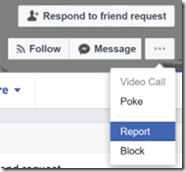
&lt;li&gt;Click on the ‘&lt;strong&gt;…’&lt;/strong&gt; button (to the right of the Message button), then click &lt;strong&gt;Report&lt;/strong&gt;.
 &lt;img src=&quot;../../assets/2017/04/facebook-report_thumb%5b2%5d.png&quot; alt=&quot;Facebook-Report_thumb&quot; /&gt;&lt;/li&gt;
&lt;li&gt;Select &lt;strong&gt;Report this profile&lt;/strong&gt; and click &lt;strong&gt;Continue&lt;/strong&gt;&lt;/li&gt;
&lt;li&gt;Select &lt;strong&gt;They&apos;re pretending to be me or someone I know&lt;/strong&gt; and click &lt;strong&gt;Continue&lt;/strong&gt;&lt;/li&gt;
&lt;li&gt;Select &lt;strong&gt;Me&lt;/strong&gt; and click &lt;strong&gt;Continue&lt;/strong&gt;&lt;/li&gt;
&lt;li&gt;Select &lt;strong&gt;Submit to Facebook for Review&lt;/strong&gt;&lt;/li&gt;
&lt;li&gt;Usually within a matter of hours, someone at Facebook will review the details and shut down the offending account.&lt;/li&gt;
&lt;/ol&gt;
&lt;h2&gt;How can you reduce the risk of this happening?&lt;/h2&gt;
&lt;p&gt;&lt;a href=&quot;/2017/04/setting-your-facebook-privacy-and&quot;&gt;Review your Facebook privacy and sharing settings&lt;/a&gt; to stop non-friends from seeing your friends list and your profile photo.&lt;/p&gt;
&lt;p&gt;&lt;a href=&quot;/2017/04/securing-your-facebook-account-with-two&quot;&gt;Enable Two Factor Authentication&lt;/a&gt; to reduce the risk of your actual Facebook account being really compromised.&lt;/p&gt;
</content>
  </entry>
  <entry>
    <id>https://david.gardiner.net.au/2017/04/setting-your-facebook-privacy-and</id>
    <updated>2017-04-16T15:54:00.000+09:30</updated>
    <title>Setting your Facebook privacy and sharing</title>
    <link href="https://david.gardiner.net.au/2017/04/setting-your-facebook-privacy-and" rel="alternate" type="text/html" title="Setting your Facebook privacy and sharing"/>
    <category term="Internet Safety"/>
    <category term="Security"/>
    <published>2017-04-16T15:54:00.000+09:30</published>
    <summary type="html">One in a series of posts on Facebook Security and Privacy If you use Facebook, you should take the time to review your privacy settings and be deliberate about what details you share with the public (as distinct from just your friends). Setting this appropriately can help prevent annoying people from creating fake Facebook accounts that have the same profile photo and name as you, and that then try to trick all your Facebook contacts into become friends with them. …</summary>
    <content type="html">&lt;p&gt;&lt;em&gt;One in a&lt;/em&gt; &lt;a href=&quot;/2017/04/facebook-security-and-privacy&quot;&gt;&lt;em&gt;series of posts&lt;/em&gt;&lt;/a&gt; &lt;em&gt;on Facebook Security and Privacy&lt;/em&gt;&lt;/p&gt;
&lt;p&gt;If you use Facebook, you should take the time to review your privacy settings and be deliberate about what details you share with the public (as distinct from just your friends). Setting this appropriately can help prevent annoying people from creating fake Facebook accounts that have the same profile photo and name as you, and that then try to trick all your Facebook contacts into become friends with them.&lt;/p&gt;
&lt;p&gt;There’s no one answer to setting privacy settings. Some people might be quite happy to share everything with everyone whereas others will prefer to keep things strictly between friends. The important thing is that you understand and are comfortable with what you’re sharing to whom.&lt;/p&gt;
&lt;h2&gt;To review your general privacy settings&lt;/h2&gt;
&lt;ol&gt;
&lt;li&gt;Click on the drop-down menu on the top right in Facebook in your web browser&lt;/li&gt;
&lt;li&gt;Click &lt;strong&gt;&lt;a href=&quot;https://www.facebook.com/settings&quot;&gt;Settings&lt;/a&gt;&lt;/strong&gt;&lt;/li&gt;
&lt;li&gt;On the left, click &lt;strong&gt;&lt;a href=&quot;https://www.facebook.com/settings?tab=privacy&quot;&gt;Privacy&lt;/a&gt;&lt;/strong&gt;&lt;/li&gt;
&lt;li&gt;Review the settings and change to your preference if necessary.&lt;/li&gt;
&lt;/ol&gt;
&lt;h2&gt;To restrict who can see your profile picture&lt;/h2&gt;
&lt;ol&gt;
&lt;li&gt;Go to your Facebook profile (click on your name in the top menu bar in Facebook in your web browser)&lt;/li&gt;
&lt;li&gt;Click on your profile photo&lt;/li&gt;
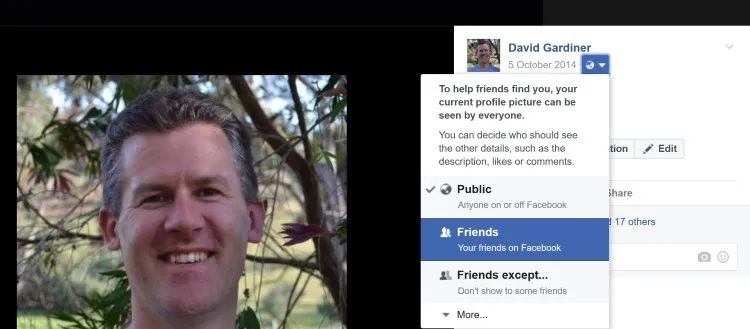
&lt;li&gt;To the right of the photo, click on the icon next to the date
 &lt;img src=&quot;https://david.gardiner.net.au/_astro/facebook-profile-photo-settings4.CppNDUZO_1KuoY0.webp&quot; alt=&quot;Reviewing profile picture sharing settings&quot; /&gt;&lt;/li&gt;
&lt;li&gt;Review the current setting and change to your preference if necessary. Choosing a non-public option will reduce the risk of someone copying your profile photo. On the other hand it will make it harder for potential friends to find you.&lt;/li&gt;
&lt;/ol&gt;
&lt;h2&gt;To restrict who can see your friends&lt;/h2&gt;
&lt;ol&gt;
&lt;li&gt;Go to your Facebook profile&lt;/li&gt;
&lt;li&gt;Click on &lt;strong&gt;Friends&lt;/strong&gt;&lt;/li&gt;
&lt;li&gt;Click on the ‘Pencil’ icon (Manage)&lt;/li&gt;
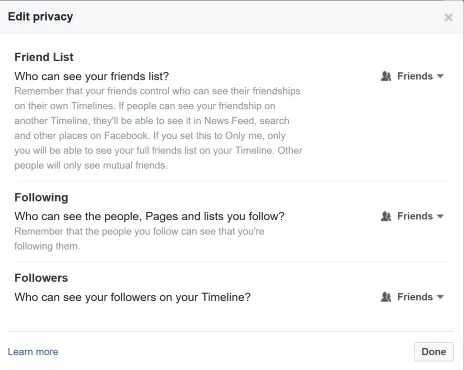
&lt;li&gt;Click &lt;strong&gt;Edit Privacy&lt;/strong&gt;
 &lt;img src=&quot;https://david.gardiner.net.au/_astro/facebook-friend-privacy3.0uOwfC0v_ZA08fv.webp&quot; alt=&quot;Facebook Friend Privacy&quot; /&gt;&lt;/li&gt;
&lt;li&gt;Review the current settings. Choosing a non-public option will reduce the risk of someone pretending to be you trying to contact all your friends.&lt;/li&gt;
&lt;/ol&gt;
&lt;p&gt;Don’t just accept the defaults, be deliberate and intentional about exactly how much and to who you are sharing your Facebook information with.&lt;/p&gt;
</content>
  </entry>
  <entry>
    <id>https://david.gardiner.net.au/2017/04/securing-your-facebook-account-with-two</id>
    <updated>2017-04-16T15:52:00.000+09:30</updated>
    <title>Securing your Facebook account with Two Factor authentication</title>
    <link href="https://david.gardiner.net.au/2017/04/securing-your-facebook-account-with-two" rel="alternate" type="text/html" title="Securing your Facebook account with Two Factor authentication"/>
    <category term="Security"/>
    <category term="Internet Safety"/>
    <published>2017-04-16T15:52:00.000+09:30</published>
    <summary type="html">One in a series of posts on Facebook Security and Privacy You should consider enabling Two Factor Authentication (often shortened to 2FA) for logging in to Facebook. This means in addition to having a unique password for Facebook (that you don’t use for any other online services), you also have to enter a (usually) 6 digit code (or receive a SMS text message) to confirm that it really is you signing in. The two factors in “two factor” are 1) your password and 2) the 6 digit code. …</summary>
    <content type="html">
&lt;p&gt;&lt;em&gt;One in a&lt;/em&gt; &lt;a href=&quot;/2017/04/facebook-security-and-privacy&quot;&gt;&lt;em&gt;series of posts&lt;/em&gt;&lt;/a&gt; &lt;em&gt;on Facebook Security and Privacy&lt;/em&gt;&lt;/p&gt;
&lt;p&gt;You should consider enabling Two Factor Authentication (often shortened to 2FA) for logging in to Facebook. This means in addition to having a unique password for Facebook (that you don’t use for any other online services), you also have to enter a (usually) 6 digit code (or receive a SMS text message) to confirm that it really is you signing in.&lt;/p&gt;
&lt;p&gt;The two factors in “two factor” are 1) your password and 2) the 6 digit code.&lt;/p&gt;
&lt;p&gt;The clever thing is that the 6 digit code changes every 30 seconds, so it’s no good writing it down as it will be out of date very quickly.&lt;/p&gt;
&lt;h2&gt;If you have a smart phone or tablet&lt;/h2&gt;
&lt;ol&gt;
&lt;li&gt;Install an authenticator app on your device.
 I recommend (and use) the &lt;a href=&quot;https://web.archive.org/web/20180208125217/https://docs.microsoft.com/en-us/azure/multi-factor-authentication/end-user/microsoft-authenticator-app-how-to&quot;&gt;Microsoft Authenticator&lt;/a&gt; app (which is available for &lt;a href=&quot;https://apps.apple.com/au/app/microsoft-authenticator/id983156458&quot;&gt;iOS&lt;/a&gt;, &lt;a href=&quot;https://play.google.com/store/apps/details?id=com.azure.authenticator&amp;amp;hl=en&quot;&gt;Android&lt;/a&gt; and &lt;a href=&quot;https://apps.microsoft.com/detail/9nblgggzmcj6?hl=en-GB&amp;amp;gl=AU&quot;&gt;Windows Phone&lt;/a&gt;), but there’s other options including &lt;a href=&quot;https://support.google.com/accounts/answer/1066447?hl=en&quot;&gt;Google Authenticator&lt;/a&gt; and &lt;a href=&quot;https://web.archive.org/web/20170130095854/https://www.authy.com/app/&quot;&gt;Authy&lt;/a&gt;.&lt;/li&gt;
&lt;li&gt;Open Facebook in your web browser (preferably on a different device to your smartphone)&lt;/li&gt;
&lt;li&gt;Go to &lt;strong&gt;Settings&lt;/strong&gt;, then &lt;strong&gt;Security&lt;/strong&gt; and then &lt;strong&gt;Login Approvals&lt;/strong&gt;
 &lt;img src=&quot;https://david.gardiner.net.au/_astro/facebook-security-settings4.C3bdMSBM_Z1vhyUe.webp&quot; alt=&quot;Facebook Security Settings&quot; /&gt;&lt;/li&gt;
&lt;li&gt;In the &lt;strong&gt;Code Generator&lt;/strong&gt; section, click on &lt;strong&gt;third-party app&lt;/strong&gt;.&lt;/li&gt;
&lt;li&gt;A QR Code (like a barcode) appears.&lt;/li&gt;
&lt;li&gt;On your smartphone, open the &lt;strong&gt;Microsoft Authenticator&lt;/strong&gt; app&lt;/li&gt;
&lt;li&gt;Click on ‘&lt;strong&gt;+&lt;/strong&gt;’ to add a new account&lt;/li&gt;
&lt;li&gt;Choose &lt;strong&gt;Other&lt;/strong&gt;&lt;/li&gt;
&lt;li&gt;Hold your smartphone in front of your computer’s web browser so that the phone’s camera can scan the QR Code.&lt;/li&gt;
&lt;li&gt;It should automatically scan the code and add a new account entry for Facebook. eg.
&lt;img src=&quot;../../assets/2017/04/microsoft%20authenticator%5b5%5d.jpg&quot; alt=&quot;Microsoft Authenticator&quot; /&gt;&lt;/li&gt;
&lt;li&gt;Note the 6 digit number now being displayed on your phone.&lt;/li&gt;
&lt;li&gt;Also notice there’s a countdown timer displayed next to this number. When this timer reaches zero, the number will expire and a new number will be displayed.&lt;/li&gt;
&lt;li&gt;Switch back to your web browser and enter this number in the confirmation field and press &lt;strong&gt;Confirm&lt;/strong&gt;&lt;/li&gt;
&lt;li&gt;Click &lt;strong&gt;Enable&lt;/strong&gt; to allow &lt;strong&gt;Login Approvals&lt;/strong&gt;.&lt;/li&gt;
&lt;li&gt;Click on &lt;strong&gt;Get Codes&lt;/strong&gt;&lt;/li&gt;
&lt;li&gt;Enter your password&lt;/li&gt;
&lt;li&gt;Print out these codes and keep them in a safe place. You can use these codes as a last resort if you lose access to the Authenticator app (eg. your phone drops in the toilet)&lt;/li&gt;
&lt;li&gt;It is also a good idea to provide your mobile phone number as a fall back in case you lose access to the Authenticator app (eg. you accidentally deleted it).&lt;/li&gt;
&lt;/ol&gt;
&lt;p&gt;From now on, each time you log in to Facebook from a new device you will need to provide the current 6 digits from the Authenticator app as additional proof of identity. If you use some devices regularly, you can then choose not to require two factor authentication in the future.&lt;/p&gt;
&lt;p&gt;If you use the Facebook App on your device, that can also function as an authenticator app. The downside to using this is that it only works for Facebook, whereas an app like Microsoft Authenticator can work with many online services.&lt;/p&gt;
&lt;p&gt;These include Amazon, Dropbox, Facebook, GitHub, Google accounts, Microsoft Accounts, Mailchimp, Twitter and others. Always choose to enable 2FA for any online services you use. Many banks and financial institutions are also using similar systems.&lt;/p&gt;
&lt;h2&gt;If you have a mobile phone&lt;/h2&gt;
&lt;ol&gt;
&lt;li&gt;Open Facebook in your web browser (preferably on a different device to your smartphone)&lt;/li&gt;
&lt;li&gt;Go to &lt;strong&gt;Settings&lt;/strong&gt;, then &lt;strong&gt;Security&lt;/strong&gt; and then &lt;strong&gt;Login Approvals&lt;/strong&gt;&lt;/li&gt;
&lt;li&gt;In the &lt;strong&gt;Text message (SMS)&lt;/strong&gt; section, if there is no number listed click on &lt;strong&gt;Add phone number&lt;/strong&gt;&lt;/li&gt;
&lt;li&gt;Follow through confirming the phone number&lt;/li&gt;
&lt;/ol&gt;
&lt;p&gt;From now on, when you log in to Facebook you’ll receive a SMS text message with a code. You’ll then need to provide that code in addition to your password. If you use a device regularly, you can tell Facebook not to prompt for 2FA again.&lt;/p&gt;
&lt;p&gt;Using 2FA with text messages is much better than not using 2FA at all, but it isn’t quite as secure as using an authenticator app. If you can’t use an app then do enable 2FA using SMS. Some services even support non-mobile numbers by reading out the code instead of as a text message.&lt;/p&gt;
</content>
  </entry>
  <entry>
    <id>https://david.gardiner.net.au/2017/04/you-just-received-friend-request-on</id>
    <updated>2017-04-16T15:51:00.000+09:30</updated>
    <title>You just received a friend request on Facebook from someone who’s already a friend</title>
    <link href="https://david.gardiner.net.au/2017/04/you-just-received-friend-request-on" rel="alternate" type="text/html" title="You just received a friend request on Facebook from someone who’s already a friend"/>
    <category term="Security"/>
    <category term="Internet Safety"/>
    <published>2017-04-16T15:51:00.000+09:30</published>
    <summary type="html">One in a series of posts on Facebook Security and Privacy First off, don’t panic! Almost certainly your friend has not “been hacked”. Instead an annoying person has just created a new Facebook account and copied your friend’s profile picture and name, and is presumably now going through their friend list asking to become friends. Use the Facebook “Report” function to let your friend know.</summary>
    <content type="html">&lt;p&gt;&lt;em&gt;One in a&lt;/em&gt; &lt;a href=&quot;/2017/04/facebook-security-and-privacy&quot;&gt;&lt;em&gt;series of posts&lt;/em&gt;&lt;/a&gt; &lt;em&gt;on Facebook Security and Privacy&lt;/em&gt;&lt;/p&gt;
&lt;p&gt;First off, don’t panic! Almost certainly your friend has not “been hacked”. Instead an annoying person has just created a new Facebook account and copied your friend’s profile picture and name, and is presumably now going through their friend list asking to become friends.&lt;/p&gt;
&lt;h2&gt;What can you do?&lt;/h2&gt;
&lt;p&gt;Use the Facebook “Report” function to let your friend know.&lt;/p&gt;
&lt;ol&gt;
&lt;li&gt;Open the fake profile page (Just click on the name. Don’t click on Confirm Request!)&lt;/li&gt;
&lt;li&gt;Click on the ‘&lt;strong&gt;…’&lt;/strong&gt; button (to the right of the Message button), then click &lt;strong&gt;Report&lt;/strong&gt;.
 &lt;img src=&quot;https://david.gardiner.net.au/_astro/facebook-report2.D8uJr9HD_6FcHI.webp&quot; alt=&quot;Facebook Report&quot; /&gt;&lt;/li&gt;
&lt;li&gt;Select Report this profile and click Continue&lt;/li&gt;
&lt;li&gt;Select They&apos;re pretending to be me or someone I know and click Continue&lt;/li&gt;
&lt;li&gt;Select Someone I know and click Continue&lt;/li&gt;
&lt;li&gt;Select Message your friend&lt;/li&gt;
&lt;li&gt;Type in your friend’s name. Your friend’s existing Facebook profile should be listed.&lt;/li&gt;
&lt;li&gt;Click Send.&lt;/li&gt;
&lt;li&gt;You friend will receive a Facebook message with a link to the offending profile and they can follow it up by reporting it to Facebook.&lt;/li&gt;
&lt;/ol&gt;
&lt;p&gt;If you’re particularly concerned, at step 6 you can also choose Submit to Facebook for Review. You will then be asked to select your friend’s real Facebook profile and send it off to Facebook.&lt;/p&gt;
</content>
  </entry>
  <entry>
    <id>https://david.gardiner.net.au/2017/04/facebook-security-and-privacy</id>
    <updated>2017-04-16T15:49:00.001+09:30</updated>
    <title>Facebook security and privacy</title>
    <link href="https://david.gardiner.net.au/2017/04/facebook-security-and-privacy" rel="alternate" type="text/html" title="Facebook security and privacy"/>
    <category term="Security"/>
    <category term="Internet Safety"/>
    <published>2017-04-16T15:49:00.001+09:30</published>
    <summary type="html">I’ve had a number of friends on Facebook suffer the annoyance of having ‘fake’ accounts using the same name and profile picture to impersonate them and contacting all their friends asking to be friends.</summary>
    <content type="html">&lt;p&gt;I’ve had a number of friends on Facebook suffer the annoyance of having ‘fake’ accounts using the same name and profile picture to impersonate them and contacting all their friends asking to be friends.&lt;/p&gt;
&lt;p&gt;It’s frustrating and annoying for everyone concerned. The victim who is being impersonated often also wonders if their Facebook account “has been hacked!”. Usually this is not the case, but I thought it would be helpful to write down some suggestions to help reduce the risk and help you feel more safe using Facebook.&lt;/p&gt;
&lt;p&gt;Topics in this series:&lt;/p&gt;
&lt;ul&gt;
&lt;li&gt;&lt;a href=&quot;/2017/04/setting-your-facebook-privacy-and&quot;&gt;Setting your Facebook privacy and sharing&lt;/a&gt;&lt;/li&gt;
&lt;li&gt;&lt;a href=&quot;/2017/04/securing-your-facebook-account-with-two&quot;&gt;Securing your Facebook account with Two Factor authentication&lt;/a&gt;&lt;/li&gt;
&lt;li&gt;&lt;a href=&quot;/2017/04/you-just-received-friend-request-on&quot;&gt;You just received a friend request on Facebook from someone who’s already a friend&lt;/a&gt;&lt;/li&gt;
&lt;li&gt;&lt;a href=&quot;/2017/04/someone-has-created-facebook-profile&quot;&gt;You just found out someone is impersonating you with a fake account on Facebook&lt;/a&gt;&lt;/li&gt;
&lt;/ul&gt;
&lt;p&gt;Let me know in the comments if there’s anything else I should cover.&lt;/p&gt;
</content>
  </entry>
  <entry>
    <id>https://david.gardiner.net.au/2015/09/automated-ato-scam-phone-calls</id>
    <updated>2015-09-30T21:14:00.001+09:30</updated>
    <title>Automated ATO scam phone calls</title>
    <link href="https://david.gardiner.net.au/2015/09/automated-ato-scam-phone-calls" rel="alternate" type="text/html" title="Automated ATO scam phone calls"/>
    <category term="Security"/>
    <published>2015-09-30T21:14:00.001+09:30</published>
    <summary type="html">Yesterday and today I received some unusual calls on my mobile phone. They were both using computerised voices and claimed to be related to some legal action related to the “ATO” (presumably the Australian Tax Office). Yesterday’s call was supposedly from an “Agent John Smith”. Pretty sure the computer voice said “A-Toe”, rather than “A-T-O” too. The calling numbers (and also the number they suggested I call them back on in the message) were:</summary>
    <content type="html">&lt;p&gt;Yesterday and today I received some unusual calls on my mobile phone. They were both using computerised voices and claimed to be related to some legal action related to the “ATO” (presumably the Australian Tax Office). Yesterday’s call was supposedly from an “Agent John Smith”. Pretty sure the computer voice said “A-Toe”, rather than “A-T-O” too.&lt;/p&gt;
&lt;p&gt;The calling numbers (and also the number they suggested I call them back on in the message) were:&lt;/p&gt;
&lt;ul&gt;
&lt;li&gt;0261004343&lt;/li&gt;
&lt;li&gt;0261003101&lt;/li&gt;
&lt;/ul&gt;
&lt;p&gt;The second number called twice as I didn’t hear or pick up the first time.&lt;/p&gt;
&lt;p&gt;No surprises, it’s a scam - &lt;a href=&quot;https://www.scamwatch.gov.au/about-us/news-and-alerts/telephone-calls-alleging-fake-arrest-warrants-used-to-scam-money&quot;&gt;https://www.scamwatch.gov.au/news/telephone-calls-alleging-fake-arrest-warrants-used-to-scam-money&lt;/a&gt;&lt;/p&gt;
&lt;p&gt;Interesting that they are calling my mobile – usually I get the “hello sir, your computer is sending us errors, would you like us to fix it” scams just on the home phone.&lt;/p&gt;
</content>
  </entry>
  <entry>
    <id>https://david.gardiner.net.au/2012/12/dmarc-and-spf-updates</id>
    <updated>2012-12-12T19:08:00.001+10:30</updated>
    <title>DMARC and SPF updates</title>
    <link href="https://david.gardiner.net.au/2012/12/dmarc-and-spf-updates" rel="alternate" type="text/html" title="DMARC and SPF updates"/>
    <category term="Security"/>
    <category term="Domain hosting"/>
    <published>2012-12-12T19:08:00.001+10:30</published>
    <summary type="html">A while back I added a DMARC entry in DNS for my @gardiner.net.au domain. The existence of this entry then means I get daily email reports which include data from a number of email servers (eg. Google, Yahoo) about emails received from my domain and whether they were regarded as legitimate or spam. I don&apos;t receive copies of the emails themselves – just a summary of how many emails the destination site thought were legitimate and how many were rejected because they thought they were spam. …</summary>
    <content type="html">&lt;p&gt;A while back I added a &lt;a href=&quot;https://dmarc.org/overview/&quot;&gt;DMARC&lt;/a&gt; entry in DNS for my @gardiner.net.au domain. The existence of this entry then means I get daily email reports which include data from a number of email servers (eg. Google, Yahoo) about emails received from my domain and whether they were regarded as legitimate or spam. I don&apos;t receive copies of the emails themselves – just a summary of how many emails the destination site thought were legitimate and how many were rejected because they thought they were spam.&lt;/p&gt;
&lt;p&gt;Microsoft have &lt;a href=&quot;https://web.archive.org/web/20131029185817/http://blogs.office.com/b/microsoft-outlook/archive/2012/12/10/outlook-com-increases-security-with-support-for-dmarc-and-ev-certificates.aspx&quot;&gt;just announced&lt;/a&gt; that they too are now sending DMARC reports, so this prompted me to review my current SPF and DMARC settings to ensure that they&apos;re working properly.&lt;/p&gt;
&lt;p&gt;The trouble with the DMARC reports are that they come via email with an attached zipped .XML file, which means you can&apos;t just view them... you have to download them, unzip them, then open it in IE (or Notepad), and scan through the XML to try and make sense of it. Wouldn&apos;t it be nice if there was a tool or service that summarised this for you?&lt;/p&gt;
&lt;p&gt;Well it turns out there are some. I&apos;ve decided try try two out - &lt;a href=&quot;http://dmarcian.com&quot;&gt;http://dmarcian.com&lt;/a&gt; and &lt;a href=&quot;http://www.dmarcanalyzer.com&quot;&gt;DMARC Analyzer&lt;/a&gt;.&lt;/p&gt;
&lt;p&gt;Both of these services allow you to upload existing DMARC reports or set up email forwarding to automatically send the reports directly. You can then log in and view a summary.&lt;/p&gt;
&lt;p&gt;I uploaded the data from the last 7 days. Here&apos;s some examples of the kind of report you get from each service:&lt;/p&gt;
&lt;h2&gt;dmarcian.com&lt;/h2&gt;
&lt;p&gt;&lt;img src=&quot;../../assets/2012/12/image%5B4%5D.png&quot; alt=&quot;Graph of DMARC results for last 7 days&quot; /&gt;&lt;/p&gt;
&lt;p&gt;The details for data from the 9th of December:&lt;/p&gt;
&lt;p&gt;&lt;img src=&quot;../../assets/2012/12/image%5B16%5D.png&quot; alt=&quot;alt text&quot; /&gt;&lt;/p&gt;
&lt;pre&gt;&lt;code&gt;GARDINER.NET.AU - 3 msgs, 3 IPs
SPF-Authorized Servers - 2 groups , 2 msgs, 2 IPs, 100% auth&apos;d
Other Servers - 1 group , 1 msg, 1 IP, 0% auth&apos;d
65.54.190.25 (bay0-omc1-s14.bay0.hotmail.com), 1 msg, 0% auth&apos;d
- 1 msg, disposition: None (monitor only) [none], DMARC-DKIM: fail (raw: none, d=none), DMARC-SPF: fail (raw: pass, dom: hotmail.com)
&lt;/code&gt;&lt;/pre&gt;
&lt;h2&gt;DMARC Analyzer&lt;/h2&gt;
&lt;p&gt;&lt;img src=&quot;../../assets/2012/12/image%5B22%5D.png&quot; alt=&quot;Graph of DMARC results for last 7 days&quot; /&gt;&lt;/p&gt;
&lt;p&gt;I was curious that both of them flagged a potential problem with an email. Sometimes this can be because it is actually spam – an email sent from an address that was not part of the authorised sender list as defined in the SPF record. But in this case, the error indicated that the email did come from a legitimate source.&lt;/p&gt;
&lt;p&gt;Next step to confirm that my SPF record is correct. A quick trip to the &lt;a href=&quot;https://www.kitterman.com/spf/validate.html&quot;&gt;SPF Record Testing Tools&lt;/a&gt; confirmed that yes, my SPF record was in effect, but that there was also an error message I hadn&apos;t noticed previously:&lt;/p&gt;
&lt;p&gt;PermError SPF Permanent Error: Too many DNS lookups&lt;/p&gt;
&lt;p&gt;So it turns out that there are &lt;a href=&quot;https://digitalshan.wordpress.com/2010/07/01/spf-records/&quot;&gt;limits on how many DNS lookups are allowed for SPF records&lt;/a&gt;. 10 to be precise.&lt;/p&gt;
&lt;p&gt;My old SFP record was:&lt;/p&gt;
&lt;pre&gt;&lt;code&gt;v=spf1 a mx ip4:203.59.1.0/24 include:aspmx.googlemail.com include:hotmail.com include:gmail.com include:live.com -all
&lt;/code&gt;&lt;/pre&gt;
&lt;p&gt;It does looks like there&apos;s some redundancy there with two similar includes covering GMail and another two for Hotmail/Live. Simplifying things down (and hopefully not losing any accuracy) I&apos;ve changed the record to this:&lt;/p&gt;
&lt;pre&gt;&lt;code&gt;v=spf1 a mx ip4:203.59.1.0/24 include:hotmail.com include:_spf.google.com ~all
&lt;/code&gt;&lt;/pre&gt;
&lt;p&gt;This now passes validation. Note that I&apos;ve reverted back to ~all (a &apos;Soft&apos; fail which means that recipients won&apos;t outright reject emails if there is a problem with the new rule). I&apos;ll switch back to -all (a &apos;hard&apos; fail) after a week or two once I&apos;m happy that nothing is broken!&lt;/p&gt;
&lt;p&gt;I&apos;ll also be interested to see if the DMARC reports contain passing results for the hotmail emails.&lt;/p&gt;
</content>
  </entry>
  <entry>
    <id>https://david.gardiner.net.au/2006/07/threat-analysis-modeling-v20</id>
    <updated>2006-07-07T09:34:00.000+09:30</updated>
    <title>Threat Analysis &amp; Modeling v2.0</title>
    <link href="https://david.gardiner.net.au/2006/07/threat-analysis-modeling-v20" rel="alternate" type="text/html" title="Threat Analysis &amp; Modeling v2.0"/>
    <category term="Software"/>
    <category term="Security"/>
    <published>2006-07-07T09:34:00.000+09:30</published>
    <summary type="html">The final release of version 2.0 is now out</summary>
    <content type="html">&lt;p&gt;The final release of version 2.0 is now out&lt;/p&gt;
</content>
  </entry>
  <entry>
    <id>https://david.gardiner.net.au/2006/05/using-annotations-to-reduce-cc-code</id>
    <updated>2006-05-22T09:53:00.000+09:30</updated>
    <title>Using Annotations to Reduce C/C++ Code Defects</title>
    <link href="https://david.gardiner.net.au/2006/05/using-annotations-to-reduce-cc-code" rel="alternate" type="text/html" title="Using Annotations to Reduce C/C++ Code Defects"/>
    <category term="Blogging"/>
    <category term="Mozilla"/>
    <category term="Security"/>
    <published>2006-05-22T09:53:00.000+09:30</published>
    <summary type="html">Michael Howard blogs about using the Standard Annotation Language to improve static code analysis and find more bugs (including security bugs) in your C and C++ source code. I&apos;ve filed a bug to see if these annotations can be added to the Mozilla source code.</summary>
    <content type="html">&lt;p&gt;&lt;a href=&quot;http://blogs.msdn.com/michael_howard/archive/2006/05/19/602077.aspx&quot;&gt;Michael Howard blogs&lt;/a&gt; about using the Standard Annotation Language to improve static code analysis and find more bugs (including security bugs) in your C and C++ source code. I&apos;ve &lt;a href=&quot;https://bugzilla.mozilla.org/show_bug.cgi?id=338758&quot;&gt;filed a bug&lt;/a&gt; to see if these annotations can be added to the Mozilla source code.&lt;/p&gt;
</content>
  </entry>
  <entry>
    <id>https://david.gardiner.net.au/2006/03/threat-analysis-modeling-v20</id>
    <updated>2006-03-10T16:07:00.000+10:30</updated>
    <title>Threat Analysis &amp; Modeling v2.0</title>
    <link href="https://david.gardiner.net.au/2006/03/threat-analysis-modeling-v20" rel="alternate" type="text/html" title="Threat Analysis &amp; Modeling v2.0"/>
    <category term="Adelaide"/>
    <category term="Security"/>
    <published>2006-03-10T16:07:00.000+10:30</published>
    <summary type="html">As seen at the recent Adelaide Security seminar, here is the latest threat modelling tool from Microsoft.</summary>
    <content type="html">&lt;p&gt;As seen at the recent Adelaide Security seminar, here is the latest threat modelling tool from Microsoft.&lt;/p&gt;
</content>
  </entry>
</feed>