<?xml version="1.0" encoding="UTF-8"?>
<feed xmlns="http://www.w3.org/2005/Atom" xml:lang="en-AU">
  <id>https://david.gardiner.net.au/tags/TeamCity.xml</id>
  <title type="html">David Gardiner - TeamCity</title>
  <updated>2026-08-12T00:18:15.730Z</updated>
  <subtitle>Blog posts tagged with &apos;TeamCity&apos; - A blog of software development, .NET and other interesting things</subtitle>
  <rights>Copyright 2026 David Gardiner</rights>
  <icon>https://www.gravatar.com/avatar/37edf2567185071646d62ba28b868fab?s=64</icon>
  <logo>https://www.gravatar.com/avatar/37edf2567185071646d62ba28b868fab?s=256</logo>
  <generator uri="https://github.com/flcdrg/astrojs-atom" version="3">astrojs-atom</generator>
  <author>
    <name>David Gardiner</name>
  </author>
  <link href="https://david.gardiner.net.au/tags/TeamCity.xml" rel="self" type="application/atom+xml"/>
  <link href="https://david.gardiner.net.au/tags/TeamCity" rel="alternate" type="text/html" hreflang="en-AU"/>
  <category term="TeamCity"/>
  <category term="Software Development"/>
  <entry>
    <id>https://david.gardiner.net.au/2019/06/teamcity-conditional-build-configurations</id>
    <updated>2019-06-21T13:00:00.000+09:30</updated>
    <title>TeamCity conditional build configurations - master vs other branches</title>
    <link href="https://david.gardiner.net.au/2019/06/teamcity-conditional-build-configurations" rel="alternate" type="text/html" title="TeamCity conditional build configurations - master vs other branches"/>
    <category term="DevOps"/>
    <category term="TeamCity"/>
    <category term="Builds"/>
    <published>2019-06-21T13:00:00.000+09:30</published>
    <summary type="html">TeamCity doesn&apos;t currently support conditional build steps (Vote on this issue).</summary>
    <content type="html">&lt;p&gt;TeamCity doesn&apos;t currently support conditional build steps (Vote on &lt;a href=&quot;https://youtrack.jetbrains.com/issue/TW-17939&quot;&gt;this issue&lt;/a&gt;). So how can you have different steps for a master builds vs. other branches?&lt;/p&gt;
&lt;p&gt;This is not an uncommon scenario - you might want to perform similar build steps for all builds, but for a master build there may be some extra steps (eg. publishing NuGet/NPM packages to a repository, triggering an external activity) that you don&apos;t want to run for a branch build (eg. a build for a pull request).&lt;/p&gt;
&lt;p&gt;It is possible to work around this limitation by creating multiple build configurations - one for master and another for non-master branches. But how can you do that efficiently? One approach is to enable &lt;a href=&quot;https://www.jetbrains.com/help/teamcity/storing-project-settings-in-version-control.html&quot;&gt;Versioned Settings&lt;/a&gt; using Kotlin.&lt;/p&gt;
&lt;p&gt;Kotlin is a language created by JetBrains that targets the JVM (and is now the &lt;a href=&quot;https://developer.android.com/kotlin&quot;&gt;recommended language for Android&lt;/a&gt; development). But it&apos;s also one of the language choices when you enable Versioned Settings in TeamCity. (The other is XML, which will look familiar if you&apos;ve ever played with TeamCity&apos;s meta-runners).&lt;/p&gt;
&lt;p&gt;I&apos;m not a Kotlin expert, but I managed to figure out that you can use it to generate the different variations, such that when TeamCity parses the Kotlin, it ends up creating multiple build configurations.&lt;/p&gt;
&lt;p&gt;One thing to be aware of is that TeamCity parses the Kotlin up-front to create the build configurations. It doesn&apos;t evaluate it as the build runs (so it &lt;a href=&quot;https://web.archive.org/web/20250219121517/https://teamcity-support.jetbrains.com/hc/en-us/community/posts/360001222619-Conditional-step-with-kotlin-dsl&quot;&gt;isn&apos;t possible to have an expression that tests an environment variable or parameter&lt;/a&gt;)&lt;/p&gt;
&lt;p&gt;The following example shows generating two build configurations - &quot;Build_CI_Master&quot; and &quot;Build_CI_Branches&quot;. The difference is that the Master build configuration enables package indexing. The build configurations use different branch filters to control whether they apply to master or non-master branches.&lt;/p&gt;
</content>
  </entry>
  <entry>
    <id>https://david.gardiner.net.au/2018/01/vsts-and-teamcity-wrapping-up</id>
    <updated>2018-01-07T21:00:00.000+10:30</updated>
    <title>VSTS and TeamCity – Wrapping up</title>
    <link href="https://david.gardiner.net.au/2018/01/vsts-and-teamcity-wrapping-up" rel="alternate" type="text/html" title="VSTS and TeamCity – Wrapping up"/>
    <category term="Azure DevOps"/>
    <category term="TeamCity"/>
    <published>2018-01-07T21:00:00.000+10:30</published>
    <summary type="html">_Part 4 in a series on integrating VSTS with TeamCity_</summary>
    <content type="html">&lt;p&gt;&lt;em&gt;Part 4 in a series on integrating &lt;a href=&quot;/2018/01/vsts-with-teamcity-introduction&quot;&gt;VSTS with TeamCity&lt;/a&gt;&lt;/em&gt;&lt;/p&gt;
&lt;p&gt;Wouldn&apos;t it be great if TeamCity and VSTS had full builtin support for each other? Well yes, yes it would! Maybe that will happen soon.&lt;/p&gt;
&lt;p&gt;If I knew Java well, I could probably have a go at writing a TeamCity addin that encapsulates most of the what the pull request server does - but the idea of spending a few weeks getting up to speed with Java/TeamCity development doesn’t excite me that much.&lt;/p&gt;
&lt;p&gt;TeamCity 2017.2 adds VSTS Git support to the &lt;a href=&quot;https://www.jetbrains.com/help/teamcity/2017.1/commit-status-publisher.html?Commit%2BStatus%2BPublisher&quot;&gt;Commit Status Publisher&lt;/a&gt; build feature. I haven’t been able to try this out yet (due to some other bugs in 2017.2 preventing me from upgrading), but it is possible this could remove or reduce the requirement for the build completion handler.&lt;/p&gt;
&lt;h2&gt;VCS post-commit hook&lt;/h2&gt;
&lt;p&gt;Now you&apos;ve seen how to to use the APIs for TeamCity and VSTS, you might also want to implement another optimisation - adding a &lt;a href=&quot;https://www.jetbrains.com/help/teamcity/2017.1/configuring-vcs-post-commit-hooks-for-teamcity.html?Configuring%2BVCS%2BPost-Commit%2BHooks%2Bfor%2BTeamCity&quot;&gt;VCS post-commit hook&lt;/a&gt;. You add an additional service hook in VSTS that notifies TeamCity that there&apos;s a code change so that TeamCity knows it should grab the latest commit(s).&lt;/p&gt;
&lt;ol&gt;
&lt;li&gt;In VSTS Project Settings, go to the &lt;strong&gt;Service Hooks&lt;/strong&gt; tab&lt;/li&gt;
&lt;li&gt;Click &apos;+&apos; to add a new service hook&lt;/li&gt;
&lt;li&gt;Select &lt;strong&gt;Web Hooks&lt;/strong&gt;&lt;/li&gt;
&lt;li&gt;In &lt;strong&gt;Trigger on this type of event&lt;/strong&gt;, select &lt;strong&gt;Code pushed&lt;/strong&gt;&lt;/li&gt;
&lt;li&gt;Optionally, review the &lt;strong&gt;Filters&lt;/strong&gt; and just check the &lt;strong&gt;Repository&lt;/strong&gt; (and branch) that should trigger the event.&lt;/li&gt;
&lt;li&gt;In the &lt;strong&gt;URL&lt;/strong&gt;, enter something like &lt;code&gt;https://www.example.com/app/rest/vcs-root-instances/commitHookNotification?locator=vcsRoot:(type:jetbrains.git,count:99999),property:(name:url,value:%2Fbuildname,matchType:contains),count:99999&lt;/code&gt;
 the locator can vary depending on your individual requirements&lt;/li&gt;
&lt;li&gt;Enter the &lt;strong&gt;username&lt;/strong&gt; and &lt;strong&gt;password&lt;/strong&gt; to authenticate with TeamCity&lt;/li&gt;
&lt;li&gt;Set &lt;strong&gt;Resource details to send&lt;/strong&gt;, &lt;strong&gt;Messages to send&lt;/strong&gt; and &lt;strong&gt;Detailed messages to send&lt;/strong&gt; to None&lt;/li&gt;
&lt;li&gt;Click &lt;strong&gt;Test&lt;/strong&gt; to confirm that everything works.&lt;/li&gt;
&lt;/ol&gt;
&lt;p&gt;The nice thing about this is that rather than TeamCity blindly polling VSTS, VSTS is telling TeamCity when it has something of interest.&lt;/p&gt;
</content>
  </entry>
  <entry>
    <id>https://david.gardiner.net.au/2018/01/vsts-with-teamcity-configuration</id>
    <updated>2018-01-03T12:06:00.001+10:30</updated>
    <title>VSTS with TeamCity – Configuration</title>
    <link href="https://david.gardiner.net.au/2018/01/vsts-with-teamcity-configuration" rel="alternate" type="text/html" title="VSTS with TeamCity – Configuration"/>
    <category term="Azure DevOps"/>
    <category term="TeamCity"/>
    <published>2018-01-03T12:06:00.001+10:30</published>
    <summary type="html">_Part 3 in a series on integrating VSTS with TeamCity_</summary>
    <content type="html">&lt;p&gt;&lt;em&gt;Part 3 in a series on integrating &lt;a href=&quot;/2018/01/vsts-with-teamcity-introduction&quot;&gt;VSTS with TeamCity&lt;/a&gt;&lt;/em&gt;&lt;/p&gt;
&lt;p&gt;Now that we&apos;ve &lt;a href=&quot;/2018/01/vsts-with-teamcity-building-pull&quot;&gt;created the pull request server&lt;/a&gt;, we need to configure VSTS and TeamCity so that they can send event messages to it.&lt;/p&gt;
&lt;h2&gt;VSTS&lt;/h2&gt;
&lt;p&gt;If you followed the steps in the &lt;a href=&quot;https://learn.microsoft.com/azure/devops/repos/git/create-pr-status-server?view=azure-devops&quot;&gt;sample tutorial&lt;/a&gt;, this will be familiar.&lt;/p&gt;
&lt;ol&gt;
&lt;li&gt;Go to the &lt;strong&gt;Service Hooks&lt;/strong&gt; tab for your project&lt;/li&gt;
&lt;li&gt;Click on the + icon&lt;/li&gt;
&lt;li&gt;Choose &lt;strong&gt;Web Hooks&lt;/strong&gt; and click &lt;strong&gt;Next&lt;/strong&gt;&lt;/li&gt;
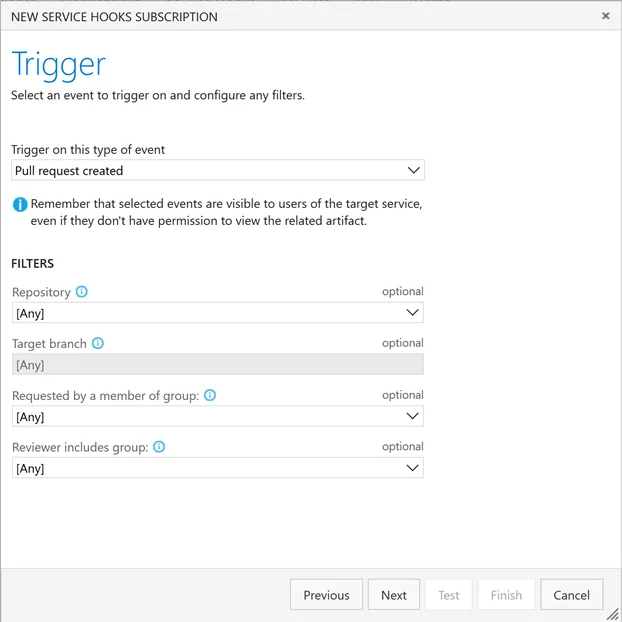
&lt;li&gt;Select &lt;strong&gt;Pull request created&lt;/strong&gt;.
 &lt;img src=&quot;https://david.gardiner.net.au/_astro/teamcity-01.i2515L8E_Z2uUtLk.webp&quot; alt=&quot;New Service Hooks Subscription dialog window screenshot&quot; /&gt;&lt;/li&gt;
&lt;li&gt;If appropriate, select a specific repository and click &lt;strong&gt;Next&lt;/strong&gt;&lt;/li&gt;
&lt;li&gt;In &lt;strong&gt;URL&lt;/strong&gt;, enter the URL that VSTS will use to connect to the pull request server, including a query string that defines which TeamCity build should be queued.
 Eg. If the pull request server is hosted at &lt;em&gt;&lt;a href=&quot;https://www.example.com/pullrequestserver&quot;&gt;https://www.example.com/pullrequestserver&lt;/a&gt;&lt;/em&gt; and the TeamCity build type id is &lt;em&gt;My_CI_Build&lt;/em&gt; then you’d use &lt;em&gt;&lt;a href=&quot;https://www.example.com/pullrequestserver?buildTypeId=My%5C_CI%5C_Build&quot;&gt;https://www.example.com/pullrequestserver?buildTypeId=My\_CI\_Build&lt;/a&gt;&lt;/em&gt;&lt;/li&gt;
&lt;li&gt;In &lt;strong&gt;Username&lt;/strong&gt; and &lt;strong&gt;Password&lt;/strong&gt;, enter the credentials that will be used to authenticate with TeamCity&lt;/li&gt;
&lt;li&gt;Leave &lt;strong&gt;Resource details to send&lt;/strong&gt; as &lt;strong&gt;All&lt;/strong&gt;.&lt;/li&gt;
&lt;li&gt;Set &lt;strong&gt;Messages to send&lt;/strong&gt; and &lt;strong&gt;Detailed messages to send&lt;/strong&gt; to &lt;strong&gt;None&lt;/strong&gt;&lt;/li&gt;
&lt;li&gt;Click on &lt;strong&gt;Test&lt;/strong&gt; to try it out.&lt;/li&gt;
&lt;li&gt;Click on &lt;strong&gt;Finish&lt;/strong&gt; to save this service hook.&lt;/li&gt;
&lt;li&gt;Repeat these steps to create another service hook for &lt;strong&gt;Pull request updated&lt;/strong&gt;, also setting the &lt;strong&gt;Change&lt;/strong&gt; filter to &lt;strong&gt;Source branch updated&lt;/strong&gt;.&lt;/li&gt;
&lt;/ol&gt;
&lt;p&gt;With the service hooks in place, you can now go to the &lt;strong&gt;Branches&lt;/strong&gt; page, and click on the … (more actions) icon and choose &lt;strong&gt;Branch policies&lt;/strong&gt;.
&lt;img src=&quot;https://david.gardiner.net.au/_astro/teamcity-02.BAB9AdAt_Z1QIKvG.webp&quot; alt=&quot;Selecting branch policy from more actions menu&quot; /&gt;&lt;/p&gt;
&lt;p&gt;The &lt;strong&gt;Add status policy&lt;/strong&gt; button should be enabled, and clicking on that you should be able to find the pull request server listed in the drop down.&lt;/p&gt;
&lt;h2&gt;TeamCity&lt;/h2&gt;
&lt;p&gt;To allow TeamCity to call the pull request server, you will need to install the &lt;a href=&quot;https://github.com/tcplugins/tcWebHooks&quot;&gt;Web Hooks plugin for TeamCity&lt;/a&gt;. With that in place, go to the build configuration page in TeamCity, and you’ll see a new WebHooks tab.&lt;/p&gt;
&lt;ol&gt;
&lt;li&gt;Click on &lt;strong&gt;add build Webhooks&lt;/strong&gt;, then &lt;strong&gt;Click to create new WebHook for this build&lt;/strong&gt; and add a new web hook for the project&lt;/li&gt;
&lt;li&gt;In the &lt;strong&gt;URL&lt;/strong&gt;, enter the URL that TeamCity will use to connect to the pull request server.
 Eg. If the pull request server is hosted at &lt;em&gt;&lt;a href=&quot;https://www.example.com/pullrequestserver&quot;&gt;https://www.example.com/pullrequestserver&lt;/a&gt;&lt;/em&gt;, you would use &lt;em&gt;&lt;a href=&quot;https://www.example.com/pullrequestserver/buildComplete&quot;&gt;https://www.example.com/pullrequestserver/buildComplete&lt;/a&gt;&lt;/em&gt;.&lt;/li&gt;
&lt;li&gt;Set the &lt;strong&gt;payload format&lt;/strong&gt; to &lt;strong&gt;Legacy webhook (JSON)&lt;/strong&gt;&lt;/li&gt;
&lt;li&gt;Clear all the trigger events except &lt;strong&gt;On Completion Trigger when build successful&lt;/strong&gt; and &lt;strong&gt;Trigger when build fails&lt;/strong&gt;&lt;/li&gt;
&lt;li&gt;Click &lt;strong&gt;Save&lt;/strong&gt;&lt;/li&gt;
&lt;/ol&gt;
&lt;p&gt;In the &lt;strong&gt;VCS Root&lt;/strong&gt; settings for the VSTS Git repository, set &lt;strong&gt;Branch Specification&lt;/strong&gt; to&lt;/p&gt;
&lt;pre&gt;&lt;code&gt;+:refs/heads/(master)
+:refs/pull/*/merge
&lt;/code&gt;&lt;/pre&gt;
&lt;p&gt;&lt;img src=&quot;https://david.gardiner.net.au/_astro/teamcity-03.B0Zr8bWl_Z14XlVu.webp&quot; alt=&quot;TeamCity branch specification page&quot; /&gt;&lt;/p&gt;
&lt;p&gt;We don&apos;t need TeamCity to trigger the builds for the pull request branches as the pull request server will be queuing those builds, but we do still want TeamCity to trigger the master builds.&lt;/p&gt;
&lt;p&gt;In the build configuration &lt;strong&gt;VCS Trigger&lt;/strong&gt;, set the &lt;strong&gt;Branch filter&lt;/strong&gt; to &lt;code&gt;+:&amp;lt;default&amp;gt;&lt;/code&gt;&lt;/p&gt;
&lt;p&gt;With all that configuration done, creating a new pull request in VSTS should now trigger a branch build in TeamCity. When the build completes, the status is posted back to VSTS, allowing the pull request to be completed by merging the changes into master.&lt;/p&gt;
</content>
  </entry>
  <entry>
    <id>https://david.gardiner.net.au/2018/01/vsts-with-teamcity-building-pull</id>
    <updated>2018-01-02T08:00:00.000+10:30</updated>
    <title>VSTS with TeamCity – Building a pull request server</title>
    <link href="https://david.gardiner.net.au/2018/01/vsts-with-teamcity-building-pull" rel="alternate" type="text/html" title="VSTS with TeamCity – Building a pull request server"/>
    <category term="Azure DevOps"/>
    <category term="TeamCity"/>
    <published>2018-01-02T08:00:00.000+10:30</published>
    <summary type="html">*Part 2 in a series on integrating VSTS with TeamCity*</summary>
    <content type="html">&lt;p&gt;&lt;em&gt;Part 2 in a series on integrating &lt;a href=&quot;/2018/01/vsts-with-teamcity-introduction&quot;&gt;VSTS with TeamCity&lt;/a&gt;&lt;/em&gt;&lt;/p&gt;
&lt;p&gt;This is a web service that handles web hook messages triggered by events in VSTS and TeamCity.&lt;/p&gt;
&lt;p&gt;I started by using the sample &lt;a href=&quot;https://learn.microsoft.com/azure/devops/repos/git/create-pr-status-server?view=azure-devops&quot;&gt;Create a pull request status server with Node.js&lt;/a&gt;. As the title suggests, this is a Node application and it uses the Express library to run as a web server. I’d never written a Node app before, but it turns out it is surprisingly easy. If you’re starting from scratch, I’d recommend following the sample tutorial first, so you get up to speed with creating a really simple Node app that VSTS can talk to. Once you’ve got that working, then you should be well placed to use the code samples below.&lt;/p&gt;
&lt;p&gt;There’s really two main processes we need to support:&lt;/p&gt;
&lt;ol&gt;
&lt;li&gt;VSTS – Pull Request Created or Updated → Trigger TeamCity build of branch&lt;/li&gt;
&lt;li&gt;TeamCity build complete → Tell VSTS if build was success or failure&lt;/li&gt;
&lt;/ol&gt;
&lt;p&gt;It’s also worth highlighting a couple of design goals for the pull request server:&lt;/p&gt;
&lt;ul&gt;
&lt;li&gt;Avoid hard-coding any specific details in the script, so that it could be easily reused in other repositories. As such, specific details (user credentials, TeamCity build configuration names etc) are configured as extra parameters in the web hook / service hook calls.&lt;/li&gt;
&lt;li&gt;Be stateless&lt;/li&gt;
&lt;/ul&gt;
&lt;h2&gt;NPM packages&lt;/h2&gt;
&lt;pre&gt;&lt;code&gt; &quot;dependencies&quot;: {
    &quot;basic-auth&quot;: &quot;^2.0.0&quot;,
    &quot;body-parser&quot;: &quot;^1.18.2&quot;,
    &quot;express&quot;: &quot;^4.16.2&quot;,
    &quot;teamcity-rest-api&quot;: &quot;0.0.8&quot;,
    &quot;vso-node-api&quot;: &quot;^6.2.8-preview&quot;
  },
  &quot;devDependencies&quot;: {
    &quot;@types/basic-auth&quot;: &quot;^1.1.2&quot;,
    &quot;@types/body-parser&quot;: &quot;^1.16.8&quot;,
    &quot;@types/express&quot;: &quot;^4.0.39&quot;,
    &quot;@types/node&quot;: &quot;^8.5.1&quot;,
    &quot;nodemon&quot;: &quot;^1.13.3&quot;,
    &quot;ts-node&quot;: &quot;^4.0.2&quot;,
    &quot;tslint&quot;: &quot;^5.8.0&quot;,
    &quot;typescript&quot;: &quot;^2.6.2&quot;
  }
&lt;/code&gt;&lt;/pre&gt;
&lt;p&gt;Note that the following code snippets have been ‘tidied’ for the blog post - the original has a fair bit of file and console logging which is invaluable when diagnosing what’s going on as you’re modifying the logic. I also switched to using TypeScript as I really appreciated the type checking it provides.&lt;/p&gt;
&lt;h2&gt;Get things ready&lt;/h2&gt;

&lt;pre&gt;&lt;code&gt;import * as auth from &apos;basic-auth&apos;;
import * as bodyParser from &apos;body-parser&apos;;
import * as express from &apos;express&apos;;
import * as fs from &apos;fs&apos;;
import * as vsts from &apos;vso-node-api&apos;;
import { GitPullRequestStatus, GitStatusState } from &apos;vso-node-api/interfaces/GitInterfaces&apos;;

const teamcity = require(&apos;teamcity-rest-api&apos;);

const app = express();
app.use(bodyParser.json({ limit: &apos;5mb&apos;}));

const collectionURL = process.env.COLLECTIONURL;
const token = process.env.VSTSTOKEN;

const authHandler = vsts.getPersonalAccessTokenHandler(token!);
const connection = new vsts.WebApi(collectionURL!, authHandler);

const vstsGit = connection.getGitApi();
&lt;/code&gt;&lt;/pre&gt;
&lt;h2&gt;Handling a pull request event&lt;/h2&gt;

&lt;pre&gt;&lt;code&gt;app.post(&apos;/prserver&apos;, (req, res) =&amp;gt; {
    const user = auth(req);

    const buildTypeId = req.query.buildTypeId;

    if (!buildTypeId || !user) {
        res.sendStatus(400);
        return;
    }

    const mergeStatus = req.body.resource.mergeStatus;

    if (mergeStatus !== &apos;succeeded&apos;) {
        return;
    }

    // Get the details about the PR from the service hook payload
    const repoId = req.body.resource.repository.id;
    const pullRequestId = req.body.resource.pullRequestId;
    const commitId = req.body.resource.lastMergeSourceCommit.commitId;

    // This needs to match the branch pattern in TeamCity
    const branchName = pullRequestId;

    // We need to find out the pull request IterationId
    vstsGit.getPullRequestIterations(repoId, pullRequestId, undefined, false)
    .then((iterations: any[]) =&amp;gt; {
        return iterations.filter(item =&amp;gt; item.sourceRefCommit.commitId === commitId)[0].id;
    })
    .then((iterationId: string) =&amp;gt; {

        // trigger TeamCity build
        const client = teamcity.create({
            url: &apos;http://localhost:8111&apos;,
            username: user.name,
            password: user.pass
        });

        // This is the data we are posting to TeamCity
        // tslint:disable-next-line:max-line-length
        const buildNodeObject = `&amp;lt;build branchName=&apos;${branchName}&apos;&amp;gt;&amp;lt;buildType id=&apos;${buildTypeId}&apos; /&amp;gt;&amp;lt;properties&amp;gt;&amp;lt;property name=&apos;vsts.pullRequestId&apos; value=&quot;${pullRequestId}&quot; inherited=&quot;false&quot;/&amp;gt;&amp;lt;property name=&apos;vsts.repositoryId&apos; value=&quot;${repoId}&quot; inherited=&quot;false&quot;/&amp;gt;&amp;lt;property name=&apos;vsts.iterationId&apos; value=&quot;${iterationId}&quot; inherited=&quot;false&quot;/&amp;gt;&amp;lt;/properties&amp;gt;&amp;lt;/build&amp;gt;`;

        client.builds.startBuild(buildNodeObject)
            .then((buildStatus: any) =&amp;gt; {
                // Build the status object that we want to post.
                // Assume that the PR is ready for review...
                const prStatus = {
                    &apos;iterationId&apos;: iterationId,
                    &apos;state&apos;: &apos;pending&apos;,
                    &apos;description&apos;: `Queued build: ${buildStatus.buildTypeId}`,
                    &apos;targetUrl&apos;: buildStatus.webUrl,
                    &apos;context&apos;: {
                        &apos;name&apos;: &apos;teamcity&apos;,
                        &apos;genre&apos;: &apos;continuous-integration&apos;
                    },
                    _links: null
                };

                // Post the status to the PR
                vstsGit.createPullRequestStatus(prStatus as any, repoId, pullRequestId);
            }, (reason: any) =&amp;gt; {
                // error logging
            });
    }).catch((reason: any) =&amp;gt; {
        // error logging
    });

    res.send(&apos;Received the POST&apos;);
});
&lt;/code&gt;&lt;/pre&gt;
&lt;h2&gt;Handling build completion from TeamCity&lt;/h2&gt;

&lt;pre&gt;&lt;code&gt;app.post(&apos;/prserver/buildComplete&apos;, (req, res) =&amp;gt; {
    const pullRequestIdNode = req.body.build.teamcityProperties.find((item: any) =&amp;gt; item.name === &apos;vsts.pullRequestId&apos;);

    if (!pullRequestIdNode) {
        // ignore if we don&apos;t have expected property
        return;
    }

    const pullRequestId = pullRequestIdNode.value;

    const repositoryId = req.body.build.teamcityProperties.filter((item: any) =&amp;gt; item.name === &apos;vsts.repositoryId&apos;)[0].value;
    const iterationId = req.body.build.teamcityProperties.filter((item: any) =&amp;gt; item.name === &apos;vsts.iterationId&apos;)[0].value as number;

    const prStatus = {
        iterationId: iterationId,
        state: GitStatusState.Succeeded,
        &apos;description&apos;: &apos;Build succeeded&apos;,
        &apos;targetUrl&apos;: req.body.build.buildStatusUrl,
        &apos;context&apos;: {
            &apos;name&apos;: &apos;teamcity&apos;,
            &apos;genre&apos;: &apos;continuous-integration&apos;
        },
        _links: null
    };

    if (req.body.build.buildResult !== &apos;success&apos;) {
        prStatus.state = GitStatusState.Failed; // &apos;failed&apos;;
        prStatus.description = `Build result: ${req.body.build.buildResult}`;
    }

    // Post the status to the PR
    vstsGit.createPullRequestStatus(prStatus as any, repositoryId, pullRequestId);

});
&lt;/code&gt;&lt;/pre&gt;
&lt;p&gt;During development I ran the Node app from the command-line and made extensive use of console and file logging.&lt;/p&gt;
&lt;p&gt;Once I was satisfied it was working as expected, I switched to using &lt;a href=&quot;https://github.com/tjanczuk/iisnode&quot;&gt;iisnode&lt;/a&gt; to run it under IIS.&lt;/p&gt;
&lt;p&gt;Where this app runs depends on how accessible your TeamCity server is. If  TeamCity is Internet-facing then the server could run anywhere (maybe  even as something like an Azure Function). If TeamCity is running behind  your firewall, then you might choose to host the pull server internally  too. Note that VSTS does need to be able to contact the pull server –  either directly (so the pull server itself is Internet-facing), or using  a reverse proxy service like &lt;a href=&quot;https://ngrok.com/&quot;&gt;ngrok&lt;/a&gt;.&lt;/p&gt;
&lt;p&gt;In the next post, I’ll describe how to configure TeamCity and VSTS to call the pull request server.&lt;/p&gt;
</content>
  </entry>
  <entry>
    <id>https://david.gardiner.net.au/2018/01/vsts-with-teamcity-introduction</id>
    <updated>2018-01-01T17:09:00.000+10:30</updated>
    <title>VSTS with TeamCity – Introduction</title>
    <link href="https://david.gardiner.net.au/2018/01/vsts-with-teamcity-introduction" rel="alternate" type="text/html" title="VSTS with TeamCity – Introduction"/>
    <category term="Azure DevOps"/>
    <category term="TeamCity"/>
    <published>2018-01-01T17:09:00.000+10:30</published>
    <summary type="html">Microsoft’s Visual Studio Team Services (VSTS) has become quite a compelling offering for managing software development.</summary>
    <content type="html">&lt;p&gt;Microsoft’s &lt;a href=&quot;https://azure.microsoft.com/en-us/products/devops/&quot;&gt;Visual Studio Team Services&lt;/a&gt; (VSTS) has become quite a compelling offering for managing software development. Features include source control, build, release, and issue tracking. With the product team working on 3 week sprints, new features are being added frequently.&lt;/p&gt;
&lt;p&gt;One feature in particular that VSTS inherited from its on-premise predecessor/sibling Team Foundation Server is &lt;a href=&quot;https://docs.microsoft.com/en-us/vsts/build-release/concepts/definitions/build/triggers#gated&quot;&gt;gated check-ins&lt;/a&gt;. This is a terrific way of keeping the build “green” – you avoid the risk of a developer committing changes that break the build (and that breaking change then ‘infecting’ the rest of the team). Instead their changes are isolated and not actually finally committed until after the build (potentially including unit tests) has passed.&lt;/p&gt;
&lt;p&gt;If you use Git version control with VSTS, the equivalent to gated check-ins is &lt;a href=&quot;https://learn.microsoft.com/azure/devops/repos/git/branch-policies?view=azure-devops&quot;&gt;branch policies&lt;/a&gt;. You can enable one or more of the following branch policies:&lt;/p&gt;
&lt;ul&gt;
&lt;li&gt;Require a minimum number of reviewers&lt;/li&gt;
&lt;li&gt;Check for linked work items&lt;/li&gt;
&lt;li&gt;Check for comment resolution&lt;/li&gt;
&lt;li&gt;Enforce a merge strategy&lt;/li&gt;
&lt;li&gt;Build validation&lt;/li&gt;
&lt;li&gt;Approval from external services&lt;/li&gt;
&lt;/ul&gt;
&lt;p&gt;Build validation uses the built-in VSTS Build services, so what if you’re already using another build server – say &lt;a href=&quot;https://www.jetbrains.com/teamcity/&quot;&gt;JetBrain’s TeamCity&lt;/a&gt; for example? Well that’s where that last item “Approval from external services” can come into play.&lt;/p&gt;
&lt;p&gt;TeamCity does have some support for building VSTS Git repositories. What it can’t currently do is integrate fully as a VSTS branch policy.&lt;/p&gt;
&lt;p&gt;This is the first in a short series of blog posts in which I’m going to describe how I leveraged the VSTS &lt;a href=&quot;https://learn.microsoft.com/rest/api/azure/devops/git/pull-request-statuses?view=azure-devops-rest-4.1&quot;&gt;Pull Request Status API&lt;/a&gt; and TeamCity’s &lt;a href=&quot;https://confluence.jetbrains.com/display/TCD10/REST+API#RESTAPI-TriggeringaBuild&quot;&gt;API&lt;/a&gt; via a custom ‘pull request server’ to act as an intermediary between VSTS and TeamCity. With this in place, pull requests must have a passing build before the changes from the branch are allowed to be merged to master.&lt;/p&gt;
&lt;ul&gt;
&lt;li&gt;Introduction&lt;/li&gt;
&lt;li&gt;&lt;a href=&quot;/2018/01/vsts-with-teamcity-building-pull&quot;&gt;Creating the pull request server&lt;/a&gt;&lt;/li&gt;
&lt;li&gt;&lt;a href=&quot;/2018/01/vsts-with-teamcity-configuration&quot;&gt;Configuration&lt;/a&gt;&lt;/li&gt;
&lt;li&gt;&lt;a href=&quot;/2018/01/vsts-and-teamcity-wrapping-up&quot;&gt;Wrapping up&lt;/a&gt;&lt;/li&gt;
&lt;/ul&gt;
</content>
  </entry>
</feed>