<?xml version="1.0" encoding="UTF-8"?>
<feed xmlns="http://www.w3.org/2005/Atom" xml:lang="en-AU" xmlns:media="http://search.yahoo.com/mrss/">
  <id>https://david.gardiner.net.au/tags/Work.xml</id>
  <title type="html">David Gardiner - Work</title>
  <updated>2026-07-13T00:27:33.255Z</updated>
  <subtitle>Blog posts tagged with &apos;Work&apos; - A blog of software development, .NET and other interesting things</subtitle>
  <rights>Copyright 2026 David Gardiner</rights>
  <icon>https://www.gravatar.com/avatar/37edf2567185071646d62ba28b868fab?s=64</icon>
  <logo>https://www.gravatar.com/avatar/37edf2567185071646d62ba28b868fab?s=256</logo>
  <generator uri="https://github.com/flcdrg/astrojs-atom" version="3">astrojs-atom</generator>
  <author>
    <name>David Gardiner</name>
  </author>
  <link href="https://david.gardiner.net.au/tags/Work.xml" rel="self" type="application/atom+xml"/>
  <link href="https://david.gardiner.net.au/tags/Work" rel="alternate" type="text/html" hreflang="en-AU"/>
  <category term="Work"/>
  <category term="Software Development"/>
  <entry>
    <id>https://david.gardiner.net.au/2026/06/macbookpro</id>
    <updated>2026-06-09T15:00:00.000+09:30</updated>
    <title>I bought a MacBook Pro!</title>
    <link href="https://david.gardiner.net.au/2026/06/macbookpro" rel="alternate" type="text/html" title="I bought a MacBook Pro!"/>
    <category term="Hardware"/>
    <category term="macOS"/>
    <category term="Work"/>
    <published>2026-06-09T15:00:00.000+09:30</published>
    <summary type="html">The decision has been made. David is broadening his hardware horizons with the selection of an Apple MacBook Pro as his next laptop.</summary>
    <content type="html">&lt;p&gt;So last time I shared how I was trying to figure out &lt;a href=&quot;/2026/05/which-laptop&quot;&gt;what my next laptop would be&lt;/a&gt;. Well I made a decision.. and it is a bit of a surprising one, but yes. I now have an Apple MacBook Pro!&lt;/p&gt;
&lt;p&gt;I remember the first time I attended Microsoft&apos;s &lt;a href=&quot;/2015/11/north-america-trip-mvp-summit-2015&quot;&gt;MVP Summit&lt;/a&gt; in Redmond back in 2015, being really surprised at the number of MVPs and Microsoft staff that were using MacBooks. I just assumed being a Microsoft event everyone would be using Windows, but apparently not. That made a lasting impression.&lt;/p&gt;
&lt;p&gt;More recently I&apos;ve read with interest how a few of my SixPivot colleagues have been using MacBooks for work. Some were long-time Mac users, others more recent adopters. One good piece of advice was to make sure you still had a good Windows laptop available. We work with a diverse range of clients - some provide their own laptops (often with preconfigured VPN/security software), some allow you to use your preferred device, and some might need it to be a Windows machine. My old Dell is still in good shape, so I have that covered.&lt;/p&gt;
&lt;p&gt;After weighing up all the options I wrote about in the last post, I ended up picking the MacBook.&lt;/p&gt;
&lt;p&gt;The specs:&lt;/p&gt;
&lt;ul&gt;
&lt;li&gt;16-inch MacBook Pro in Space Black with M5 Pro chip&lt;/li&gt;
&lt;li&gt;18-core CPU, 20-core GPU, 16-core Neural Engine&lt;/li&gt;
&lt;li&gt;64GB unified memory&lt;/li&gt;
&lt;li&gt;2TB SSD storage&lt;/li&gt;
&lt;li&gt;Standard display&lt;/li&gt;
&lt;li&gt;US English Backlit Magic Keyboard with Touch ID&lt;/li&gt;
&lt;li&gt;Three Thunderbolt 5 ports, MagSafe 3 port, 3.5mm headphone jack, HDMI port, SDXC card slot&lt;/li&gt;
&lt;/ul&gt;
&lt;p&gt;&lt;img src=&quot;https://david.gardiner.net.au/_astro/macbook-with-box.aih314YC_2GN1M.webp&quot; alt=&quot;New MacBook Pro laptop sitting on the box it came in&quot; /&gt;&lt;/p&gt;
&lt;p&gt;Physically it&apos;s not dissimilar to other laptops I&apos;ve used. One obvious thing is the different arrangement of modifier keys on the keyboard. (More about that later).&lt;/p&gt;
&lt;p&gt;The getting started process was pretty straightforward:&lt;/p&gt;
&lt;ul&gt;
&lt;li&gt;Confirm language and region&lt;/li&gt;
&lt;li&gt;Optionally transfer data from another device (I chose to set up as new)&lt;/li&gt;
&lt;li&gt;Accessibility preferences&lt;/li&gt;
&lt;li&gt;Data and privacy preferences&lt;/li&gt;
&lt;li&gt;Creating a local Mac account&lt;/li&gt;
&lt;li&gt;Optionally then sign in with Apple Account (which I did)&lt;/li&gt;
&lt;li&gt;Confirm Mac settings&lt;/li&gt;
&lt;li&gt;Siri and AI&lt;/li&gt;
&lt;li&gt;Notifications&lt;/li&gt;
&lt;li&gt;Touch ID&lt;/li&gt;
&lt;li&gt;Apple Pay&lt;/li&gt;
&lt;li&gt;And then you&apos;re about done.&lt;/li&gt;
&lt;/ul&gt;
&lt;p&gt;A friendly welcome screen and we&apos;re up and running. Sometimes change is a good thing. You can challenge your habits and assumptions and sometimes find better ways of doing things.&lt;/p&gt;
&lt;h2&gt;Nice things&lt;/h2&gt;
&lt;p&gt;Everyone raves about battery life, especially with the newer ARM-based MacBooks. For the most part I&apos;m seeing this to be true.&lt;/p&gt;
&lt;p&gt;The &lt;a href=&quot;https://support.apple.com/en-au/guide/app-store/fird2c7092da/mac&quot;&gt;integration with iPhone apps&lt;/a&gt; is nifty. I wrote a few years back &lt;a href=&quot;/2011/02/comparison-of-public-weather-forecasts&quot;&gt;how dodgy a lot of the weather data for Australia is&lt;/a&gt;. So it&apos;s nice that through this feature I can have the Australian Bureau of Meteorology&apos;s iOS app sitting on my desktop as a &lt;a href=&quot;https://support.apple.com/en-au/guide/mac-help/mchl52be5da5/mac&quot;&gt;widget&lt;/a&gt;.&lt;/p&gt;
&lt;p&gt;&lt;img src=&quot;https://david.gardiner.net.au/_astro/desktop-gadgets.rpQC1f3S_ZT77Fa.webp&quot; alt=&quot;Screenshot of macOS desktop showing calendar and Adelaide weather gadgets&quot; /&gt;&lt;/p&gt;
&lt;p&gt;That integration also includes Messages, Phone and FaceTime. Messages is the one I&apos;ve noticed the most, as they pop up as notifications in macOS in addition to on my iPhone. As I normally have my phone on silent, the &apos;ding&apos; from macOS surprised me at first. Being able to copy/paste screenshots into Messages from macOS is a nice bonus. Yes, you can do that on iPhone, but it is much easier viewing a 600 page PDF on a big screen that you want to copy a diagram out of.&lt;/p&gt;
&lt;h2&gt;New and different things&lt;/h2&gt;
&lt;p&gt;macOS is Unix-based. Or according to Wikipedia: A &quot;proprietary Unix operating system, derived from OPENSTEP for Mach and FreeBSD&quot;.&lt;/p&gt;
&lt;p&gt;As an experienced iPhone user, there are some areas of the user interface that are quite familiar. System Settings is a good example.&lt;/p&gt;
&lt;p&gt;&lt;img src=&quot;https://david.gardiner.net.au/_astro/macos-system-settings.LSeT9782_Z8Kvep.webp&quot; alt=&quot;Screenshot of macOS System Settings&quot; /&gt;&lt;/p&gt;
&lt;p&gt;I suspect many Mac users may have never even opened a shell and are quite happy sticking with the GUI interface. macOS comes with &apos;Terminal&apos; as the default terminal program, and &lt;a href=&quot;https://zsh.sourceforge.io/&quot;&gt;zsh&lt;/a&gt; as the default shell.&lt;/p&gt;
&lt;p&gt;zsh is an interesting choice for macOS - it&apos;s apparently &lt;a href=&quot;https://sourceforge.net/p/zsh/code/commit_browser&quot;&gt;still hosted on SourceForge&lt;/a&gt; (there&apos;s a blast from the past!), but from what I&apos;ve seen online, the reason Apple chose it was due to the software license it uses.&lt;/p&gt;
&lt;p&gt;I could switch to another shell (including PowerShell) but for now I want to immerse myself in all things &apos;Mac&apos; so becoming more acquainted with zsh is the way to go.&lt;/p&gt;
&lt;p&gt;I have installed &lt;a href=&quot;https://ghostty.org/&quot;&gt;Ghostty&lt;/a&gt; on the recommendation of &lt;a href=&quot;https://blog.gertjvr.com/&quot;&gt;Gert&lt;/a&gt; and have been using that in preference to Terminal.&lt;/p&gt;
&lt;p&gt;&lt;img src=&quot;https://david.gardiner.net.au/_astro/ghostty.DLMn2rUY_Z1Y7uvJ.webp&quot; alt=&quot;Ghostty screenshot&quot; /&gt;&lt;/p&gt;
&lt;h3&gt;Swiping to switch applications&lt;/h3&gt;
&lt;p&gt;I&apos;ve been impressed when I&apos;ve seen other MacBook users somehow swishing left and right between fullscreen applications. I accidentally swiped with three fingers on the trackpad and discovered that was how you do that! &lt;kbd&gt;Command&lt;/kbd&gt;-&lt;kbd&gt;Tab&lt;/kbd&gt; is the keyboard equivalent (and similar to Windows Alt-&lt;kbd&gt;Tab&lt;/kbd&gt;)
&lt;/p&gt;&lt;h3&gt;Menus&lt;/h3&gt;
&lt;p&gt;This has caught me out a few times, and I was vaguely aware of this but had kind of forgotten. macOS menus always live at the top of the screen. Sometimes if the application you&apos;re using is fullscreen then the menu will disappear unless you mouse up to the top.&lt;/p&gt;
&lt;p&gt;&lt;img src=&quot;https://david.gardiner.net.au/_astro/finder-menu.D6UM4Ym4_Z1l8IVi.webp&quot; alt=&quot;screenshot of menus&quot; /&gt;&lt;/p&gt;
&lt;h3&gt;Start menu&lt;/h3&gt;
&lt;p&gt;It&apos;s called the Dock, it lives at the bottom, and like the application menus hides itself unless you mouse down the bottom of the screen.&lt;/p&gt;
&lt;p&gt;I do keep hitting the &lt;kbd&gt;Command&lt;/kbd&gt; key thinking it&apos;s the &lt;kbd&gt;Windows&lt;/kbd&gt; key and it will bring up the dock (or Apps list). Turns out I should be using &lt;kbd&gt;Fn&lt;/kbd&gt;-&lt;kbd&gt;A&lt;/kbd&gt; and &lt;kbd&gt;Fn&lt;/kbd&gt;-&lt;kbd&gt;Shift&lt;/kbd&gt;-&lt;kbd&gt;A&lt;/kbd&gt; respectively.&lt;/p&gt;
&lt;p&gt;&lt;img src=&quot;https://david.gardiner.net.au/_astro/dock.a4IM3S1-_Z1KrVou.webp&quot; alt=&quot;screenshot of dock&quot; /&gt;&lt;/p&gt;
&lt;h3&gt;Keyboard&lt;/h3&gt;
&lt;p&gt;The keyboard is fine. The feel is quite comparable to my Dell, which I&apos;ve had no complaints with. As I mentioned above, the modifier keys are slightly different. There&apos;s a &lt;kbd&gt;Control&lt;/kbd&gt; key but it is used differently to Windows. All the familiar shortcuts that you&apos;d use &lt;kbd&gt;Ctrl&lt;/kbd&gt; on Windows, you actually use the &lt;kbd&gt;Command&lt;/kbd&gt; key (with the funny squiggle &apos;⌘&apos;).&lt;/p&gt;
&lt;p&gt;So close, but so different:&lt;/p&gt;
&lt;p&gt;&lt;img src=&quot;https://david.gardiner.net.au/_astro/windows-modifier-keys.De9A2oJr_SUasB.webp&quot; alt=&quot;Windows keyboard showing modifier keys&quot; /&gt;&lt;img src=&quot;https://david.gardiner.net.au/_astro/mac-modifier-keys.DSil0LSd_cu6Xd.webp&quot; alt=&quot;MacBook Pro keyboard showing modifier keys&quot; /&gt;&lt;/p&gt;
&lt;p&gt;And no &lt;kbd&gt;Delete&lt;/kbd&gt; key! How bizarre. Well technically there is a key that Apple refers to as &apos;Delete&apos;, but it has the ⌫ icon and acts like what I think of as &lt;kbd&gt;Backspace&lt;/kbd&gt; (in that it deletes the character to the left and moves left). If you use &lt;kbd&gt;fn&lt;/kbd&gt;-&lt;kbd&gt;Delete&lt;/kbd&gt; then that does the equivalent of a normal delete key (Apple refer to this as &apos;forward delete&apos;), or you may be able to use &lt;kbd&gt;Control&lt;/kbd&gt;-&lt;kbd&gt;D&lt;/kbd&gt;.&lt;/p&gt;
&lt;p&gt;I need to memorise the &lt;a href=&quot;https://support.apple.com/en-us/102650&quot;&gt;Mac keyboard shortcuts&lt;/a&gt;!&lt;/p&gt;
&lt;p&gt;I also regularly use an external keyboard. That creates a conundrum. When connected to my MacBook, do I:&lt;/p&gt;
&lt;ol&gt;
&lt;li&gt;Use the modifier keys on the external keyboard like they physically mirror the ones on the MacBook Pro keyboard, or&lt;/li&gt;
&lt;li&gt;Change the mapping of the external keyboard so that I use it in same way as when I&apos;m connected to a Windows machine.&lt;/li&gt;
&lt;/ol&gt;
&lt;p&gt;I guess the question is which muscle memory is a stronger trigger - does the &quot;feel&quot; of the external keyboard have me fall into thinking &quot;Windows&quot; modifiers, or does looking at the MacBook Pro screen help transition my brain&apos;s process to work in &quot;Apple&quot; mode?&lt;/p&gt;
&lt;h2&gt;Equivalent things&lt;/h2&gt;
&lt;p&gt;As &lt;a href=&quot;https://chocolatey.org/&quot;&gt;Chocolatey&lt;/a&gt; is for Windows, &lt;a href=&quot;https://brew.sh/&quot;&gt;Homebrew&lt;/a&gt; is a package manager for macOS (and also Linux). Where possible I&apos;ve been using &lt;code&gt;brew&lt;/code&gt; to install software.&lt;/p&gt;
&lt;p&gt;It&apos;s nice to find familiar applications are available on both platforms:&lt;/p&gt;
&lt;ul&gt;
&lt;li&gt;&lt;a href=&quot;https://www.firefox.com&quot;&gt;Firefox&lt;/a&gt;&lt;/li&gt;
&lt;li&gt;&lt;a href=&quot;https://code.visualstudio.com/&quot;&gt;Visual Studio Code&lt;/a&gt;&lt;/li&gt;
&lt;li&gt;&lt;a href=&quot;https://www.microsoft.com/en-au/microsoft-365&quot;&gt;Microsoft Office&lt;/a&gt;&lt;/li&gt;
&lt;li&gt;&lt;a href=&quot;https://bitwarden.com/&quot;&gt;Bitwarden&lt;/a&gt;&lt;/li&gt;
&lt;li&gt;&lt;a href=&quot;https://slack.com/intl/en-au/&quot;&gt;Slack&lt;/a&gt;&lt;/li&gt;
&lt;li&gt;&lt;a href=&quot;https://www.scootersoftware.com/&quot;&gt;Beyond Compare&lt;/a&gt;&lt;/li&gt;
&lt;/ul&gt;
&lt;h2&gt;Missing things&lt;/h2&gt;
&lt;p&gt;A few Windows favourites that I will need to find alternatives to:&lt;/p&gt;
&lt;ul&gt;
&lt;li&gt;&lt;a href=&quot;https://paint.net/&quot;&gt;Paint.NET&lt;/a&gt; (I&apos;m trying &lt;a href=&quot;https://www.gimp.org/&quot;&gt;GIMP&lt;/a&gt; but it feels overly complex for what I need)&lt;/li&gt;
&lt;li&gt;&lt;a href=&quot;https://tortoisegit.org/&quot;&gt;TortoiseGit&lt;/a&gt;&lt;/li&gt;
&lt;/ul&gt;
&lt;h2&gt;Weird things&lt;/h2&gt;
&lt;p&gt;I&apos;m quite used to Windows Hello being able to sign me in by looking at me on my Windows laptop. Likewise on my iPhone using Face ID. So it is really odd that this is missing on the MacBook. I&apos;ve found myself a few times smiling sweetly at my sleeping laptop, only to realise that it was oblivious to my attentions. There is Touch ID at least.&lt;/p&gt;
&lt;p&gt;I started to install the &lt;a href=&quot;https://www.synology.com/en-global/dsm/packages/ActiveBackup&quot;&gt;Synology Active Backup for Business agent&lt;/a&gt;, but there&apos;s some extra steps that sounded tricky. That may deserve a separate blog post if I get it working.&lt;/p&gt;
&lt;h2&gt;Limited support for Dell docks&lt;/h2&gt;
&lt;p&gt;I have a &lt;a href=&quot;/2021/02/new-laptop&quot;&gt;Dell WD19TB Dock&lt;/a&gt; that I usually run two of my three monitors through. I was a bit surprised to discover that the MacBook couldn&apos;t see the second external monitor connected to the dock - it was just mirroring the same content on both. I found this documentation on &lt;a href=&quot;https://www.dell.com/support/kbdoc/en-au/000124312/dell-thunderbolt-dock-wd19tb-and-apple-usb-c-hosts&quot;&gt;Dell Thunderbolt Docks and Apple USB-C Hosts&lt;/a&gt; which explains what is possible.&lt;/p&gt;
&lt;p&gt;It turns out macOS doesn&apos;t support &quot;&lt;a href=&quot;https://www.intel.com/content/www/us/en/support/articles/000059105/graphics.html&quot;&gt;Multi-Stream Transport&lt;/a&gt;&quot;. And if you&apos;re using DisplayPort and DisplayPort/HDMI (which I was), then mirroring is what happens. The workaround is to make sure one of the monitors is instead connected via USB-C. None of my monitors have USB-C output, so I bought one of these &lt;a href=&quot;https://www.amazon.com.au/gp/product/B0DJSHRWFT?th=1&amp;amp;linkCode=ll2&amp;amp;tag=flcdrg07-22&amp;amp;linkId=fcb96e0b880ec7f1655eae1dbe21b454&amp;amp;ref_=as_li_ss_tl&quot;&gt;USB-C to HDMI cables&lt;/a&gt;, and sure enough I then had two distinct external monitors.&lt;/p&gt;
&lt;p&gt;While the dock can technically host 3 monitors, it doesn&apos;t look like that will work at all with macOS. I usually run the 3rd monitor through a separate hub (as my Dell laptop can&apos;t run 3 through the dock at high resolution), so I can do the same with the MacBook.&lt;/p&gt;
&lt;p&gt;According to the &apos;M5 Pro chip&apos; section of &lt;a href=&quot;https://support.apple.com/en-us/101571#macbook-pro-m5-pro&quot;&gt;How many displays can be connected to MacBook Pro&lt;/a&gt;, 3 external displays is the hard limit.&lt;/p&gt;
&lt;h2&gt;SixPivot laptop allowance&lt;/h2&gt;
&lt;p&gt;One of the things I realised when I was researching laptops was that, even though the &lt;a href=&quot;https://handbook.sixpivot.com.au/perks-and-benefits/laptop-allowance#how-the-laptop-scheme-works&quot;&gt;laptop allowance at SixPivot&lt;/a&gt; is very generous, because of the crazy hardware price hikes, you don&apos;t get as much as you used to. I&apos;m pleased to see that just in the last few days they&apos;ve not only increased the allowance, but also provided a second option if you are happy to wait 3 years for a hardware refresh instead of the normal 2. In two (or three) years time that will be something to consider.&lt;/p&gt;
&lt;h2&gt;Onwards&lt;/h2&gt;
&lt;p&gt;It&apos;s been a pretty smooth start. I&apos;m looking forward to learning more about what this machine can do 😀&lt;/p&gt;
&lt;p&gt;&lt;/p&gt;</content>
    <media:thumbnail url="https://david.gardiner.net.au/_astro/macbook-with-box.aih314YC.jpg" width="857" height="643"/>
    <media:content medium="image" url="https://david.gardiner.net.au/_astro/macbook-with-box.aih314YC.jpg" width="857" height="643"/>
  </entry>
  <entry>
    <id>https://david.gardiner.net.au/2026/02/a-new-year</id>
    <updated>2026-02-03T12:30:00.000+10:30</updated>
    <title>A new year, and 5 years at SixPivot</title>
    <link href="https://david.gardiner.net.au/2026/02/a-new-year" rel="alternate" type="text/html" title="A new year, and 5 years at SixPivot"/>
    <category term="Animals"/>
    <category term="Cycling"/>
    <category term="Life"/>
    <category term="Work"/>
    <published>2026-02-03T12:30:00.000+10:30</published>
    <summary type="html">Some highlights of 2025, surviving the summer heat, and 5 years at SixPivot.</summary>
    <content type="html">&lt;p&gt;December and January have come and gone. What&apos;s been going on?&lt;/p&gt;
&lt;p&gt;&lt;img src=&quot;https://david.gardiner.net.au/_astro/20260123_235150170_iOS.BwW0bG0e_Z10a4R8.webp&quot; alt=&quot;David wearing sunglasses and Akubra hat and yellow DDD Adelaide t-shirt&quot; /&gt;&lt;/p&gt;
&lt;p&gt;I had 3 weeks off over the Christmas/New Years break, which was much appreciated. We didn&apos;t go away, but it did give me a chance to do a few jobs around the house. We&apos;re renovating our laundry and there was some painting that needed to be done before the new cupboards get installed. The whole process has taken quite a bit longer than we&apos;d hoped but it does feel like the end is in sight.&lt;/p&gt;
&lt;p&gt;The Tour Down Under was on recently in Adelaide. On the second Saturday, the men&apos;s race came quite close to where we live. I met up with our friend Jane and we hung out at top the King of the Mountain stage finish to cheer all the riders on. If you were watching the TV broadcast I&apos;m the yellow blob to the right of the arch, visible for about 0.2 seconds. That bright yellow &apos;DDD Adelaide 2025 Organiser&apos; t-shirt comes in handy!&lt;/p&gt;
&lt;p&gt;&lt;img src=&quot;https://david.gardiner.net.au/_astro/20260125_232629000_iOS.DBN8epnk_1o05Sw.webp&quot; alt=&quot;Still of Tour Down Under TV footage, showing David and Jane on the right&quot; /&gt;&lt;/p&gt;
&lt;p&gt;We&apos;ve already had a number of days over 40°C - Summer is definitely here in Adelaide. On days like that the aim is to keep cool and try and protect our garden and animals from the heat as best we can. Old bedsheets are put to good use! There&apos;s actually a Mandarin tree hiding under there.&lt;/p&gt;
&lt;p&gt;&lt;img src=&quot;https://david.gardiner.net.au/_astro/20260125_221829715_iOS.CQiu2JT7_2rC0xe.webp&quot; alt=&quot;Mandarin tree hiding under some bedsheets&quot; /&gt;&lt;/p&gt;
&lt;p&gt;One other change for the Gardiner family is we&apos;ve had some new additions:&lt;/p&gt;
&lt;p&gt;Vanessa (a 1 year old tortoiseshell-coloured rescue cat) joined us back in May last year. She loves all the girls in the house but just puts up with me. More than once I&apos;ve gone to start work in the morning (or returning after lunch) and discovered there&apos;s an extra &quot;cushion&quot; on my chair. Well I thought it was my chair but I think she has other ideas 😃.&lt;/p&gt;
&lt;p&gt;&lt;img src=&quot;https://david.gardiner.net.au/_astro/20260103_003832468_iOS.exkgOMIu_1BlSdt.webp&quot; alt=&quot;Vanessa the cat, on my work chair&quot; /&gt;&lt;/p&gt;
&lt;p&gt;And in early January our chook collection doubled. We&apos;re now looking after Peckachoo and Egglet, in addition to our two bantams. They belong to my son and daughter in-law, and needed a new home after friends who had been looking after them on their behalf moved to the country.&lt;/p&gt;
&lt;p&gt;&lt;img src=&quot;https://david.gardiner.net.au/_astro/20260203_020604797_iOS.WbDZhsgC_ZfdTYL.webp&quot; alt=&quot;Two full-sizes chooks&quot; /&gt;&lt;/p&gt;
&lt;p&gt;The new chooks are full-sized, so in comparison to the bantams they seem huge! But they&apos;re settling in well. We&apos;ve kept them apart from the bantams for now. They&apos;re great layers - most days we get an egg from both. I&apos;m hoping it will inspire our bantams (who are not the most reliable in that department) but so far not so much.&lt;/p&gt;
&lt;h2&gt;Adelaide .NET User Group&lt;/h2&gt;
&lt;p&gt;Recently the ADNUG organising team caught up for a meal and we started planning out the year. One minor issue we&apos;re still trying to solve is a venue. Normally we meet at the University of South Australia&apos;s City West campus. But UniSA has just merged with University of Adelaide to become &apos;Adelaide University&apos; and that was causing a delay in us being able to book our regular room. Merging two large complex organisations is tricky at the best of times, so I can only imagine all the internal systems and processes they&apos;re trying to figure out. We&apos;ve ended up with a different venue for February but hopefully we can be back at City West for April.&lt;/p&gt;
&lt;h2&gt;DDD Adelaide&lt;/h2&gt;
&lt;p&gt;I&apos;ve also spent a bit of time editing some of the videos recorded at DDD Adelaide. I&apos;m not giving up my day job just yet, but starting to figure out more about how to use DaVinci Resolve 😃. You can see the recordings that we&apos;ve published so far at &lt;a href=&quot;https://www.youtube.com/@DDDAdelaide&quot;&gt;https://www.youtube.com/@DDDAdelaide&lt;/a&gt;.&lt;/p&gt;
&lt;h2&gt;5 year work anniversary at SixPivot&lt;/h2&gt;
&lt;p&gt;My first reminder of this was getting some LinkedIn notifications on the weekend. I continue to be grateful for working for a modern, people-focused company. Small enough that I know everyone, but large enough that there is a diverse range of experience and thinking.&lt;/p&gt;
&lt;p&gt;After previously working with a few longer-term clients, I&apos;ve been mixing it up a bit recently with some shorter engagements. I am enjoying the variety.&lt;/p&gt;
&lt;p&gt;I&apos;ve received 500 &lt;a href=&quot;https://handbook.sixpivot.com.au/perks-and-benefits/benefits#perks&quot;&gt;&apos;good vibes&apos; points&lt;/a&gt; for my &apos;workversary&apos;! I&apos;m due to get a new laptop this year, so I might put them towards that (which I may need to given the price of RAM these days!)&lt;/p&gt;
</content>
    <media:thumbnail url="https://david.gardiner.net.au/_astro/20260123_235150170_iOS.BwW0bG0e.jpg" width="764" height="1019"/>
    <media:content medium="image" url="https://david.gardiner.net.au/_astro/20260123_235150170_iOS.BwW0bG0e.jpg" width="764" height="1019"/>
  </entry>
  <entry>
    <id>https://david.gardiner.net.au/2025/04/edifier-speakers</id>
    <updated>2025-04-21T15:00:00.000+09:30</updated>
    <title>Edifier MR4 Powered Studio Monitor Speakers</title>
    <link href="https://david.gardiner.net.au/2025/04/edifier-speakers" rel="alternate" type="text/html" title="Edifier MR4 Powered Studio Monitor Speakers"/>
    <category term="Hardware"/>
    <category term="Work"/>
    <published>2025-04-21T15:00:00.000+09:30</published>
    <summary type="html">Adding some external speakers to my work desk, and what I thought of the Edifier MR4
Powered Studio Monitor speakers.</summary>
    <content type="html">&lt;p&gt;I quite often like to have music playing in the background when I&apos;m working. &lt;a href=&quot;https://www.abc.net.au/listen/doublej&quot;&gt;Double J&lt;/a&gt; is my default choice, though I sometimes will pick out an old CD that I have copied onto my Synology, or for that rare time when I&apos;m under the pump then some calming classical music (via &lt;a href=&quot;https://www.abc.net.au/listen/live/classic2&quot;&gt;ABC Classic 2&lt;/a&gt;) is just the ticket.&lt;/p&gt;
&lt;p&gt;Also worth calling out that this isn&apos;t something you can easily do if you work in an office unless you have your own room or you&apos;re happy to wear headphones. Kind of funny that earlier in my career I did have my own private office, but later on the transition to open-plan seating came into fashion and I&apos;m not keen on wearing headphones all day so music listening was put on hold. So yeah, another big plus for working from home!&lt;/p&gt;
&lt;p&gt;The speakers on my &lt;a href=&quot;/2023/04/new-laptop&quot;&gt;Dell XPS 9530&lt;/a&gt; are surprisingly good, but I wondered if adding some external speakers might make it even better.&lt;/p&gt;
&lt;p&gt;I had accrued some &lt;a href=&quot;https://handbook.sixpivot.com.au/perks-and-benefits/rewards-shop&quot;&gt;SixPivot &quot;Good Vibes points&quot;&lt;/a&gt;, so I thought I&apos;d spend some of those on some new speakers.&lt;/p&gt;
&lt;p&gt;There&apos;s so many options, so I asked my colleagues for recommendations. Two caught my attention:&lt;/p&gt;
&lt;ul&gt;
&lt;li&gt;&lt;a href=&quot;https://www.amazon.com.au/Creative-Under-Monitor-Bluetooth-Dual-Driver-Compatible/dp/B0B28MG2SL?th=1&amp;amp;linkCode=ll1&amp;amp;tag=flcdrg07-22&amp;amp;linkId=1fc52f0f8f21eb9dd368409491bb7b26&amp;amp;language=en_AU&amp;amp;ref_=as_li_ss_tl&quot;&gt;Creative Stage Air PC V2 Under Monitor Soundbar&lt;/a&gt;&lt;/li&gt;
&lt;li&gt;&lt;a href=&quot;https://www.amazon.com.au/dp/B09FX5FZ6Y?th=1&amp;amp;linkCode=ll1&amp;amp;tag=flcdrg07-22&amp;amp;linkId=599f7effce2769beb32fe6ba48758575&amp;amp;language=en_AU&amp;amp;ref_=as_li_ss_tl&quot;&gt;Edifier MR4 Powered Studio Monitor Speakers&lt;/a&gt; (affiliate links)&lt;/li&gt;
&lt;/ul&gt;
&lt;p&gt;The Soundbar was the cheaper option so I went with that. I plugged it in and was all excited to hear wonderful improved sound, but queue the sad trombones - it was very disappointing. The sound was muddy, like listening to an old AM radio. Needless to say I sent it back.&lt;/p&gt;
&lt;p&gt;I then decided to give the Edifier speakers a try. My colleague &lt;a href=&quot;https://becdetat.com/&quot;&gt;Rebecca&lt;/a&gt; had a positive experience with these, so I was hopeful.&lt;/p&gt;
&lt;p&gt;They&apos;re actually just speakers - no Bluetooth or USB inputs, which was actually my preference. Do one thing and hopefully it will do it well! They arrived and I plugged them into my laptop, and they sounded really nice.&lt;/p&gt;
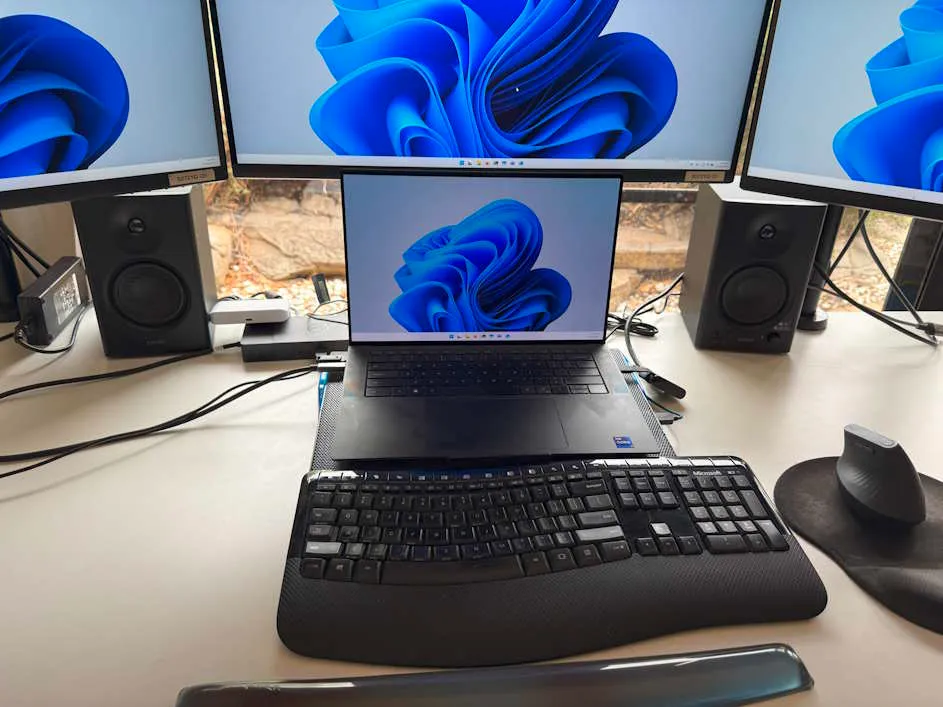
&lt;p&gt;I&apos;m relatively tall, so I have my monitors raised up on monitor stands, which means the speakers just sit nicely in the gap underneath.&lt;/p&gt;
&lt;p&gt;&lt;img src=&quot;https://david.gardiner.net.au/_astro/desk-with-speakers.BhW-UfYf_2scXbU.webp&quot; alt=&quot;Speakers on David&apos;s desk, with laptop and three monitors&quot; /&gt;&lt;/p&gt;
&lt;p&gt;While my laptop does have an audio jack, I realised that my Dell WD19TB Dock also has one, and figured that would be a better option to use long-term. Then I just need to unplug the one Thunderbolt cable for those times I want to take my laptop to the sofa while watching TV.&lt;/p&gt;
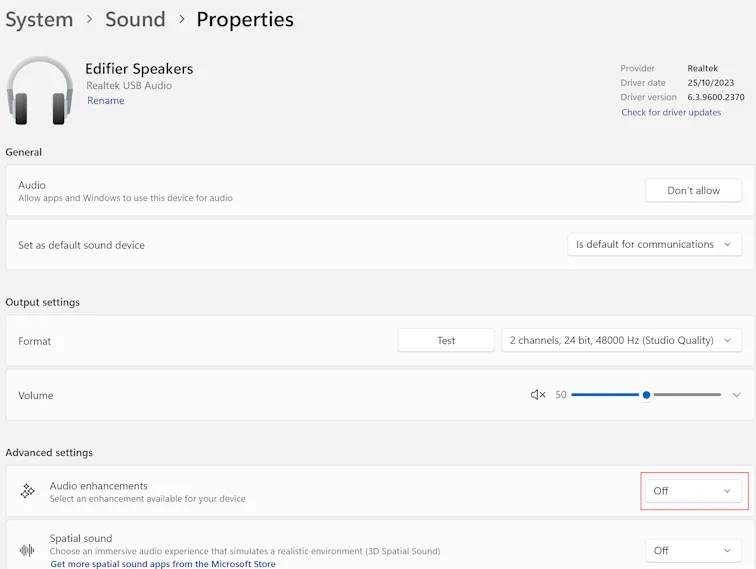
&lt;p&gt;But to my surprise, the audio quality went really bad - a lot like the Creative speaker. A bit of online searching and I found a comment that said to set &lt;strong&gt;Audio enhancements&lt;/strong&gt; to &lt;strong&gt;Off&lt;/strong&gt; in the device properties. That fixed the problem! (I&apos;m now wondering if that might have been the cause of the poor experience with the Creative Soundbar?)&lt;/p&gt;
&lt;p&gt;&lt;img src=&quot;https://david.gardiner.net.au/_astro/audio-device-settings.muhWzkxA_1kfEQ1.webp&quot; alt=&quot;Windows Settings, showing audio enhancements set to &apos;off&apos; for audio device&quot; /&gt;&lt;/p&gt;
&lt;p&gt;I also made use of the &lt;strong&gt;Rename&lt;/strong&gt; option to rename the device so I can tell them apart from the other audio devices on the machine. It&apos;s a pity you can&apos;t change the icon from headphones to desk speakers, but that&apos;s not a big deal.&lt;/p&gt;
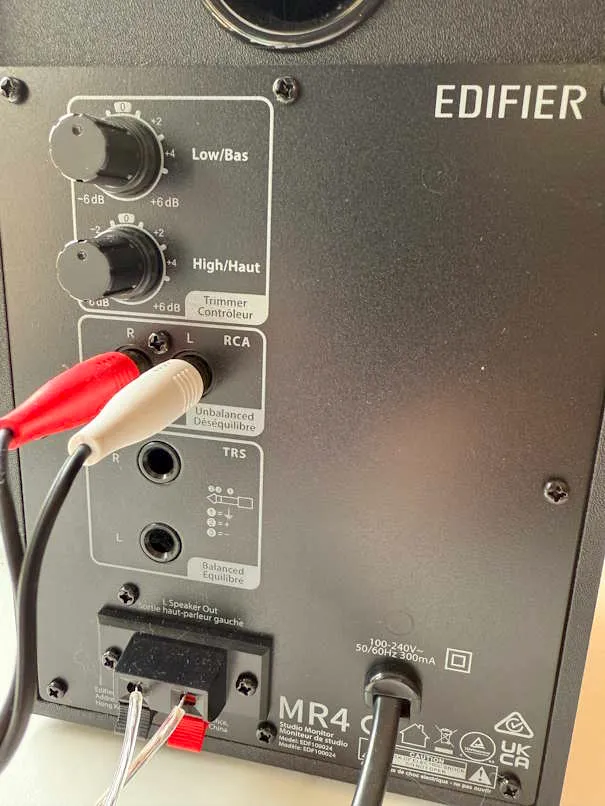
&lt;p&gt;The speakers have RCA and TRS inputs on the rear. There&apos;s also an Aux input and headphone output jack on the front of the right speaker. I used the supplied RCA to 3.5mm cable to connect to my laptop/dock. My limited understanding is that the TRS jack is intended for connecting to a &apos;balanced&apos; device like an audio mixer, not a computer. There&apos;s more technical data about the speakers on the &lt;a href=&quot;https://edifier.com.au/products/edifier-mr4-p-au&quot;&gt;Edifier site&lt;/a&gt;.&lt;/p&gt;
&lt;p&gt;&lt;img src=&quot;https://david.gardiner.net.au/_astro/edifier-rear-view.GTkyIzJg_ZAHboD.webp&quot; alt=&quot;Rear view of speaker showing input jacks and bass/treble knobs&quot; /&gt;&lt;/p&gt;
&lt;p&gt;One thing to be aware of if you regularly turn off the power to your devices when you&apos;re not using them (like I do to save power) - when mains power is restored they default to &apos;off&apos; mode. So you need to press the power button on the front of the speakers to turn them on.&lt;/p&gt;
&lt;p&gt;So thanks Rebecca, those were a good recommendation. I&apos;m enjoying them a lot!&lt;/p&gt;
</content>
    <media:thumbnail url="https://david.gardiner.net.au/_astro/edifier-rear-view.GTkyIzJg.jpg" width="605" height="806"/>
    <media:content medium="image" url="https://david.gardiner.net.au/_astro/edifier-rear-view.GTkyIzJg.jpg" width="605" height="806"/>
  </entry>
  <entry>
    <id>https://david.gardiner.net.au/2025/02/four-years-sixpivot</id>
    <updated>2025-02-01T10:30:00.000+10:30</updated>
    <title>4 years at SixPivot</title>
    <link href="https://david.gardiner.net.au/2025/02/four-years-sixpivot" rel="alternate" type="text/html" title="4 years at SixPivot"/>
    <category term="Work"/>
    <published>2025-02-01T10:30:00.000+10:30</published>
    <summary type="html">A reflection on four years at SixPivot and the changes along the way.</summary>
    <content type="html">&lt;p&gt;Another year has passed, and today I clock up 4 years at &lt;a href=&quot;https://www.sixpivot.com.au&quot;&gt;SixPivot&lt;/a&gt;!&lt;/p&gt;
&lt;p&gt;&lt;img src=&quot;https://david.gardiner.net.au/_astro/sixpivot-logo.epcrlVxZ_1AGJSz.webp&quot; alt=&quot;SixPivot logo&quot; /&gt;&lt;/p&gt;
&lt;p&gt;Looking back at &lt;a href=&quot;/2024/02/three-years-sixpivot&quot;&gt;last year&apos;s post&lt;/a&gt;, I must say it has been a consistent story.&lt;/p&gt;
&lt;p&gt;I&apos;m still enjoying working from home (and my heart goes out to those unfortunate to work for organisations with short-sighted management who are forcing a return to office for no good reasons other than a) they feel lonely in office themselves, b) they&apos;re looking at how much they&apos;re paying for empty offices or c) they don&apos;t trust their employees and figure if they can&apos;t see them in the office then how do they know that they&apos;re actually working? (To be clear, I think there are some valid reasons to work in an office, but these are not three of them).&lt;/p&gt;
&lt;p&gt;I&apos;m still enjoying the flexibility of a morning walk/bike ride/water the garden/pick blackberries/etc before I kick of the work day.&lt;/p&gt;
&lt;p&gt;I even more value my SixPivot colleagues. The breadth of experience and opinions is so good. It was great to see them all at our SixPivot Summit last year, and I will again come this July. Plus we have our &apos;PPP&apos; professional development day coming up in late March where we&apos;ll gather in two locations (Brisbane and Melbourne) for a day of technical training and knowledge sharing. (Think a mini &apos;&lt;a href=&quot;https://dddadelaide.com/&quot;&gt;DDD Conference&lt;/a&gt;&apos; but just for Pivots!)&lt;/p&gt;
&lt;p&gt;And it&apos;s always nice to get &lt;a href=&quot;https://handbook.sixpivot.com.au/perks-and-benefits/benefits#perks&quot;&gt;&apos;good vibes&apos; points&lt;/a&gt; for my &apos;workversary&apos;! 4 years means 400 points are mine to spend in the &lt;a href=&quot;https://handbook.sixpivot.com.au/perks-and-benefits/rewards-shop&quot;&gt;SixPivot rewards shop&lt;/a&gt;. Do I buy some gift cards, put them towards my next laptop, phone, a donation to charity or open source, a new SixPivot polo shirt, or maybe all of the above?&lt;/p&gt;
&lt;p&gt;I&apos;ll be wrapping up my involvement with my current client at the end of February, so I&apos;m looking forward to some new and challenging client engagements soon.&lt;/p&gt;
</content>
    <media:thumbnail url="https://david.gardiner.net.au/_astro/sixpivot-logo.epcrlVxZ.png" width="216" height="216"/>
    <media:content medium="image" url="https://david.gardiner.net.au/_astro/sixpivot-logo.epcrlVxZ.png" width="216" height="216"/>
  </entry>
  <entry>
    <id>https://david.gardiner.net.au/2024/02/three-years-sixpivot</id>
    <updated>2024-02-01T15:54:00.000+09:30</updated>
    <title>3 years at SixPivot</title>
    <link href="https://david.gardiner.net.au/2024/02/three-years-sixpivot" rel="alternate" type="text/html" title="3 years at SixPivot"/>
    <category term="Work"/>
    <published>2024-02-01T15:54:00.000+09:30</published>
    <summary type="html">A reflection on three years at SixPivot, including highlights from projects, people, and growth.</summary>
    <content type="html">&lt;p&gt;A month down already in 2024, which means it&apos;s my 3rd anniversary at SixPivot!&lt;/p&gt;
&lt;p&gt;&lt;img src=&quot;https://david.gardiner.net.au/_astro/sixpivot-logo.epcrlVxZ_1AGJSz.webp&quot; alt=&quot;SixPivot logo&quot; /&gt;&lt;/p&gt;
&lt;p&gt;I&apos;m pleased to report things continue to go well on the work front. Working for a remote-first company really does suit me. Here I sit (or sometimes stand) at my desk at home, looking out at my garden and to the hills beyond. My morning commute is (depending on the weather) a 5km walk around the neighbourhood, or if I&apos;m feeling inspired a 20km bike ride. As long as there aren&apos;t too many meetings (which isn&apos;t that common for me) then being able to focus without distractions is very valuable.&lt;/p&gt;
&lt;p&gt;It is also so good to have the depth and variety of expertise to draw on with my colleagues. That is a real highlight and something I lean on pretty regularly. I try to repay the favour when I can too. There&apos;s a positive shared sense of humour across the company too - I think that&apos;s also a healthy sign.&lt;/p&gt;
&lt;p&gt;Even though we all work remotely, it is extra special when we do catch up in person. That has happened over the past 12 months, with both me travelling interstate a few times, and also when we had an impressive contingent of Pivots in town for &lt;a href=&quot;/2023/11/ddd-adelaide-2023-done&quot;&gt;DDD Adelaide 2024&lt;/a&gt; in November.&lt;/p&gt;
&lt;p&gt;Another nice thing about having a work anniversary at SixPivot (aka &apos;workversary&apos;!) is you are &lt;a href=&quot;https://handbook.sixpivot.com.au/perks-and-benefits/benefits#perks&quot;&gt;given a bunch of &apos;good vibes&apos; points to spend&lt;/a&gt; in the &lt;a href=&quot;https://handbook.sixpivot.com.au/perks-and-benefits/rewards-shop&quot;&gt;rewards shop&lt;/a&gt;.&lt;/p&gt;
&lt;p&gt;I&apos;m looking forward to seeing what the next 12 months at SixPivot brings.&lt;/p&gt;
</content>
    <media:thumbnail url="https://david.gardiner.net.au/_astro/sixpivot-logo.epcrlVxZ.png" width="216" height="216"/>
    <media:content medium="image" url="https://david.gardiner.net.au/_astro/sixpivot-logo.epcrlVxZ.png" width="216" height="216"/>
  </entry>
  <entry>
    <id>https://david.gardiner.net.au/2023/12/apple-tv-4k</id>
    <updated>2023-12-29T13:30:00.000+10:30</updated>
    <title>Apple TV 4K with Ethernet</title>
    <link href="https://david.gardiner.net.au/2023/12/apple-tv-4k" rel="alternate" type="text/html" title="Apple TV 4K with Ethernet"/>
    <category term="Hardware"/>
    <category term="Work"/>
    <published>2023-12-29T13:30:00.000+10:30</published>
    <summary type="html">Reviews redeeming workplace reward points for an Apple TV 4K with Ethernet and whether the upgrade was worthwhile.</summary>
    <content type="html">&lt;p&gt;At SixPivot we have a concept of &lt;a href=&quot;https://handbook.sixpivot.com.au/perks-and-benefits/rewards-shop&quot;&gt;&apos;Good Vibe&apos; points&lt;/a&gt;. You can give points to colleagues as a way of saying thanks for something they&apos;ve done. Points you&apos;ve received can be spent in our internal Rewards shop. I previously used points to top up my laptop allowance when &lt;a href=&quot;/2023/04/new-laptop&quot;&gt;purchasing my latest laptop&lt;/a&gt;. More recently I used points to purchase an Apple TV 4K via some JB HiFi gift cards.&lt;/p&gt;
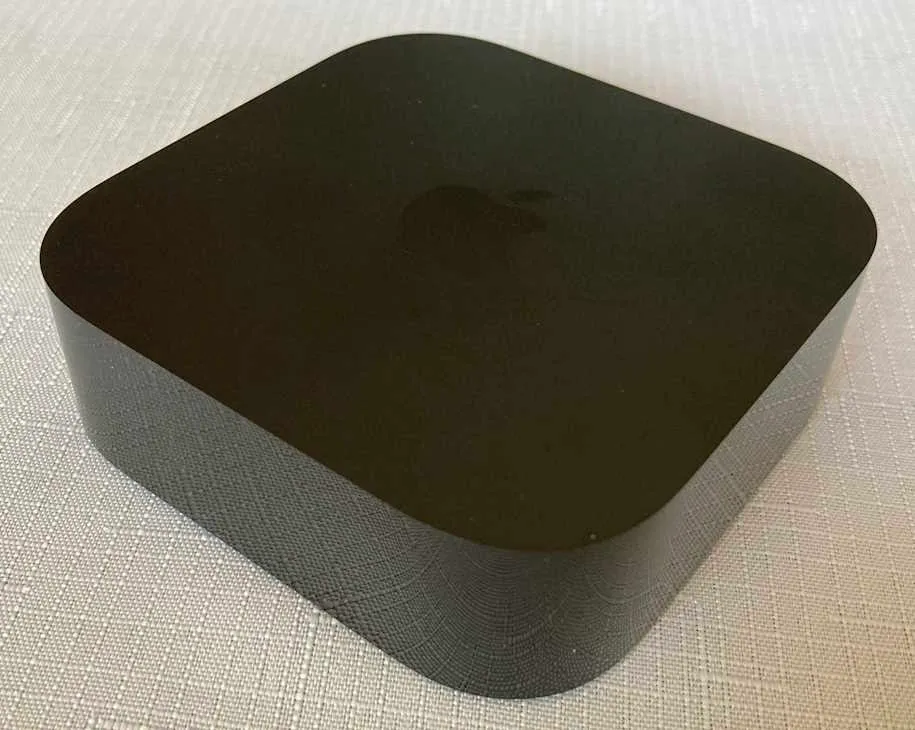
&lt;p&gt;&lt;img src=&quot;https://david.gardiner.net.au/_astro/apple-tv-front.CcBwqDWI_Z17ILn2.webp&quot; alt=&quot;Apple TV device - front view&quot; /&gt;&lt;/p&gt;
&lt;p&gt;We have just one TV in the house. It&apos;s an LG Smart TV (2014 model), so it is getting on in years. But it still works, though the number of apps it runs has reduced over time. The free-to-air TV stations in Australia all have streaming apps for smart TVs and mobile devices, but only ABC and SBS had apps that worked on this model, and SBS dropped support earlier in the year. Netflix still works on the TV, but Disney+ doesn&apos;t, so we&apos;ve been using the Xbox One for that. But those free-to-air apps aren&apos;t on XBox either.&lt;/p&gt;
&lt;p&gt;While we don&apos;t currently own any Apple desktops or laptops, we do have iPhones and iPads (largely because back in the day the kids&apos; schools required them to have iPads), and we&apos;ve stuck with that ecosystem. And so with Christmas approaching, I settled on the idea of buying an Apple TV device. I opted for the 4K model with 128GB of storage and an Ethernet port. Our TV isn&apos;t 4K but probably one day we will get one that is, and I do have Ethernet running to where the TV lives in the house, so it made sense to take advantage of that (and the extra storage).&lt;/p&gt;
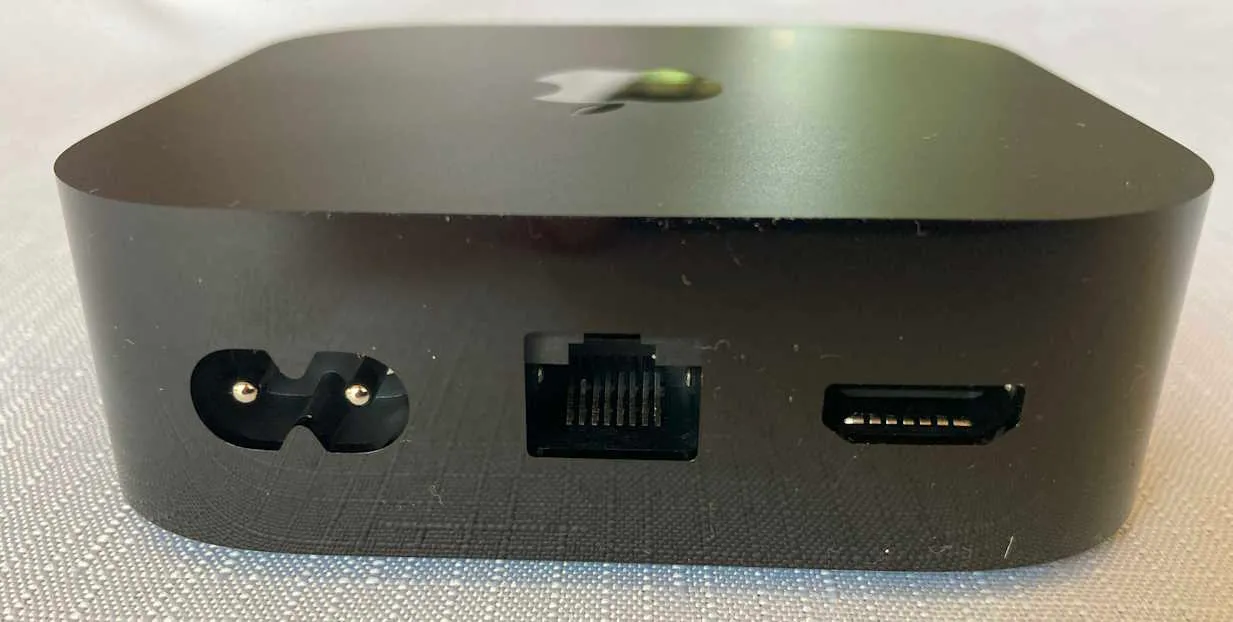
&lt;p&gt;&lt;img src=&quot;https://david.gardiner.net.au/_astro/apple-tv-rear.CBQytOHz_1kS0nJ.webp&quot; alt=&quot;Apple TV device - rear view showing HDMI, Ethernet and power sockets&quot; /&gt;&lt;/p&gt;
&lt;p&gt;I&apos;d bought it a few weeks before Christmas and had hidden it away, so actually only remembered it later on Christmas day. The family were at first a bit bemused by my choice. &quot;But what does it do?&quot; they asked.&lt;/p&gt;
&lt;p&gt;Setting it up was quite straightforward - I used my iPhone to configure it and we were up and running in a few minutes. And yes, even though it is a &apos;4K&apos; model, it works just fine with a regular HD TV.&lt;/p&gt;
&lt;p&gt;But the clincher was installing the free-to-air apps. SBS, ABC TV, 7Plus, 9Now and 10Play all work. And having easy access to many of the TV series that family members enjoy was an &apos;Ah Haa!&apos; moment.&lt;/p&gt;
&lt;p&gt;It also runs Netflix and Disney+, and being a more modern device, also runs them faster and more responsively than the TV ever could.&lt;/p&gt;
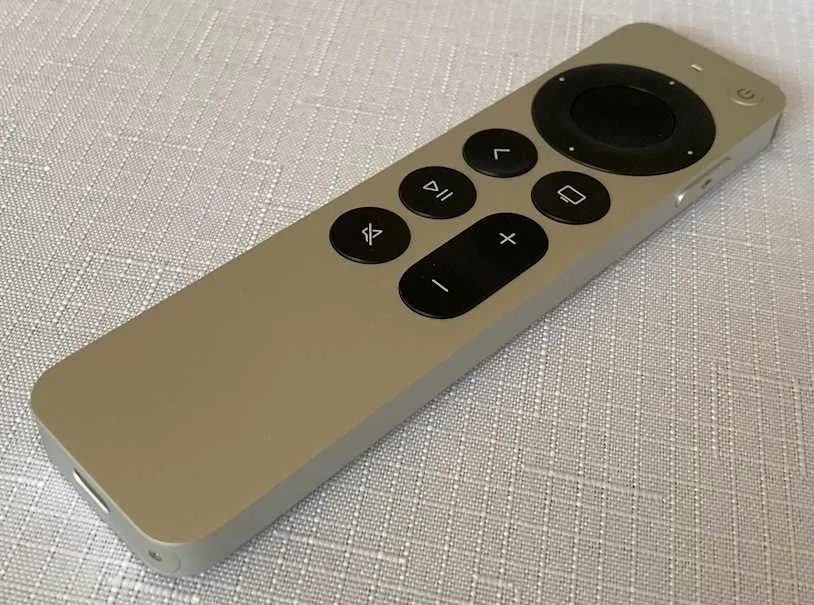
&lt;p&gt;Having all the streaming services in one place is very convenient. The remote is simple but usable. Time will tell how robust it is (to survive being accidentally dropped on the floor).&lt;/p&gt;
&lt;p&gt;&lt;img src=&quot;https://david.gardiner.net.au/_astro/apple-tv-controller.Ct8EHGmb_1SxFYk.webp&quot; alt=&quot;Apple TV Controller&quot; /&gt;&lt;/p&gt;
&lt;p&gt;One nice surprise - using the remote control to turn off the Apple TV device also turns off the TV. (You still need the TV remote to turn it on again though). The volume buttons also directly control the TV volume (not just the Apple TV volume).&lt;/p&gt;
&lt;p&gt;The &apos;Home&apos; button is a bit surprising. By default seems to take you to the Apple TV+ screen (Apple&apos;s own streaming service). Actually, that might explain why Apple doesn&apos;t call it a &apos;Home&apos; button but the &apos;TV&apos; button. I just discovered that you can change the &lt;a href=&quot;https://support.apple.com/en-au/guide/tv/welcome/tvos&quot;&gt;behaviour via Settings&lt;/a&gt; so that it does take you to the home screen - a much more sensible setting.&lt;/p&gt;
&lt;p&gt;Usually when you&apos;re searching for content you need to peck away with the remote selecting letters from the alphabet (and most of the Apple TV apps display a single-line alphabet rather than a keyboard layout). However, I discovered that if you have your iPhone handy, you can use the iPhone keyboard to enter the search text, which is much quicker than using the remote.&lt;/p&gt;
&lt;p&gt;You get a 3-month trial of Apple TV+, so given it&apos;s the Christmas holidays we&apos;ve taken advantage of that. At this stage I&apos;m not sure we&apos;d pay for it once the trial is over - it would need to replace Netflix or Disney+ if we did.&lt;/p&gt;
&lt;p&gt;So far, so good and the family seem to have adapted to it quickly.&lt;/p&gt;
&lt;p&gt;&lt;a href=&quot;https://www.amazon.com.au/Apple-2022-Apple-Ethernet-128GB-Storage-Generation/dp/B0BJMQSLJP?&amp;amp;linkCode=ll1&amp;amp;tag=flcdrg07-22&amp;amp;linkId=29391148ee1ef4bfc8eabdd5d15dc221&amp;amp;language=en_AU&amp;amp;ref_=as_li_ss_tl&quot;&gt;Apple TV 4K + Ethernet&lt;/a&gt; (affiliate link)&lt;/p&gt;
</content>
    <media:thumbnail url="https://david.gardiner.net.au/_astro/apple-tv-front.CcBwqDWI.jpg" width="915" height="730"/>
    <media:content medium="image" url="https://david.gardiner.net.au/_astro/apple-tv-front.CcBwqDWI.jpg" width="915" height="730"/>
  </entry>
  <entry>
    <id>https://david.gardiner.net.au/2023/04/new-laptop</id>
    <updated>2023-04-26T19:30:00.000+09:30</updated>
    <title>New laptop - Dell XPS 9530</title>
    <link href="https://david.gardiner.net.au/2023/04/new-laptop" rel="alternate" type="text/html" title="New laptop - Dell XPS 9530"/>
    <category term="Hardware"/>
    <category term="Work"/>
    <published>2023-04-26T19:30:00.000+09:30</published>
    <summary type="html">Shares the decision process, configuration choices, and first impressions after upgrading to a Dell XPS 9530.</summary>
    <content type="html">&lt;p&gt;At SixPivot we get a &lt;a href=&quot;https://handbook.sixpivot.com.au/perks-and-benefits/benefits#equipping-and-developing-you&quot;&gt;generous laptop allowance (currently $AU4,400!)&lt;/a&gt; that we can use every two years. Given I celebrated my 2-year anniversary earlier this year, I was keen to organise an upgrade to the &lt;a href=&quot;/2021/02/new-laptop&quot;&gt;laptop I&apos;d purchased when I first started&lt;/a&gt;. Rather than order immediately, I knew that Dell had some new models coming out, so I held off until they became available in Australia before ordering.
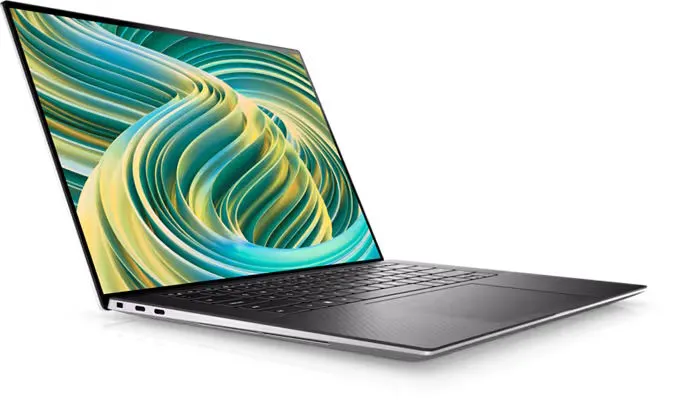
&lt;img src=&quot;https://david.gardiner.net.au/_astro/notebook-xps-15-9530-t-black-gallery-4.v_wrbI9E_Z2d0yE8.webp&quot; alt=&quot;Dell XPS 9530, front left view&quot; /&gt;
I do agree with the adage &quot;Use the right tool for the job&quot;, and as a software developer, I want to use the best computer possible.&lt;/p&gt;
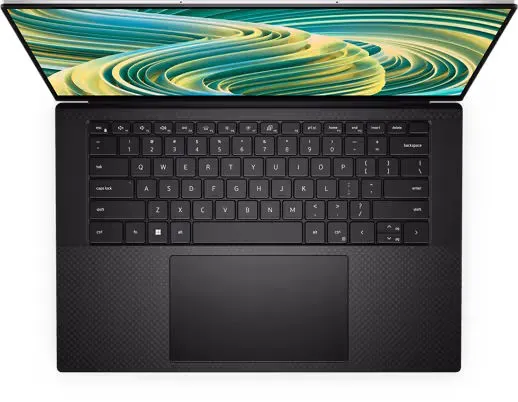
&lt;p&gt;The Dell Latitude 14&quot; laptop has done the job, but I wanted to return to a 15&quot; laptop. The convenience of a full-size keyboard, with a little more room in the case to ensure better cooling should hopefully make for a more comfortable and quieter experience.&lt;/p&gt;
&lt;p&gt;&lt;img src=&quot;https://david.gardiner.net.au/_astro/notebook-xps-15-9530-t-black-gallery-3.nHyASFiO_sut9O.webp&quot; alt=&quot;View of Dell XPS 9530 showing the keyboard&quot; /&gt;&lt;/p&gt;
&lt;p&gt;I selected the new &lt;a href=&quot;https://web.archive.org/web/20240915211241/https://www.dell.com/en-au/shop/cty/pdp/spd/xps-15-9530-laptop/xn95300ucfg001cmauh02&quot;&gt;Dell XPS 15 9530&lt;/a&gt; and decked it out with the following options:&lt;/p&gt;
&lt;ul&gt;
&lt;li&gt;13th Generation Intel(R) Core(TM) i9-13900H Processor (14-Core, 24MB Cache, up to
5.4 GHz)&lt;/li&gt;
&lt;li&gt;NVIDIA(R) GeForce(R) RTX(TM) 4070 with 8 GB GDDR6&lt;/li&gt;
&lt;li&gt;64GB DDR5 4800MHz&lt;/li&gt;
&lt;li&gt;2TB M.2 PCIe NVMe Solid State Drive&lt;/li&gt;
&lt;li&gt;15.6&quot; OLED 3.5K (3456x2160) InfinityEdge Touch Anti-Reflective 400-Nit Display&lt;/li&gt;
&lt;/ul&gt;
&lt;p&gt;The i9 CPU is the fastest they offer (and my first i9), and it&apos;s also the latest generation which I preferred. I wanted the higher res display over standard HD - it happens to be a touch display, which is a bonus. I don&apos;t use touch a lot (and would have been fine without it), but it can be handy sometimes.&lt;/p&gt;
&lt;p&gt;There were higher-capacity SSDs on offer, but I haven&apos;t really got close to filling the 2TB drive on the Latitude, so I think that should be fine. Upgrading later is always an option. 64GB of RAM is double what I had previously, but you can never have too much RAM!&lt;/p&gt;
&lt;h2&gt;Cost&lt;/h2&gt;
&lt;p&gt;If you head over to the &lt;a href=&quot;https://web.archive.org/web/20240915211241/https://www.dell.com/en-au/shop/cty/pdp/spd/xps-15-9530-laptop/xn95300ucfg001cmauh02&quot;&gt;Dell website and select similar options&lt;/a&gt;, you may notice the total cost is quite a bit more than my allowance, so how does that work? Well, there are a couple of extra factors working in my favour:&lt;/p&gt;
&lt;ol&gt;
&lt;li&gt;SixPivot has a business account with Dell, so we get better pricing than regular retail, and&lt;/li&gt;
&lt;li&gt;SixPivot also has a &lt;a href=&quot;https://handbook.sixpivot.com.au/perks-and-benefits/rewards-shop&quot;&gt;&quot;Good Vibes&quot; points scheme&lt;/a&gt;, where we can each award points to our colleagues to show our appreciation for something great they&apos;ve done. Those points can be spent in our SixPivot Rewards shop, and one thing you can spend them on is portable devices (like laptops). I had accrued enough points to cover the extra amount above the $4,400.&lt;/li&gt;
&lt;/ol&gt;
&lt;h2&gt;Comparison&lt;/h2&gt;
&lt;p&gt;It&apos;s interesting to see how my new device compares to my previous platforms, and how styles and ports have changed over the years.&lt;/p&gt;
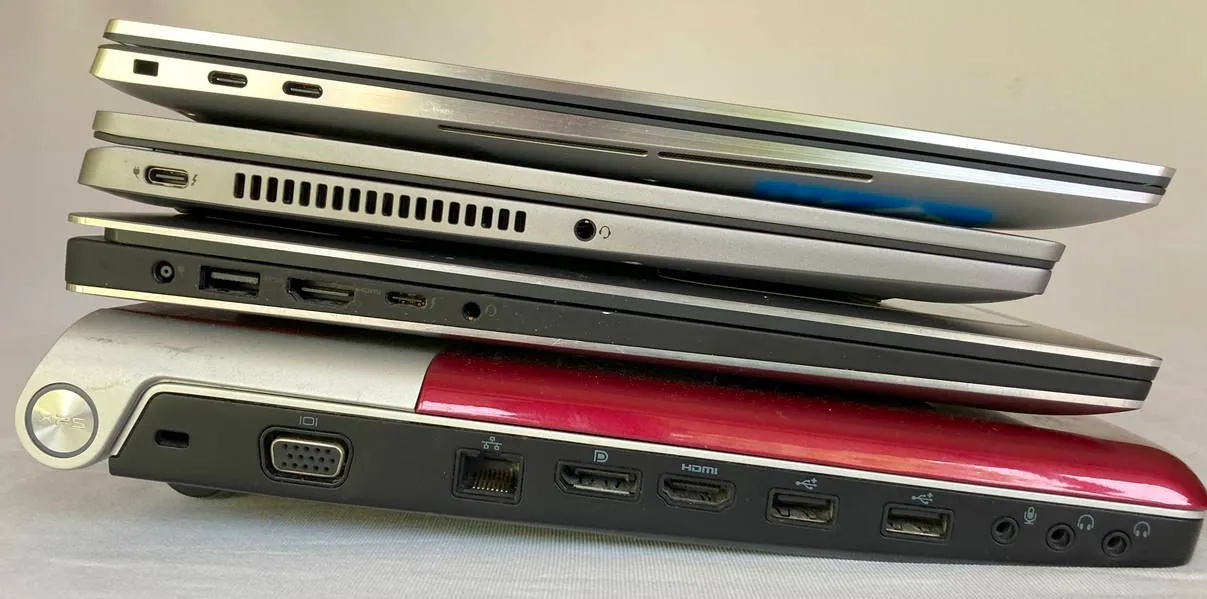
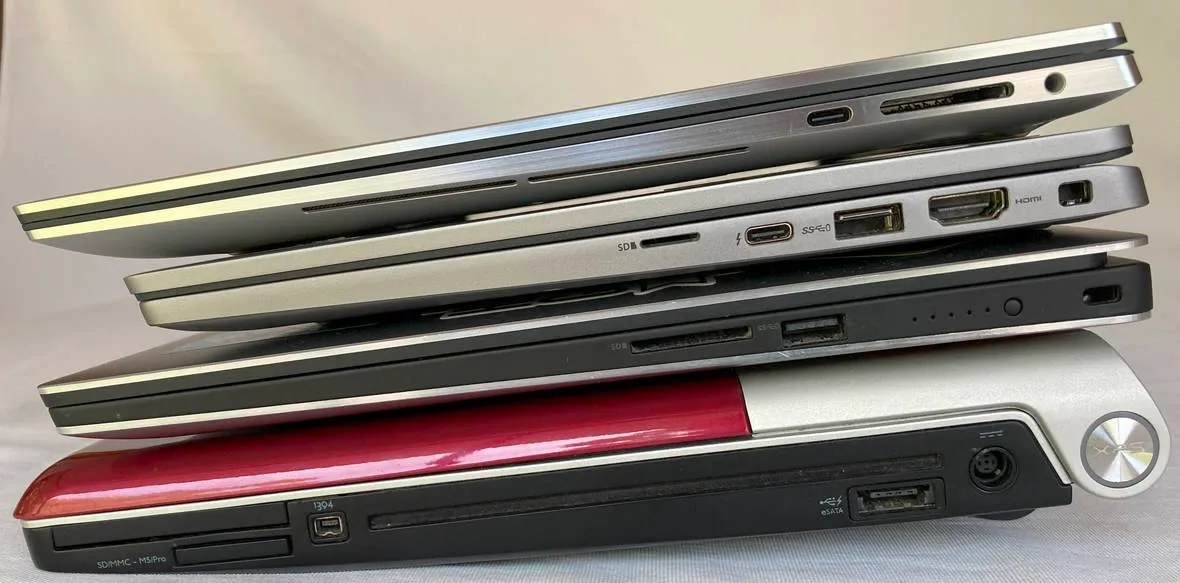
&lt;p&gt;(top to bottom, newest to oldest) The XPS 9530, &lt;a href=&quot;/2021/02/new-laptop&quot;&gt;Latitude 7420&lt;/a&gt;, &lt;a href=&quot;/2016/04/my-new-dell-xps-15-laptop&quot;&gt;XPS 9550&lt;/a&gt; and &lt;a href=&quot;/2010/04/my-new-laptop-dell-studio-xps-1645&quot;&gt;XPS 1645&lt;/a&gt;.&lt;/p&gt;
&lt;p&gt;&lt;img src=&quot;https://david.gardiner.net.au/_astro/laptops-left.BcDGD2pt_ZcUou8.webp&quot; alt=&quot;Stack of laptops showing ports on left side&quot; /&gt;
&lt;img src=&quot;https://david.gardiner.net.au/_astro/laptops-right.D5Jhmdex_Z1Kt5I1.webp&quot; alt=&quot;Stack of laptops showing ports on right side&quot; /&gt;&lt;/p&gt;
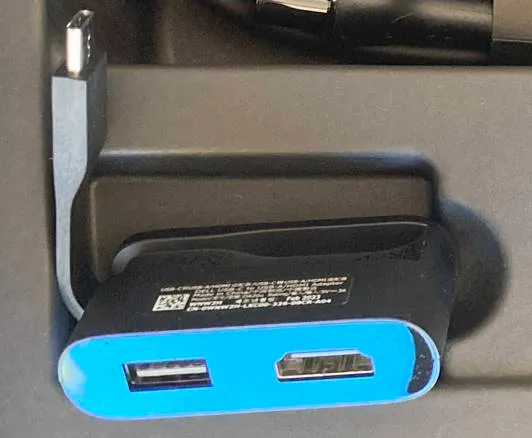
&lt;p&gt;Gone are the USB-A, HDMI, DisplayPort, VGA, eSATA ports and the like. Instead, just 3 USB-C ports, an SD card reader slot, and a 3.5mm audio jack are all you get. It finally feels like USB-C is becoming the de-facto standard for extensibility. If you didn&apos;t have an existing dock, Dell does throw in a handy compact USB-C to USB-A and HDMI adapter.&lt;/p&gt;
&lt;p&gt;&lt;img src=&quot;https://david.gardiner.net.au/_astro/usb-c-adapter.ynhyI3Dr_BN7dF.webp&quot; alt=&quot;USB-C adapter&quot; /&gt;&lt;/p&gt;
&lt;p&gt;Unlike my last XPS (the 9550), the camera is now located on top of the screen (whatever were they thinking!), and interestingly the 9730 is actually a little bit narrower even though the display is still 15.6&quot;.&lt;/p&gt;
&lt;p&gt;This is a pretty beefy machine, and I think it should easily see me through the next 2 years!&lt;/p&gt;
</content>
    <media:thumbnail url="https://david.gardiner.net.au/_astro/xps-15-9530.DzMgbdjA.png" width="200" height="119"/>
    <media:content medium="image" url="https://david.gardiner.net.au/_astro/xps-15-9530.DzMgbdjA.png" width="200" height="119"/>
  </entry>
  <entry>
    <id>https://david.gardiner.net.au/2023/02/two-years-sixpivot</id>
    <updated>2023-02-01T08:00:00.000+10:30</updated>
    <title>2 years at SixPivot</title>
    <link href="https://david.gardiner.net.au/2023/02/two-years-sixpivot" rel="alternate" type="text/html" title="2 years at SixPivot"/>
    <category term="Work"/>
    <published>2023-02-01T08:00:00.000+10:30</published>
    <summary type="html">A reflection on two years at SixPivot, including what has gone well and why the role continues to be rewarding.</summary>
    <content type="html">&lt;p&gt;The 1st of February means I tick over two years at SixPivot! I&apos;m pleased to report things continue to go well.&lt;/p&gt;
&lt;p&gt;Take a look back at my &lt;a href=&quot;/2021/02/sixpivot&quot;&gt;thoughts on joining SixPivot&lt;/a&gt;, and &lt;a href=&quot;/2022/02/a-year-at-sixpivot&quot;&gt;my first year anniversary post&lt;/a&gt;.&lt;/p&gt;
&lt;p&gt;SixPivot&apos;s presence in Adelaide has now grown to 5. We all work from home, but I think we might have a few local catchups this year. (Head over to the &lt;a href=&quot;https://web.archive.org/web/20230328083800/https://www.sixpivot.com.au/team/&quot;&gt;SixPivot team page&lt;/a&gt; to see our full list of staff)&lt;/p&gt;
&lt;p&gt;It&apos;s a great place to work, and I&apos;m looking forward to what 2023 brings.&lt;/p&gt;
</content>
    <media:thumbnail url="https://david.gardiner.net.au/_astro/sixpivot-logo.oRG1dCrt.png" width="334" height="92"/>
    <media:content medium="image" url="https://david.gardiner.net.au/_astro/sixpivot-logo.oRG1dCrt.png" width="334" height="92"/>
  </entry>
  <entry>
    <id>https://david.gardiner.net.au/2022/09/steptember-2022</id>
    <updated>2022-09-13T15:00:00.000+09:30</updated>
    <title>STEPtember 2022</title>
    <link href="https://david.gardiner.net.au/2022/09/steptember-2022" rel="alternate" type="text/html" title="STEPtember 2022"/>
    <category term="Health"/>
    <category term="Work"/>
    <published>2022-09-13T15:00:00.000+09:30</published>
    <summary type="html">For the second year in a row, along with some of my SixPivot colleagues, I&apos;m taking part in STEPtember.</summary>
    <content type="html">
&lt;p&gt;&lt;img src=&quot;https://david.gardiner.net.au/_astro/steptember.BYG72LAu_1HKBpD.webp&quot; alt=&quot;STEPtember logo&quot; /&gt;&lt;/p&gt;
&lt;p&gt;For the &lt;a href=&quot;/2021/09/steptember&quot;&gt;second year in a row&lt;/a&gt;, along with some of my SixPivot colleagues, I&apos;m taking part in &lt;a href=&quot;https://www.steptember.org.au&quot;&gt;STEPtember&lt;/a&gt;. STEPtember raises funds for people with and research into Cerebral Palsy. I&apos;ll be aiming to walk at least 10,000 steps each day in September.&lt;/p&gt;
&lt;p&gt;To sponsor me, head over to &lt;a href=&quot;https://www.steptember.org.au/sponsor?kw=DavidGardiner&quot;&gt;https://www.steptember.org.au/s/157783/383539&lt;/a&gt;. In Australia, donations of $2 or more are tax deductible.&lt;/p&gt;
</content>
    <media:thumbnail url="https://david.gardiner.net.au/_astro/steptember.BYG72LAu.png" width="489" height="132"/>
    <media:content medium="image" url="https://david.gardiner.net.au/_astro/steptember.BYG72LAu.png" width="489" height="132"/>
  </entry>
  <entry>
    <id>https://david.gardiner.net.au/2022/08/sixpivot-summit</id>
    <updated>2022-08-09T17:30:00.000+09:30</updated>
    <title>SixPivot Summit 2022</title>
    <link href="https://david.gardiner.net.au/2022/08/sixpivot-summit" rel="alternate" type="text/html" title="SixPivot Summit 2022"/>
    <category term="Work"/>
    <published>2022-08-09T17:30:00.000+09:30</published>
    <summary type="html">I started working at SixPivot back in February 2021.</summary>
    <content type="html">&lt;p&gt;I started working at &lt;a href=&quot;/2021/02/sixpivot&quot;&gt;SixPivot back in February 2021&lt;/a&gt;. Given the state of the pandemic, all my interactions were done online. But I was hoping it wouldn&apos;t be too long before I got to meet all the other &apos;Pivots&apos; (as SixPivot folks call ourselves). 18 months later, the wait was a little longer than I&apos;d thought it would be.&lt;/p&gt;
&lt;p&gt;So with all that pent-up anticipation, did the in-person SixPivot Summit meet expectations?&lt;/p&gt;
&lt;h2&gt;YES&lt;/h2&gt;
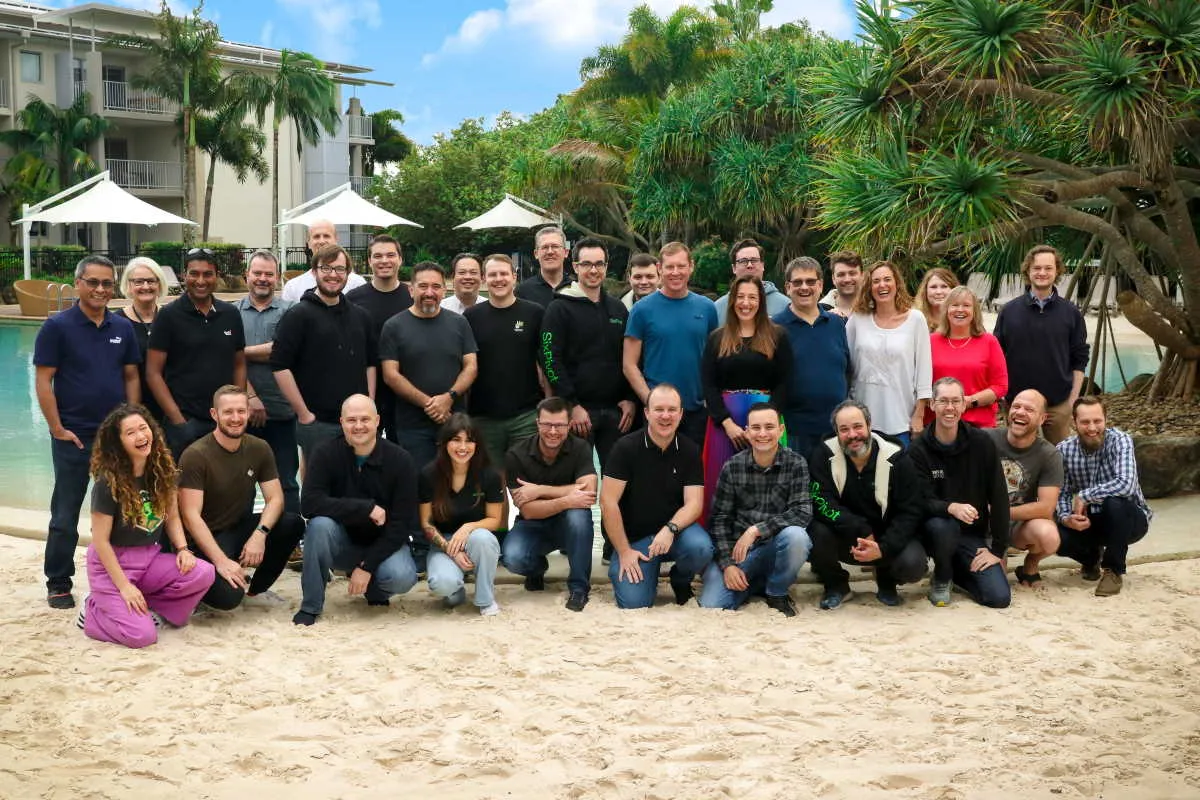
&lt;p&gt;&lt;img src=&quot;https://david.gardiner.net.au/_astro/pivot-group-shot.DR1r--mv_bq7Lz.webp&quot; alt=&quot;Group photo of almost all the SixPivot staff, standing in front of a swimming pool&quot; /&gt;&lt;/p&gt;
&lt;p&gt;The summit was held at &lt;a href=&quot;https://www.peppers.com.au/salt/&quot;&gt;Peppers Salt Resort and Spa Kingscliff&lt;/a&gt;, which is just south of the Queensland/NSW border. A very nice place to visit.&lt;/p&gt;
&lt;p&gt;I flew out of Adelaide on a cold and wintery morning and arrived a couple of hours later at Gold Coast Airport, where it was also overcast and raining! Not quite as cold though.&lt;/p&gt;
&lt;p&gt;Friday afternoon was settling in, and then a pleasant walk down to the local lawn bowls club for a few ends of social bowling with most of the other pivots and their families, followed by dinner nearby at the local surf club.&lt;/p&gt;
&lt;p&gt;Saturday was the summit proper. A full day of sessions from the SixPivot leadership team, but very much in an interactive and open format. The openness is something I definitely appreciate.&lt;/p&gt;
&lt;p&gt;I remember thinking during the afternoon, &quot;I really feel like I&apos;ve found my work &apos;home&apos;&quot;. A sense of shared values and purpose, but still with a range of opinions, experiences and perspectives. That had certainly been my sense over the last 18 months, but it was great to have it confirmed in person.&lt;/p&gt;
&lt;p&gt;Saturday night staff and their families were all invited to a dinner held at the resort. Great food and more time to spend getting to know everyone.&lt;/p&gt;
&lt;p&gt;Sunday was our own time, with my flight back home in the early afternoon. Clear skies had returned, so I enjoyed a quick walk along the beach before breakfast. Afterwards, (and being a Sunday), I watched my local church service from the comfort of my hotel room. Handy that &lt;a href=&quot;https://www.youtube.com/c/SeedsUnitingChurch&quot;&gt;they live stream on YouTube&lt;/a&gt;!&lt;/p&gt;
&lt;p&gt;&lt;img src=&quot;https://david.gardiner.net.au/_astro/shell-on-beach.CpgFq1dR_TwPHs.webp&quot; alt=&quot;A ribbed shell on a sandy beach&quot; /&gt;&lt;/p&gt;
&lt;p&gt;There were still plenty of Pivots around so I took the opportunity for more chatting and saying farewell to those leaving on earlier flights. Then a friendly taxi ride back to the airport and an uneventful flight back home to Adelaide.&lt;/p&gt;
&lt;p&gt;It was a great weekend. I definitely feel more connected with, and have a better understanding of my colleagues. I&apos;m looking forward to our next opportunity to come together.&lt;/p&gt;
</content>
    <media:thumbnail url="https://david.gardiner.net.au/_astro/sixpivot-logo.oRG1dCrt.png" width="334" height="92"/>
    <media:content medium="image" url="https://david.gardiner.net.au/_astro/sixpivot-logo.oRG1dCrt.png" width="334" height="92"/>
  </entry>
</feed>