A simple 'Up Next' Dashboard using PowerShell
Last Saturday, we ran DDD Adelaide 2019.
Last Saturday, we ran DDD Adelaide 2019. When we were setting up the venue on Friday afternoon, I realised that there was a huge flat-screen TV in the open area (behind where the registration/info desk would be located) and we hadn’t made any plans to use it.
We could just pop a copy of the DDD logo on a USB stick and probably the TV could just show that in ‘slide-show’ mode. But then I thought maybe we could go one better. Wouldn’t it be nice if you could display a simple ‘What’s on now, and what’s coming up next’ dashboard?
Ok, it’s Friday night, and I really should have been heading to bed, but I’d been inspired - now to find something that would fit the bill. A quick search of GitHub didn’t reveal anything obvious, so can I write a simple application myself to do the job?
First question - WPF, WinForms? HTML+JavaScript? They’d all do the job, but I wanted something simple that I could get done quickly! I decided I’d give PowerShell a go - and I kind of liked the idea of making it “old-school” ASCII text too.
I copied over the conference agenda data and decided on simple ordered dictionary would suffice for the data structure, using the time as the key. Then just two queries - one to find the entry who’s time is now, and the second to find the entry for what’s coming up next.
To help with development, I added a -test mode, that sped up time and made the clock run from 7am. Later on Saturday I realised I had an ‘off by one’ bug in the query logic - the test mode was useful to validate the fix.
One extra touch - I added a ‘current time’ and used [Console]::SetCursorPosition() to locate that in the bottom right-hand corner. While I was at it, just to be fancy, I added some colour to the ‘DDD’ bit in the title.
To run the dashboard, I used Windows Terminal. That allowed me to run full screen and choose a nice font size.
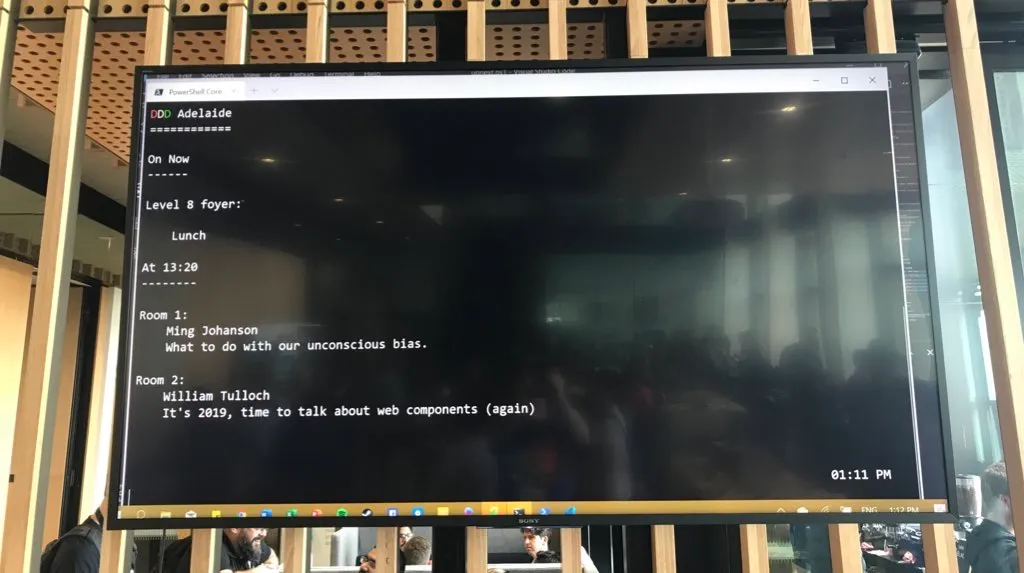
The dashboard worked well and I heard a few compliments that people liked it. Not bad for something whipped up in an hour!
If I revisit the script in the future, I might see if I can incorporate a simple Tweet wall - either on the right-hand side, or maybe alternating every 30 seconds. There was a lot of Twitter traffic on the day and it would have been nice to showcase that.
The source is all on GitHub. Pull requests welcome!