Multiple .NET SDK versions and PowerShell on macOS with Homebrew
How to run multiple .NET SDK versions on macOS with Homebrew while keeping PowerShell working, by using alternate casks and adjusting PATH precedence.
As a long-time Chocolatey user on Windows, it’s not surprising that Homebrew has become my go-to solution for installing software on macOS. There are a few quirks though, and the .NET SDK is one of them.
There’s a dotnet ‘Formula’ (which installs the dotnet binary in /opt/homebrew/bin/dotnet)
There’s also a dotnet-sdk ‘Cask’, but these are not compatible, and are known to conflict with each other.
(For my own benefit, a ‘formula’ is “Homebrew package definition that builds from upstream sources”, and a ‘cask’ is a “Homebrew package definition that installs pre-compiled binaries built and signed by upstream”)
PowerShell is also available via Homebrew, and interestingly it depends on the ‘dotnet’ formula, so if you also want to install PowerShell this way then that makes the decision for you.
But there’s another problem. It’s quite common to need to have multiple versions of .NET SDKs installed. Unfortunately the way that the default ‘dotnet’ formulae work is that while you can run brew install dotnet@8 as well, you only end up with one .NET SDK available (e.g. when you run dotnet --list-sdks).
Fortunately, some community members have built their own Homebrew packages that resolve this. I’ve used the one created by Junian Triajianto in https://github.com/junian/homebrew-dotnet
After adding his ‘tap’ (a Tap is Homebrew’s term for a 3rd-party repository)
brew trust junian/homebrew-dotnet
brew tap junian/homebrew-dotnet
You can then install the SDKs. Note that you should use the full version number ‘8.0’ or ‘10.0’ otherwise Homebrew might install the above cask instead of Junian’s
brew install dotnet-sdk@8.0
brew install dotnet-sdk@10.0
That installs dotnet in /usr/local/share/dotnet/dotnet
“But hey, what about PowerShell?” you ask!
Installing PowerShell via Homebrew will still install the dependent package ‘dotnet’
brew install powershellAnd by default Homebrew will have updated the PATH so that its binaries are found first. We need to fix that
I edited my ~/.zprofile and appended the following to it:
# Force the https://github.com/junian/homebrew-dotnet versions of .NET (not the one installed by PowerShell)
export DOTNET_ROOT="/usr/local/share/dotnet"

# Keep dotnet ahead of Homebrew paths.
typeset -U path
path=("$DOTNET_ROOT" "$HOME/.dotnet/tools" $path)
export PATH
The end result is that I get multiple .NET SDKs working:
dotnet --list-sdks
8.0.423 [/usr/local/share/dotnet/sdk]
10.0.302 [/usr/local/share/dotnet/sdk]
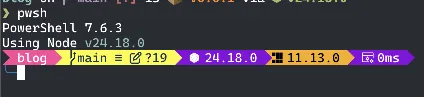
But PowerShell is still happy too:
In this scenario, I’d suggest that Chocolatey probably does a better job of curating packages so that you don’t end up with multiple variations of packages for the same software, but it’s good that Homebrew offers a way to resolve the issue.